
ALLIMITY QYSY-RC4390A-S-QYSY
ALLIMITY RC4390A Replacement Remote Control User Manual
Model: QYSY-RC4390A-S-QYSY
פּראָדוקט איבערview
The ALLIMITY RC4390A is a replacement remote control designed for various SMARTECH television models. This remote is engineered to provide full functionality without the need for complex programming, offering a direct replacement experience.

פיגורע 1: פראָנט view of the ALLIMITY RC4390A remote control. This image displays the complete layout of the remote, highlighting the ergonomic design and the arrangement of its various function buttons, including the power button, numerical keys, navigation pad, volume and channel controls, and quick access buttons for streaming services.
סעטאַפּ און ינסטאַלירונג
This replacement remote control requires no programming. Simply insert the correct batteries, and it will be ready for immediate use with compatible SMARTECH TV models.
ייַנמאָנטירונג פון באַטאַרייע
- געפֿינען די באַטאַרייע אָפּטייל אויף די צוריק פון די ווייַט קאָנטראָל.
- רוקט דעם דעקל פונעם באַטעריע־אָפּטייל אַראָפּ אָדער אין דער ריכטונג וואָס ווערט אָנגעוויזן דורך אַ פײַל צו עס עפֿענען.
- Insert two AAA alkaline batteries (not included), ensuring the positive (+) and negative (-) terminals align correctly with the markings inside the compartment.
- פֿאַרמאַכט דעם דעקל פֿון דער באַטעריע־אָפּטיילונג דורך עס צוריקצורוקן אין פּלאַץ ביז עס קליקט זיכער.
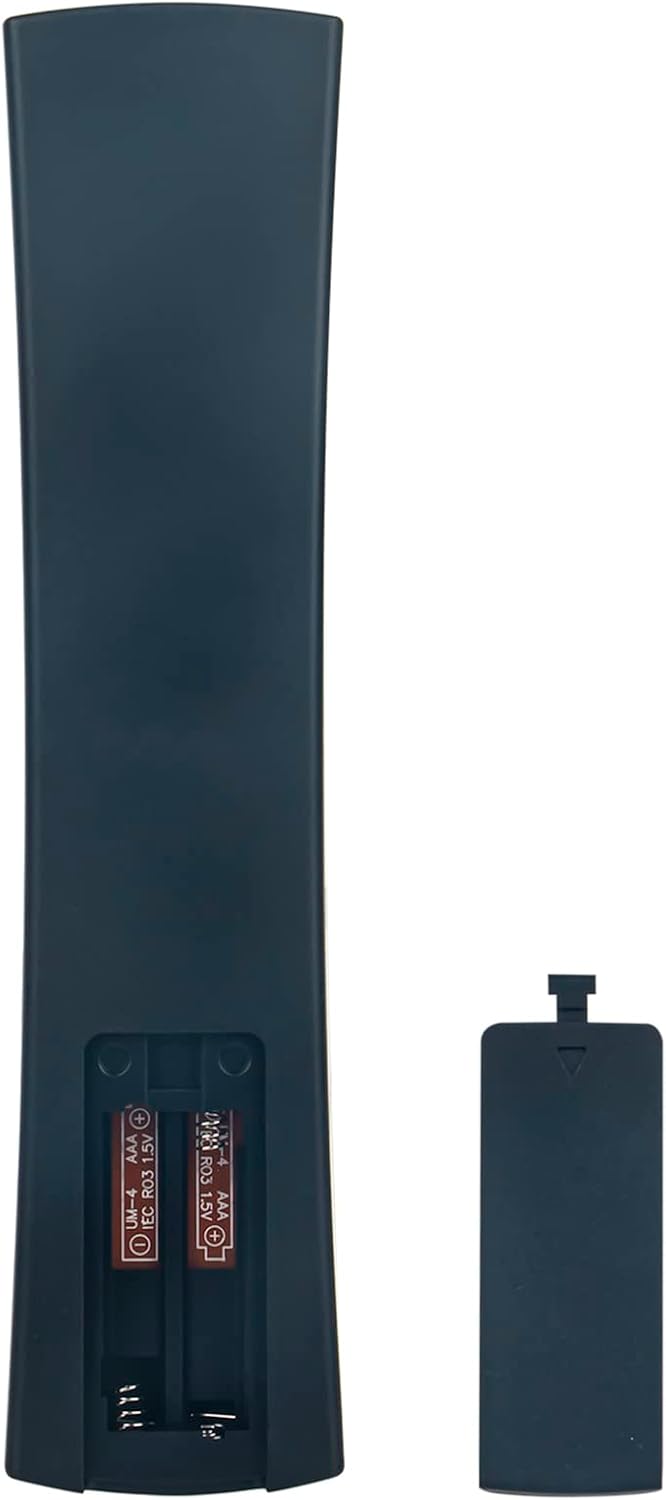
Figure 2: Battery compartment of the remote control. This image illustrates the open battery compartment on the back of the remote, clearly showing the two slots for AAA batteries and the polarity indicators.
אַפּערייטינג ינסטראַקשאַנז
The ALLIMITY RC4390A remote control is designed for intuitive operation, mirroring the functions of your original SMARTECH TV remote.
שליסל פאַנגקשאַנז
- מאַכט קנעפּל (⏻): טורנס די טעלעוויזיע אויף אָדער אַוועק.
- נומערן בלאט (0-9): דירעקטע קאַנאַל אויסוואַל.
- באַנד אַרויף / אַראָפּ (+/-): אַדזשאַסץ די אַודיאָ באַנד.
- קאַנאַל אַרויף / אַראָפּ (▲/▼): טוישט טעלעוויזיע קאַנאַלן.
- Navigation Pad (◀ ▲ ▶ ▼): געניצט צו נאַוויגירן מעניוז און אויסקלייבן אָפּציעס.
- OK קנעפּל: באַשטעטיקט אויסוואַלן אין מעניוז.
- צוריק קנעפּל: קערט צו די פריערדיקע פאַרשטעלן אָדער מעניו.
- אַרויסגאַנג קנעפּל: פֿאַרלאָזט דעם איצטיקן מעניו אָדער אַפּליקאַציע.
- היים קנעפּל (⌂): Accesses the TV's smart home screen or main menu.
- Dedicated App Buttons (Netflix, YouTube, Kids, USB): Provides quick access to these specific applications or inputs.
- מעדיע קאָנטראָל קנעפּלעך (שפּילן, פּויזע, האַלטן, צוריקדרייען, שנעל פאָרויסשפּולן): קאָנטראָלס מעדיע פּלייבאַק.
קאַמפּאַטאַבאַל מאָדעלס
This remote control is compatible with a wide range of SMARTECH TV models, including but not limited to:
- LE-2219
- LE-24P28SA41
- LE2219-SMT
- LE-2419D
- LE-2419DTS
- LE-2822
- LE-4317
- LE-3219NSA
- LE-4018
- LE-4048SA
- LE-4317SA
- LE-4348SA
- LE-3222
- LE-5017SA
- LE-6519
- LE3918
- LE32011
- LE32D7
- LE-32D11
- LEDF32
- N30HC1LB1H
- 32P18SLN83
וישאַלט
געהעריגע אויפהאלטונג גאראנטירט די לאנגעוויטי און אפטימאלע פאָרשטעלונג פון אייער ווײַטקאָנטראָל.
- רייניקונג: Use a soft, dry cloth to wipe the surface of the remote. For stubborn dirt, slightly dampווישט דעם שטאָף מיט וואַסער אָדער אַ מילדן, נישט-שרייַבנדיקן רייניגער. פֿאַרמייַדט איבעריקע פֿײַכטקייט.
- באַטערי פאַרבייַט: Replace batteries when the remote's response becomes sluggish or stops working. Always replace both batteries at the same time with new alkaline batteries.
- סטאָרידזש: If the remote will not be used for an extended period, remove the batteries to prevent leakage and potential damage to the remote. Store in a cool, dry place.
- ויסמיידן שעדיקן: Do not drop the remote, expose it to extreme temperatures, or immerse it in liquids.
טראָובלעשאָאָטינג
If you encounter issues with your remote control, refer to the following common troubleshooting steps:
| פּראָבלעם | מעגלעך סיבה | לייזונג |
|---|---|---|
| ווײַטקאָנטראָל רעאַגירט נישט. | טויטע אדער נישט ריכטיג אריינגעשטעלטע באַטעריעס. שטערונג צווישן ווײַטקאָנטראָל און טעלעוויזיע. ווײַטקאָנטראָל אַרויס פון דערגרייכונג. |
|
| עטלעכע קנעפּלעך אַרבעטן נישט. | Dirt or debris under buttons. Specific button malfunction. |
|
| די ווײַטקאָנטראָל אַרבעט צווישנצײַטיק. | נידעריגע באַטעריע מאַכט. שטערונג. |
|
ספּעסאַפאַקיישאַנז
| שטריך | דעטאַל |
|---|---|
| סאָרט | אַללימאַטי |
| מאָדעל נומער | QYSY-RC4390A-S-QYSY |
| פּראָדוקט דימענשאַנז | 4 X 12 X 0.3 סענטימעטער |
| פּונקט וואָג | 60 ג |
| קאַנעקטיוויטי טעכנאָלאָגיע | ינפרערעד (IR) |
| ספּעציעלע פֿעיִקייטן | ערגאַנאַמיק פּלאַן |
| מאַקס סופּפּאָרטעד דעוויסעס | 18 (referring to the number of compatible TV models listed) |
וואָראַנטי און שטיצן
As a replacement remote control, this product typically adheres to the standard return and exchange policies of the retailer from which it was purchased. Please refer to your purchase documentation for specific warranty details or return periods.
For technical support or inquiries regarding compatibility, please contact the seller or manufacturer directly through the platform where the product was acquired. Provide your order details and the model number of your television for efficient assistance.
Ask a question about this manual
Ask about setup, troubleshooting, compatibility, parts, safety, or missing instructions. Manuals+ will review the question and use this page’s manual context to help answer it.