
הקדמה
The Vibeat Smart Watch is designed to enhance your daily life with smart features and comprehensive health tracking. This manual provides essential information on setting up, operating, and maintaining your device to ensure optimal performance.
- Smart Bluetooth Call & Reminder: Connect via Bluetooth to dial/answer calls and receive SNS notifications.
- All-round Health Tracking: Monitors 24/7 Heart Rate, Stress levels, Blood Oxygen (SpO2), and sleep patterns.
- Useful Fitness Watch: Supports 20 sports modes, records steps, distance, calories, and heart rate. IP68 waterproof for open water swimming.
- Helpful Extras: Features weather updates, noise monitor, Bluetooth Alexa, and music control.
- Attractive Watch Faces: Customize your watch face from the app or use your own photos.
- גרויס באַטאַרייע לעבן: Up to 14 days of use and 30+ days standby on a single charge.
וואָס איז אין די קעסטל
- 1 x סמאַרטוואַטטש
- 1 x טשאַרדזשינג קאַבלע
- 1 x באַניצער מאַנואַל (געדרוקט)
סעטאַפּ גייד
1. Initial Setup & App Installation
Before first use, ensure your smartwatch is fully charged. Download the 'VeryFit' app from the Google Play Store or Apple App Store. You can find the QR code for the app in the printed user manual or on the watch screen during initial setup.

Figure 1: Vibeat Smart Watch main display.
2. Pairing Your Smart Watch
Open the 'VeryFit' app on your smartphone. Navigate to the 'Device' tab and select 'Add Device'. The app will search for your Vibeat Smart Watch (ID208BT). Once found, tap to pair. Follow any on-screen prompts to confirm the pairing on both your phone and watch.
3. Attaching/Removing Watch Straps
To remove a strap, locate the quick-release pin on the underside of the strap where it connects to the watch body. Slide the pin inwards and gently pull the strap away from the watch. To attach a strap, align the pin with the corresponding hole on the watch body, slide the pin inwards, and push the strap into place until the pin locks securely.
אַפּערייטינג ינסטראַקשאַנז
1. יקערדיק נאַוויגאַציע
The Vibeat Smart Watch features a responsive touch screen and a side button for navigation. Swipe up/down or left/right to browse through different functions and data screens. Press the side button to return to the home screen or wake the device.
2. בלועטוט רופן
Once connected to your phone via Bluetooth, you can make and answer calls directly from your watch. The built-in microphone and speaker allow for hands-free communication.

Figure 2: Bluetooth Call & Message Reminder feature.
3. Alexa Assistant
Integrate with Alexa Assistant to control smart home devices, check weather, set timers, and more using voice commands directly from your watch.

Figure 3: Amazon Alexa Voice Assistant integration.
4. געזונט טראַקינג
The watch continuously monitors your heart rate, blood oxygen (SpO2), and stress levels. It also tracks your sleep patterns, distinguishing between deep and light sleep, to help you understand your overall health. (Note: Health data is for reference only and cannot be used for medical diagnosis.)

Figure 4: 24-Hour Health Tracking features.
5. ספּאָרט מאָדעס און טעטיקייט טראַקינג
Choose from 20 sports modes to track your workouts accurately. The watch records steps, distance, calories burned, and activity minutes. Connected GPS allows for precise outdoor activity tracking.

Figure 5: 20+ Sports Modes for personal fitness tracking.
6. Music Control & Other Features
Control music playback on your smartphone directly from your watch. Other useful features include weather forecasts, an ambient noise monitor, a 'Find My Phone' function, and a flashlight.

Figure 6: Helpful Extras including Weather, Music Control, Ambient Noise Monitor, and Stress Monitoring.
7. קאַסטאַמייזאַבאַל זייגער פנימער
Personalize your watch with a variety of attractive watch faces available through the 'VeryFit' app. You can also upload your own photos to create unique custom dials.
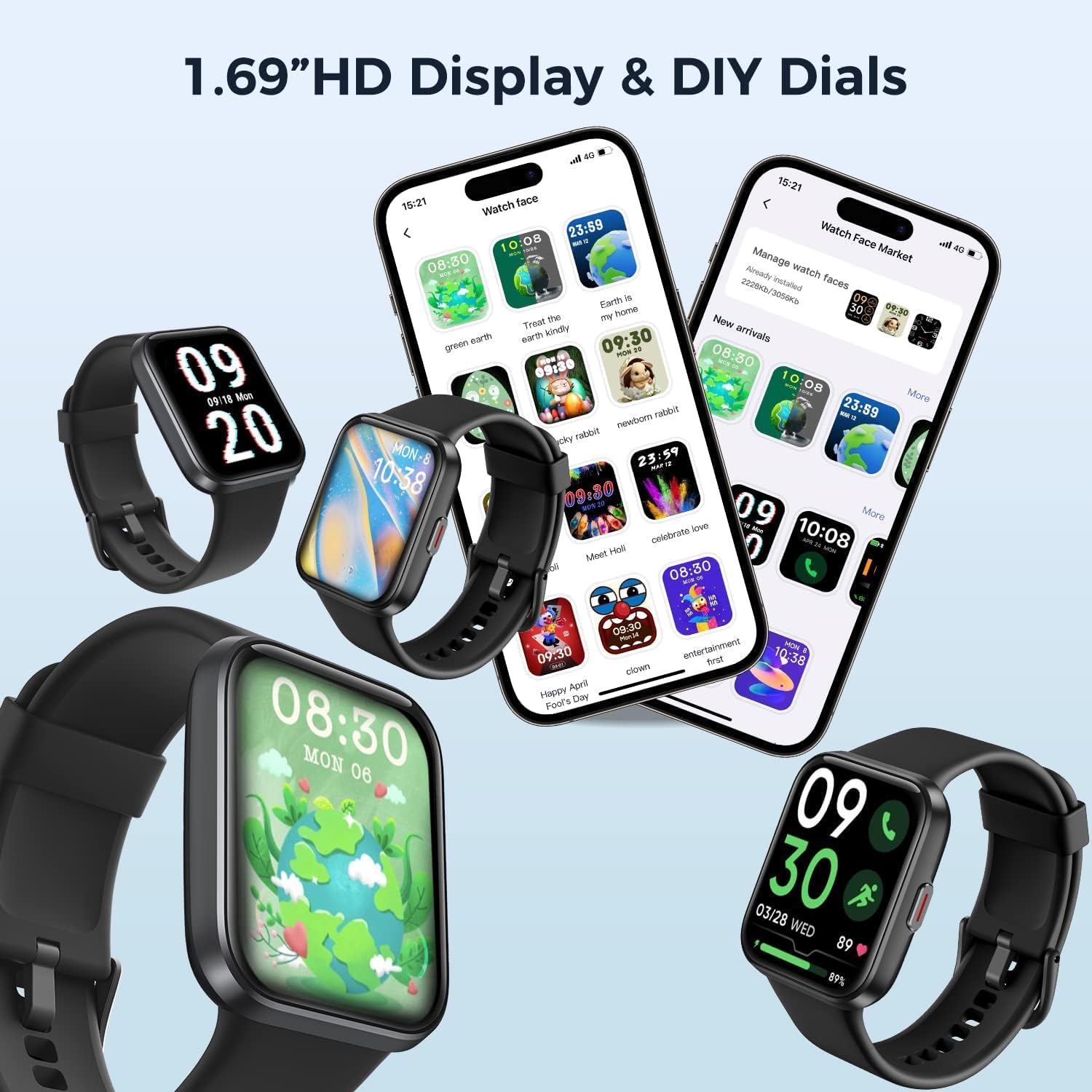
Figure 7: 1.69" HD Display & DIY Dials.
וישאַלט
1. טשאַרדזשינג
The Vibeat Smart Watch uses magnetic charging. Connect the charging cable to the magnetic contacts on the back of the watch. A full charge takes approximately 2 hours and provides up to 14 days of daily use or 30+ days of standby time.
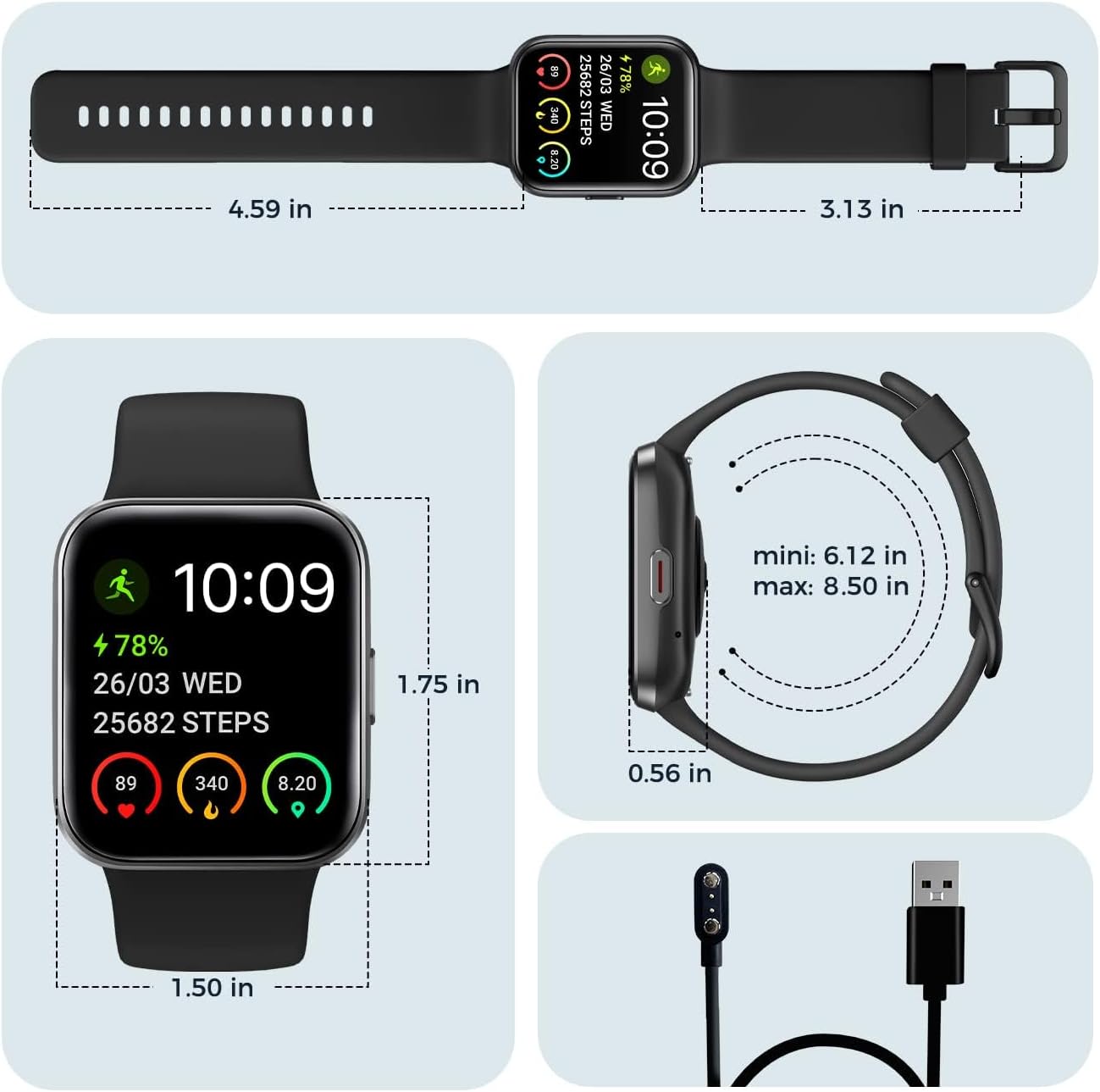
Figure 8: Smart Watch Dimensions and Charging Cable.
2. וואַסער קעגנשטעל (IP68)
The watch is IP68 waterproof, making it suitable for hand washing, heavy rain, and open water swimming. It is not recommended for hot water, saunas, or diving.

פיגור 9: IP68 וואַסערפּרוף פֿונקציע.
3. Water Ejection
After swimming or exposure to water, use the water ejection feature to clear any remaining water from the speaker and microphone. This helps maintain sound quality and device longevity.
טראָובלעשאָאָטינג
1. קאָנעקטיוויטי פּראָבלעמען
Ensure Bluetooth is enabled on your smartphone and the watch is within range. Restart both the watch and the 'VeryFit' app. If issues persist, try unpairing and re-pairing the device.
2. נאטיפיקאציעס דערשייַנען נישט
Check app permissions for 'VeryFit' on your smartphone to ensure notifications are allowed. Verify that notification settings are enabled within the 'VeryFit' app for specific applications.
3. באַטעריע דריינט זיך שנעל אויס
Reduce screen brightness, disable unnecessary continuous health monitoring features, and limit frequent use of Bluetooth calling or Alexa if not needed. Ensure the watch is fully charged using the provided cable.
4. Health Data Inaccuracies
Ensure the watch is worn snugly on your wrist, about one finger's width above the wrist bone. Avoid wearing it too loosely or too tightly. Remember that health data from the watch is for reference purposes only and should not be used for medical diagnosis.
ספּעסאַפאַקיישאַנז
| סאָרט | וויבעאַט |
| מאָדעל נומער | 208בט |
| פאַרשטעלן גרייס | 1.69 אינטשעס |
| ווייַז טיפּ | קאָליר סקרין |
| קאַנעקטיוויטי טעכנאָלאָגיע | בלועטאָאָטה |
| בלועטאָאָטה ווערסיע | BLE 5.1 |
| וואָטערפּרוף לעוועל | IP68 |
| באַטאַרייע קאַפּאַציטעט | 300 מאַה |
| טשאַרדזשינג צייט | וועגן 2 שעה |
| באַטערי לעבן | Up to 14 days (daily use), 30+ days (standby) |
| פּונקט וואָג | 1.44 אונסעס |
| אָפּערייטינג סיסטעם | Android (compatible with iOS 9.0/Android OS 6.0 or above) |
וואָראַנטי & שטיצן
For detailed warranty information, please refer to the documentation included with your product. For further assistance, troubleshooting, or to access the full user manual in PDF format, please visit the official Vibeat Store or refer to the User Manual (PDF) provided:
איר קענט אויך באַזוכן די יו Vibeat Store for additional support and product information.