
פּראָדוקט איבערview
This manual provides detailed instructions for the assembly, operation, and maintenance of your ONKRON Motorized TV Stand, model TS1991E. This electric TV stand is designed to support 50-100 inch displays weighing up to 265 lbs, featuring VESA patterns from 200x200 to 1000x600 mm. It offers smooth motorized height adjustment, a 5-degree tilt option, and mobile functionality with lockable wheels, making it suitable for various environments including business, education, events, and home use.
The stand includes a height-adjustable storage shelf and an additional webcam shelf, enhancing its utility. Its robust construction ensures stability and durability.
וויכטיק סאַפעטי אינפֿאָרמאַציע
- וואָג קאַפּאַציטעט: Do not exceed the maximum load capacity of 265 lbs for TVs or 176.3 lbs for interactive panels. Overloading can cause instability and damage.
- פאַרשטעלן גרייס: Ensure your display is within the recommended 50-100 inch size range.
- VESA קאַמפּאַטאַבילאַטי: Verify your TV's VESA mounting pattern is compatible (200x200 to 1000x600 mm).
- פֿאַרזאַמלונג: Follow all assembly instructions carefully. Improper assembly can lead to product failure or injury.
- עלעקטריקאַל זיכערקייַט: Ensure the power cord is not pinched or damaged. Do not operate the stand with a damaged cord or plug. Keep liquids away from electrical components.
- באַוועגונג: When moving the stand, ensure the TV is securely mounted and the path is clear. Lock the wheels once the stand is in its desired position.
- קינדער און פּעץ: Keep children and pets away from the stand during operation to prevent accidents.
- וישאַלט: Regularly inspect the stand for loose parts or damage. Do not attempt to repair electrical components yourself.
פּעקל אינהאַלט
Before beginning assembly, please verify that all components listed below are present and undamaged. If any parts are missing or damaged, contact ONKRON customer support.

Image: All components and hardware for the ONKRON TS1991E Motorized TV Stand laid out for inspection.
- באַזע קאַמפּאָונאַנץ
- Vertical columns with integrated motors
- TV mounting bracket and arms
- Adjustable AV shelf
- Webcam shelf
- ווייַט קאָנטראָל
- קאָנטראָל פּאַנעל
- Caster wheels (with locking mechanism)
- Power strip holder
- All necessary fasteners and tools for assembly
אַסעמבלי אינסטרוקציעס
Follow these steps carefully to assemble your ONKRON Motorized TV Stand. It is recommended to have two people for assembly due to the size and weight of some components.
- אויספּאַקן און אָרגאַניזירן: Carefully remove all components from the packaging. Lay them out on a clean, flat surface and compare them with the 'Package Contents' section to ensure all parts are present.
- אַסעמבאַל די באַזע: Attach the support legs to the central base frame using the provided bolts and tools. Ensure all connections are secure.
- אינסטאַלירן קאַסטער ווילז: Securely attach the caster wheels to the bottom of the base legs. Ensure the locking mechanisms are functional.
- Attach Vertical Columns: Mount the two vertical columns, which house the motorized lift mechanism, to the assembled base. Connect any internal wiring as instructed in the detailed diagram (refer to the included paper manual for specific wiring steps).
- Install TV Mounting Bracket: Secure the TV mounting bracket to the top of the vertical columns. This bracket will hold your television.
- Mount TV Arms to Television: Attach the TV mounting arms to the back of your television using the appropriate VESA screws. Ensure the arms are centered and securely fastened.
- Hang Television: Carefully lift your television and hook the TV mounting arms onto the bracket installed on the stand. Secure the TV in place with the safety screws or clips provided.
- ינסטאַלירן שעלוועס: Attach the adjustable AV shelf and the webcam shelf to the desired heights on the vertical columns.
- פאַרבינדן מאַכט: Plug the stand's power cord into a grounded electrical outlet.

בילד: הינטערשטע view of the assembled ONKRON Motorized TV Stand, showing the mounting bracket and column structure.
אַפּערייטינג ינסטראַקשאַנז
הייך אַדזשאַסטמאַנט
The ONKRON TS1991E features a motorized lift system for effortless height adjustment. You can control the height using the included remote control or the integrated control panel on the stand.
- ווייַט קאָנטראָל: Use the 'Up' and 'Down' arrows on the remote to raise or lower the TV. The stand offers a height adjustment range from 44.5 inches to 63 inches.
- זכּרון פּרעסעץ: The control panel allows you to save up to 4 preferred height settings. To save a height, adjust the stand to the desired position, then press and hold one of the numbered preset buttons (1, 2, 3, or 4) until you hear a beep or see a confirmation on the display. To recall a saved height, simply press the corresponding numbered button.
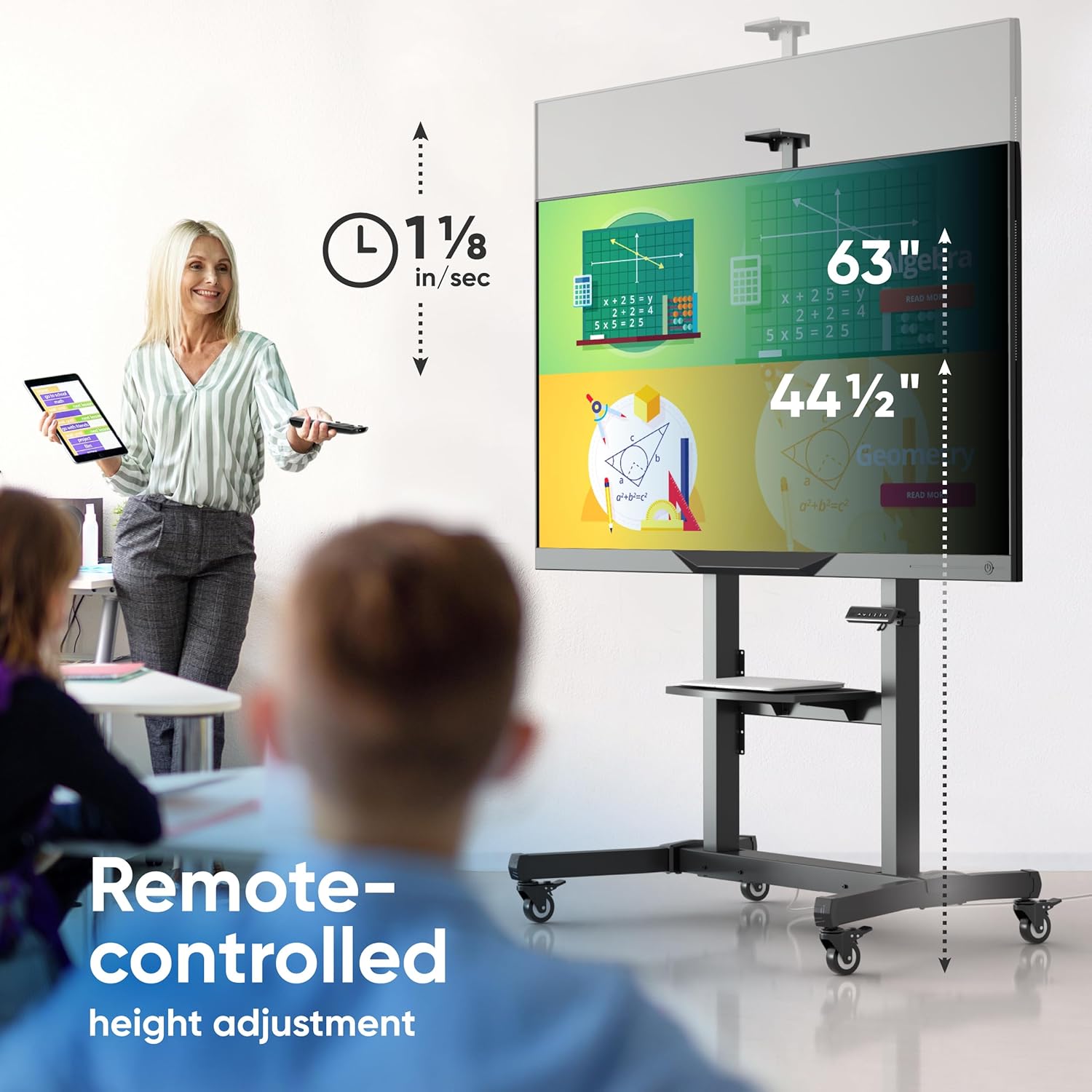
Image: Remote control being used to adjust the height of the TV stand, illustrating the adjustable height range.

Image: Close-up of the integrated control panel with height adjustment buttons and memory presets.
טילט אַדזשאַסטמאַנט
The TV mounting bracket allows for a manual tilt adjustment of +/- 5 degrees. This feature helps optimize viewינג ווינקלען און רעדוצירן בליץ.
- To adjust the tilt, loosen the tilt locking knobs on the sides of the TV mounting arms.
- Carefully tilt the TV to the desired angle (up to 5 degrees up or down).
- Tighten the tilt locking knobs to secure the TV in position.

Image: A person demonstrating the manual tilt adjustment of the TV screen on the stand.
מאָביליטעט און סטאַביליטעט
The stand is equipped with smooth-running caster wheels for easy relocation. Each wheel includes a locking mechanism to ensure stability when the stand is stationary.
- To move the stand, unlock all caster wheels.
- Carefully push the stand to its new location.
- Once in position, engage the locking mechanism on all wheels to prevent unintended movement.
בילד: נאָענט-אַרויף view of the maneuverable wheels with locking system on the TV stand.
Accessory Shelves
The stand includes an adjustable AV tray and a webcam shelf for additional equipment.
- AV Tray: The main shelf can be adjusted to various heights along the vertical columns to accommodate laptops, media players, or other accessories. It supports up to 11 lbs.
- Webcam Shelf: A dedicated shelf is provided at the top for mounting a webcam, ideal for video conferencing.

Image: The adjustable AV shelf and webcam shelf providing additional storage space for accessories.
פּראָדוקט ווידעא
Video: An official ONKRON promotional video demonstrating the features and operation of the TS1991E Motorized TV Stand, including height adjustment and mobility.
וישאַלט
- רייניקונג: ווישט אָפּ דעם שטאַנד מיט אַ ווייכן, טרוקענעם שטאָף. פֿאַר שווערע פֿלעקן, ניצט אַ ביסלamp מען קען ניצן אַ שטאָף, און דערנאָך עס זאָל גלייך טריקענען. פֿאַרמייַדן אַברייסיוו רייניגער אָדער סאָלווענטן.
- דורכקוק: Periodically check all bolts and fasteners to ensure they are tight. Re-tighten if necessary.
- קאַבלע פאַרוואַלטונג: Ensure all cables are neatly routed and not pinched by moving parts.
- מאָטאָר קער: The motorized components are designed for long-term use and generally require no special maintenance. Avoid obstructing the lift mechanism during operation.
טראָובלעשאָאָטינג
- Stand Not Moving:
- Check if the power cord is securely plugged into both the stand and the wall outlet.
- מאַכן זיכער אַז די מאַכט ווענטיל איז פאַנגקשאַנאַל.
- וועריפיצירט אז די באַטעריעס פון די ווײַטקאָנטראָל זענען נישט אויסגעשעפּט.
- If the stand has an overload protection feature, it might have been triggered. Unplug the stand for 10 minutes, then plug it back in.
- רימאָוט קאָנטראָל ניט ריספּאַנדינג:
- פאַרבייַטן די ווייַט קאָנטראָל באַטעריז.
- Ensure there are no obstructions between the remote and the stand's receiver.
- TV Appears Unstable:
- Ensure all mounting bolts for the TV and the stand's structure are securely tightened.
- Verify that the TV's weight and VESA pattern are within the stand's specifications.
- Make sure the caster wheels are locked when the stand is stationary.
- ומגעוויינטלעך נויזיז בעשאַס אָפּעראַציע:
- Slight motor noise is normal. If the noise is loud or grinding, discontinue use and contact customer support.
- Check for any obstructions in the lift mechanism.
If you encounter issues not covered here, please contact ONKRON customer support for assistance.
ספּעסאַפאַקיישאַנז
- מאָדעל: TS1991E
- סקרין גרייס קאַמפּאַטאַבילאַטי: 50 - 100 אינטשעס
- מאַקסימום מאַסע קאַפּאַציטעט: 265 lbs (for TVs), 176.3 lbs (for interactive panels)
- VESA קאַמפּאַטאַבילאַטי: 200x200 מ״מ ביז 1000x600 מ״מ
- הייך אַדזשאַסטמאַנט קייט: 44.5 אינטשעס צו 63 אינטשעס
- ווינקל ווינקל +/- 5 דיגריז
- מאַטעריאַל: אַללוי סטיל
- נומער וואָג: 77 לבס
- Adjustable AV Shelf Load: אַרויף צו 11 לבס
- קאָליר: שוואַרץ

Image: Visual representation of VESA compatibility, screen size range, and weight limits.

Image: Detailed dimensions of the ONKRON Motorized TV Stand.
וואָראַנטי און שטיצן
ONKRON motorized TV stands undergo multi-stage quality control for long-term reliability. For any questions regarding your ONKRON TS1991E Motorized TV Stand, including assembly, operation, or troubleshooting, please contact ONKRON customer support. Our team is ready to assist you.
For more information and support, please visit the official ONKRON webזייטל אדער זעט די קאנטאקט דעטאלן וואס זענען צוגעשטעלט געווארן מיט אייער פראדוקט פארפאקונג.