
1. הקדמה
Thank you for choosing the Osee LCM215-HDR+ 21.5 Inch Full HD Field Production Monitor. This monitor is designed for professional video production, offering a 1500-nit ultra-high brightness panel, excellent backlight uniformity, and comprehensive input/output options. This manual provides essential information for the safe and efficient use of your monitor, including setup, operation, maintenance, and troubleshooting.
2. זיכערקייַט אינפֿאָרמאַציע
- מאַכט צושטעלן: Use only the specified power adapter. Ensure the power source matches the monitor's requirements.
- ווענטילאַטיאָן: Do not block ventilation openings. Ensure adequate airflow around the monitor to prevent overheating.
- וואַסער און נעץ: Keep the monitor away from water, rain, and high humidity. Do not operate with wet hands.
- רייניקונג: Disconnect power before cleaning. Use a soft, dry cloth. Avoid liquid cleaners or aerosols.
- האַנדלינג: באַהאַנדלט דעם מאָניטאָר מיט פֿאָרזיכט. פֿאַרמײַדט אים צו לאָזן פֿאַלן אָדער אים אויסשטעלן צו שטאַרקע קלאַפּן.
- פאַרריכטן: פרובירט נישט צו פאררעכטן דעם מאָניטאָר אליין. לאָזט איבער אַלע סערוויסעס צו קוואַליפֿיצירטע פּערסאָנעל.
3. פּעקל אינהאַלט
באַשטעטיקן אַז אַלע זאכן זענען פאַראַן אין דיין פּעקל:
- Osee LCM215-HDR+ 21.5 Inch Full HD Ultra-High Brightness Field Production Monitor
- V-בארג באַטערי פּלאַטע
- Sun Hood
- C-Stand Adapter
- Custom Foam Mold
- דעסקטאָפּ שטיין פֿיס
- מאַכט קאַבלע
- באַניצער מאַנואַל
- Osee 1-Year Limited Warranty Card
4. פּראָדוקט איבערview
The Osee LCM215-HDR+ is an upgraded version of the LCM215-HDR monitor, featuring a new 1500-nit ultra-high brightness panel with excellent backlight uniformity. This super 1500-nit screen is approximately 3-4 times brighter than other field monitors, allowing outdoor shooting in direct sunlight without image washout. It does not require a sun hood during use. The LCM215-HDR+ monitor supports various connectors, including 2Ch 3G/HD/SD-SDI input, 1Ch video input, 1 HDMI input, and 1Ch 3G/HD/SD-SDI output. It supports most audio and video formats. The monitor's compatibility makes it suitable for various application scenarios, whether placed on a table, mounted on a rod using a C-stand adapter, or transmitting signals and images wirelessly. It offers superior software functions, including built-in SDR/HDR 3DLUTs. The LCM215-HDR+ provides 30 SDR 3DLUTs to convert log modes to REC 709 for major camera brands like FUJIFILM, GoPro, JVC, Panasonic, RED, and Sony. Additionally, it offers 14 HDR 3DLUTs to further convert log modes.
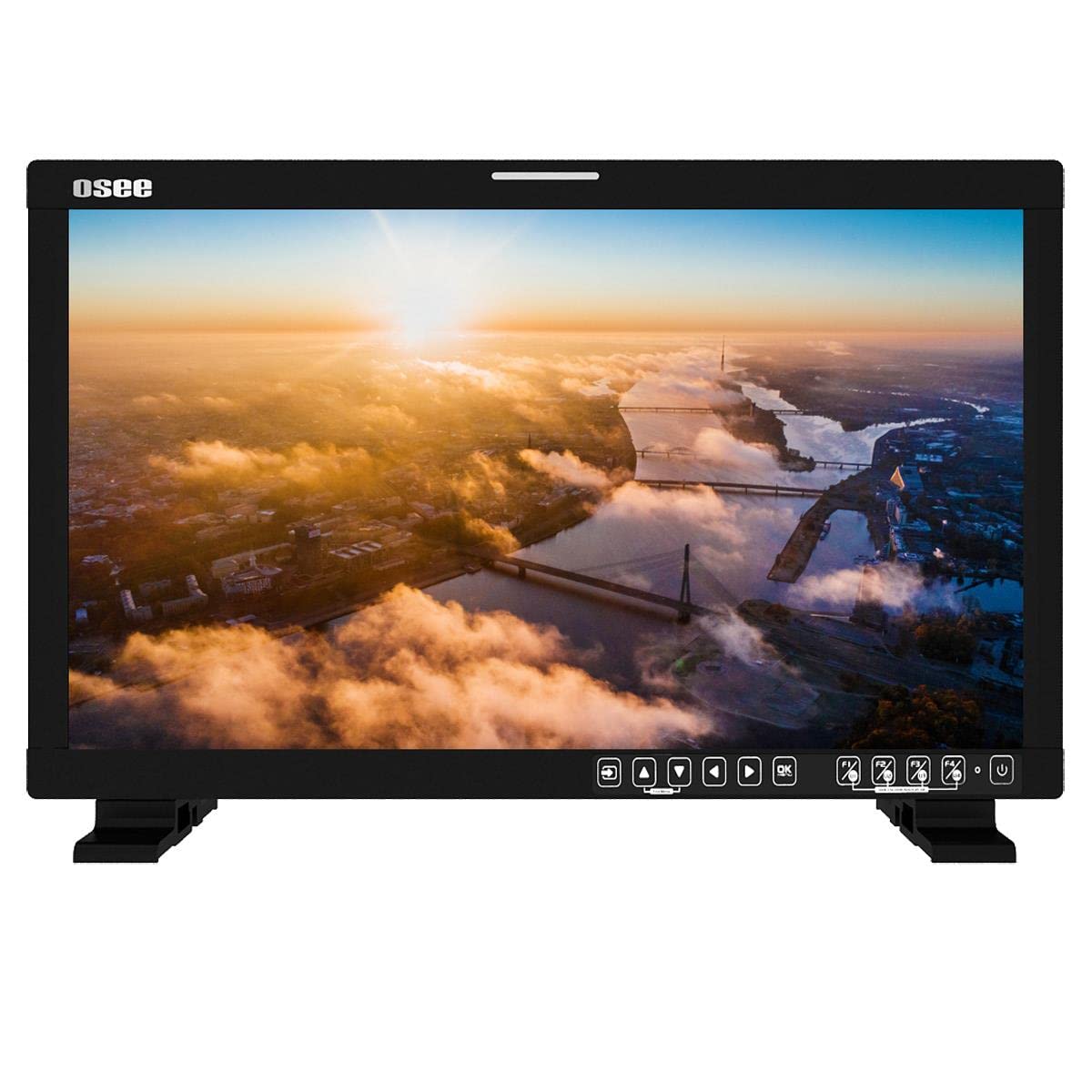
פיגורע 4.1: פראָנט view of the Osee LCM215-HDR+ monitor, displaying a vibrant landscape scene.
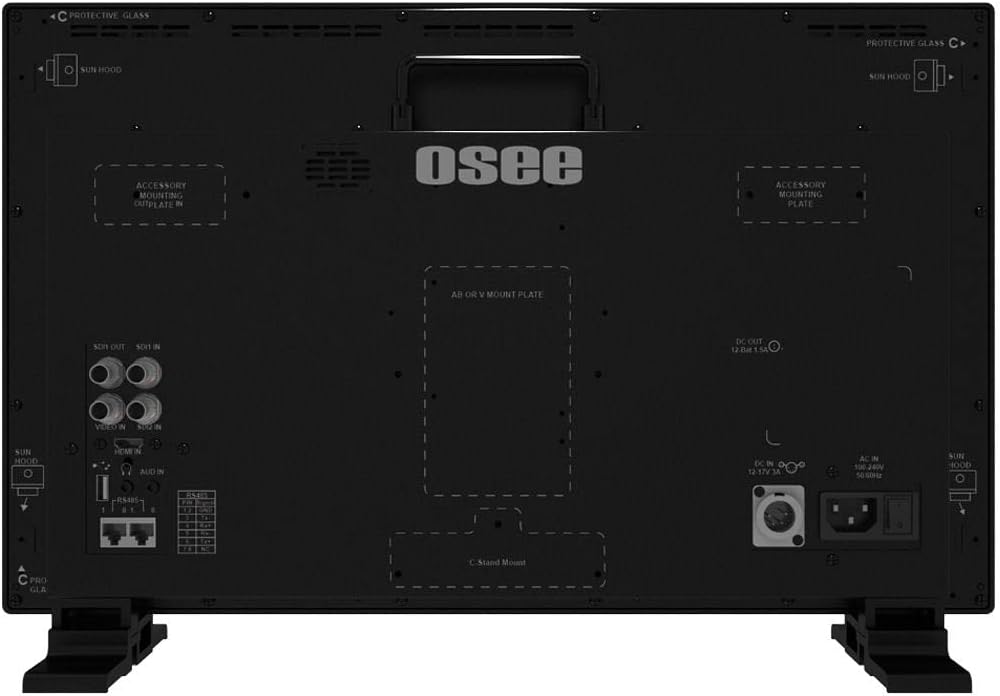
פיגורע 4.2: זייַט view of the Osee LCM215-HDR+ monitor, showing its slim profile and robust build.

פיגורע 4.3: דערציען view of the Osee LCM215-HDR+ monitor, highlighting various input/output ports including SDI, HDMI, and power connections.

Figure 4.4: Osee LCM215-HDR+ monitor displayed with its included accessories: sun hood, C-stand adapter, and V-mount battery plate.

Figure 4.5: Two Osee LCM215-HDR+ monitors in a field production setting, displaying video content from cameras.
5. סעטאַפּ
5.1 מאָנטירן דעם מאָניטאָר
- דעסקטאָפּ נוצן: Attach the provided desktop stand feet to the bottom of the monitor. Ensure they are securely fastened.
- C-Stand Mounting: Use the included C-stand adapter to mount the monitor onto a C-stand or other compatible rod. Secure the adapter firmly to the monitor and the stand.
- Accessory Mounting Plates: The monitor features accessory mounting plates on the rear for additional equipment.
5.2 מאַכט קאַנעקשאַן
- Connect the power cable to the AC input port on the rear of the monitor.
- Plug the other end of the power cable into a suitable power outlet (100-240V AC).
- Alternatively, attach a V-mount battery to the V-mount battery plate for portable operation.
5.3 אַרייַנשרייַב קאַנעקשאַנז
The LCM215-HDR+ supports multiple input types:
- SDI: Connect your 3G/HD/SD-SDI sources to the SDI IN ports. The monitor has 2 SDI inputs.
- הדמי: Connect your HDMI source to the HDMI IN port.
- ווידעא: Connect analog video sources to the Video IN port.
The monitor also features 1Ch 3G/HD/SD-SDI output for looping through signals to other devices.
6. אָפּערייטינג
6.1 פּאַוערינג אויף / אַוועק
Press the power button located on the front panel to turn the monitor on or off. The power indicator light will illuminate when the monitor is on.
6.2 מעניו נאַוויגאַציע
Use the control buttons on the front panel to navigate the on-screen display (OSD) menu. Typically, there are buttons for menu access, navigation (up/down/left/right), and selection (enter).
6.3 אַרייַנשרייַב סעלעקציע
Access the input menu via the OSD to select the desired input source (SDI 1, SDI 2, HDMI, Video).
6.4 Brightness and Picture Settings
Adjust brightness, contrast, saturation, and other picture parameters through the OSD menu. The LCM215-HDR+ offers a super bright 1500-nit display, ideal for outdoor viewing.
6.5 LUT Functions
The monitor includes built-in 3DLUTs for color management:
- SDR 3DLUTs: Access 30 SDR 3DLUTs to convert log modes from major camera brands (FUJIFILM, GoPro, JVC, Panasonic, RED, Sony) to REC 709.
- HDR 3DLUTs: Utilize 14 HDR 3DLUTs for advanced log mode conversions.
These functions are accessible through the OSD menu, allowing you to apply them to your input signal for accurate monitoring.
6.6 אַודיאָ רעזולטאַט
The monitor features a built-in speaker for audio monitoring. Adjust the volume through the OSD menu.
7. וישאַלט
7.1 רייניקונג
- פאַרשטעלן: ווישט אָפּ דעם עקראַן מיט אַ ווייכן, לינט-פֿרײַעם שטאָף. פֿאַר שווערע פֿלעקן, ווישט אַ ביסלampווישט דעם שטאָף מיט וואַסער אָדער אַ רייניקונג לייזונג ספּעציפֿיש פֿאַרן עקראַן (שפּריצט נישט גלייך אויפן עקראַן).
- גוף: ווישט אויס דעם מאָניטאָר'ס קasinג מיט אַ ווייכן, טרוקענעם שטאָף. פֿאַרמייַדן אַברייסיוו רייניגער אָדער סאָלווענטן.
7.2 סטאָרידזש
When not in use for extended periods, store the monitor in a cool, dry place, away from direct sunlight and extreme temperatures. Use the custom foam mold and original packaging for protection during transport or storage.
7.3 Battery Care (V-Mount)
If using a V-mount battery, follow the battery manufacturer's guidelines for charging, discharging, and storage to maximize battery life and performance.
8. טראָובלעשאָאָטינג
- קיין מאַכט:
- קוק אויב די מאַכט קאַבלע איז סיקיורלי פארבונדן צו די מאָניטאָר און די מאַכט ווענטיל.
- If using a V-mount battery, ensure it is charged and properly attached.
- באַשטעטיקן אַז די מאַכט ווענטיל איז פאַנגקשאַנאַל.
- קיין סיגנאַל:
- Ensure the input source (camera, video switcher) is powered on and outputting a signal.
- Check that the video cables (SDI, HDMI, Video) are securely connected to both the source and the monitor.
- Verify that the correct input source is selected in the monitor's OSD menu.
- Confirm the signal format from your source is supported by the monitor (refer to Specifications).
- Image Problems (Distorted, Flickering, Incorrect Colors):
- קאָנטראָלירט דעם ווידעא קאַבל פֿאַר שאָדן אָדער לויזע פֿאַרבינדונגען. פּרוּווט אַן אַנדער קאַבל אויב מעגלעך.
- Reset the monitor's picture settings to default via the OSD menu.
- Ensure the correct LUT is applied, or disable LUTs to check the raw signal.
- If the issue persists, try connecting a different video source to isolate the problem.
- קיין אַודיאָ:
- Check the audio settings in the OSD menu and ensure the volume is not muted or set too low.
- Verify that the input source is sending an audio signal.
If you encounter issues not covered here, please contact Osee customer support.
9. ספּעסאַפאַקיישאַנז
| שטריך | באַשרייַבונג |
|---|---|
| סאָרט | Osee |
| מאָדעל נומער | LCM215-HDR+ |
| פאַרשטעלן גרייס | 21.5 אינטשעס |
| האַכלאָטע | FHD 1080p (Native: 1920 x 1080) |
| ווייַז טיפּ | געפירט לקד |
| Screen Surface Finish | גלאָסי |
| Viewינג אַנגלע | 170 דיגריז |
| פֿעיִקייטן | Built-in Speaker, High Dynamic Range |
| אַרייַנשרייַב ינטערפייסיז | 2x 3G/HD/SD-SDI, 1x Video, 1x HDMI |
| רעזולטאַט ינטערפייסיז | 1x 3G/HD/SD-SDI |
| מאַכט אַרייַנשרייַב | AC 100-240V, V-Mount Battery |
| קאָליר | שוואַרץ |
| פּראָדוקט נוצן | דעסקטאָפּ |
| מאַונטינג טיפּ | דעסק בארג |
| UPC | 650971522317 |
| ASIN | B0BZKSSN5D |
10. וואָראַנטי און שטיצן
The Osee LCM215-HDR+ monitor comes with a 1-year limited warranty. Please refer to the warranty card included in your package for detailed terms and conditions. For technical support, service, or further inquiries, please visit the official Osee webזייטל אדער קאָנטאַקט אייער לאקאלן דיסטריביאַטאָר. האַלט אייער קויף קוויטל ווי אַ באַווייַז פון קויפן פֿאַר וואָראַנטי קליימז.