1. פּראָדוקט איבערview
This replacement remote control is designed to operate various devices including TV, audio players, video players, and projectors, specifically compatible with the Motorola 4K Android TV Stick DVM4KA01 and similar Android TV Boxes. It functions via infrared (IR) communication.
שליסל פֿעיִקייטן
- דעדאַקייטאַד פאַרבייַט ווייַט קאָנטראָל.
- No programming or setup required; simply install new batteries.
- Constructed from durable ABS material for comfortable handling.
- Tested for functionality prior to delivery.
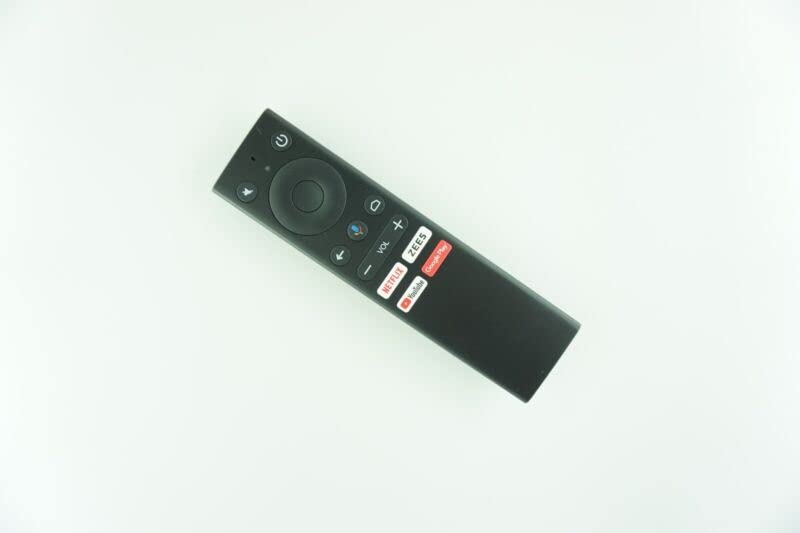
Image of the black replacement remote control. It features a power button, mute button, navigation pad, back button, home button, voice control button, volume up/down buttons, and dedicated buttons for Netflix, ZEES, YouTube, and Google Play.
2. סעטאַפּ
ייַנמאָנטירונג פון באַטאַרייע
The remote control requires 2 AAA batteries (not included). Follow these steps to install them:
- געפֿינען די באַטאַרייע אָפּטייל אויף די צוריק פון די ווייַט קאָנטראָל.
- רוק דעם דעקן פון די באַטאַרייע אָפּטייל.
- אַרײַנשטעלן צוויי AAA באַטעריעס, און זיכער מאַכן אַז די פּאָזיטיוו (+) און נעגאַטיוו (-) טערמינאַלן זענען ריכטיק אויסגעשטעלט מיט די אינדיקאַטאָרן אינעווייניק.
- פאַרמאַכן די באַטאַרייע אָפּטייל דעקן סיקיורלי.
וויכטיק באַטערי אינפֿאָרמאַציע:
- צי ניט מישן אַלט און נייַ באַטעריז.
- דו זאלסט נישט מישן פאַרשידענע טייפּס פון באַטעריז.
- Remove batteries if the remote control will not be used for an extended period.
ערשט סעטאַפּ
This replacement remote control typically requires no programming or complex setup. Once batteries are installed, it should be ready for immediate use with compatible devices.
3. אַפּערייטינג ינסטרוקטיאָנס
יקערדיק אָפּעראַציע
Point the remote control directly at the device you wish to operate. Ensure there are no obstructions between the remote and the device's IR receiver.
קנעפּל פאַנגקשאַנז
- מאַכט קנעפּל: טוט אן אדער אויסלעשן דעם פארבונדענעם אפאראט.
- שטיל קנעפּל: מאָט אָדער אַנמיוט די אַודיאָ.
- נאַוויגאַציע פּאַד (קייַלעכדיק): Use the directional buttons (Up, Down, Left, Right) to navigate menus and select items. The center button acts as an 'OK' or 'Enter' button.
- צוריק קנעפּל: קערט צו די פריערדיקע פאַרשטעלן אָדער מעניו.
- היים קנעפּל: Returns to the main home screen of the device.
- קול קאָנטראָל קנעפּל: Activates voice commands (if supported by your device and configured).
- Volume Buttons (VOL +/-): Increases or decreases the audio volume.
- Dedicated App Buttons (Netflix, ZEES, YouTube, Google Play): גיט דירעקטן צוטריט צו די סטרימינג אַפּלאַקיישאַנז.
באַמערקונג: As this is a replacement remote, some advanced functions of your original remote may not be supported. This is not indicative of a defective product.
4. וישאַלט
רייניקונג
To clean the remote control, gently wipe it with a soft, dry cloth. Do not use liquid cleaners or abrasive materials, as these can damage the remote's surface or internal components.
באַטערי פאַרבייַט
Replace batteries when the remote's performance degrades or it stops responding. Follow the battery installation steps outlined in the 'Setup' section.
5. טראָובלעשאָאָטינג
פּראָסט ישוז און סאַלושאַנז
| פּראָבלעם | מעגלעך סיבה | לייזונג |
|---|---|---|
| רימאָוט נישט ריספּאַנדינג | טויטע אדער נישט ריכטיק אינסטאלירטע באַטעריעס. | Check battery orientation and replace with fresh AAA batteries. |
| Remote not controlling device | Obstruction between remote and device; remote out of range; device not compatible. | Ensure clear line of sight to device's IR receiver. Move closer to the device. Verify device compatibility (e.g., Motorola 4K Android TV Stick DVM4KA01). |
| עטלעכע פונקציעס ארבעטן נישט | This is a replacement remote, and some specific functions of the original remote may not be replicated. | This is expected behavior for a replacement remote. Focus on core functions. |
If issues persist after troubleshooting, please contact the seller for further assistance.
6. ספּעסאַפאַקיישאַנז
פּראָדוקט ספּעסאַפאַקיישאַנז
- מאָדעל קאַמפּאַטאַבילאַטי: Motorola 4K Android TV Stick DVM4KA01, various TV/Audio/Projector devices.
- קאַנעקטיוויטי טעכנאָלאָגיע: ינפרערעד (IR)
- מאַכט מקור: 2 X AAA באַטעריז (ניט אַרייַנגערעכנט)
- מאַטעריאַל: אַבס פּלאַסטיק
- קאָליר: Black or white (color may vary)
- מאַקסימום נומער פון שטיצט דעוויסעס: 1
- פאַבריקאַנט: e-remotecontrol
באַמערקונג: ספּעסאַפאַקיישאַנז זענען אונטערטעניק צו טוישן אָן פריערדיק באַמערקן.
7. וואָראַנטי און שטיצן
צוריקקומען פּאָליטיק
This product is subject to a 30-day return policy for refund or replacement. Please refer to your purchase details for specific terms.
קונה שטיצן
For technical assistance or inquiries regarding this product, please contact the seller directly through your purchase platform. Providing your original remote part number or unit model may help in resolving specific compatibility questions.
