
VILTROX DC-550Pro-1200Nits
VILTROX DC-550 Pro 5.5 inch Camera Field Monitor User Manual
Model: DC-550Pro-1200Nits | Brand: VILTROX
1. הקדמה
The VILTROX DC-550 Pro is a high-brightness 5.5-inch camera field monitor designed for professional videography and photography. It features a 4K HDMI touchscreen, 1200 nits brightness, 3D LUT support, and various monitoring functions to assist with precise focus and exposure. This manual provides detailed instructions for setting up, operating, and maintaining your DC-550 Pro monitor.
2. וואָס איז אין דער קעסטל
ווען איר עפנט דעם פעקל, ביטע זיכער מאכן אז אלע פאלגנדע זאכן זענען אריינגערעכנט:
- 1x DC-550Pro Camera Video Monitor
- 1x Sunshade Hood
- 1x VILTROX NP-F550 Battery
- 1x VL-550 Cold Shoe Adapter
- 1x טיפּ-C קאַבלע
- 2x HDMI קאַבלע
- 1x Plastic Carry Case
- 1x באַניצער מאַנואַל (דאָס דאָקומענט)
- 1x פּאַקינג קעסטל

Image: VILTROX DC-550 Pro Camera Field Monitor with all included accessories, such as the sunshade, battery, cables, and cold shoe adapter.
3. פּראָדוקט איבערview
3.1 שליסל פֿעיִקייטן
- 1200 Nits High Brightness: True 1200 nits display for clear outdoor monitoring. Full HD 1920x1080 resolution, 1200:1 contrast ratio, and 178° ultra-wide viewינג ווינקל.
- Quick-Released Hood & Compact Design: Detachable sunshade hood for light interference blocking. Four custom buttons and stepwise knobs for efficient function setting.
- 4K HDMI Input/Output: Supports 4K 30Hz (3840x2160p, 4096x2160p) signal pass-through for simultaneous monitoring. Dual HDMI (In/Output) jacks for lossless high-definition transmission.
- Multiple Power Supply Options: Supports NP-F series lithium battery, DC IN 12-18V, and Type-C 5V 3A power bank.
- Custom 3D LUT Support: Import 3D LUTs via SD card for various creative styles and camera Log mode monitoring. Includes RGB Parade waveform, vectorgraph, RGB & brightness histogram, auxiliary focus, audio column, image flip, false color, etc.
3.2 Monitor Components

Image: Detailed diagram showing the various ports, buttons, and features of the VILTROX DC-550 Pro monitor, including SD card cover, F1/F2/F3 shortcut keys, Return key, Type-C interface, locating holes, 1/4 screw holes, DC power interface, Battery Release key, Cooling air inlet, Headphone jack, ON/OFF key, Knob/Adjusted key, Monitor Display, HDMI output, and HDMI input.
| ניין. | קאָמפּאָנענט | ניין. | קאָמפּאָנענט |
|---|---|---|---|
| 1 | סד קאָרט דעקן | 10 | כעדפאָון דזשאַק |
| 2 | F1/F2/F3 דורכוועג שליסלען | 11 | ON/OFF שליסל |
| 3 | צוריקקומען שליסל | 12 | Knob/Adjusted key |
| 4 | טיפּ-C צובינד | 13 | מאָניטאָר ווייַז |
| 5 | לאָוקייטינג לאָך | 14 | HDMI רעזולטאַט |
| 6 | 1/4 שרויף לאָך | 15 | HDMI אַרייַנשרייַב |
| 7 | דק מאַכט צובינד | 16 | לאָוקייטינג לאָך |
| 8 | Battery Release key | 17 | 1/4 שרויף לאָך |
| 9 | קאָאָלינג לופט ינלעט | 18 | פאָכער ווענטיל |
4. סעטאַפּ
4.1 מאַכט די מאָניטאָר
The DC-550 Pro offers flexible power options:
- NP-F Series Lithium Battery: Insert a compatible NP-F series battery (one NP-F550 is included) into the battery slot on the back of the monitor.
- DC IN 12-18V: Connect a 12-18V DC power adapter to the DC power interface (7).
- Type-C 5V 3A Power Bank: Use a Type-C cable to connect a 5V 3A power bank to the Type-C interface (4).
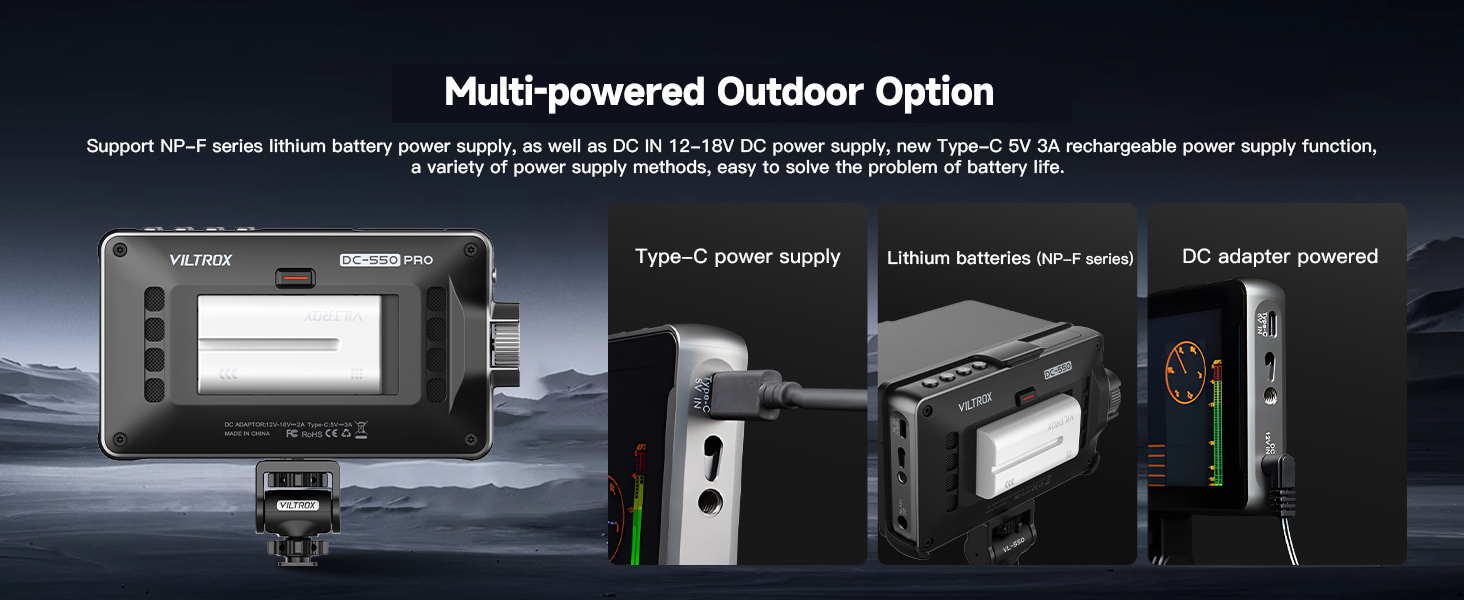
Image: Illustration of the three power supply methods for the monitor: Type-C power bank, NP-F series lithium battery, and DC adapter.
4.2 Attaching the Sunshade Hood
The detachable sunshade hood helps block strong light interference for better outdoor monitoring. Simply align and attach the hood to the top of the monitor. It can be quickly released when not needed.

Image: Visual guide demonstrating the quick open and close mechanism of the sunshade hood.
4.3 מאָנטירן דעם מאָניטאָר
Use the included VL-550 Cold Shoe Adapter to mount the monitor to your camera's hot shoe or other compatible mounting points. The adapter allows for 360° pitch angle and ±85° horizontal rotation for optimal viewing.

Image: Illustration of the VL-550 cold shoe adapter's flexibility, allowing for 360-degree pitch and 85-degree horizontal rotation.
4.4 ערשטע שפּראַך איינשטעלונג
If your monitor's default language is not English, follow these steps to change it:
- Double tap the screen to wake up the menu.
- Click on the top right corner to access the system settings.
- Then click the button that corresponds to "English" (often labeled with Chinese characters first, then English after selection).
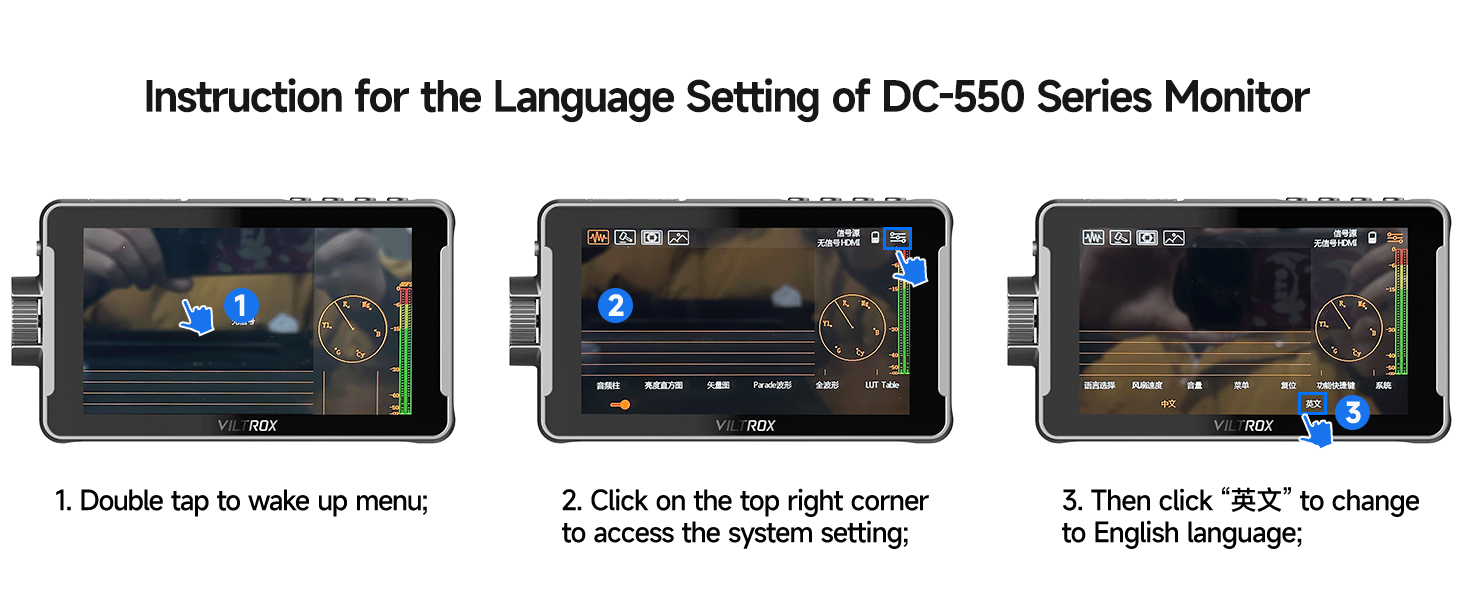
Image: Step-by-step visual instructions for changing the monitor's language setting.
Video: An official VILTROX video demonstrating the features and usage of the DC-550/550Pro monitor, including menu navigation and setup.
5. אַפּערייטינג די מאָניטאָר
5.1 Connecting to a Camera (HDMI)
Connect your camera's HDMI output to the monitor's HDMI input (15) using one of the provided HDMI cables. If you wish to loop the signal to another monitor, use the HDMI output (14).

בילד: דעטאַלירט view of the 4K HDMI Input and Output ports on the VILTROX DC-550 Pro monitor.
5.2 טאָוטש סקרין קאָנטראָלס
The DC-550 Pro features a sensitive touchscreen for intuitive navigation and control:
- טאָפּל טאַפּ: Access menus and settings.
- Double Finger Swipe: פארגרעסער אין/אַרויס.
- Swipe Right Side: סטרויערן די באַקלייט.
- Swipe Left Side: סטרויערן די באַנד.
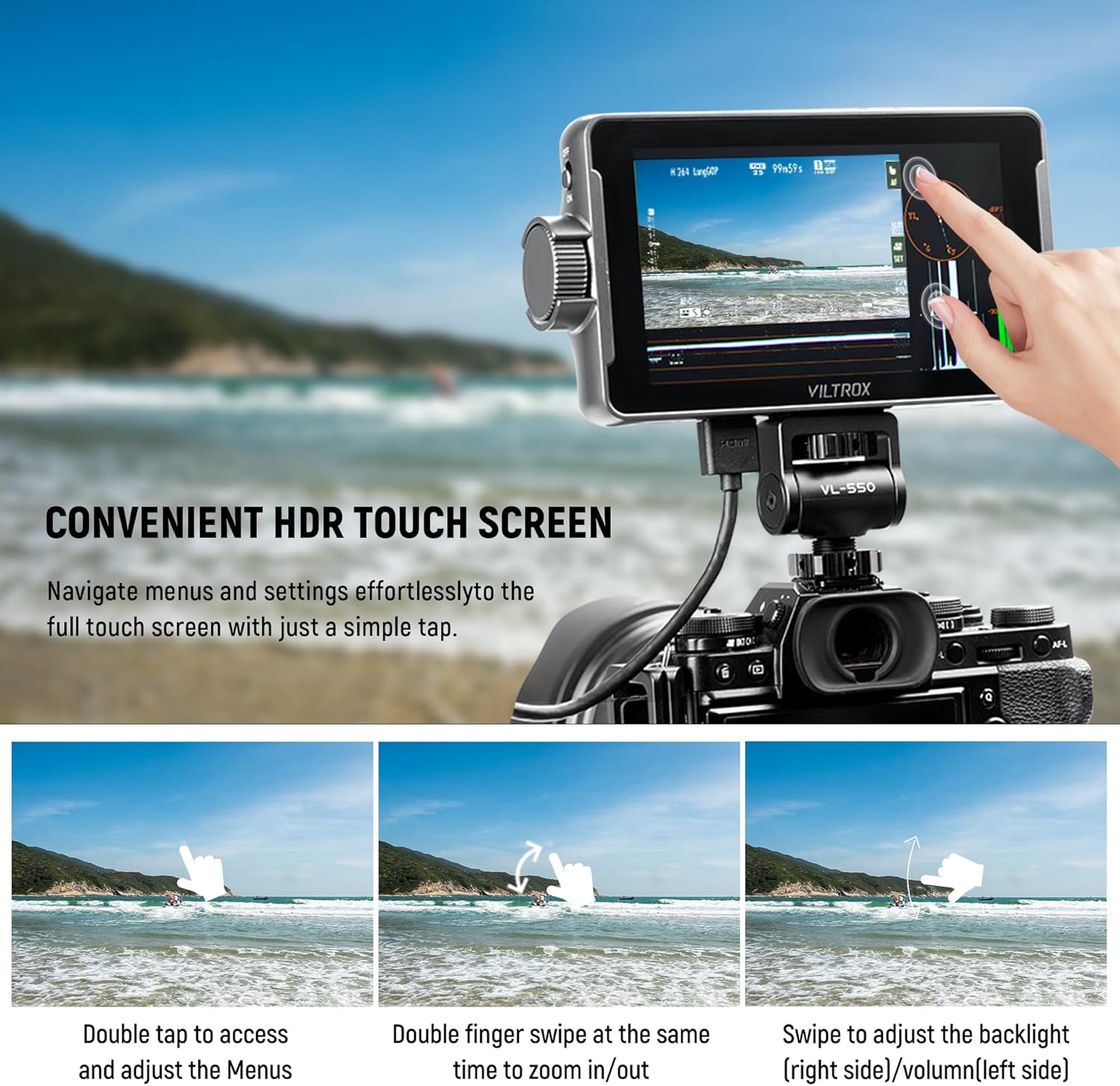
Image: Demonstrates various touch screen gestures for controlling the monitor's functions.
5.3 מאָניטאָרינג פונקציעס
The monitor provides a comprehensive suite of professional monitoring tools:
- 3D LUT: Import custom 3D LUTs via SD card (slot 1) to preview different color grades or camera Log modes.
- Auxiliary Focus (Peaking): Highlights in-focus areas for precise focusing.
- פאַלש קאָליר: Displays exposure levels using a color overlay.
- היסטאָגראַם: Visualizes the tonal distribution of the image (RGB & Brightness).
- Waveform (RGB Parade): Shows the luminance and color levels across the image.
- Vectorgraph: Displays color saturation and hue.
- Other functions include Volume Bar, Image Flip, Zoom, Scanning Mode, Safe Mark, Mark Ratio, and Camera Mode.
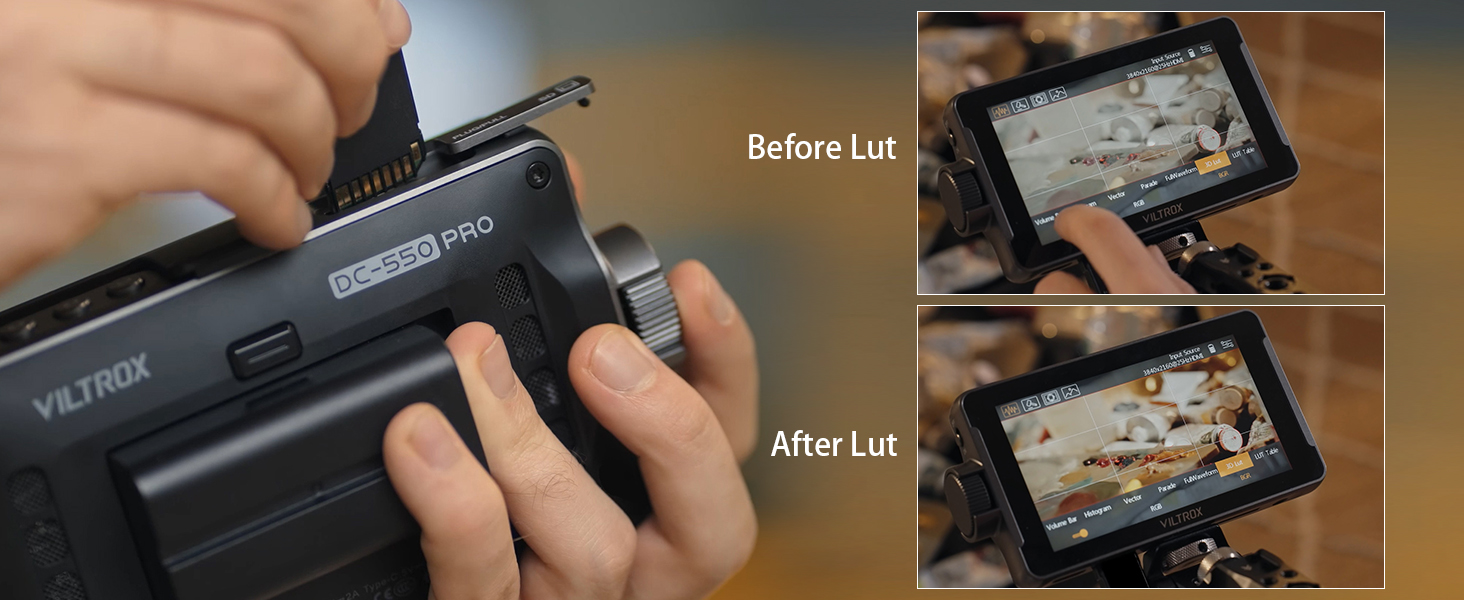
Image: Demonstrates the effect of applying a 3D LUT to the video feed, showing "Before Lut" and "After Lut" views.

Image: A visual representation of the professional monitoring functions available on the monitor, including Parade Wave, RGB Histogram, Vectorscope, Brightness Histogram, Mirror Image, Image Freeze, Pixel to Pixel, Monochrome, Safe Mark, Volume Bar, Peaking, False Colors, Exposure, Zoom, Scanning Mode, 3D LUT, Mark Ratio, and Camera Mode.
6. וישאַלט
6.1 רייניקונג די מאָניטאָר
To ensure optimal performance and longevity, regularly clean your VILTROX DC-550 Pro monitor:
- ניצט אַ ווייכן, לינט-פֿרייע שטאָף צו זאַכט ווישן דעם עקראַן און קערפּער.
- פֿאַר שווערע פֿלעקן, אַ ביסל דampווישט דעם שטאָף מיט וואַסער אָדער אַ רייניקונג לייזונג וואָס איז זיכער פֿאַרן עקראַן. פֿאַרמייַדט שטרענגע כעמיקאַלן.
- Ensure no liquid enters the ports or ventilation openings.
6.2 סטאָרידזש
When not in use, store the monitor in its plastic carry case in a cool, dry place away from direct sunlight and extreme temperatures.

Image: The included plastic carry case, designed to protect the monitor and its accessories during storage and transport.
6.3 קאָאָלינג סיסטעם
The monitor is equipped with cooling air inlets (9) and a fan outlet (18) to dissipate heat during operation. Ensure these areas are not obstructed to maintain proper ventilation.

בילד: נאָענט-אַרויף view of the cooling air inlets on the monitor, indicating airflow for heat dissipation.
7. טראָובלעשאָאָטינג
If you encounter issues with your VILTROX DC-550 Pro monitor, please refer to the following common problems and solutions:
| פּראָבלעם | מעגלעך סיבה | לייזונג |
|---|---|---|
| מאָניטאָר טוט נישט מאַכט אויף. | Low or depleted battery; incorrect power connection. | Ensure battery is charged and properly inserted. Check DC or Type-C power connections. |
| No signal displayed. | Incorrect HDMI connection; camera output settings; incompatible resolution. | Verify HDMI cables are securely connected to input (15). Check camera's HDMI output settings (resolution, format). Ensure monitor is set to correct input source. |
| Screen is too dim/bright. | Brightness settings. | Adjust brightness using the touchscreen swipe gesture (swipe right side) or through the menu. |
| טאָוטשסקרעען ניט ריספּאַנדאַבאַל. | Temporary software glitch; screen protector interference. | Restart the monitor. Ensure screen is clean and free of debris. If a screen protector is installed, ensure it's properly applied. |
| Monitor overheating. | Obstructed ventilation; prolonged use in high temperatures. | Ensure cooling air inlets (9) and fan outlet (18) are clear. Operate in a well-ventilated area. Allow monitor to cool down if necessary. |
8. ספּעסאַפאַקיישאַנז
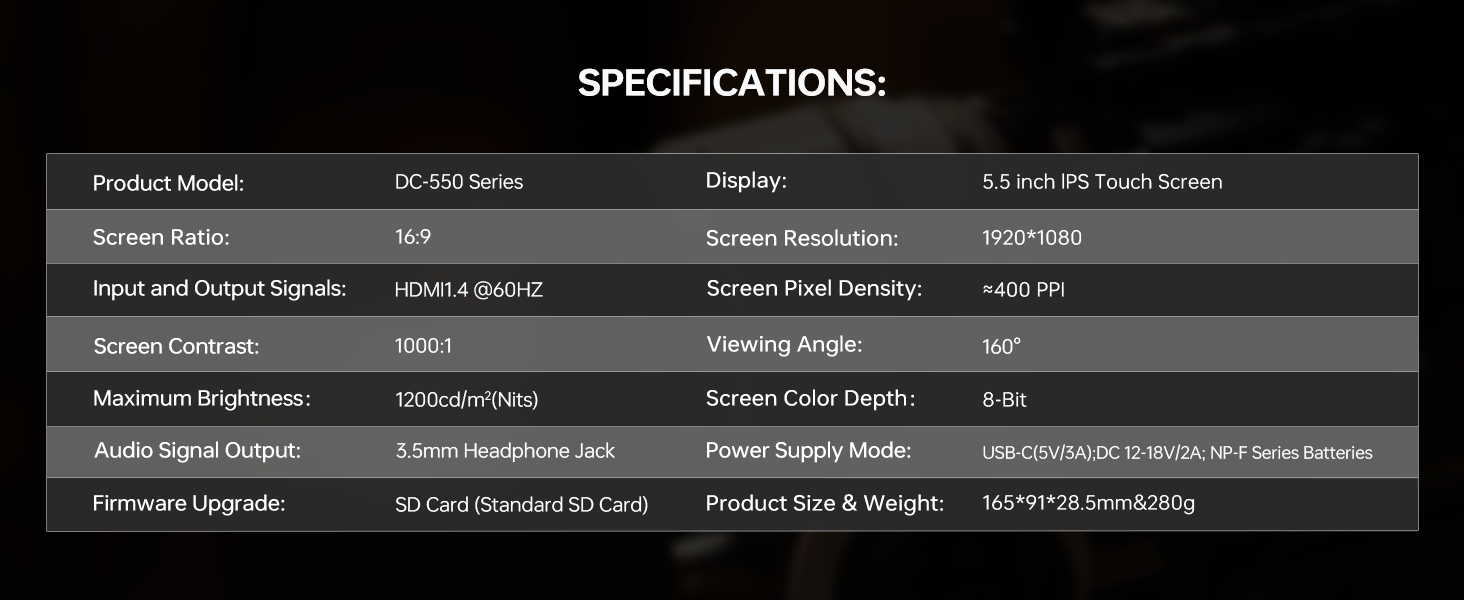
Image: Official specifications table for the VILTROX DC-550 Series monitor.
| שטריך | דעטאַל |
|---|---|
| פּראָדוקט מאָדעל | דק-550 סעריע |
| ווייַז | 5.5 אינטש IPS טאָוטש סקרין |
| Screen Ratio | 16:9 |
| פאַרשטעלן האַכלאָטע | 1920*1080 |
| אַרייַנשרייַב און רעזולטאַט סיגנאַלז | HDMI1.4 @60HZ |
| Screen Pixel Density | ≈400 PPI |
| פאַרשטעלן קאָנטראַסט | 1000:1 |
| Viewינג אַנגלע | 160° |
| מאַקסימום ברייטנאַס | 1200cd/m² (Nits) |
| Screen Color Depth | 8-ביסל |
| אַודיאָ סיגנאַל רעזולטאַט | 3.5 מם כעדפאָון דזשאַק |
| מאַכט צושטעלן מאָדע | USB-C (5V/3A), DC 12-18V/2A, NP-F Series Batteries |
| פירמוואַרע אַפּגרייד | SD Card (Standard SD Card) |
| פּראָדוקט גרייס און וואָג | 165*91*28.5mm & 280g |
9. וואָראַנטי און שטיצן
VILTROX provides a 1-year replacement service and friendly after-sales service support to all customers. For any inquiries or support needs, please contact VILTROX customer service through their official channels or the retailer where you purchased the product.
For more information, visit the official VILTROX Store: VILTROX Official Store
Ask a question about this manual
Ask about setup, troubleshooting, compatibility, parts, safety, or missing instructions. Manuals+ will review the question and use this page’s manual context to help answer it.