
1. פּראָדוקט איבערview
The GATEXPERT GT1100DC is an automatic sliding gate opener designed for gates weighing up to 1100 pounds and with a length of up to 39 feet. It utilizes a sprocket and chain transmission system for reliable operation. This kit provides enhanced security and convenience for driveway gates.
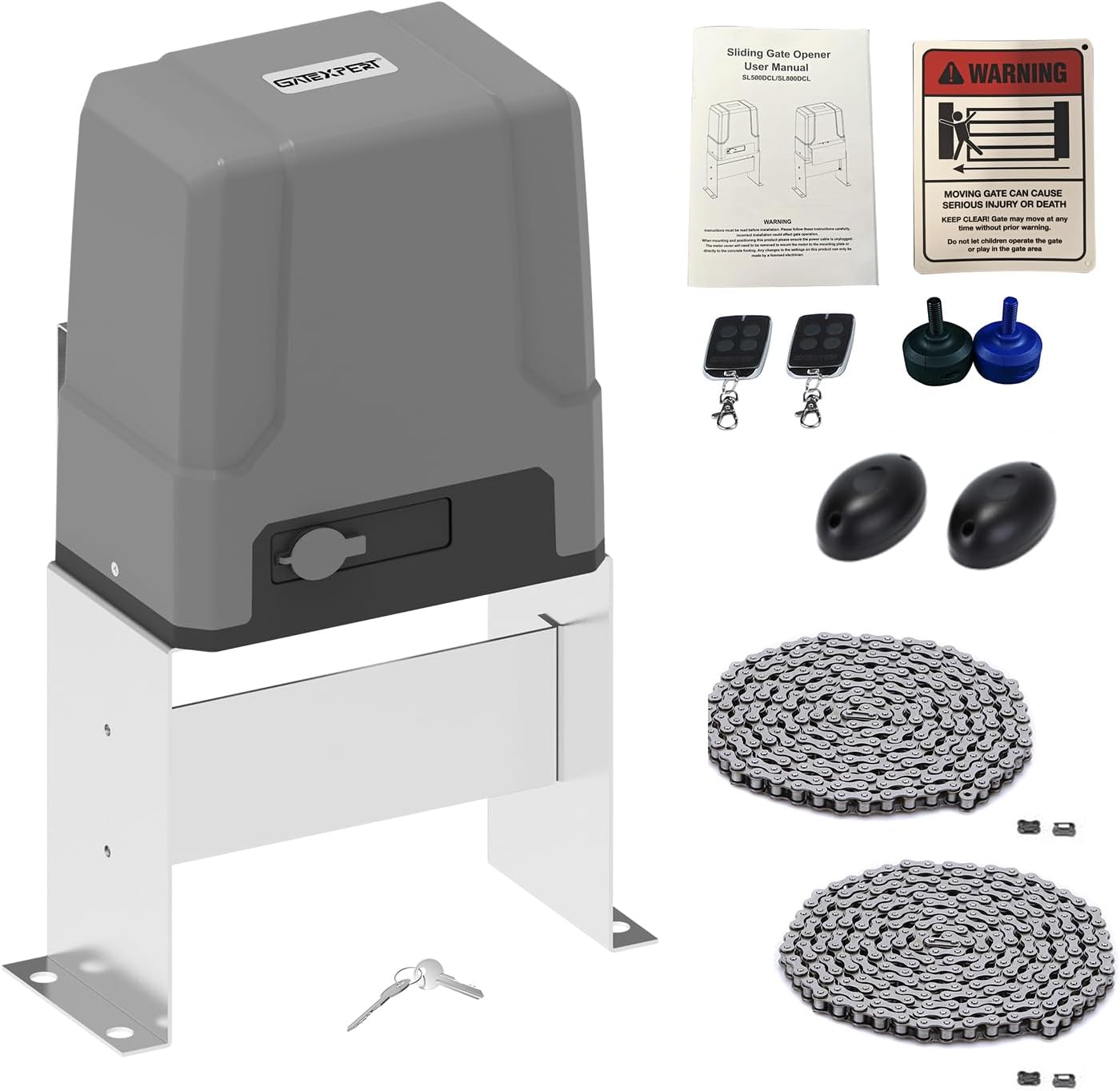
Image 1.1: GATEXPERT GT1100DC Automatic Sliding Gate Opener Kit, showing the main motor unit, remote controls, infrared sensors, manual release keys, and chains.
2. זיכערקייַט אינפֿאָרמאַציע
וויכטיק: Read all safety instructions carefully before installation and operation. Failure to follow these instructions may result in serious injury or property damage.
- Ensure the installation area is clear of obstructions and potential hazards.
- האַלט קינדער און חיות אַוועק פון די טויער געגנט בעת אָפּעראַציע.
- Never attempt to stop a moving gate with your hands or body.
- In case of power failure or remote control loss, use the provided manual release keys to operate the gate.
- The system includes reliable electronic limit switches for safety. Ensure they are correctly adjusted.
- Professional installation is recommended for electrical connections.
Image 2.1: A warning sign indicating caution around a moving gate, emphasizing safety, as included in the kit.
3. פּעקל אינהאַלט
באַשטעטיקט אַז אַלע קאָמפּאָנענטן וואָס זענען ליסטעד אונטן זענען אַרייַנגערעכנט אין דיין פּעקל:
- קסנומקס רענטגענ מאָטאָר יוניט
- 1 x אַקסעססאָריעס באָקס
- 1 x Set of Infrared Sensors
- 2 x רימאָוט קאָנטראָלס
- 2 x מאַנואַל ריליס קיז
- 2 x Chains (10ft/pc)
- 1 x ענגליש באַניצער מאַנואַל
- Complete Installation Hardware

Image 3.1: A visual representation of all items included in the GATEXPERT GT1100DC kit, laid out for verification.
4. ספּעסאַפאַקיישאַנז
| שטריך | באַשרייַבונג |
|---|---|
| מאָדעל נומער | GT1100DC |
| מאַקס גייט וואָג | 1100 לבס |
| מאַקס טויער לענג | 39 ft |
| פאָר מאָדע | Sprocket and Chain Transmission |
| מאַכט צושטעלן | 110 וו / 60 הז |
| מאָטאָר מאַכט | 150 וואט (24 וודק) |
| פּראָדוקט דימענשאַנז | 12.76 X 9.21 X 19.69 אינטשעס |
| פּונקט וואָג | 38.4 פונט |
| באַטעריז אַרייַנגערעכנט | No (Storage battery not included) |

Image 4.1: Technical drawing illustrating the dimensions of the GATEXPERT GT1100DC gate opener in millimeters and inches.
5. סעטאַפּ און ייַנמאָנטירונג
The GATEXPERT GT1100DC is designed for easy DIY installation using commonly available tools. No welding or high-voltage electrical connections are required. The complete installation process typically takes a few hours.
5.1 General Installation Steps:
- מאָנטירן די מאָטאָר אַפּאַראַט: Securely mount the motor unit to a stable base next to your sliding gate.
- Install the Chain: Attach the provided chains to the gate and connect them to the motor's sprocket. Ensure proper tension.
- פאַרבינדן מאַכט: Connect the gate opener to a 110V/60Hz power source.
- Install Infrared Sensors: Position the infrared sensors to detect obstructions in the gate's path.
- Wire Accessories: Connect any optional accessories such as solar panels, wireless keypads, or alarm lamps.
- דורכפירן ערשט סעטאַפּ: Follow the operating instructions for remote control learning and travel learning.

בילד 5.1: עקס.amples of the GATEXPERT GT1100DC gate opener installed on different types of sliding gates, demonstrating typical setup scenarios.
5.2 קאָנטראָל באָרד איבערview:
The control board manages all functions of the gate opener. Familiarize yourself with its layout for programming and troubleshooting.
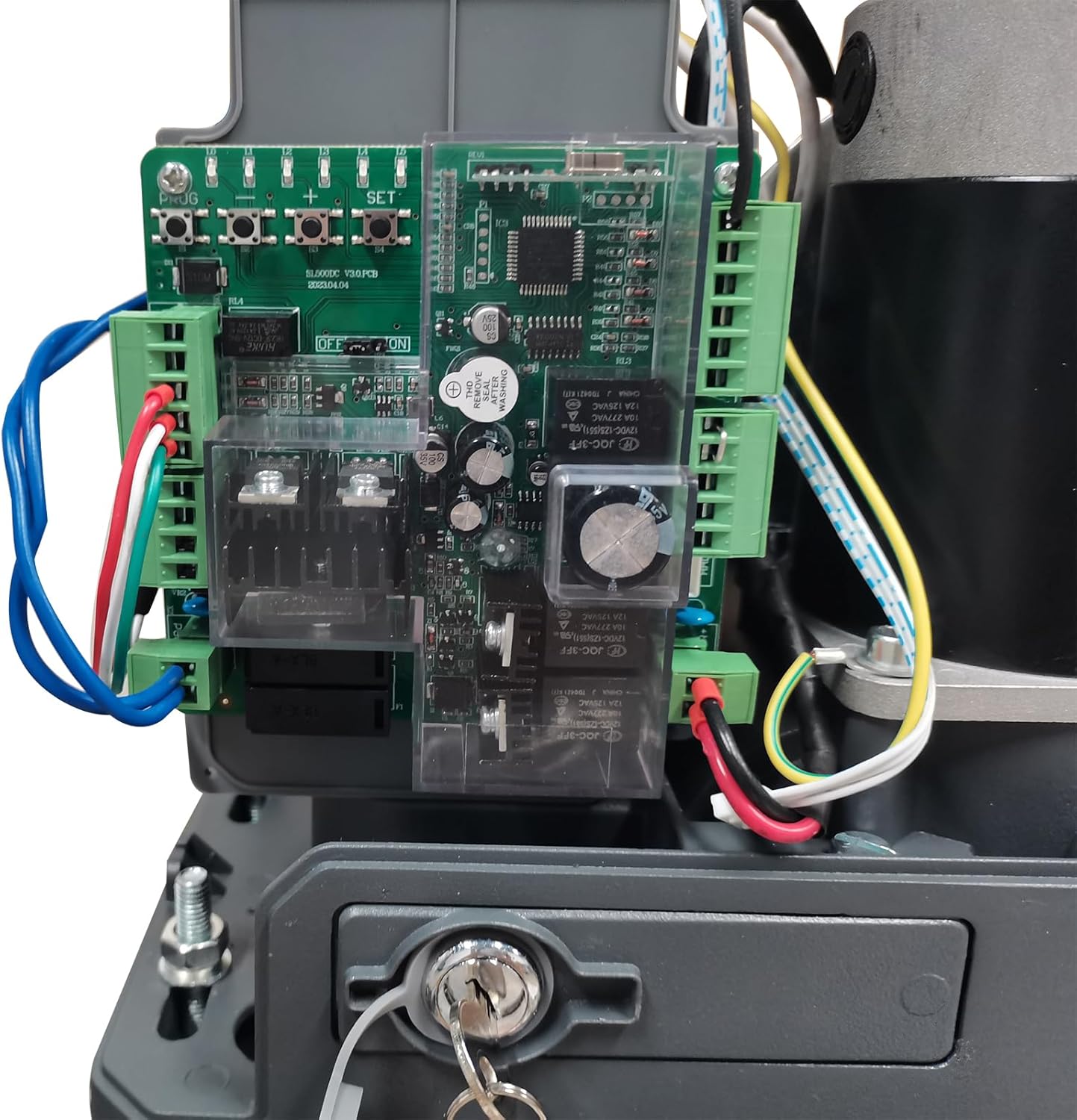
בילד 5.2: דעטאַלירט view of the control board inside the GATEXPERT GT1100DC, showing wiring terminals and programming buttons.
6. אַפּערייטינג ינסטרוקטיאָנס
This section details how to program and operate your GATEXPERT GT1100DC gate opener.
6.1 לערנען פון ווייטער קאנטראל
Follow these steps to program your remote controls to the gate opener:
- Press and hold the "+" button on the control board for 3 seconds until L1 illuminates.
- Press the "SET" button once. L1 and L5 will flicker alternately.
- Press the desired button on your remote control. L1-L5 will illuminate for 1 second, indicating successful learning.
- Press the "PROGRAM" button to exit learning mode.
Video 6.1: Demonstration of how to program a remote control to the GATEXPERT GT1100DC gate opener, showing the button presses on the control board and remote.
6.2 Travel Learning (Limit Setting)
The gate opener needs to learn the full travel distance of your gate. This sets the open and close limits.
Video 6.2: A comprehensive video demonstrating the setup and travel learning process for the GATEXPERT sliding gate opener, including clearing remote controls, single-button learning, and slow stop travel setting.
Refer to the full video above for detailed steps on Travel Learning and Slow Stop Travel Setting. Setting a slow stop distance ensures smoother gate operation and extends the lifespan of the opener.
6.3 Automatic Close Time Setting
You can configure the gate to automatically close after a set period. The automatic closing time can be set to 10s, 20s, 30s, 40s, or 50s.
Consult the full instruction manual for specific button sequences to adjust this setting.
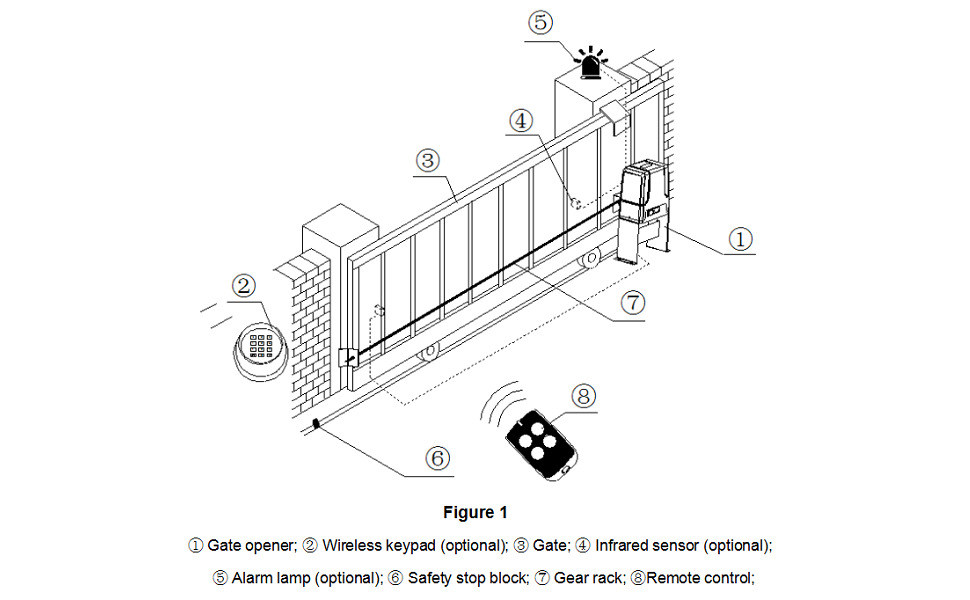
Image 6.3: Diagram illustrating a typical sliding gate setup, labeling the gate opener, wireless keypad, gate, infrared sensor, alarm lamp, safety stop block, gear rack, and remote control.
7. וישאַלט
רעגולערע אויפהאלטונג גאראנטירט די לאנגעוויטי און אפטימאלע פאָרשטעלונג פון אייער טויער עפֿנער.
- Inspect Chains: Periodically check the chains for proper tension and lubrication. Adjust if necessary.
- ריין סענסאָרס: Ensure infrared sensors are clean and free from obstructions to maintain proper safety function.
- קוק פֿאַר אַבסטראַקשאַנז: Regularly clear the gate's path of any debris, plants, or other objects.
- פּרובירן זיכערקייַט פֿעיִקייטן: Periodically test the auto-reverse function and infrared sensors to ensure they are working correctly.
- מאַנואַל מעלדונג: Familiarize yourself with the manual release mechanism and test it occasionally.
8. טראָובלעשאָאָטינג
If you encounter issues with your gate opener, refer to the following common troubleshooting tips:
- טויער רירט זיך נישט:
- קוק די מאַכט צושטעלן.
- Ensure manual release is engaged (if applicable).
- Verify remote control battery and programming.
- קוק נאָך שטערונגען אין דעם וועג פֿונעם טויער.
- טויער שטעלט זיך אפ אומגעריכט:
- Inspect infrared sensors for obstructions or misalignment.
- Check for physical obstructions along the gate's travel path.
- רימאָוט קאָנטראָל נישט ארבעטן:
- פאַרבייַטן ווייַט קאָנטראָל באַטאַרייע.
- Re-program the remote control following the "Remote Control Learning" section.
For more detailed troubleshooting, please consult the comprehensive user manual included with your product or contact customer support.
9. וואָראַנטי און שטיצן
The GATEXPERT GT1100DC Automatic Sliding Gate Opener Kit comes with a 12-חודש וואָראַנטי from the date of purchase. Additionally, a free product return and exchange service is available within 30 days of purchase.
For any issues during product installation, operation, or for comprehensive system solutions, please contact GATEXPERT customer service via the service email provided in your product packaging or on the official GATEXPERT webפּלאַץ.