
1. הקדמה
This manual provides detailed instructions for the installation, operation, and maintenance of the PeakDo Wireless HDMI Transmitter and Receiver P3 S. This device is designed to wirelessly transmit uncompressed 1080P Full HD video and digital audio with zero latency, making it ideal for various applications including gaming, home entertainment, and professional presentations. The P3 S model features a USB-C port on the receiver for compatibility with AR smart glasses and portable monitors, in addition to standard HDMI output.

Figure 1: PeakDo Wireless HDMI Transmitter (left) and Receiver (right).
2. פּראָדוקט איבערview
2.1 שליסל פֿעיִקייטן
- Wireless AR Smart Glasses Setup: Features a Type-C port on the Receiver for direct connection to AR smart glasses (e.g., XREAL Air, Rokid Max/Air, RayNeo, VITURE One) and portable monitors, enabling cable-free AR experiences.
- Uncompressed FHD Video & Digital Audio: Transmits 1080P Full HD video and digital audio without compression, ensuring high-quality output.
- Zero Latency Transmission: Provides 0 latency for real-time applications such as live sports, synchronized gaming, and interactive meetings.
- פּלאַג און שפּיל אָפּעראַציע: Requires no Wi-Fi connection or app installation for setup.
- ברייט קאַמפּאַטאַבילאַטי: Transmitter (TX) connects to PC, Laptop, Xbox, PlayStation, Nintendo Switch, TV Box. Receiver (RX) connects to TVs, monitors, projectors via HDMI, and AR smart glasses/portable monitors via USB-C.
- טראַנסמיסיע קייט: Effective wireless transmission up to 100 feet (approximately 30 meters).
2.2 פּעקל אינהאַלט
ביטע באַשטעטיקן אַז אַלע זאכן זענען פאַראַן אין דעם פּעקל:
- PeakDo Wireless HDMI Transmitter (TX)
- PeakDo Wireless HDMI Receiver (RX)
- USB Power Cable(s)
- באַניצער מאַנואַל (דעם דאָקומענט)
3. סעטאַפּ אינסטרוקציעס
3.1 פֿאַרבינדן דעם טראַנסמיטער (TX)
- Connect the HDMI end of the Transmitter (TX) to the HDMI output port of your source device (e.g., PC, laptop, game console, TV box).
- Connect the USB power cable to the TX unit and plug the other end into a USB power source (e.g., a USB port on your source device, a USB wall adapter). Ensure the TX receives at least 5V 2A power supply.

Figure 2: Compatible input (TX) and output (RX) devices.
3.2 פֿאַרבינדן דעם ריסיווער (RX)
- וויכטיק: First, connect the USB power cable to the RX unit and plug the other end into a USB power source (e.g., a USB wall adapter). Ensure the RX receives at least 5V 2A power supply. The RX unit requires sufficient power to function correctly.
- For HDMI displays (TV, Monitor, Projector): Connect an HDMI cable from the HDMI output port of the Receiver (RX) to the HDMI input port of your display device.
- For AR Smart Glasses or Portable Monitors: Connect a USB-C cable from the Type-C port on the Receiver (RX) to the USB-C input port of your AR smart glasses or portable monitor.
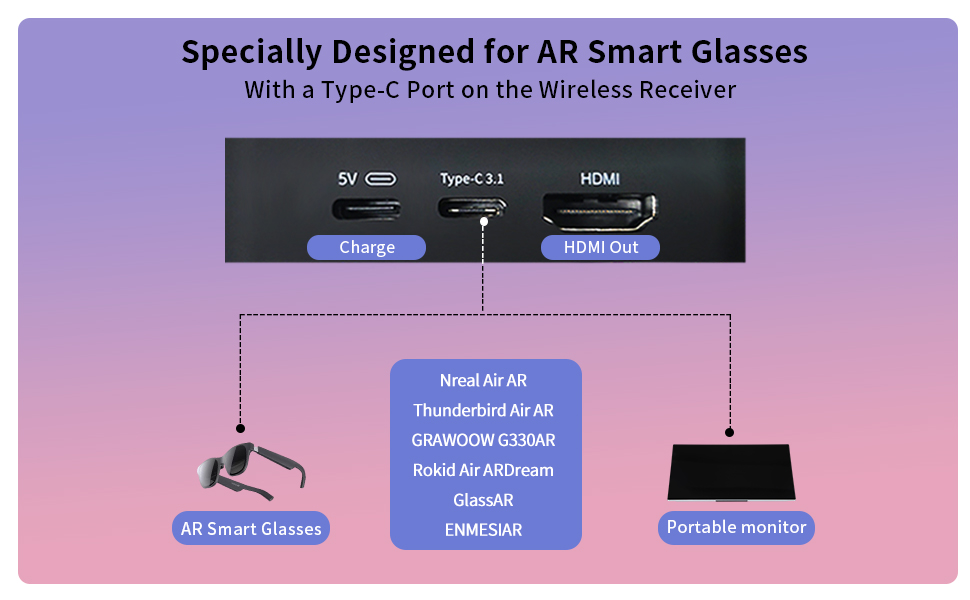
Figure 3: Receiver ports (5V power, Type-C 3.1, HDMI) and AR glasses compatibility.
באַמערקונג: For certain AR glasses like Nreal, you may need to upgrade their firmware for optimal compatibility. Refer to your AR glasses manufacturer's instructions for firmware updates.
4. אַפּערייטינג ינסטרוקטיאָנס
4.1 אײַנצושאַלטן און פֿאַרבינדן
Once both the Transmitter (TX) and Receiver (RX) units are connected to their respective power sources and devices, they will automatically power on and attempt to pair. The system is designed for plug-and-play operation, requiring no manual pairing steps or software installation.

Figure 4: Plug and Play setup in a meeting environment.
4.2 באַניץ סינעריאָוז
- גיימינג: Experience zero-latency gaming on a large screen or through AR glasses.
- היים פֿאַרווייַלונג: Stream movies, TV shows, or other media from your PC or TV box to any display.
- Presentations/Meetings: Share content wirelessly from your laptop to a projector or large monitor in a conference room.
- AR Experiences: Connect directly to compatible AR smart glasses for immersive gaming or productivity.
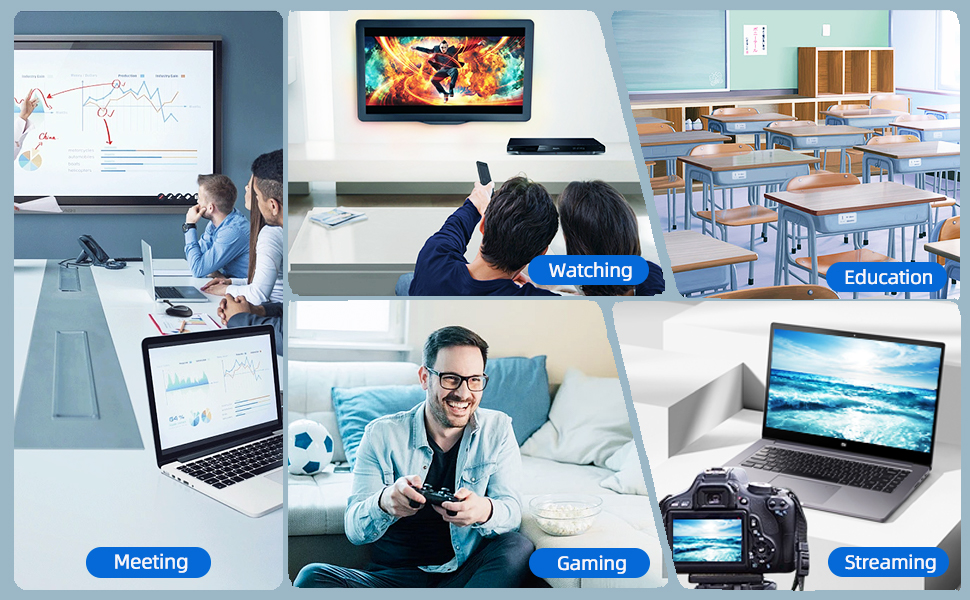
Figure 5: Diverse applications of the PeakDo Wireless HDMI system.

פיגורע 6: עקסample of a wireless AR gaming setup.
5. וישאַלט
The PeakDo Wireless HDMI Transmitter and Receiver P3 S requires minimal maintenance.
- רייניקונג: ניצט אַ ווייכע, טרוקענע שטאָף צו רייניקן די אויסערלעכע זייט פון די אַפּאַראַטן. ניצט נישט קיין פליסיקע רייניגער אָדער אַעראָזאָלן.
- סטאָרידזש: ווען נישט אין באַנוץ פֿאַר לענגערע פּעריאָדן, זאָל מען האַלטן די דעווייסעס אין אַ קיל, טרוקן אָרט, אַוועק פֿון דירעקטער זון און עקסטרעמע טעמפּעראַטורן.
- מאַכט צושטעלן: Always ensure both TX and RX units receive adequate power (5V 2A) from a stable power source.
6. טראָובלעשאָאָטינג
6.1 No Signal / Black Screen
- טשעק מאַכט: Ensure both the Transmitter (TX) and Receiver (RX) units are properly powered. The RX unit specifically requires sufficient power (5V 2A) and should be powered first before connecting the HDMI/USB-C cable to the display.
- קאַבלע קאַנעקשאַנז: Verify that all HDMI and USB-C cables are securely connected to their respective ports on the devices and displays.
- מקור מיטל אויסגאַנג: Confirm that your source device (PC, game console) is outputting video correctly. Try connecting the source device directly to the display with a cable to rule out issues with the source.
- אַרויסווייַזן אַרייַנשרייַב: Ensure your display (TV, monitor, projector, AR glasses) is set to the correct input source (e.g., HDMI 1, USB-C).
- ריסטאַרט דיווייסאַז: Disconnect power from both TX and RX units, then reconnect. Also, restart your source device and display.
6.2 Intermittent Signal / Flickering
- דיסטאַנסע און מניעות: Reduce the distance between the TX and RX units. Ensure there are no significant physical obstructions (walls, large furniture) between them that could interfere with the wireless signal.
- ינטערפיראַנס: Keep the units away from other wireless devices (e.g., Wi-Fi routers, cordless phones, microwave ovens) that operate on similar frequencies.
- מאַכט צושטעלן: Ensure stable and sufficient power supply to both units. Fluctuations in power can affect signal stability.
6.3 קיין אַודיאָ
- Source Audio Settings: Check the audio output settings on your source device to ensure audio is being sent via HDMI.
- Display Audio: Verify that the audio on your display device (TV, monitor, AR glasses) is not muted and the volume is turned up.
- קאַבלע אָרנטלעכקייַט: Ensure the HDMI or USB-C cable connecting the RX to the display is not damaged.
6.4 AR Glasses Compatibility Issues
- Firmware דערהייַנטיקן: As mentioned in the setup, some AR glasses (e.g., Nreal) may require a firmware update to work correctly with external video sources. Consult your AR glasses manufacturer's support.
- Power to RX: Ensure the RX unit is adequately powered, especially when connecting to power-hungry AR glasses.
- USB-C קאַבלע: Use a high-quality USB-C cable that supports video transmission.
7. ספּעסאַפאַקיישאַנז
| שטריך | באַשרייַבונג |
|---|---|
| מאָדעל נומער | פּ 3 ז |
| ווידעא קאָדירונג | YUV422 or RGB444 (uncompressed 1080P) |
| האַכלאָטע שטיצן | אַרויף צו 1080 פּ גאַנץ הד |
| לייטאַנס | 0 לייטאַנס |
| קאַנעקטיוויטי טעכנאָלאָגיע | Wireless (Millimeter Wave) |
| טראַנסמיסיע ראַנגע | ביז 100 פֿיס (אומגעפער 30 מעטער) |
| Compatible Transmitter Devices | PC, Laptop, Xbox, PS4, PS5, Switch, PS3, TV Box, etc. |
| Compatible Receiver Devices | TV, Monitor, Projector (via HDMI); AR Smart Glasses, Portable Monitor (via USB-C) |
| גאַנץ הדמי פּאָרץ | 1 (on Receiver) |
| קאַנעקטער טיפּ | HDMI, Micro USB (for power), USB-C (on Receiver) |
| אַודיאָ רעזולטאַט מאָדע | Mono (Digital Audio) |
| אַרומרינגלען סאָונד קאַנאַל קאַנפיגיעריישאַן | 2.0 |
| מאַכט צושטעלן | 5V 2A (for both TX and RX units) |
| פּונקט וואָג | 1.08 פונט (אומגעפער 0.49 ק"ג) |
| פּעקל דימענשאַנז | 6.73 x 5.83 x 2.48 אינטשעס (אומגעפער 17.1 x 14.8 x 6.3 ס״מ) |
8. וואָראַנטי און שטיצן
For warranty information and technical support, please refer to the official PeakDo webזייטל אדער קאנטאקט זייער קאסטומער סערוויס גלייך. האלט אייער קויף קוויטל פאר גאראנטיע טענות.
- פאַבריקאַנט: פּיקדאָ
- ערשטער דאַטע בנימצא: 16 מערץ 2023
- קונה ריviews: 3.3 out of 5 stars (based on 6 ratings at time of data extraction)