
1. הקדמה
This manual provides detailed instructions for the Loutoc Voice Remote Control, Model 1385a. This remote is designed as a replacement and upgrade for specific Samsung Smart TVs from 2021 and 2022, offering voice control and quick access to popular streaming services. It features a fast response time of 0.5 seconds and durable silicone buttons tested for over 15,000 clicks. Please read this manual carefully to ensure proper use and optimal performance.

Image 1: Loutoc Voice Remote Control, front view.
2. קאַמפּאַטאַבילאַטי
The Loutoc Voice Remote Control (Model 1385a) is specifically compatible with 2021/2022 Samsung Neo QLED / Crystal UHD 4K Smart TVs that have Alexa Built-in. It is designed to replace or function similarly to the following Samsung TV remote models with voice function:
- TM2180A (BN68-11642A, BN68-11929A, BN68-11929B, BN68-11929D)
- TM2180E (BN68-11645A, BN68-11645G)
- TM2280E (BN68-13842D, BN68-13842H, BN68-13842J)
- BN68-11645D
באַמערקונג: This remote control may not be fully compatible with Samsung TVs from other years or models that do not support voice control or the listed remote models.

Image 2: The remote is compatible with 2021/2022 Samsung Neo QLED and Crystal UHD 4K Smart TVs with Alexa Built-in.

Image 3: Visual representation of compatible Samsung TV remote models.
3. סעטאַפּ
3.1. באַטאַרייע ייַנמאָנטירונג
The Loutoc Voice Remote Control requires צוויי אַאַאַ באַטעריז פֿאַר אָפּעראַציע. צו אינסטאַלירן די באַטעריעס:
- געפֿינען די דעקן פון די באַטאַרייע אָפּטייל אויף די צוריק פון די ווייַט קאָנטראָל.
- Slide the cover downwards or press the latch (if present) to open it.
- אַרײַנשטעלן צוויי AAA באַטעריעס, און זיכער מאַכן אַז די פּאָזיטיוו (+) און נעגאַטיוו (-) טערמינאַלן זענען ריכטיק אויסגעשטעלט מיט די מאַרקירונגען אינעווייניק אין דעם אָפּטייל.
- פאַרמאַכן די באַטאַרייע אָפּטייל דעקן סיקיורלי.
3.2. פּערינג ינסטרוקטיאָנס
For full functionality, including voice control and advanced features, the remote control must be paired with your Samsung Smart TV. If the remote does not automatically pair upon battery installation, follow these steps:
- זייט זיכער אז אייער סאַמסונג סמאַרט טעלעוויזיע איז אנגעצונדן.
- Point the Loutoc remote control directly at the front of your TV.
- סיימאַלטייניאַסלי דריקן און האַלטן די "צוריקקומען" קנעפּל (געבויגענער פײַל) און די "Play/Pause" button (triangle and two vertical lines) for at least 3 to 5 seconds.
- Release the buttons when a pairing message appears on your TV screen, indicating that the pairing process has begun or is complete.
- The TV screen should display a confirmation message once pairing is successful.
If pairing fails, ensure the batteries are correctly inserted and try again. Maintain a clear line of sight to the TV during the pairing process.
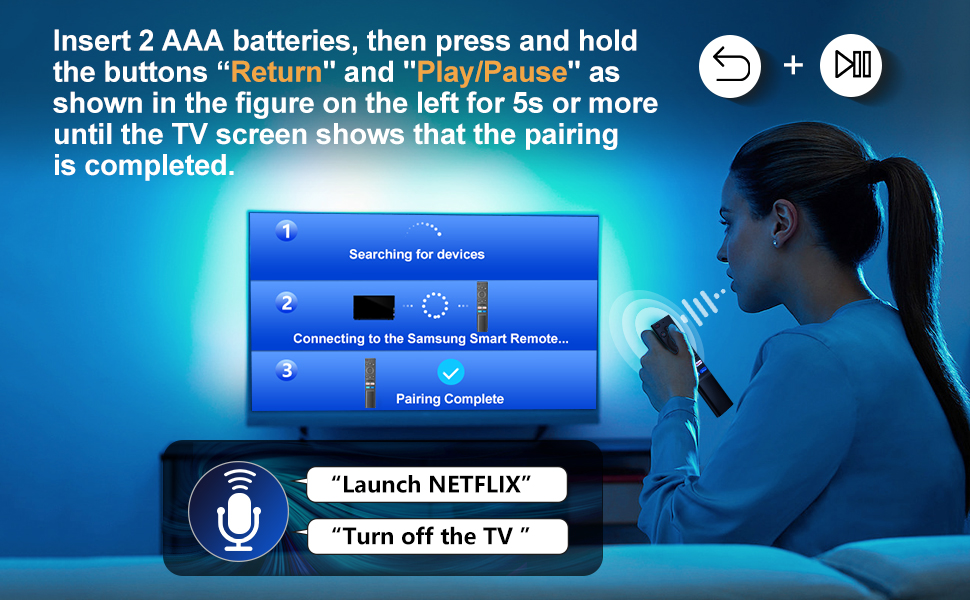
Image 4: Visual guide for pairing the remote control with your Samsung Smart TV by holding the Return and Play/Pause buttons.
4. אַפּערייטינג ינסטרוקטיאָנס
The Loutoc Voice Remote Control offers intuitive navigation and quick access to various TV functions and streaming services.
4.1. קנעפּל פונקציעס איבערview
Refer to the diagram below for a detailed overview of each button's function:

Image 5: Labeled diagram of the Loutoc Voice Remote Control buttons and their functions.
| קנעפּל / שטריך | באַשרייַבונג |
|---|---|
| מאַכט | פּרעסע צו דרייען די טעלעוויזיע אויף אָדער אַוועק. |
| מיק / געפירט | Used as MIC when using voice recognition with the remote control. The LED indicates remote activity. |
| קול אַססיסטאַנט | Press and hold this button to speak commands to the voice assistant (e.g., Alexa). Supported languages and features may vary by geographical region. |
| Color / Number button (123) | Press once to display the virtual numeric pad and color buttons. Use these to access additional options or enter numbers/text. Press and hold for 1 second or more to access the TTX menu. |
| מולטי View | Press this button directly to enter the Multi View function. Press and hold for 1 second or more to access the Shortcuts menu screen. |
| Directional buttons (Up, Down, Left, Right) | Moves the focus and changes values on the TV's menu. |
| אויסקלייַבן | Selects or runs a focused item. When pressed while watching a broadcast program, detailed program information appears. |
| צוריקקומען | Returns to the previous menu. When pressed for 1 second or more, the running function is terminated. When pressed while watching a program, the previous channel appears. |
| Smart Hub (Home) | קערט צו די היים פאַרשטעלן. |
| שפּיל / פּויזע | Controls media playback. Use to pause/play content. When pressed, the playback controls appear. Using these controls, you can control the media content that is playing. To use Game Bar, press and hold the button in Game Mode. Game Bar may not be supported depending on the model or geographical area. |
| באַנד (+/-) | Moves the button up or down to adjust the volume. To mute the sound, press the button. When pressed for 1 second or more, the Accessibility Shortcuts menu appears. |
| קאַנאַל (אַרויף/אַראָפּ) | Moves the button up or down to change the channel. To see the Guide screen, press the button. When pressed for 1 second or more, the Channel List screen appears. |
| Launch App buttons (NFLX, Rakuten TV, Prime Video, Dis) | Press each button to launch its respective application directly. |
4.2. Voice Control Function
The remote features a dedicated voice control button, allowing you to interact with your Samsung Smart TV using voice commands. This function is particularly useful for searching content, changing settings, or controlling smart home devices connected to your TV's voice assistant.
- דריקן און האַלטן די קול אַססיסטאַנט button (microphone icon).
- Speak your command clearly into the microphone located on the remote.
- Release the button once you have finished speaking.
Examples of commands include: "Launch Netflix", "Turn off the TV", "זוכן פֿאַר action movies".

Image 6: The remote control highlighting the voice function button.

Image 7: A user demonstrating the voice control feature to launch applications or control the TV.
4.3. Quick Access Shortcut Buttons
The remote includes four dedicated shortcut buttons for instant access to popular streaming applications:
- NFLX: Launches Netflix.
- ראַקוטען טעלעוויזיע: Launches Rakuten TV.
- פּריים ווידעא: Launches Amazon Prime Video.
- דיס: Launches Disney+.

Image 8: Close-up of the dedicated shortcut buttons for streaming services.
5. וישאַלט
To ensure the longevity and proper functioning of your Loutoc Voice Remote Control, follow these maintenance guidelines:
- רייניקונג: ניצט אַ ווייכע, טרוקענע שטאָף צו רייניקן די ווײַטקאָנטראָל. פֿאַר שווערע שמוץ, אַ ביסל טרוקענעםampווישט דעם שטאָף מיט וואַסער אָדער אַ מילדן, נישט-שרייַבנדיקן רייניגער. פֿאַרמייַדט ניצן שטרענגע כעמיקאַלן אָדער שרייַבנדיקע מאַטעריאַלן.
- באַטערי פאַרבייַט: Replace batteries when the remote's response becomes sluggish or it stops functioning. Always replace both batteries at the same time with new ones of the same type (AAA).
- סטאָרידזש: האַלט די ווײַטקאָנטראָלירטע אַפּאַראַטור אין אַ קיל, טרוקן אָרט, ווײַט פֿון דירעקטער זון, עקסטרעמע טעמפּעראַטורן און הויכער פֿײַכטקייט.
- ויסמיידן טראפנס: באַשיצט דעם ווײַטקאָנטראָל פֿון פֿיזישן קלאַפּ, ווײַל פֿאַלן קענען שאַטן אינעווייניקסטע קאָמפּאָנענטן.
6. טראָובלעשאָאָטינג
If you encounter issues with your Loutoc Voice Remote Control, refer to the following common problems and solutions:
- ווייַט ניט ריספּאַנדינג:
- קאָנטראָלירט צי די באַטעריעס זענען ריכטיק אַרײַנגעשטעלט און האָבן גענוג אָפּצאָל. טוישט זיי אויב נייטיק.
- זיכער מאַכן אַז עס זענען נישטאָ קיין שטערונגען צווישן דעם ווײַטקאָנטראָל און דעם טעלעוויזיע.
- Re-pair the remote control with your TV by following the "Pairing Instructions" in Section 3.2.
- שטימע קאנטראל ארבעט נישט:
- Ensure the remote is properly paired via Bluetooth/RF (not just infrared).
- Make sure you are pressing and holding the Voice Assistant button while speaking.
- Speak clearly and close to the microphone on the remote.
- Check your TV's settings to ensure the voice assistant feature is enabled and configured correctly.
- Delayed response or intermittent functionality:
- This can sometimes occur if the remote is not fully paired or if there's interference. Try re-pairing the remote.
- זייט זיכער אז איר זענט אין דער עפעקטיווער אפעראציע-ראַנג (ביז 8 מעטער / 26 פֿיס).
- טוישן די באַטעריעס אויב זיי זענען נידעריק.
- Specific shortcut buttons not working:
- Ensure your TV has the corresponding application installed and updated.
- Verify that the remote is correctly paired.
אויב די פראבלעם בלייבט נאך פרובירן די לייזונגען, ביטע קאנטאקטירט קאסטומער סופארט.
7. ספּעסאַפאַקיישאַנז
| שטריך | דעטאַל |
|---|---|
| סאָרט | Loutoc |
| מאָדעל נומער | 1385אַ |
| מאַכט מקור | 2 X AAA באַטעריז (ניט אַרייַנגערעכנט) |
| קאַנעקטיוויטי טעכנאָלאָגיע | Bluetooth/RF (for pairing and voice control), Infrared (for basic functions) |
| מאַקסימום קייט | אַרויף צו 8 מעטער (26 פֿיס) |
| קאָנטראָללער טיפּ | Voice Control, Button Control |
| נומער פון קנעפּלעך | Approx. 20 (including directional pad) |
| ספּעציעלע פֿעיִקייטן | Ergonomic design, No programming required (after pairing), Lightweight, Universal (for compatible Samsung models) |
| קאָליר | שוואַרץ |
| דימענסיעס (L X W X H) | בעערעך 19.7 X 4.8 X 1.5 סענטימעטער (7.76 X 1.89 X 0.59 אינטשעס) |
| וואָג | בעערעך 40 גראַמז (1.41 אונסעס) |
| לאַנד פון אָריגין | כינע |

Image 9: Dimensions of the Loutoc Voice Remote Control.
8. וואָראַנטי און שטיצן
Loutoc is committed to providing quality products and customer satisfaction. If you have any questions regarding your Loutoc Voice Remote Control or encounter any issues, please do not hesitate to contact our customer support team.
- קונה סערוויס: For inquiries about your order or product, please contact us directly. We aim to respond within 12 hours on business days.
- וואָראַנטי: Specific warranty details may vary. Please refer to your purchase documentation or contact customer support for more information.