
1. הקדמה
Thank you for choosing the Vamav Nova12 12-inch Professional Amplified Speaker with DSP. This manual provides essential information for the safe and efficient operation of your new audio equipment. Please read this manual thoroughly before use and retain it for future reference.
2. זיכערקייַט אינסטרוקציעס
כדי צו זיכער מאַכן זיכערע אָפּעראַציע און פאַרמייַדן שאָדן, אָבסערווירן די פאלגענדע פאָרזיכטיגקייטן:
- מאַכט מקור: Connect the speaker only to a power supply specified in the specifications section. Ensure the power cable is not damaged or pinched.
- ווענטילאַטיאָן: בלאָקירט נישט די ווענטילאַציע עפענונגען. זאָרגט פֿאַר גענוג לופט שטראָם אַרום דעם אַפּאַראַט צו פאַרמייַדן איבערהיצונג.
- נעץ: Do not expose the speaker to rain, moisture, or excessive humidity. This product is not waterproof.
- אָרט: Place the speaker on a stable, level surface. Avoid placing it near heat sources or in direct sunlight.
- רייניקונג: Disconnect from power before cleaning. Use a dry, soft cloth. Do not use liquid cleaners or aerosols.
- סערוויס: דו זאלסט נישט פּרווון צו דינען דעם פּראָדוקט זיך. קאָנטאַקט אַלע קוואַלאַפייד סערוויס פּערסאַנעל.
3. פּעקל אינהאַלט
באַשטעטיקן אַז אַלע זאכן זענען פאַראַן אין פּעקל:
- Vamav Nova12 12-inch Professional Amplified Speaker with DSP
- מאַכט קאַבלע
- באַניצער מאַנואַל (דעם דאָקומענט)
4. פּראָדוקט איבערview
The Vamav Nova12 is a professional amplified speaker featuring a 12-inch woofer and integrated Digital Signal Processing (DSP) for optimized audio performance. It is designed for various applications, including home theater systems, televisions, and game consoles.
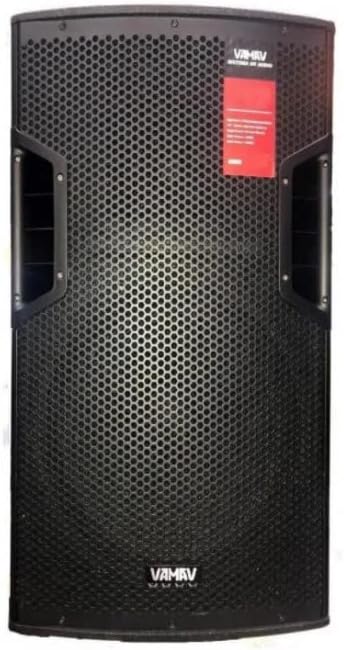
פיגורע 4.1: פראָנט View
This image displays the front of the Vamav Nova12 speaker, featuring a robust metal grille protecting the 12-inch woofer and tweeters. The Vamav logo is visible at the bottom, and handles are integrated on the sides for portability.

פיגורע 4.2: דערציען View
This image shows the rear panel of the Vamav Nova12 speaker, which houses the DSP control interface, various input and output connections (including RCA), and the power input. The cooling vents are also visible.
5. סעטאַפּ
Follow these steps to set up your Vamav Nova12 speaker:
- אָרט: Position the speaker on a stable, flat surface. Ensure there is sufficient space around the unit for proper ventilation. The speaker is designed for floor mounting.
- מאַכט קשר: Connect the provided power cable to the power input on the rear panel of the speaker, then plug the other end into a suitable electrical outlet.
- אַודיאָ אַרייַנשרייַב: Connect your audio source (e.g., home theater system, television, game console) to the RCA input ports on the rear panel of the speaker using an RCA cable (not included). Ensure correct left/right channel connections if applicable.
6. אַפּערייטינג ינסטרוקטיאָנס
Once the speaker is set up, follow these instructions for operation:
- מאַכט אויף: Locate the power switch on the rear panel and switch it to the 'ON' position. The DSP display should illuminate.
- באַנד אַדזשאַסטמאַנט: Use the master volume control knob on the rear panel to adjust the overall output level of the speaker. Start with a low volume and gradually increase it to a comfortable listening level.
- DSP Controls: The integrated DSP (Digital Signal Processor) allows for fine-tuning of the audio characteristics. Refer to the DSP interface on the rear panel to navigate menus and adjust settings such as equalization, crossover points, and other audio parameters. Specific DSP functions are controlled via the tactile interface.
- אַודיאָ פּלייבאַק: Begin playing audio from your connected source. Adjust the source volume and speaker volume as needed.
- מאַכט אַוועק: When finished, switch the power button on the rear panel to the 'OFF' position.
7. וישאַלט
Proper maintenance ensures the longevity and optimal performance of your speaker:
- רייניקונג: Regularly wipe the exterior of the speaker with a soft, dry, lint-free cloth. Do not use abrasive cleaners, waxes, or solvents.
- ווענטילאַטיאָן: Periodically check that the ventilation openings are free from dust and debris. Use a soft brush or compressed air to clear any blockages.
- סטאָרידזש: If storing the speaker for an extended period, disconnect it from power, clean it, and store it in a cool, dry place, preferably in its original packaging.
8. טראָובלעשאָאָטינג
If you encounter issues with your Vamav Nova12 speaker, refer to the following common problems and solutions:
| פּראָבלעם | מעגלעך סיבה | לייזונג |
|---|---|---|
| קיין מאַכט | Power cable not connected; Power outlet not active; Power switch off | Ensure power cable is securely connected; Check power outlet with another device; Turn power switch to 'ON' |
| קיין געזונט | Audio cable not connected; Source device not playing; Speaker volume too low; DSP settings incorrect | Check RCA cable connections; Verify audio playback on source device; Increase speaker volume; Reset DSP settings if necessary |
| פאַרקרימט געזונט | Volume too high (speaker or source); Damaged audio cable; DSP settings incorrect | Reduce volume on both speaker and source; Try a different audio cable; Adjust DSP settings |
9. ספּעסאַפאַקיישאַנז
Detailed technical specifications for the Vamav Nova12 speaker:
| שטריך | באַשרייַבונג |
|---|---|
| מאָדעל | Nova12 |
| רעדנער טיפּ | וואָאָפער |
| ספּעציעלע שטריך | Tweeters, DSP |
| רעקאָממענדעד ניצט | Game Consoles, Home Theater Systems, Televisions |
| קאַמפּאַטאַבאַל דעוויסעס | Home Theater, Television, Game Console |
| סובוואָאָפער דיאַמעטער | 12 אינטשעס |
| קאָליר | שוואַרץ |
| וואָטערפּרוף | פאַלש |
| קאָנטראָל מעטאָד | טאַקטיל |
| רעדנער גרייס | 12 אינטשעס |
| מאַכט מקור | קאָרדעד עלעקטריק |
| דורכשניטלעך באַטאַרייע לעבן | 5 Hours (if applicable, for internal components) |
| פּראָדוקט וואָג | 25 קג |
| קאַנעקטיוויטי טעכנאָלאָגיע | RCA |
| אַודיאָ רעזולטאַט מאָדע | מאָנאָ |
| מאַונטינג טיפּ | שטאָק בארג |
10. וואָראַנטי און שטיצן
Vamav products are designed for reliability and performance. For specific warranty details, please refer to the warranty card included with your purchase or contact your retailer. Keep your proof of purchase for any warranty claims.
For technical support or service inquiries, please contact the retailer where you purchased the product or visit the official Vamav webפּלאַץ פֿאַר קאָנטאַקט אינפֿאָרמאַציע.