
1. הקדמה
The Kestrel 5500 Weather Meter is a robust, multi-function environmental measurement device designed for a wide range of applications, including meteorology, boating, aviation, hiking, research, hunting, farming, and military use. This device provides accurate, instantaneous readings for 14 different environmental parameters, ensuring you have critical weather information at your fingertips. Equipped with wireless Bluetooth LiNK connectivity, it allows for seamless data transfer to compatible iOS and Android devices.

Figure 1: Kestrel 5500 Weather Meter displaying current wind speed and temperature.
ווידעא 1: איבערview of the Kestrel Weather Product Line, showcasing various models and their applications.
2. סעטאַפּ
2.1. באַטאַרייע ייַנמאָנטירונג
- Locate the battery compartment on the back of the Kestrel 5500.
- רוק די באַטאַרייע דעקן עפענען.
- Insert one AAA lithium battery (included) into the compartment, ensuring correct polarity.
- פאַרמאַכן די באַטאַרייע דעקן סיקיורלי.

פיגורע 2: דערציען view of the Kestrel 5500, highlighting the battery compartment.
2.2. ערשטע אויפשטעל
Press and hold the power button (␟) until the display illuminates. The device will perform a self-check and then display initial readings.
2.3. LiNK (Bluetooth) Connectivity
The Kestrel 5500 features Bluetooth LiNK for wireless data transfer. Download the Kestrel LiNK app from your device's app store (iOS/Android) to connect and manage your meter. Follow the in-app instructions for pairing.
3. Operating the Kestrel 5500
3.1. נאַוויגירן דעם עקראַן
Use the directional arrow buttons to scroll through different measurement screens and menu options. The center button typically acts as a 'Select' or 'Enter' key, while the left arrow often functions as 'Exit' or 'Back'.

פיגורע 3: פראָנט view of the Kestrel 5500, showing the display and navigation buttons.
3.2. גענומען מעזשערמאַנץ
For accurate wind measurements, ensure the impeller is exposed to the airflow. For temperature and humidity, allow the device to acclimate to the environment for a few minutes. The Kestrel 5500 measures the following parameters:
- ווינט ספּיד
- ווינט ריכטונג
- ווינט טשיל
- לופט טעמפּעראַטור
- וואַסער טעמפּעראַטור
- Snow Temperature
- קאָרעוו הומידיטי
- היץ סטרעסס אינדעקס
- טוי פונט טעמפּעראַטור
- נאַס באַלב טעמפּעראַטור
- סטאנציע דרוק
- באַראָמעטריק דרוק
- הייך
- געדיכטקייַט הייך
Video 2: Demonstrates the Kestrel 5500 in action, highlighting its various measurement capabilities.
4. קאַלאַבריישאַן
4.1. קאָמפּאַס קאַלאַבריישאַן
Compass calibration is essential for accurate wind direction, crosswind, and headwind/tailwind readings. It should be performed after changing batteries, updating firmware, or relocating to a new geographical area. It is also good practice to calibrate every 2-3 weeks.
- From the main screen, press the 'Gear' button to enter the menu.
- Scroll to 'System' and press the center button.
- Scroll to 'Compass Cal.' and press the center button.
- Follow the on-screen instructions: Hold the Kestrel upright and rotate it slowly for 30 seconds, keeping it away from any metal objects.
Video 3: Detailed instructions on how to calibrate the compass on Kestrel 5400, 5500, and 5700 models.
5. אַקסעססאָריעס
Enhance the functionality and portability of your Kestrel 5500 with a range of available accessories:
5.1. Vane Mount
The included Vane Mount allows you to attach your Kestrel 5500 to a tripod, transforming it into a compact, portable weather station. This ensures the meter is always facing into the wind for continuous, accurate readings.

Figure 4: Kestrel 5500 mounted on a small tripod with the Vane Mount for stable wind direction readings.
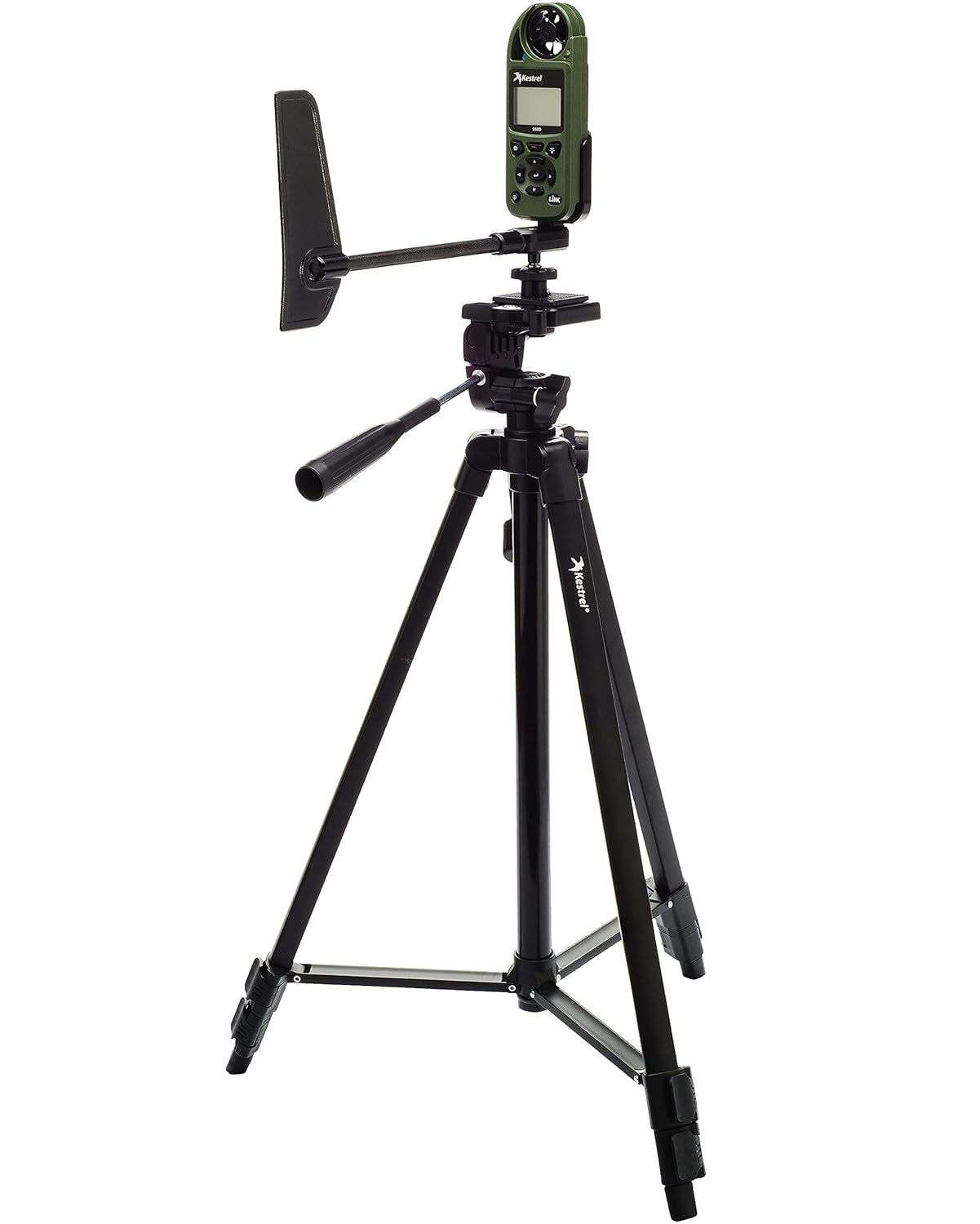
Figure 5: Kestrel 5500 mounted on a full-size tripod with the Vane Mount, suitable for various field applications.
5.2. Carrying Cases & Holders
- Nite Ize Case: A basic case with a pivoting belt clip for versatile carrying options.
- MOLLE Compatible Pouch: Available in various colors, this pouch offers a compact way to carry your Kestrel and can be attached to MOLLE systems.
- Armageddon Gear Taco Pouch: A zippered pouch designed to securely hold your Kestrel.
- Kydex Holsters: Custom-made Kydex holders that can attach directly to your belt.
- Badger Ordnance Clip: A clip designed for mounting the Kestrel onto spotting scopes or other devices with a Picatinny rail, allowing for integrated data collection.
5.3. Tripods
- Full-Size Tripod: Offers three adjustments for height and angle, compatible with the Vane Mount.
- מיני טרייפאָד: A compact and portable option, ideal for keeping the Kestrel at muzzle level for shooting applications.
5.4. Connectivity Cables
- USB Data Transfer Cable: A proprietary cable that connects to the optical ports on the back of your Kestrel for faster data transfer to a PC or iOS device.
- LiNK Dongle: An alternative for wired connectivity.
Video 4: Demonstrates various Kestrel accessories, including cases, tripods, and connectivity options.
6. וישאַלט
6.1. Impeller Replacement
The Kestrel's impeller is designed to be user-replaceable. If the impeller becomes damaged or accumulates too much debris, affecting accuracy, it can be easily replaced. Replacement impellers are factory-calibrated at two different speeds to ensure continued accuracy.
6.2. אַלגעמיינע קער
The Kestrel 5500 is rugged, drop-tested (MIL-STD-810G), and waterproof (IP67). To maintain its performance, keep the device clean and free of obstructions, especially around the impeller and sensors. Store it in a protective case when not in use.
7. טראָובלעשאָאָטינג
7.1. Compass Calibration Failure
If compass calibration repeatedly fails (displaying
פֿאַרבונדענע דאָקומענטן - 5500
 |
קעסטרעל 5500 וועטער מעטער באַניצער גייד This user guide provides comprehensive instructions for operating the Kestrel 5500 Weather Meter, covering its features, measurements, settings, data logging, connectivity, and maintenance. Learn how to use your Kestrel device for accurate environmental data collection. |
 |
קעסטרעל וועטער מעטערס באַניצער גייד: 1000, 2000, 2500, 3000, 3500 סעריע א פולשטענדיגע באַניצער פירער פֿאַר Kestrel וועטער מעטערס, וואָס דעקט פֿעיִקייטן, סעטאַפּ, אָפּעראַציע, וישאַלט און וואָראַנטי פֿאַר מאָדעלן 1000, 2000, 2500, 2500NV, 3000, 3500, 3500NV און 3500DT. |
 |
Kestrel Rotating Vane Mount: Instructions and Safety Information User guide for the Kestrel Rotating Vane Mount (Model 319041), detailing mounting, disassembly procedures, and critical safety warnings regarding California Proposition 65. Includes links for further information. |
 |
Kestrel HUD Heads Up Display for 5700 Ballistics Meters: User Manual Comprehensive user manual for the Kestrel HUD Heads Up Display, detailing setup, connectivity with 5700 Ballistics Meters, screen views, settings, firmware updates, and specifications. Learn how to mount and operate your Kestrel HUD for enhanced ballistic calculations. |
 |
ווי אזוי צו פארבינדן בושנעל עליט 1-מייל קאנקס ראַנגעפינדער מיט קעסטרעל 5700 שריט-ביי-שריט אינסטרוקציעס פארן ווירעלעס קאנעקטן א בושנעל עליט 1-מייל קאנקס לייזער ריינדזש פינדער צו א קעסטרעל 5700 באליסטיקס/עליט לינק יוניט ניצנדיג בלועטוט. |
 |
קעסטרעל 5000 סעריע פירמווער דערהייַנטיקונג געשיכטע א פולשטענדיגער לאג פון פירמווער דערהייַנטיקונגען פֿאַר די Kestrel 5000 סעריע פון דעוויסעס, מיט דעטאַלן פון ווערסיע נומערן, מעלדונג דאַטעס, און ספּעציפֿישע פֿאַרבעסערונגען אָדער באַג פיקסיז פֿאַר מאָדעלן אַרייַנגערעכנט די 5000, 5100, 5200, 5400, 5500, 5700, און 5700 Elite. |
Ask a question about this manual
Ask about setup, troubleshooting, compatibility, parts, safety, or missing instructions. Manuals+ will review the question and use this page’s manual context to help answer it.