
1. הקדמה
Thank you for choosing the Vamav Sync 15 Professional Amplified Speaker. This manual provides essential information for the safe and efficient operation of your device. Please read it thoroughly before use and retain it for future reference.
2. זיכערקייַט אינסטרוקציעס
- מאַכט מקור: Ensure the speaker is connected to a power source that matches the voltagE ספּעסיפיעד אויף די מיטל.
- ווענטילאַטיאָן: Do not block ventilation openings. Maintain adequate space around the speaker for proper airflow.
- וואַסער און נעץ: Keep the speaker away from water, rain, and excessive humidity. Do not operate with wet hands.
- היץ: Avoid placing the speaker near heat sources such as radiators, heat registers, stoves, or other heat-producing appliances.
- רייניקונג: Disconnect from power before cleaning. Use a dry, soft cloth. Do not use liquid cleaners or aerosols.
- סערוויס: דו זאלסט נישט פּרווון צו דינען דעם פּראָדוקט זיך. קאָנטאַקט אַלע קוואַלאַפייד סערוויס פּערסאַנעל.
- אָרט: שטעלט דעם רעדנער אויף אַ סטאַבילער, גלאַטער ייבערפלאַך כּדי צו פאַרהיטן אַז ער זאָל נישט פאַלן.
3. פּעקל אינהאַלט
באַשטעטיקן אַז אַלע זאכן זענען פאַראַן אין פּעקל:
- Vamav Sync 15 Ampליפיעד ספּיקער
- מאַכט קאַבלע
- באַניצער מאַנואַל (דעם דאָקומענט)
4. פּראָדוקט איבערview
Familiarize yourself with the various components of your Vamav Sync 15 speaker.
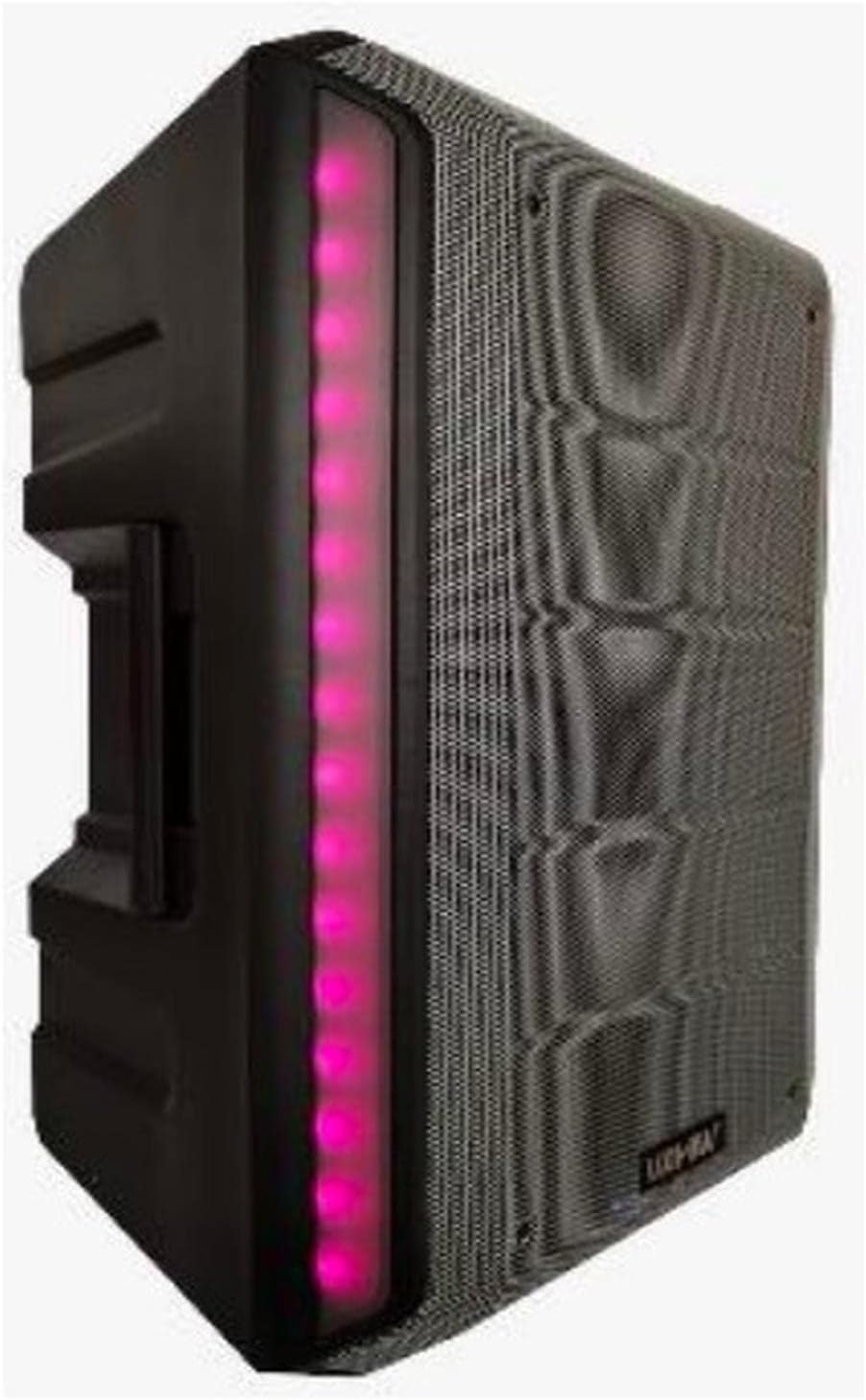
פיגורע 4.1: פראָנט View. This image displays the front of the Vamav Sync 15 speaker, featuring a protective grille over the speaker cone and an illuminated LED strip along the side, indicating power and operational status.
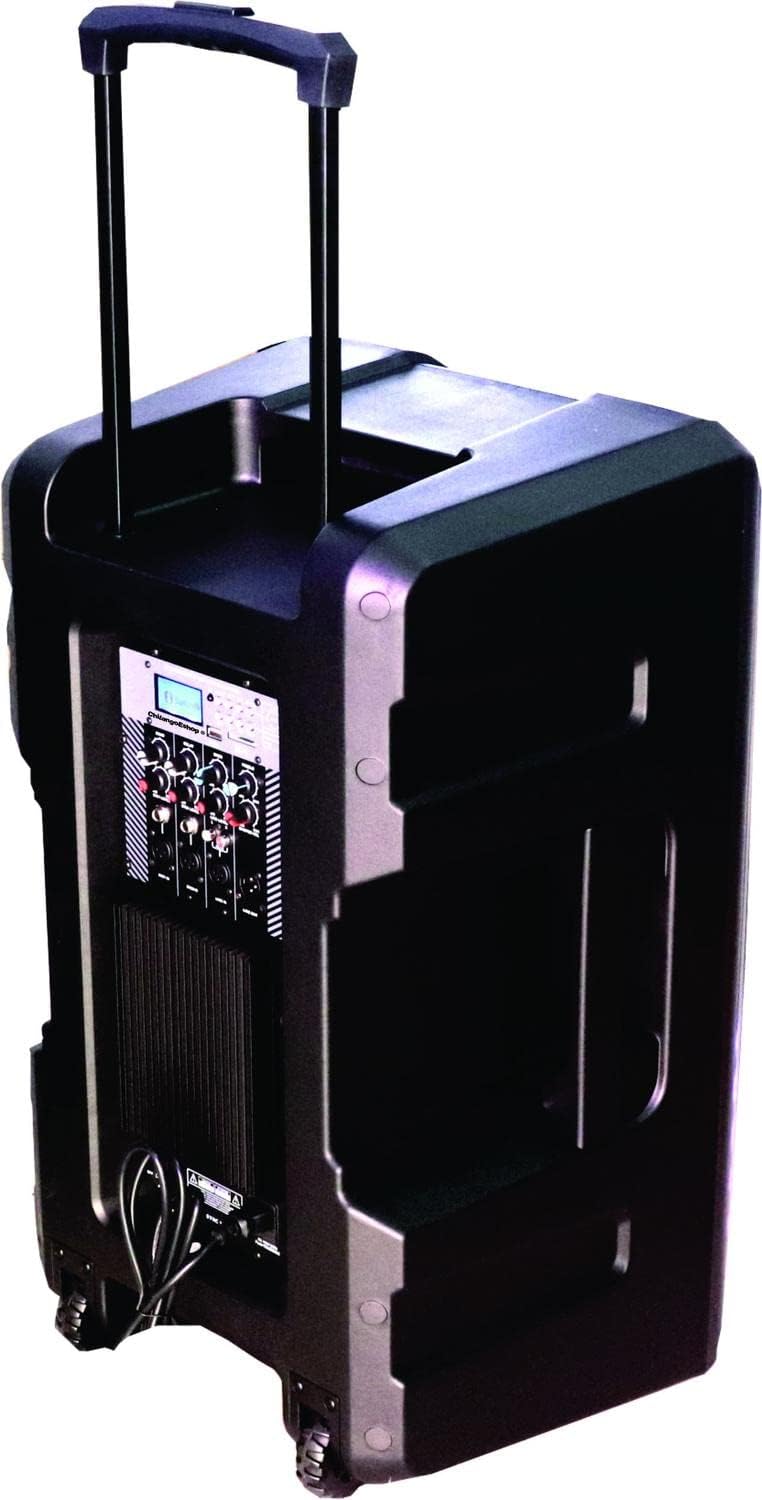
פיגורע 4.2: דערציען View. The rear of the speaker is shown, highlighting the retractable handle for portability and integrated wheels at the base, designed for easy transport.

פיגור 4.3: קאנטראל פאנעל. א דיטיילד view of the control panel, featuring an MP3 digital display, Bluetooth connectivity indicator, USB and SD card slots, various input ports (XLR, 6.3mm Jack, RCA), and control knobs for Echo, Delay, Bass, Treble, Microphone Levels, Line Level, and Master Volume.

פיגורע 4.4: דנאָ View. This image illustrates the bottom of the speaker, showing the robust wheels for mobility and a central socket designed for mounting the speaker on a stand.

Figure 4.5: Speaker Dimensions. An illustration indicating the approximate dimensions of the Vamav Sync 15 speaker: 70 cm in height, 35 cm in depth, and 40 cm in width.
5. סעטאַפּ
- אויספּאַקן: פֿאָרזיכטיק אַרויסנעמען דעם רעדנער און אַלע אַקסעסאָריעס פֿון דער פּאַקאַדזשינג.
- אָרט: Position the speaker on a stable, flat surface or mount it on a compatible speaker stand using the bottom pole mount socket. Ensure adequate space for ventilation.
- מאַכט קשר: Connect the provided power cable to the speaker's power input and then to a suitable electrical outlet.
- ערשט מאַכט אויף: Turn the Master Volume knob to its minimum setting before powering on the unit to avoid sudden loud sounds. Press the power switch to turn on the speaker.
6. אַפּערייטינג ינסטרוקטיאָנס
6.1. מאַכט אויף / אויסגעלאשן
- To power on, ensure the Master Volume is low, then flip the power switch located on the control panel.
- To power off, turn the Master Volume to minimum, then flip the power switch.
6.2. בלועטאָאָטה קאַנעקשאַן
- Turn on the speaker. The display will show the current mode.
- Press the 'MODE' button on the control panel until 'Bluetooth' is selected. The Bluetooth indicator will flash, signifying it is ready for pairing.
- אויף אייער מאָבילער מיטל (סמאַרטפאָן, טאַבלעט, אאז"וו), אַקטיווירט בלועטוט און זוכט פֿאַר פֿאַראַן דעוויסעס.
- Select 'CHSYNC 15' from the list of devices. Once connected, the Bluetooth indicator will stop flashing and remain solid.
- You can now play audio from your device through the speaker. The effective Bluetooth range is approximately 10 meters.
6.3. USB/SD קאַרטל ווידערשפּיל
- אַרײַנשטעלן אַ USB פלאַש דרייוו אָדער SD קאַרטל אין דעם ריספּעקטיוון שפּאַלט אויף דער קאָנטראָל פּאַנעל.
- The speaker will automatically switch to USB/SD mode and begin playing audio files. If not, press the 'MODE' button to select USB or SD.
- Use the playback controls (Play/Pause, Next, Previous) on the control panel to manage your audio.
6.4. Connecting Microphones and Line-in Devices
- מיקראָפאָן: Connect microphones to the 'MIC 1 IN' or 'MIC 2 IN' XLR or 6.3mm Jack inputs. Adjust individual microphone levels using the 'MIC 1 LEVEL' and 'MIC 2 LEVEL' knobs.
- Line-in Devices: Connect external audio sources (e.g., mixer, CD player) to the 'LINE IN' RCA inputs or the 6.3mm Jack input. Adjust the input level using the 'LINE LEVEL' knob.
- שורה אָוט: Use the 'LINE OUT' 6.3mm Jack to connect to another amplified speaker or recording device.
6.5. אַודיאָ קאָנטראָלס
- ECHO: אַדזשאַסטירט דעם עקאָ עפֿעקט פֿאַר מיקראָפֿאָנען.
- פאַרהאַלטן: Controls the delay time of the echo effect.
- באַס: Adjusts the low-frequency audio output.
- טרעבל: Adjusts the high-frequency audio output.
- MASTER VOL: Controls the overall output volume of the speaker.
7. וישאַלט
- רייניקונג: Regularly wipe the speaker's exterior with a soft, dry cloth. Do not use abrasive cleaners or solvents.
- סטאָרידזש: ווען נישט אין באַנוץ פֿאַר לענגערע פּעריאָדן, זאָל מען דעם רעדנער אַוועקלייגן אין אַ קיל, טרוקן אָרט, אַוועק פֿון דירעקטער זון און עקסטרעמע טעמפּעראַטורן.
- קאַבלע זאָרגן: Inspect power and audio cables periodically for damage. Replace any frayed or damaged cables immediately.
8. טראָובלעשאָאָטינג
| פּראָבלעם | מעגלעך סיבה | לייזונג |
|---|---|---|
| קיין מאַכט | שטראָם קאַבל נישט פארבונדן; שטראָם אַוטלעט דעפעקטיוו; שטראָם קנעפּל אויסגעלאָשן. | Ensure power cable is securely connected; Test outlet with another device; Turn power switch on. |
| קיין געזונט רעזולטאַט | Master Volume too low; Input source not selected; Input device not connected or faulty; Mute activated. | Increase Master Volume; Select correct input mode (Bluetooth, USB, Line In); Check connections of input device; Ensure no mute function is active. |
| בלועטאָאָטה איז נישט קאַנעקטינג | Speaker not in Bluetooth mode; Device too far; Bluetooth not enabled on source device; Already connected to another device. | Press MODE button to select Bluetooth; Move device closer (within 10m); Enable Bluetooth on your device; Disconnect from other devices. |
| USB/SD קאַרטל שפּילט נישט | אומרעכט file format; USB/SD card faulty or improperly inserted; Speaker not in USB/SD mode. | פאַרזיכערן אַודיאָ files are compatible (e.g., MP3); Reinsert USB/SD card; Press MODE button to select USB/SD. |
9. ספּעסאַפאַקיישאַנז
| שטריך | באַשרייַבונג |
|---|---|
| מאָדעל נאָמען | CHSYNC 15 |
| רעדנער טיפּ | מאָניטאָר, Amplified (Active) |
| רעדנער גרייס | 15 אינטשעס |
| סיסטעם | צוויי-וועג סיסטעם |
| קול קויל | 2" KSV |
| דרייווער | 34 מם |
| RMS מאַכט רעזולטאַט | 150 וואטס |
| ווירעלעסס טעכנאָלאָגיע | Bluetooth (10 meters distance) |
| קאַנעקטיוויטי טעכנאָלאָגיע | בלועטאָאָטה, וסב |
| מידיאַ פּלייַבאַקק | וסב פּאָרט, סד קאָרט שפּעלטל |
| אַודיאָ קאָנטראָלס | Bass, Treble, Echo, Delay, Master Volume, Mic Levels, Line Level |
| ינפּוץ | XLR, 6.3mm Jack (x1), RCA |
| רעזולטאַט | 6.3 מם דזשאַק |
| מאַכט מקור | באַטערי |
| קאָנטראָל מעטאָד | טאַקטיל |
| מאַטעריאַל | פּלאַסטיק |
| קאָליר | שוואַרץ |
| פּראָדוקט דימענשאַנז | 13.8" ד x 15.8" ב x 27.6" ה (35 ס״מ ד x 40 ס״מ ב x 70 ס״מ ה) |
| קאַמפּאַטאַבאַל דעוויסעס | Desktop computer, Laptop, Projector, MP3 player, Smartphone, Tablet, Television, Video game console |
10. וואָראַנטי און שטיצן
פֿאַר וואָראַנטי אינפֿאָרמאַציע און טעכנישע שטיצע, ביטע זען די דאָקומענטאַציע וואָס איז צוגעשטעלט געוואָרן ביים קויפן אָדער קאָנטאַקט דיין הענדלער. האַלט דיין באַווייַז פון קויפן פֿאַר קיין וואָראַנטי קליימז.