
1. הקדמה און איבערview
This manual provides detailed instructions for the installation, operation, and maintenance of your Yansoo 3-Channel Dash Cam. Please read this manual thoroughly before using the device to ensure proper functionality and safety.
פּראָדוקט פֿעיִקייטן:
- 3-קאַנאַל רעקאָרדינג: Simultaneously captures video from the front (170° wide-angle), rear (165°), and inside (140°) of your vehicle.
- הויך דעפיניציע ווידעא: Supports 1080P Front video + AHD-720P Rear video + AHD-720P Inside video.
- Enhanced Night Vision: Features 4 unique infrared LED fill lights, F1.8 aperture, and WDR technology for optimal performance in low light.
- Emergency Lock (G-Sensor): Automatically detects sudden shocks or collisions and locks the current video footagE צו פאַרמייַדן אָווועררייטינג.
- שלייף רעקאָרדינג: Continuously records and automatically overwrites the oldest unlocked video files ווען די זכּרון קאָרט איז פול.
- פּאַרקינג מאָניטאָר: Activates recording when motion or shocking is detected while parked (requires separate hardwire kit for 24/7 monitoring).
- Adjustable Interior Camera: The interior lens can be rotated 60° for flexible positioning.
פּעקל אינהאַלט:
- Yansoo 3-Channel Dash Cam Unit
- דערציען אַפּאַראַט מיט קאַבלע
- סאַקשאַן קאַפּ בארג
- Car Charger (Type-C)
- וסב דאַטאַ קאַבלע
- באַניצער מאַנואַל
- Mounting Hardware for Rear Camera
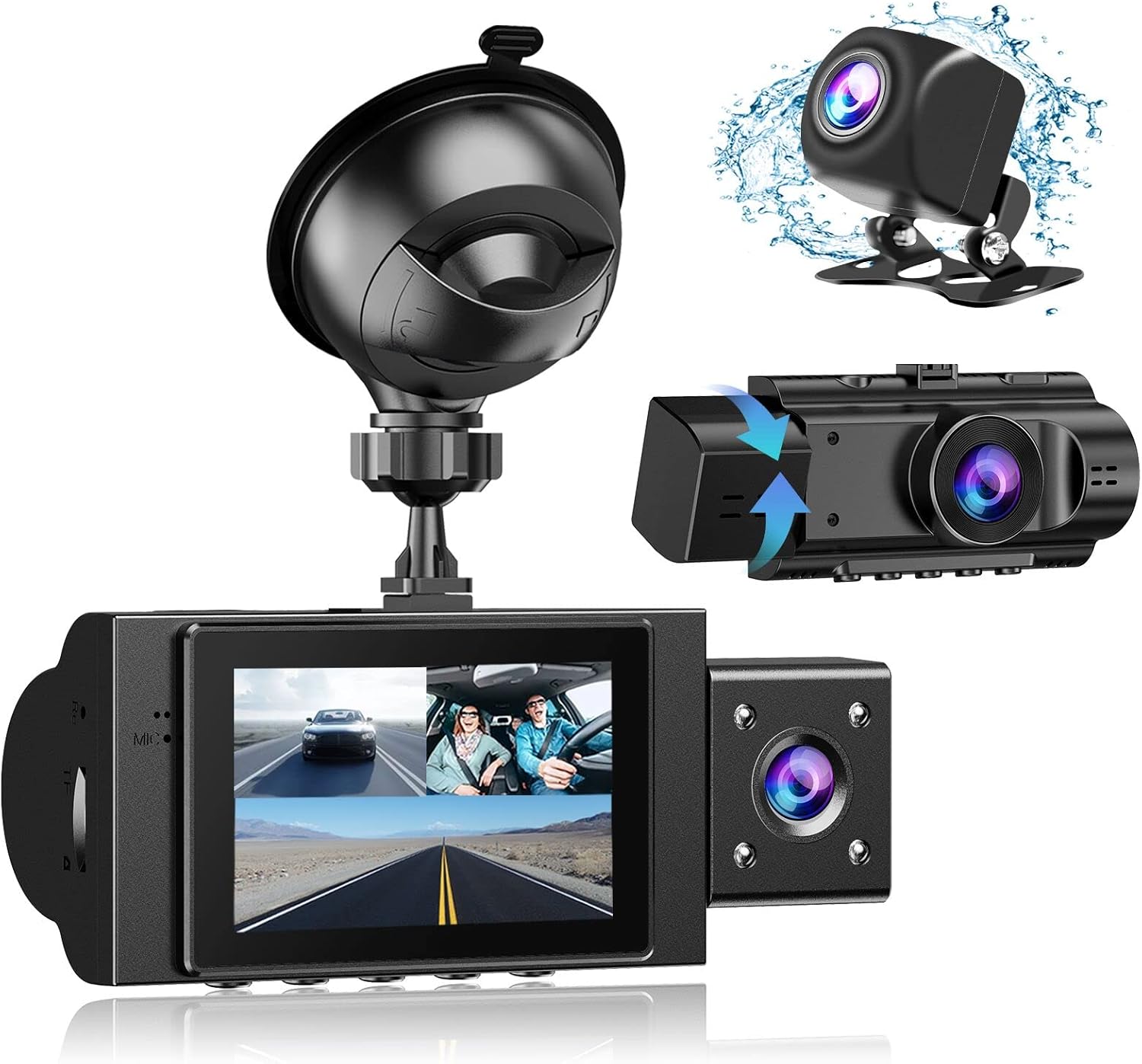
Image: The Yansoo 3-Channel Dash Cam unit with its suction cup mount and the separate rear camera, illustrating the complete package.
2. סעטאַפּ
2.1 ינסערטינג די זכּרון קאַרד
The dash cam supports Micro Memory cards up to 64GB (Class 10 or above recommended, not included). Please format the card in the camera menu before first use.
- Locate the memory card slot on the side of the dash cam.
- Insert the Micro Memory card into the slot until it clicks into place.
- צו אַרויסנעמען, דריק לײַכט די קאַרטל ביז זי קומט אַרויס.

Image: A four-panel illustration showing the steps to insert a Micro SD card into the dash cam's slot.
2.2 מאָנטירן די דאַש קאַם
Mount the main dash cam unit to your windshield using the provided suction cup mount. Choose a location that does not obstruct your view בשעת דרייווינג.
- רייניקט דעם אויסגעקליבענעם אָרט אויף אייער ווינטשילד גרינטלעך.
- באַפעסטיקט די זויג קאַפּ מאָונט צו דער דאַש קאַם אַפּאַראַט.
- דריק דעם זויג-בעכערל פעסט קעגן דער ווינטשילד און דריי דעם הייבער צו עס באפעסטיקן.
- אַדזשאַסטירן דעם קאַמעראַ ווינקל צו ענשור אַ קלאָר view פון די וועג פאָרויס.

Image: The Yansoo 3-Channel Dash Cam mounted on a car's windshield, showing its position relative to the driver's view.
2.3 ינסטאָלינג די דערציען אַפּאַראַט
The rear camera provides a view of the vehicle's rear. It can be installed inside the rear window or externally above the license plate.
- פֿאַרבינדט דעם הינטערשטן קאַמעראַ קאַבל צו דער הויפּט דאַש קאַם אַפּאַראַט.
- Route the cable neatly along the vehicle's interior trim to the rear.
- Mount the rear camera in the desired location, ensuring a clear view.

Image: A diagram illustrating the recommended cable routing path for the dash cam and rear camera within a car's interior.
2.4 מאַכט קאַנעקשאַן
Connect the dash cam to your vehicle's cigarette lighter socket using the provided car charger. The camera will automatically power on and begin recording when the vehicle starts.

Image: The Yansoo 3-Channel Dash Cam connected to a power source, indicating its readiness for operation.
3. אַפּערייטינג ינסטרוקטיאָנס
3.1 יקערדיק אָפּעראַציע
- מאַכט אויף / אַוועק: The camera powers on/off automatically with your vehicle's ignition. You can also manually power on/off by pressing and holding the power button.
- אָנהייב / האַלטן רעקאָרדינג: Recording starts automatically when the camera powers on. Press the "OK" button to manually stop or start recording.
- באַשטימען ווייַז Views: Press the "Up" button to cycle through different display modes (Front, Inside, Rear, Picture-in-Picture combinations).
Video: Demonstration of the Yansoo X88 Dash Cam's recording capabilities, showcasinג זיין מעגלעכקייט צו כאַפּן קלאָרע ווידעאָ פֿוtage.
Video: Footage from the Yansoo X88 Dash Cam demonstrating its clear day and night recording capabilities.
Video: A demonstration of the Yansoo X88 Dash Cam's 1080P Full HD recording quality.
3.2 מעניו סעטטינגס
To access the menu settings, stop recording (if active) by pressing the "OK" button, then press the "M" button twice.
- רעזאלוציע: Adjust video resolution for front, inside, and rear cameras.
- שלייף רעקאָרדינג: Set the duration of video segments (e.g., 1, 3, 5 minutes).
- ג-סענסאָר סענסיטיוויטי: Adjust the sensitivity of the emergency lock feature.
- פּאַרקינג מאָניטאָר: Enable or disable the parking monitoring function.
- טאָג / צייט: שטעלן די ריכטיק דאַטע און צייט פֿאַר פּינטלעך צייטampס אויף רעקאָרדינגס.
- שפּראַך: Select your preferred language for the menu.
Video: A step-by-step guide on how to set the date and time on the Yansoo Dash Cam.
4. וישאַלט
- רעגולער פֿאָרמאַטירן: Format the memory card regularly (e.g., once a month) to prevent data corruption and ensure optimal recording performance.
- לענס רייניקונג: האַלט די קאַמעראַ לענסעס ריין מיט אַ ווייכן, לינט-פֿרייע שטאָף. פֿאַרמייַדט אַברייסיוו מאַטעריאַלן וואָס קענען קראַצן די לענס.
- Firmware דערהייַנטיקונגען: Check the official Yansoo webזייטל פֿאַר אַלע בנימצא פירמווער דערהייַנטיקונגען צו פֿאַרבעסערן פאָרשטעלונג און לייגן נייַע פֿעיִקייטן.
- טעמפּעראַטור קאָנסידעראַטיאָנס: פֿאַרמײַדן אויסצושטעלן די דאַש קאַם צו עקסטרעמע טעמפּעראַטורן פֿאַר פֿאַרלענגערטע פּעריאָדן.
5. טראָובלעשאָאָטינג
| פּראָבלעם | מעגלעך סיבה | לייזונג |
|---|---|---|
| קאַמעראַ גייט נישט אָן. | No power from cigarette lighter; loose connection. | Check car charger connection; ensure vehicle ignition is on. |
| די אויפנאמע שטעלט זיך אפ אומגעריכט. | Memory card full or corrupted; G-Sensor triggered. | Format memory card; adjust G-Sensor sensitivity. |
| ווידעא שפּילtage is blurry. | Protective film on lens; dirty lens. | Remove protective film; clean lenses with a soft cloth. |
| Date/Time is incorrect. | Date/Time not set or battery low. | Set Date/Time in menu; ensure continuous power supply. |
| די קאַמעראַ פרירט זיך אָדער אַרבעט נישט ריכטיק. | ווייכווארג פראבלעם. | Use a needle to press the "RE" (Reset) button. |
6. ספּעסאַפאַקיישאַנז
| שטריך | דעטאַל |
|---|---|
| פּראָדוקט דימענשאַנז | 4.13 X 1.57 X 1.77 אינטשעס |
| פּונקט וואָג | 1.23 פונט |
| ווידעא קאַפּטורע רעסאָלוטיאָן | 1080p (Front), 720p (Inside & Rear) |
| פעלד פון View | 170° (Front), 140° (Inside), 165° (Rear) |
| קאַנעקטיוויטי טעכנאָלאָגיע | וסב |
| ספּעציעלע שטריך | G-Sensor, Loop Recording, Parking Monitor, Night Vision |
| מאַונטינג טיפּ | סאַקשאַן בארג |
| פאַבריקאַנט | יאַנסאָאָ |
7. וואָראַנטי און שטיצן
Yansoo offers comprehensive after-sales support for your dash cam.
- וואָראַנטי: 1-YEAR warranty from the date of purchase.
- טעכניש סערוויס: 7*24 hours technical service is available.
- קאָנטאַקט: For any questions or issues, please contact our customer service team via Amazon or the after-sales email provided in the original product packaging.
- באַניצער מאַנואַל (PDF): A digital version of the user manual is available for download דאָ.