
1. הקדמה
א דאנק פארן קויפןasing the LFF LDR113-EU Kitchen Radio. This manual provides essential information for the safe and efficient operation of your device. Please read it thoroughly before use and retain it for future reference.
The LFF LDR113-EU is a versatile kitchen radio featuring DAB+, FM, and Bluetooth connectivity. It includes dual alarms, a sleep timer, and 60 station presets, designed for both tabletop use and under-cabinet mounting.
2. זיכערקייַט אינפֿאָרמאַציע
- מאַכט מקור: ניצט נאָר דעם צוגעשטעלטן מאַכט אַדאַפּטער. זיכערט זיך אַז דער וואָלומען איזtage שוועבעלעך דיין היגע מאַכט צושטעלן.
- וואַסער און נעץ: Do not expose the device to water, rain, or excessive moisture. Avoid placing liquids near the radio.
- ווענטילאַטיאָן: זיכער מאַכן אַז עס איז גענוג ווענטילאַציע אַרום דעם אַפּאַראַט. נישט פאַרשפּאַרן די ווענטילאַציע עפענונגען.
- היץ: האַלט דעם אַפּאַראַט אַוועק פון היץ קוועלער ווי ראַדיאַטאָרן, היץ רעגיסטערס, אויוון, אָדער אַנדערע היץ-פּראָדוצירנדיקע אַפּאַראַטן.
- רייניקונג: טרענט אפ פון עלעקטריציטעט איידער רייניגן. ניצט א ווייכע, טרוקענע שטאָף. ניצט נישט פליסיקע רייניגער אדער אייראזאל רייניגער.
- סערוויס: דו זאלסט נישט פּרווון צו דינען דעם פּראָדוקט זיך. קאָנטאַקט אַלע קוואַלאַפייד סערוויס פּערסאַנעל.
- אָרט: Place the radio on a stable, level surface or mount it securely according to the instructions.
3. פּעקל אינהאַלט
ביטע קאָנטראָלירט אַז אַלע זאכן זענען פאַראַן אין דעם פּעקל:
- LFF LDR113-EU Kitchen Radio
- מאַכט אַדאַפּטער
- Mounting Kit (screws, spacers, mounting template)
- באַניצער מאַנואַל (דעם דאָקומענט)
4. פּראָדוקט איבערview
מאַכט זיך באַקאַנט מיט די ראַדיאָ'ס קאָמפּאָנענטן און קאָנטראָלס.

פיגורע 4.1: פראָנט view of the LFF LDR113-EU Kitchen Radio, showing the LCD display on the left, control buttons in the center, and a large rotary knob on the right. The buttons include power, mode, menu, info, preset, timer/sleep, and navigation arrows. The rotary knob is for volume and selection.

פיגורע 4.2: Diagram illustrating the key features of the LFF Kitchen Radio, including DAB/DAB+ radio, FM radio, two alarms, sleep timer, Bluetooth connectivity, and 60 station presets.
4.1. קאָנטראָלן און אַרויסווייַזונג
- LCD קאָליר ווייַז: Shows current mode, station information, time, and settings.
- מאַכט קנעפּל: טורנס די ראַדיאָ אויף / אַוועק.
- מאָדע קנעפּל: Switches between DAB+, FM, and Bluetooth modes.
- מעניו/אינפֿאָרמאַציע קנעפּל: Accesses menu options or displays station information.
- פאָראויסגעשטעלטע קנעפּלעך (1-5): Quick access to saved stations.
- Timer/Sleep Button: Sets sleep timer or alarm functions.
- נאַוויגאַציע קנעפּלעך (אַרויף/אַראָפּ/לינקס/רעכטס): Navigates through menus and station lists.
- Rotary Knob (Volume/Enter): Adjusts volume, scrolls through options, and confirms selections.
5. סעטאַפּ
5.1. מאַכט קאַנעקשאַן
- Connect the power adapter to the DC IN port on the back of the radio.
- צאַפּן די מאַכט אַדאַפּטער אין אַ וואַנט ווענטיל.
- דער ראַדיאָ וועט זיך אָנצינדן אָדער אַרייַן אין סטענדביי מאָדע.
5.2. Initial Scan (DAB+ and FM)
Upon first power-on, the radio will typically perform an automatic scan for DAB+ and FM stations. If not, follow these steps:
- דרוק די מאָדע button to select DAB+ or FM mode.
- For DAB+, the radio will usually initiate a full scan automatically. If not, navigate to the 'Full Scan' option in the DAB+ menu and press the rotary knob to confirm.
- For FM, navigate to the 'Auto Scan' option in the FM menu and press the rotary knob to confirm.
- The radio will search for available stations and store them.

פיגורע 5.1: The LFF Kitchen Radio's LCD color screen displaying the main menu with icons for Digital Radio (DAB+), FM Radio, and Bluetooth, indicating available modes.
6. אַפּערייטינג ינסטרוקטיאָנס
6.1. מאַכט אויף / אויסגעלאשן
דרוק די מאַכט button to turn the radio on or off (standby mode).
6.2. מאָדע סעלעקציע
דרוק די מאָדע דריקט דעם קנעפּל איבער און איבער צו דורכגיין די DAB+, FM, און בלועטוט מאָדעס.
6.3. DAB+ ראַדיאָ אָפּעראַציע
- אין DAB+ מאָדע, ניצט די אַרויף / אַראָפּ navigation buttons or the rotary knob to browse available stations.
- Press the rotary knob to select a station.
- דרוק מעניו / אינפֿאָרמאַציע צו view station information (e.g., program type, signal strength).
6.4. עפעם ראַדיאָ אָפּעראַציע
- אין FM מאָדע, ניצט די אַרויף / אַראָפּ navigation buttons to tune to stations manually.
- דריקן און האַלטן די אַרויף / אַראָפּ buttons for automatic station seeking.
- דרוק מעניו / אינפֿאָרמאַציע צו view סטאַנציע אינפֿאָרמאַציע.
6.5. בלועטאָאָטה קאַנעקטיוויטי
Connect your smartphone or other Bluetooth-enabled device to the radio.
- דרוק די מאָדע button to select Bluetooth mode. The display will show 'Bluetooth Pairing'.
- אויף דיין רירעוודיק מיטל, געבן בלועטאָאָטה און זוכן פֿאַר בנימצא דעוויסעס.
- Select 'LFF LDR113-EU' from the list of devices.
- Once connected, the radio display will show 'Bluetooth Connected'. You can now play audio from your device through the radio.
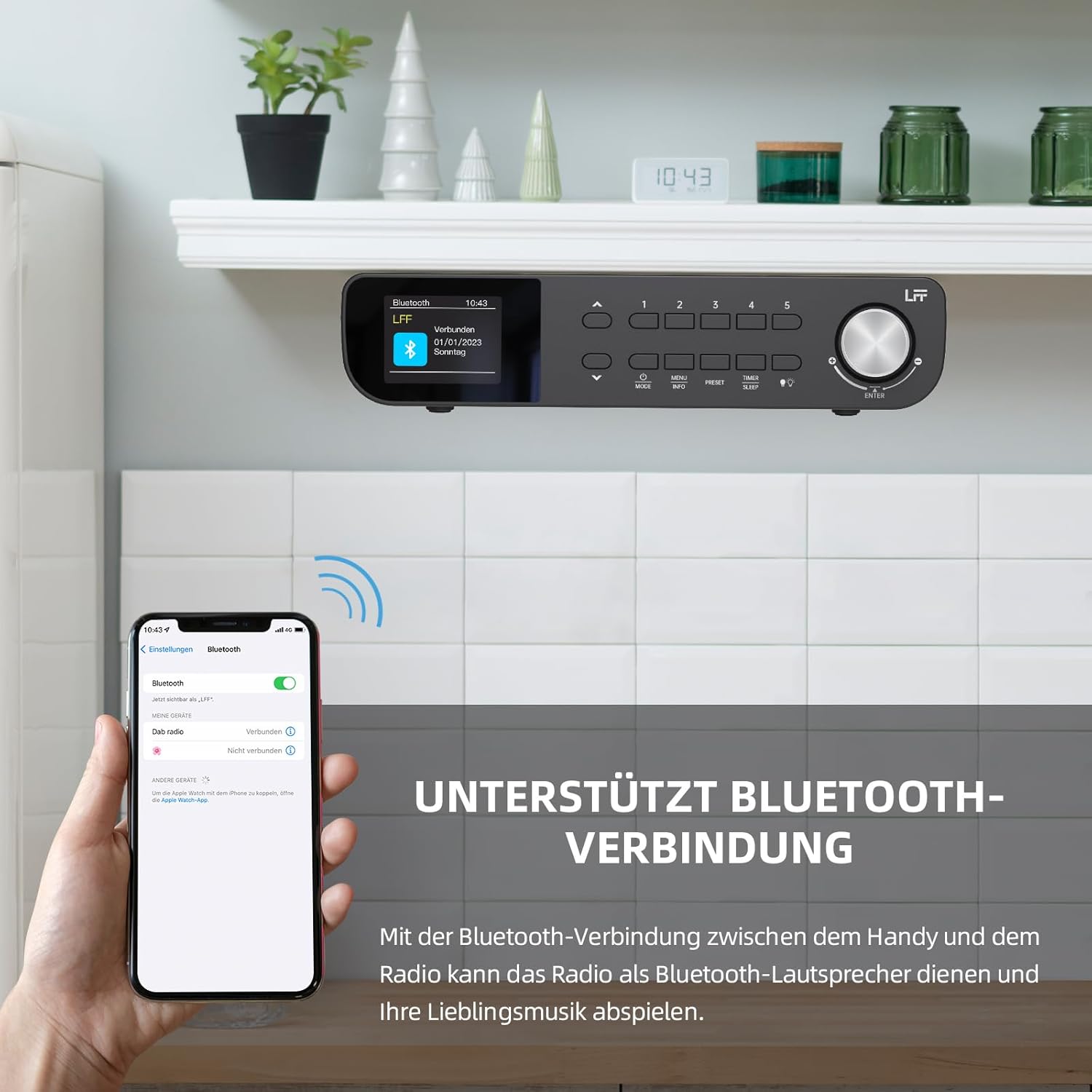
פיגורע 6.1: The LFF Kitchen Radio displaying a successful Bluetooth connection, with a smartphone screen showing the radio as a connected device.

פיגורע 6.2: נאָענט-אַרויף view of the radio's display indicating 'LFF' and 'Connected' under the Bluetooth menu, confirming a successful pairing.
6.6. באַשטעטיקן אַלאַרמס
The radio features two independent alarms.
- דרוק די טייַמער / שלאָף button repeatedly until 'Alarm 1' or 'Alarm 2' appears.
- Use the navigation buttons and rotary knob to set the alarm time, source (DAB+, FM, or Buzzer), and frequency (daily, weekdays, weekends, once).
- Confirm settings by pressing the rotary knob.

פיגורע 6.3: Close-up of the radio's display showing the current time and options to activate or deactivate Alarm 1 and Alarm 2.
6.7. שלאָפן טימער
דער שלאָף טייַמער ערלויבט דעם ראַדיאָ זיך אויטאָמאַטיש אויסצושאַלטן נאָך אַ באַשטימטער צייט.
- דרוק די טייַמער / שלאָף button repeatedly until 'Sleep Timer' appears.
- Use the navigation buttons or rotary knob to select the desired sleep duration (e.g., 15, 30, 60 minutes).
- באַשטעטיקן דורך דרינגלעך די דריי-קנופּ.

פיגורע 6.4: Close-up of the radio's display showing the 'Sleep Timer' setting, with an option to set the duration, for example, to 30 minutes.
6.8. פּרעסעץ
Save up to 60 favorite stations for quick access.
- צו ראַטעווען אַ פאָרסעט: Tune to the desired station. Press and hold one of the פאָרגעשטעלט (1-5) buttons until 'Preset Saved' appears. For additional presets, use the 'Preset Store' option in the menu.
- צו צוריקרופן אַ פּריסעט: בעקיצער דריקן איינער פון די פאָרגעשטעלט (1-5) buttons. For other presets, navigate to 'Preset Recall' in the menu.
6.9. געפֿירט ליכט
The radio includes an integrated LED light, useful for illuminating the area below if mounted under a cabinet.
- דרוק די ליכט button (if available, or navigate through menu) to turn the LED light on or off.

פיגורע 6.5: The LFF Kitchen Radio mounted under a kitchen cabinet, with its integrated LED light providing illumination to the countertop below.
6.10. ווייַז ברייטנאַס
Adjust the display backlight brightness to suit your environment.
- Access the 'Display' or 'Settings' menu.
- Select 'Brightness' and choose from High, Medium, or Low settings.

פיגורע 6.6: A visual comparison of the LFF Kitchen Radio's display at three different backlight brightness levels: High, Medium, and Low, demonstrating the adjustable visibility.
7. מאָונטינג ינסטרוקטיאָנס
The LFF LDR113-EU Kitchen Radio offers flexible placement options: tabletop or under-cabinet mounting.
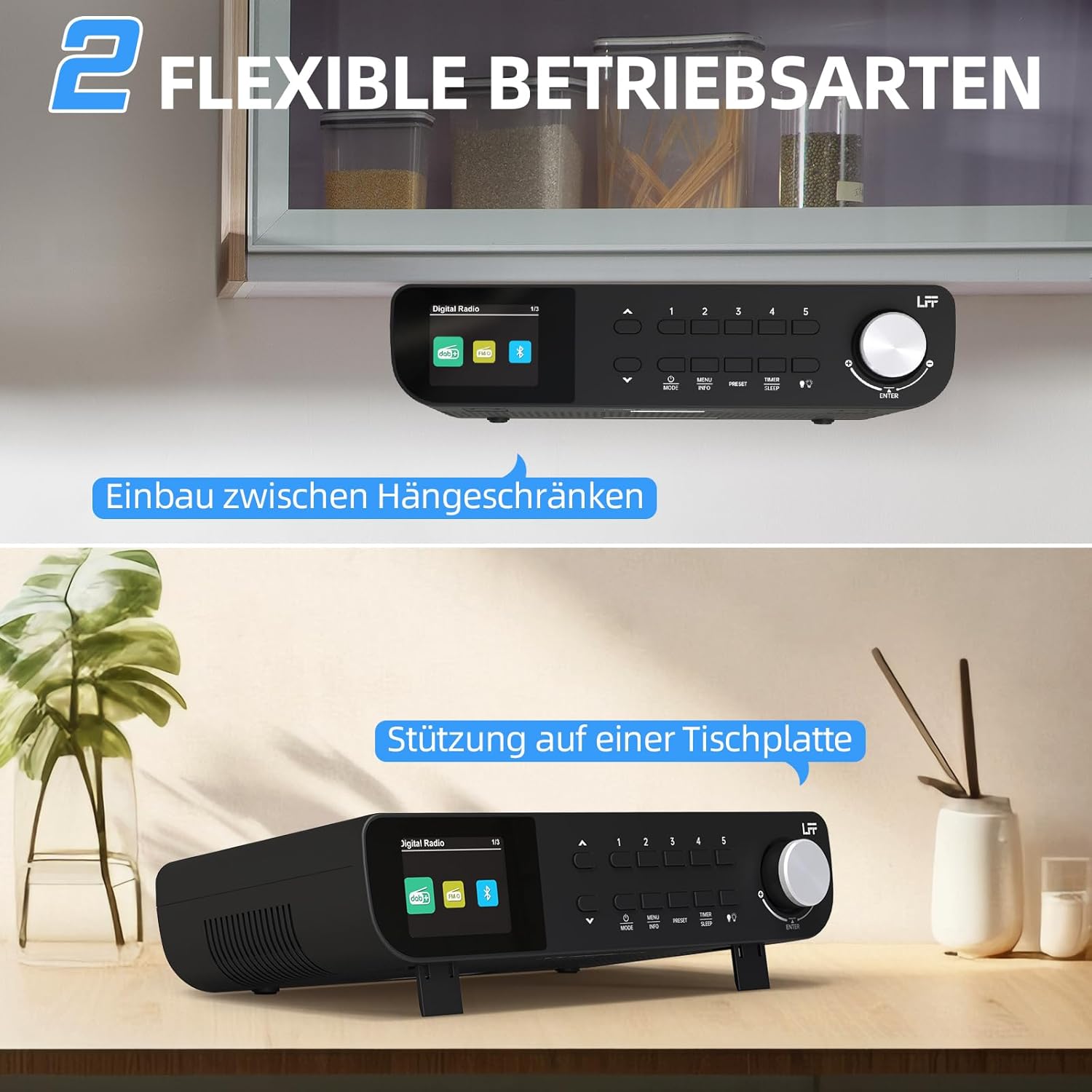
פיגורע 7.1: The LFF Kitchen Radio displayed in two common installation scenarios: mounted underneath a kitchen cabinet and placed freestanding on a tabletop.
7.1. Tabletop Placement
Simply place the radio on a stable, flat surface. Ensure it is not near the edge to prevent accidental falls.
7.2. Under-Cabinet Mounting
For under-cabinet installation, use the provided mounting kit.
- צוגרייטן דעם אָרט: Choose a suitable location under a kitchen cabinet, ensuring there is enough space and access to a power outlet.
- מארק בויער האָלעס: Use the provided mounting template to mark the drill holes on the underside of the cabinet.
- בויער פּילאָט האָלעס: בויער פּילאָט האָלעס אין די אנגעצייכנט שטעלעס.
- צוטשעפּען די מאָנטירונג פּלאַטע (אויב אָנווענדלעך): Some models may include a separate mounting plate. Attach this to the cabinet using the screws.
- זיכער מאַכן דעם ראַדיאָ: Align the radio with the mounting holes or plate and secure it using the provided screws. Ensure it is firmly attached.
- פאַרבינדן מאַכט: צאַפּן די מאַכט אַדאַפּטער.

פיגורע 7.2: Detailed diagram showing the steps for under-cabinet mounting, including measuring distances (e.g., 58mm) and securing the radio with screws.
8. וישאַלט
- רייניקונג: To clean the radio, disconnect it from the power supply. Use a soft, dry, lint-free cloth. Do not use abrasive cleaners, waxes, or solvents.
- אַנטענע: Ensure the antenna is extended for optimal reception in DAB+ and FM modes. Handle it gently to avoid damage.
- סטאָרידזש: אויב איר לייגט אַוועק דעם ראַדיאָ פֿאַר אַ לענגערע צייט, זאָלט איר עס אָפּשטעקן פֿון עלעקטריע און עס אַוועקלייגן אין אַ קילן, טרוקענעם אָרט.
9. טראָובלעשאָאָטינג
| פּראָבלעם | מעגלעך סיבה | לייזונג |
|---|---|---|
| קיין מאַכט | שטראָם אַדאַפּטער נישט פארבונדן אדער אַ דעפעקטיווע אַוטלעט. | קאָנטראָלירט די שטראָם פֿאַרבינדונג. פּרוּווט אַן אַנדער אַוטלעט. |
| שלעכטע DAB+/FM אויפנאמע | אַנטענע נישט אויסגעשטרעקט, שוואַך סיגנאַל, אָדער שטערונג. | Fully extend the antenna. Reposition the radio. Perform a full scan. |
| בלועטאָאָטה איז נישט קאַנעקטינג | Radio not in pairing mode, device too far, or already connected to another device. | Ensure radio is in Bluetooth mode. Move device closer. Disconnect from other devices. |
| קיין געזונט | Volume too low, mute activated, or incorrect mode. | Increase volume. Check if mute is active. Ensure correct mode (DAB+, FM, Bluetooth). |
| דער אַרויסווייַזן איז נישט ארבעטן | Brightness too low or device malfunction. | Adjust display brightness. If problem persists, contact support. |
10. ספּעסאַפאַקיישאַנז

פיגורע 10.1: Diagram showing the dimensions of the LFF Kitchen Radio: 250mm length, 146mm width, and 55mm height.
| שטריך | דעטאַל |
|---|---|
| סאָרט | לפף |
| מאָדעל נומער | LDR113-EU |
| קאָליר | שוואַרץ |
| קאַנעקטיוויטי | בלועטאָאָטה |
| טונינג טעכנאָלאָגיע | DAB Plus, FM |
| מאַכט מקור | עלעקטריק קאַבלע |
| אָפטקייַט | 108 MHz (FM max) |
| דימענסיעס (L X W X H) | 250 מם X 146 מם X 55 מם |
| פּרעסעץ | 60 |
| ווייַז | על-סי-די קאָליר פאַרשטעלן |
| ספּעציעלע פֿעיִקייטן | Dual Alarms, Sleep Timer, Under-cabinet mounting option, LED Light |
11. וואָראַנטי און שטיצן
This product comes with a standard manufacturer's warranty. Please refer to the warranty card included in your package for specific terms and conditions. For technical support, troubleshooting assistance, or warranty claims, please contact your retailer or the LFF customer service department.