
הקדמה
This manual provides detailed instructions for the proper use and maintenance of your Sunny CRS-300AT Android Smart LED TV Remote Control. This remote is designed for compatibility with AXEN LED TVs and features a dedicated Live TV button for convenient access to live broadcasts. Please read this manual carefully before using the remote control to ensure optimal performance and longevity.
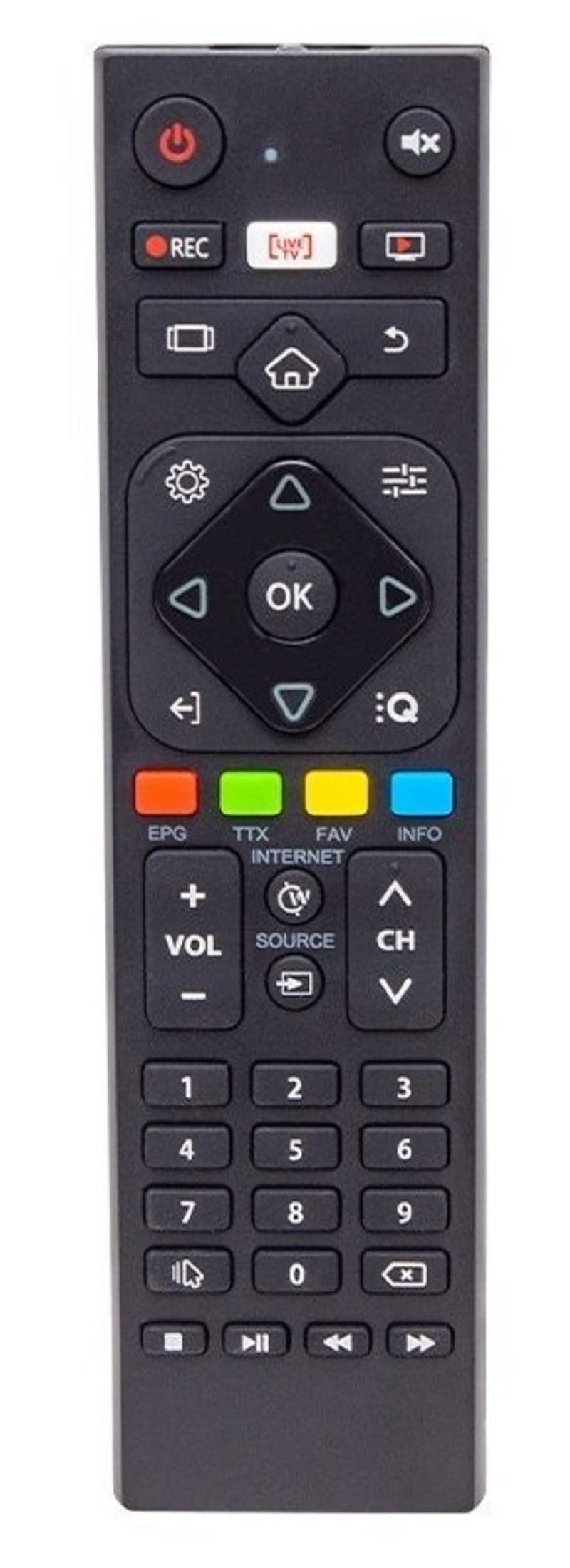
Image of the Sunny CRS-300AT remote control, showing its ergonomic design and button layout, including the dedicated Live TV button.
סעטאַפּ
ייַנמאָנטירונג פון באַטאַרייע
- געפֿינען די באַטאַרייע אָפּטייל אויף די צוריק פון די ווייַט קאָנטראָל.
- רוקט דעם דעקל פונעם באַטעריע־אָפּטייל אַראָפּ אָדער אין דער ריכטונג וואָס ווערט אָנגעוויזן דורך אַ פײַל צו עס עפֿענען.
- Insert two AAA batteries (not included), ensuring the positive (+) and negative (-) terminals align correctly with the markings inside the compartment. Incorrect battery orientation can prevent the remote from functioning.
- לייגט צוריק דעם דעקל פונעם באַטעריע־אָפּטייל דורך עס צוריקצורוקן אין פּלאַץ ביז עס קליקט זיכער.
The remote control is an infrared (IR) device and does not require pairing. Once batteries are installed, it is ready for use with compatible AXEN LED TVs.
אַפּערייטינג ינסטראַקשאַנז
Point the remote control directly at your television's IR receiver. Ensure there are no obstructions between the remote and the TV.
שליסל פאַנגקשאַנז
- מאַכט קנעפּל (⏻): טורנס די טעלעוויזיע אויף אָדער אַוועק.
- באַנד אַרויף / אַראָפּ (Vol +/-): אַדזשאַסץ די געזונט באַנד.
- קאַנאַל אַרויף / אַראָפּ (טש+/-): טוישט טעלעוויזיע קאַנאַלן.
- שטום (🔇): שטומט אדער אנשטומט דעם טעלעוויזיע קלאַנג.
- נומער קנעפּלעך (0-9): Directly select TV channels or input numbers.
- נאַוויגאַציע קנעפּלעך (▲ ▼ ◀ ▶): נאַוויגירן דורך מעניוז און אָפּציעס.
- OK/Enter קנעפּל: באַשטעטיקט אויסוואַלן אין מעניוז.
- צוריק/צוריק קנעפל: קערט צו די פריערדיקע פאַרשטעלן אָדער מעניו.
- היים קנעפּל (🏠): Accesses the Smart TV home screen or main menu.
- לייוו טעלעוויזיע קנעפל: Directly switches to live television broadcasting.
- אַרייַנגאַנג/מקור קנעפּל: Changes the input source (e.g., HDMI 1, HDMI 2, AV).
- מעניו קנעפּל: Opens the TV's main settings menu.
Specific button layouts and functions may vary slightly depending on your TV model, but the core functions remain consistent.
וישאַלט
רייניקונג
- ווישט ווי די ווײַטקאָנטראָל מיט אַ ווייכן, טרוקענעם שטאָף.
- פֿאַר שווערן שמוץ, אַ ביסל דampווישט דעם שטאָף מיט וואַסער אָדער אַ מילדן, נישט-שרייַבנדיקן רייניגער. שפּריצט נישט פליסיקייטן גלייך אויף דער ווייַטקאָנטראָל.
- Avoid using harsh chemicals, solvents, or abrasive cleaning materials, as these can damage the remote's surface or internal components.
באַטערי קער
- טוישט די באַטעריעס ווען די ווייַט קאָנטראָל רעאַקציע ווערט טראָגלעך אָדער הערט אויף צו אַרבעטן.
- אויב דער ווײַטקאָנטראָל וועט נישט געניצט ווערן פֿאַר אַ לענגערע צײַט, נעמט אַרויס די באַטעריעס כּדי צו פֿאַרמײַדן ליקאַדזש און מעגלעכן שאָדן.
- פּאָטער פון געוויינט באַטעריז לויט די היגע רעגיאַליישאַנז.
סטאָרידזש
האַלט די ווײַטקאָנטראָל אין אַ קיל, טרוקן אָרט ווײַט פֿון דירעקטער זון, עקסטרעמע טעמפּעראַטורן און הויכער פֿײַכטקייט.
טראָובלעשאָאָטינג
| פּראָבלעם | מעגלעך סיבה | לייזונג |
|---|---|---|
| ווייַט קאָנטראָל נישט ארבעטן. | טויטע אדער נישט ריכטיק אינסטאלירטע באַטעריעס. | פאַרבייטן באַטעריעס מיט נייַע, זיכער מאַכן אַז די פּאָלאַריטעט איז ריכטיק (+/-). |
| ווייַט קאָנטראָל נישט ארבעטן. | Obstruction between remote and TV's IR receiver. | Ensure a clear line of sight between the remote and the TV. Remove any objects blocking the signal. |
| ווייַט קאָנטראָל נישט ארבעטן. | Remote is too far from the TV. | Move closer to the TV. The effective range for IR remotes is typically up to 7 meters (23 feet). |
| Some buttons are not responding. | שמוץ אָדער דעבריס אונטער די קנעפּלעך. | Clean the remote control as described in the Maintenance section. |
| TV is not responding to any remote commands. | TV's IR receiver might be faulty or blocked. | Check your TV's user manual for troubleshooting its IR receiver. Try restarting the TV by unplugging it for a few minutes. |
ספּעסאַפאַקיישאַנז
- מאָדעל: Sunny CRS-300AT
- סאָרט: Sunny (Compatible with AXEN)
- קאַמפּאַטאַבאַל דעוויסעס: Televisions (specifically AXEN LED TVs)
- קאַנעקטיוויטי טעכנאָלאָגיע: ינפרערעד (IR)
- מאַכט מקור: 2 X AAA באַטעריז (ניט אַרייַנגערעכנט)
- ASIN: B0BW4M6SRC
וואָראַנטי אינפֿאָרמאַציע
This product is typically covered by a manufacturer's warranty. For specific details regarding warranty duration, coverage, and claims process, please refer to the documentation provided with your purchase or contact the retailer where the product was acquired. Keep your proof of purchase for warranty purposes.
שטיצן
If you encounter issues that cannot be resolved using the troubleshooting guide, or if you require further assistance, please contact:
- The retailer from whom you purchased the remote control.
- The manufacturer's customer support (refer to product packaging or manufacturer's webוועבזייטל פֿאַר קאָנטאַקט דעטאַלן).
When contacting support, please have your product model (CRS-300AT) and proof of purchase readily available.