
הקדמה
The Sonos Era 300 is a wireless smart speaker designed to deliver next-level audio that immerses you inside your music. Featuring a breakthrough acoustic design with optimally positioned drivers, it projects sound from wall to wall and floor to ceiling, supporting Dolby Atmos Music. This manual provides essential information for setting up, operating, and maintaining your Sonos Era 300 speaker.

Figure 1: Sonos Era 300 Wireless Smart Speaker in White.
וואָס איז אין די קעסטל
- Sonos Era 300 - White
- מאַכט קאַבלע
סעטאַפּ
אויספּאַקן און ערשטע פֿאַרבינדונג
Carefully remove your Sonos Era 300 speaker from its packaging. Connect the provided power cable to the speaker and plug it into a power outlet. The speaker will power on automatically.

Figure 2: Sonos Era 300 features at a glance.
Sonos App Setup
Download the Sonos app on your smartphone or tablet. Open the app and follow the on-screen instructions to set up your new Era 300 speaker. This process will guide you through connecting the speaker to your Wi-Fi network and registering it to your Sonos account.
Speaker Placement for Optimal Sound
The Sonos Era 300 features six optimally positioned drivers, including an upward-firing tweeter, to support Dolby Atmos Music. For the best immersive experience, place the speaker in an uncluttered area with at least 2 feet of overhead clearance. Ensure the top of the speaker has a direct line of sight to the ceiling for sound to bounce off effectively. Avoid placing the speaker inside a cabinet or in a confined space that would obstruct its side or top-firing drivers.

Figure 3: Diagram illustrating Sonos Era 300 sound projection.
Video 1: Official Sonos guide to setting up the Era 300 speaker, including unboxing and placement tips.
אַפּערייטינג ינסטראַקשאַנז
ריר קאָנטראָלס
The Sonos Era 300 features intuitive touch controls located on the top of the speaker. You can use these controls to play, pause, skip tracks, and adjust the volume. Touch controls can be deactivated via the Sonos app if desired.
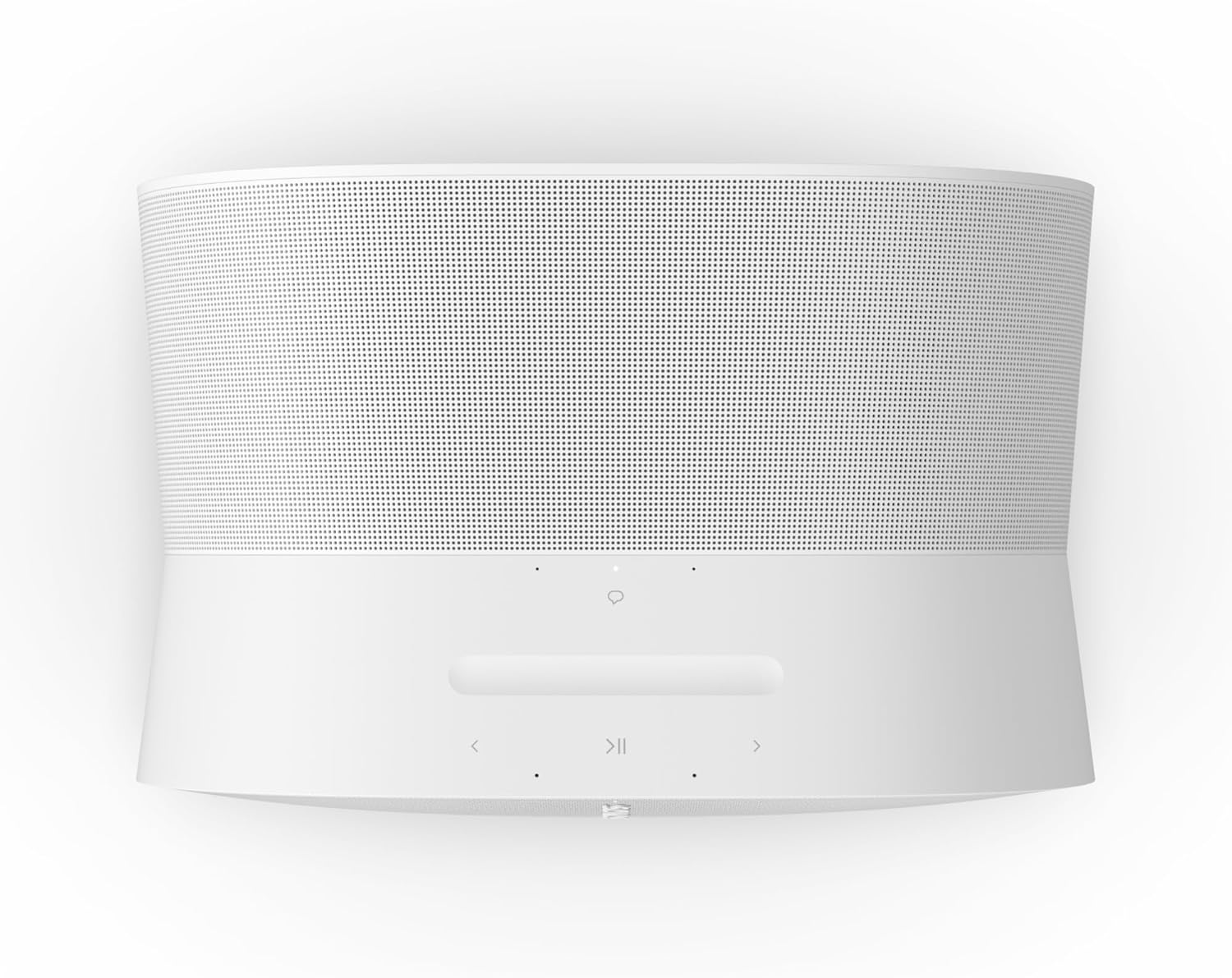
פיגורע 4: שפּיץ view of Sonos Era 300 showing touch controls.
קול קאָנטראָל
The Era 300 supports Sonos Voice Control and Amazon Alexa built-in. Use voice commands to play music, control playback, group speakers, and manage smart home devices. For privacy, microphones can be physically disconnected using a switch on the back of the speaker.

Figure 5: Sonos Era 300 voice control options.
קאַנעקטיוויטי אָפּציעס
- ווי-פי: Stream from all your favorite services over Wi-Fi for the highest quality audio without interruptions.
- בלועטאָאָטה: Pair a Bluetooth device with the press of a button to stream directly from a paired device.
- שורה-אין: Connect a turntable or other audio source using an auxiliary cable and the Sonos Line-In Adapter (sold separately).

Figure 6: Sonos Era 300 connectivity options.
Trueplay טונינג
Trueplay tuning optimizes the speaker's sound for the unique acoustics of your room. This technology measures how sound reflects off nearby surfaces and adjusts the EQ for the best listening experience, no matter where the Era 300 is placed.
Dolby Atmos Experience
The Era 300's acoustic design projects sound from wall to wall and floor to ceiling, immersing you in every dimension of the song when playing Dolby Atmos content. For an enhanced home theater experience, pair two Era 300 speakers with a Sonos Arc or Beam (Gen 2) soundbar for multichannel surround sound.

Figure 7: Sonos Era 300 integrated into a home theater system.
ווידעא 2: א קורצע הקדמהview video from Sonos highlighting the next-level sound experience of the Era 300.
עק אַדזשאַסטמאַנט
You can adjust the bass and treble settings of your Era 300 speaker through the Sonos app to customize the sound profile to your preference. The speaker sounds rather flat out of the box, and increasing the bass by five clicks is often recommended for a fuller sound.
וישאַלט
The Sonos Era 300 is humidity resistant, making it suitable for use in bathrooms or outdoor covered areas. To clean the speaker, use a soft, dry cloth. Avoid using harsh chemicals or abrasive materials.
טראָובלעשאָאָטינג
קאַנעקטיוויטי ישוז
If your speaker frequently loses connection, ensure it is placed in an area with a strong and stable Wi-Fi signal. As a Wi-Fi-first speaker, a solid connection is crucial for optimal performance. Rebooting your router and the speaker can often resolve temporary connection issues.
זארגן וועגן געזונט קוואַליטעט
If the sound quality is not as expected, verify the speaker's placement. Ensure there are no obstructions blocking the top or side-firing drivers. Utilize the Trueplay tuning feature in the Sonos app to optimize the sound for your specific room acoustics. If you desire more physical bass, consider adding a Sonos wireless subwoofer to your system.
ספּעסאַפאַקיישאַנז
| סאָרט | Sonos |
| מאָדעל נאָמען | Sonos Era 300 - White |
| נומער מאָדעל נומער | E30G1US1 |
| פּראָדוקט דימענשאַנז | 6.65"ד רענטגענ 6.65"וו רענטגענ 7.44"ה |
| פּונקט וואָג | 9.85 פונט (4470 גראַמז) |
| מאַטעריאַל | פּלאַסטיק |
| רעדנער טיפּ | מולטי רום |
| ספּעציעלע פֿעיִקייטן | Apple AirPlay 2, Bluetooth, Dolby Enabled, Humidity Resistant, Touch Controls, Voice Enabled, WiFi |
| קאַנעקטיוויטי טעכנאָלאָגיע | Wireless (Airplay, Bluetooth, NFC, Wi-Fi) |
| אַודיאָ רעזולטאַט מאָדע | אַרומרינגלען |
| אַרומרינגלען סאָונד קאַנאַל קאַנפיגיעריישאַן | 5.1.2 |
| רעדנער מאַקסימום רעזולטאַט מאַכט | 300 וואטס |
| מאַכט מקור | קאָרדעד עלעקטריק |
| וואַסער קעגנשטעל מדרגה | ניט וואַסער קעגנשטעליק |
וואָראַנטי און שטיצן
וואָראַנטי
The Sonos Era 300 comes with a Limited Warranty. Please refer to the official Sonos website or your purchase documentation for specific terms and conditions.
שוץ פּלאַנז
פארברייטערטע שוץ פלענער זענען פאראן צו קויפן:
- 2-יאָר שוץ פּלאַן: $47.99 (one-time)
- 3-יאָר שוץ פּלאַן: $60.99 (one-time)
- גאַנץ באַשיצן: $16.99 (monthly) - Covers all eligible past and future purchases.
צוריקקומען פּאָליטיק
This product is eligible for a 30-day refund/replacement return policy when purchased from Amazon.


