
1. הקדמה
א דאנק פארן קויפןasing the Roadstar IR-540D+BT Micro Hi-Fi System. This system offers a wide range of audio options including Internet Radio, DAB+/FM digital radio, CD-MP3 playback, Bluetooth connectivity, and USB media support. This manual provides essential information for safe operation, setup, and troubleshooting to ensure optimal performance of your device.
2. זיכערקייַט אינפֿאָרמאַציע
- לייענען אַלע ינסטראַקשאַנז קערפאַלי איידער נוצן.
- האַלטן דעם מאַנואַל פֿאַר צוקונפֿט רעפֿערענץ.
- שטעלט נישט אויס דעם אַפּאַראַט צו רעגן אָדער פייכטקייט כּדי צו פאַרמייַדן פייער אָדער עלעקטרישע קלאַפּן.
- זאָרגט פֿאַר געהעריקע ווענטילאַציע; פֿאַרשטאָפּט נישט קיין ווענטילאַציע עפענונגען.
- ניצן בלויז אַטאַטשמאַנץ / אַקסעסעריז ספּעסיפיעד דורך דער פאַבריקאַנט.
- אָפּשטעקן די אַפּאַראַט בעשאַס בליץ סטאָרמז אָדער ווען אַניוזד פֿאַר לאַנג פּיריאַדז.
- אָפּשיקן אַלע סערוויסעס צו קוואַלאַפייד סערוויס פּערסאַנעל.
3. פּעקל אינהאַלט
ביטע קאָנטראָלירט אַז אַלע זאכן זענען פאַראַן:
- Roadstar IR-540D+BT Micro Hi-Fi System
- ווייַט קאָנטראָל
- מאַכט אַדאַפּטער
- באַניצער מאַנואַל (דעם דאָקומענט)
4. פּראָדוקט איבערview
Familiarize yourself with the main components and controls of your Hi-Fi system.
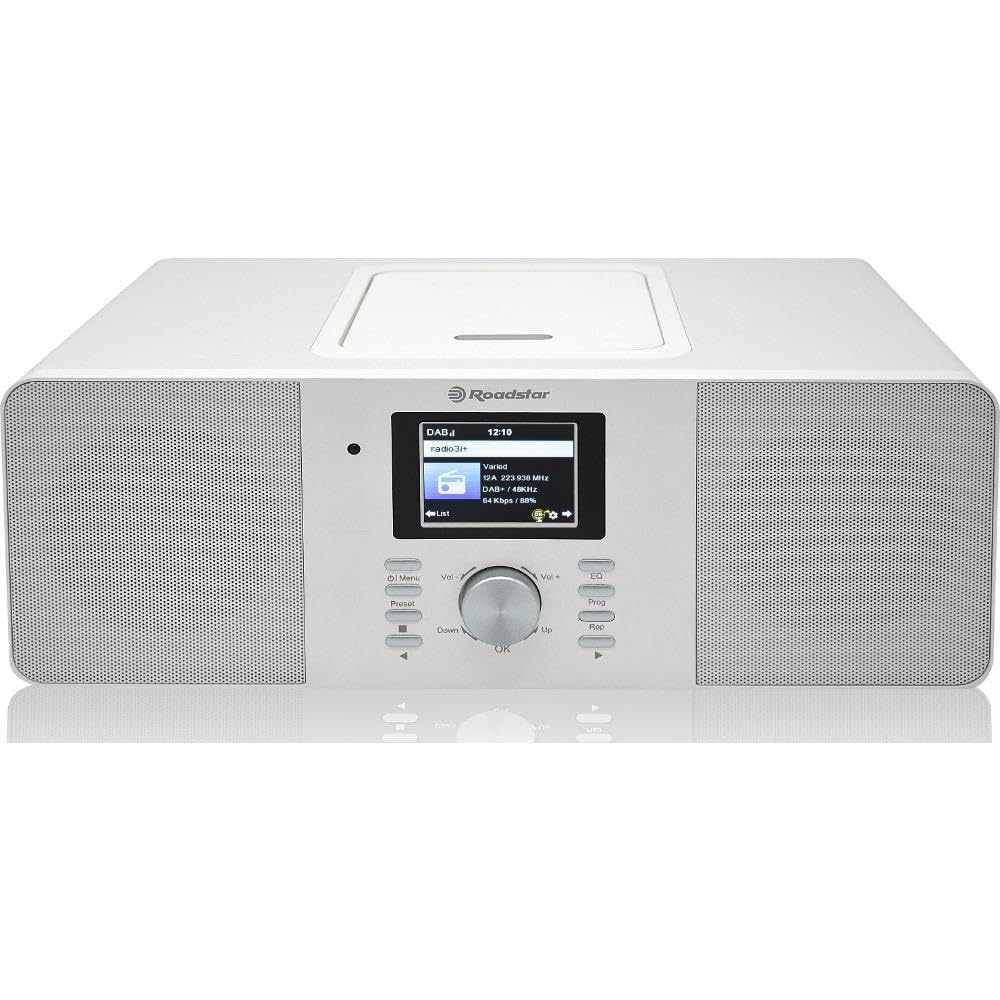
פיגורע 4.1: פראָנט view of the Roadstar IR-540D+BT Micro Hi-Fi System.

Figure 4.2: Close-up of the LCD display and main control buttons/knobs.
פראָנט פּאַנעל קאָנטראָלס:
- LCD ווייַז: Shows current mode, track information, radio station, time, etc.
- מאַכט קנעפּל: טורנס די אַפּאַראַט אויף/אַוועק.
- מאָדע קנעפּל: Switches between CD, Internet Radio, DAB+, FM, Bluetooth, AUX, USB.
- באַנד קנעפּל: אַדזשאַסץ די אַודיאָ רעזולטאַט מדרגה.
- נאַוויגאַציע קנעפּלעך (אַרויף/אַראָפּ/לינקס/רעכטס/גוט): פֿאַר מעניו נאַוויגאַציע און סעלעקציע.
- שפּיל / פּויזע קנעפּל: Controls playback for CD/USB/Bluetooth.
- איבערשפרינגען/זוכן קנעפּלעך: Skips tracks or searches radio stations.
- וסב פּאָרט: For USB media playback and fast charging.
- כעדפאָון דזשאַק: פֿאַר פּריוואַט צוגעהערט.
דערציען פּאַנעל קאַנעקשאַנז:
- AUX IN: 3.5 מ״מ דזשעק פֿאַר פֿאַרבינדן עקסטערנע אַודיאָ דעוויסעס.
- FM/DAB Antenna Input: For connecting the included antenna.
- דק אין: מאַכט אַדאַפּטער קשר.

Figure 4.3: The Roadstar IR-540D+BT system shown with its multi-function remote control.
רימאָוט קאָנטראָל פאַנגקשאַנז:
- All basic functions (Power, Volume, Mode, Playback controls).
- Direct access buttons for different modes (e.g., CD, BT, Internet Radio).
- Numeric keypad for direct track/station entry.
- Alarm setting and sleep timer functions.
5. סעטאַפּ
5.1 מאַכט קאַנעקשאַן
- Connect the power adapter to the DC IN jack on the rear of the unit.
- צאַפּן די מאַכט אַדאַפּטער אין אַ נאָרמאַל וואַנט ווענטיל.
5.2 אַנטענע קאַנעקשאַן
For optimal DAB+ and FM radio reception, connect the supplied antenna to the FM/DAB Antenna Input on the rear panel. Extend the antenna fully and adjust its position for the best signal.
5.3 Initial Wi-Fi Setup (for Internet Radio)
Upon first power-on or when selecting Internet Radio mode, the system will prompt you to configure network settings.
- Use the navigation buttons to select 'Network Setup' or 'Wi-Fi Setup'.
- The system will scan for available Wi-Fi networks. Select your network from the list.
- Enter your Wi-Fi password using the navigation buttons and 'OK' to confirm each character.
- Once connected, the system will confirm the connection. You can now access Internet Radio stations.
6. אַפּערייטינג ינסטרוקטיאָנס
6.1 אַלגעמיינע אָפּעראַציע
- מאַכט אויף / אַוועק: דריק דעם פּאַוער קנעפּל אויף דער אַפּאַראַט אָדער ווײַטקאָנטראָל.
- אויסקלייַבן מאָדע: Press the 'Mode' button repeatedly to cycle through available sources (CD, Internet Radio, DAB+, FM, Bluetooth, AUX, USB).
- סטרויערן באַנד: Rotate the Volume knob or use the VOL +/- buttons on the remote.
6.2 סי-די/MP3 שפּיל
- עפֿנט דעם דעקל פֿונעם סי-די אָפּטייל.
- Place a CD or MP3 CD with the label side facing up.
- Close the CD compartment cover. The system will automatically switch to CD mode and begin playback.
- Use the Play/Pause, Skip, and Search buttons for control.
6.3 ראַדיאָ אָפּעראַציע
6.3.1 אינטערנעט ראַדיאָ
- אויסקלייבן 'אינטערנעט ראַדיאָ' מאָדע.
- Use the navigation buttons to browse stations by genre, location, or search.
- Press 'OK' to select a station.
6.3.2 DAB+/FM Radio
- Select 'DAB+' or 'FM' mode.
- For DAB+, the system will perform an auto-scan for available stations. For FM, use the search buttons to find stations.
- To save a preset, press and hold the 'Preset' button, then select a preset number and press 'OK'.
6.4 בלועטוט קאָנעקטיוויטי
- Select 'Bluetooth' mode. The display will show 'Pairing' or 'Waiting for connection'.
- אויף אייער מאָבילער מיטל (סמאַרטפאָן, טאַבלעט), אַקטיווירט בלועטוט און זוכט פֿאַר פֿאַראַן דעוויסעס.
- Select 'IR-540D+BT' from the list.
- Once paired, you can play audio from your device through the Hi-Fi system.
6.5 USB ווידערשפּיל און טשאַרדזשינג
- Insert a USB flash drive into the USB port. The system will automatically switch to USB mode and begin playing compatible audio fileס (למשל, MP3).
- The USB port also supports fast charging for compatible devices.
6.6 AUX IN פֿאַרבינדונג
Connect an external audio device (e.g., MP3 player, smartphone) to the AUX IN jack on the rear panel using a 3.5mm audio cable. Select 'AUX' mode to listen to audio from the connected device.
6.7 שרעק פֿונקציע

Figure 6.1: The display showing alarm clock settings.
The system features a dual alarm function.
- Press the 'Alarm' button on the remote or navigate through the menu to 'Alarm Settings'.
- אויסקלייַבן שרעק 1 אָדער שרעק 2.
- Set the desired alarm time, source (Buzzer, FM, DAB+, Internet Radio), and volume.
- געבן די שרעק.
7. וישאַלט
- רייניקונג: ניצט אַ ווייכע, טרוקענע שטאָף צו רייניקן דעם אַפּאַראַט. ניצט נישט קיין שרײַבנדיקע רייניגערס אדער סאָלווענטן.
- CD באַהאַנדלונג: האַלט אָן סי-דיס ביי די ברעגן. רייניקט מיט אַ ווייכן, לינט-פֿרייע שטאָף, ווישנדיק פֿון צענטער אַרויס.
- ווענטילאַטיאָן: ענשור אַז די ווענטאַליישאַן אָופּאַנינגז זענען נישט אפגעשטעלט צו פאַרמייַדן אָוווערכיטינג.
8. טראָובלעשאָאָטינג
| פּראָבלעם | מעגלעך סיבה | לייזונג |
|---|---|---|
| קיין מאַכט | שטראָם קאַבל נישט פארבונדן; שטראָם אַוטלעט דעפעקטיוו. | קאָנטראָלירט די פֿאַרבינדונג פֿון דער מאַכט קאַבל; פּרוּווט אַן אַנדער ווענטיל. |
| קיין געזונט | קול צו נידעריג; אומרעכטע מאָדע אויסגעקליבן; קאָפּהערער פֿאַרבונדן. | Increase volume; Select correct source mode; Disconnect headphones. |
| נעבעך ראַדיאָ אָפּטראָג | אַנטענע נישט אויסגעשטרעקט/ריכטיג פּאַזיציאָנירט; שוואַך סיגנאַל. | Extend and reposition the antenna; Try auto-tuning again. |
| בלועטאָאָטה פּערינג ניט אַנדערש | דעווייס נישט אין פּערינג מאָדע; דיסטאַנץ צו ווייט; שטערונג. | Ensure unit is in Bluetooth mode; Keep devices close; Restart both devices. |
| Internet Radio not connecting | אומרעכט Wi-Fi פּאַראָל; ראַוטער פּראָבלעמען; שוואַכער Wi-Fi סיגנאַל. | Re-enter Wi-Fi password; Restart router; Move unit closer to router. |
9. ספּעסאַפאַקיישאַנז
| שטריך | באַשרייַבונג |
|---|---|
| סאָרט | ראָאַדסטאַר |
| מאָדעל נומער | IR-540D+BT |
| קאַנעקטיוויטי טעכנאָלאָגיע | Auxiliary, USB, Bluetooth, Wi-Fi |
| שטיצט סטאַנדאַרדס | CD, CD-R, CD-RW, MP3, WAV, AAC, WMA |
| רעדנער טיפּ | סטערעאָ |
| רעזולטאַט מאַכט (RMS) | 2 x 10 W (Total 20W RMS) |
| מאַכט מקור | קאָרדעד עלעקטריק |
| קאַמפּאַטאַבאַל דעוויסעס | MP3 שפּילער, סמאַרטפאָון, טאַבלעט |
| ראַדיאָ טונער | אינטערנעט ראַדיאָ, DAB+, FM |
| וסב פּאָרט | Playback and Fast Charging |
| ווייַז | דיגיטאַל לקד |
| ספּעציעלע פֿעיִקייטן | Dual Alarm, Equalizer Presets |
10. וואָראַנטי און שטיצן
For warranty information and technical support, please refer to the warranty card included with your product or visit the official Roadstar webזייטל. האַלט דיין קויפן באַווייַז פֿאַר קיין וואָראַנטי קליימז.