
1. הקדמה
This manual provides detailed instructions for the installation, operation, and maintenance of your TP-Link Deco X50-Outdoor AX3000 Whole Home Mesh WiFi 6 Unit. The Deco X50-Outdoor is designed to extend your mesh WiFi network to outdoor and indoor spaces, providing robust and stable wireless connectivity. Please read this manual thoroughly before using the device to ensure proper setup and optimal performance.
2. זיכערקייַט אינפֿאָרמאַציע
שטענדיק פֿאָלגן די גרונטלעכע זיכערהייט מיטלען צו רעדוצירן דעם ריזיקאָ פֿון פֿײַער, עלעקטרישן קלאַפּ און שאָדן:
- דו זאלסט נישט ויסשטעלן דעם מיטל צו וואַסער אָדער נעץ.
- דו זאלסט נישט פּרווון צו דיסאַסעמבאַל, פאַרריכטן אָדער מאָדיפיצירן די מיטל.
- ניצן בלויז די מאַכט אַדאַפּטער צוגעשטעלט מיט די מיטל.
- Ensure the device is installed in a stable location to prevent it from falling.
- האַלטן די מיטל אַוועק פון היץ קוואלן און דירעקט זונשייַן.
- For outdoor installation, ensure all cable connections are properly sealed to prevent water ingress.
3. פּעקל אינהאַלט
באַשטעטיקן אַז דיין פּעקל כּולל די פאלגענדע זאכן:
- 1 x TP-Link Deco X50-Outdoor Unit
- 1 x מאַכט אַדאַפּטער
- 1 רענטגענ עטהערנעט קאַבלע
- Mounting Kit (includes mounting bracket, screws, and wall plugs)
- שנעל ינסטאַללאַטיאָן גייד

Image: The retail packaging for the TP-Link Deco X50-Outdoor unit, showing the device and its key features.
4. פּראָדוקט איבערview
The Deco X50-Outdoor is a cylindrical, white unit designed for both outdoor and indoor use. It features an IP65 rating for waterproof and dustproof protection, making it suitable for various weather conditions.
4.1 מיטל אויסלייג

בילד: פראָנט view of the TP-Link Deco X50-Outdoor unit, showcasing its sleek, cylindrical design and 'deco outdoor' branding.

Image: The bottom of the Deco X50-Outdoor unit, revealing the port cover and the attachment point for the mounting bracket.
4.2 פּאָרטן און קנעפּלעך
Under the protective cover at the bottom of the unit, you will find the following:
- PoE פּאָרט: Used for Power over Ethernet (PoE) connection, providing both power and data through a single Ethernet cable.
- LAN Ports (2): For connecting wired devices or for backhaul connection to other Deco units.
- מאַכט פּאָרט: For connecting the included power adapter when not using PoE.
- באַשטעטיק קנעפּל: A small button to reset the device to factory settings.

בילד: א נאָענטע בילד view of the PoE and AC power supply ports located at the base of the Deco X50-Outdoor unit, with labels indicating their functions.
5. סעטאַפּ
Follow these steps to set up your Deco X50-Outdoor unit. It is recommended to use the TP-Link Deco app for a guided setup process.
5.1 Download the Deco App
- Scan the QR code in the Quick Installation Guide or search for "TP-Link Deco" in the App Store or Google Play.
- אראפקאפיע און ינסטאַלירן די דעקאָ אַפּ אויף דיין סמאַרטפאָנע אָדער טאַבלעט.
5.2 גשמיות ינסטאַלירונג
The Deco X50-Outdoor can be mounted on a pole, wall, or placed on a tabletop.
- קלייַבן אַ אָרט: Select a location that provides optimal WiFi coverage and is within range of your existing Deco network (if extending). For outdoor use, ensure it's protected from direct impact and accessible for power/Ethernet.
- מאָונטינג:
- פּאָול בארג: Use the provided straps to secure the mounting bracket to a pole.
- וואנט בארג: Drill holes, insert wall plugs, and screw the mounting bracket to the wall.
- טאַבלעטאָפּ: Simply place the unit on a flat, stable surface.
- פאַרבינדן מאַכט:
- ניצן מאַכט אַדאַפּטער: Connect the provided power adapter to the power port and plug it into an electrical outlet.
- ניצן PoE: Connect an Ethernet cable from a PoE-enabled switch or injector to the PoE port on the Deco unit.
- Connect to Existing Network (Optional): If you are using the Deco X50-Outdoor as a satellite unit, it will connect wirelessly to your main Deco unit. For a wired backhaul, connect an Ethernet cable from one of the LAN ports to your main Deco unit or network switch.

Image: The Deco X50-Outdoor unit securely mounted on an outdoor pole, demonstrating a typical installation scenario.
5.3 אַפּ-געפירטע סעטאַפּ
- Open the Deco app and log in with your TP-Link ID. If you don't have one, create an account.
- Tap the "+" icon in the top right corner to add a new Deco unit.
- Select your Deco model (X50-Outdoor) and follow the on-screen instructions to complete the setup. The app will guide you through connecting the unit and integrating it into your existing Deco mesh network.
6. אָפּערייטינג
Once set up, your Deco X50-Outdoor unit will automatically integrate into your mesh network, providing seamless WiFi coverage. You can manage your network using the TP-Link Deco app.
6.1 Deco App Features
The Deco app allows you to:
- View פארבונדענע דעווייסעס און זייער סטאַטוס.
- שטעלן אַרויף אַ גאַסט נעץ.
- פירן עלטערן קאָנטראָלן.
- פּריאָריטיזירן דעוויסעס פֿאַר אָפּטימאַל פאָרשטעלונג (QoS).
- Access HomeShield Security features.
- דערהייַנטיקן פירמוואַרע.
- Monitor network health and usage.
6.2 געפירט ינדיקאַטאָר סטאַטוס
The LED on your Deco unit indicates its status:
- שטאַרק גרין: Deco is working properly.
- פּולסינג גרין: דעקאָ איז סטאַרטינג אַרויף.
- האַרט רויט: דעקאָ האט אַ פּראָבלעם (למשל, קיין אינטערנעט פֿאַרבינדונג).
- פּולסינג רויט: Deco is disconnected from the main Deco unit.
- סאָליד בלוי: דעקאָ איז גרייט פֿאַר סעטאַפּ.
- פּולסינג בלוי: Deco is pairing via Bluetooth.
7. וישאַלט
Regular maintenance ensures the longevity and optimal performance of your Deco X50-Outdoor unit.
7.1 פירמוואַרע דערהייַנטיקונגען
Keep your Deco's firmware updated to benefit from the latest features, security enhancements, and bug fixes. You can check for and install updates via the Deco app.
7.2 רייניקונג
Wipe the device with a soft, dry cloth. Do not use liquid cleaners or chemical sprays.
7.3 ענוויראָנמענטאַל קאַנסידעריישאַנז
Despite its outdoor rating, avoid placing the unit in locations where it is constantly submerged in water or exposed to extreme physical impact.
8. טראָובלעשאָאָטינג
If you encounter issues with your Deco X50-Outdoor, try the following solutions:
8.1 קיין אינטערנעט פֿאַרבינדונג
- Check the LED status. If solid red, ensure your main Deco unit has an internet connection.
- Verify that the Ethernet cable (if used) is securely connected.
- Restart your modem, main Deco unit, and then the X50-Outdoor unit.
8.2 Deco X50-Outdoor Disconnected
- Ensure the unit is within range of your main Deco or another satellite Deco.
- קוק די מאַכט קשר.
- Try relocating the unit to a closer position to the main Deco.
8.3 Slow WiFi Speed
- Ensure the unit is placed in an open area, free from obstructions.
- קוק פֿאַר פירמוואַרע דערהייַנטיקונגען.
- Use the Deco app to run a network optimization test.
8.4 פאַבריק באַשטעטיק
If issues persist, you may need to perform a factory reset. With the Deco unit powered on, use a pin to press and hold the Reset button until the LED turns solid red (approximately 1 second), then release. The unit will restart with factory default settings.
9. ספּעסאַפאַקיישאַנז
Technical details for the TP-Link Deco X50-Outdoor unit:
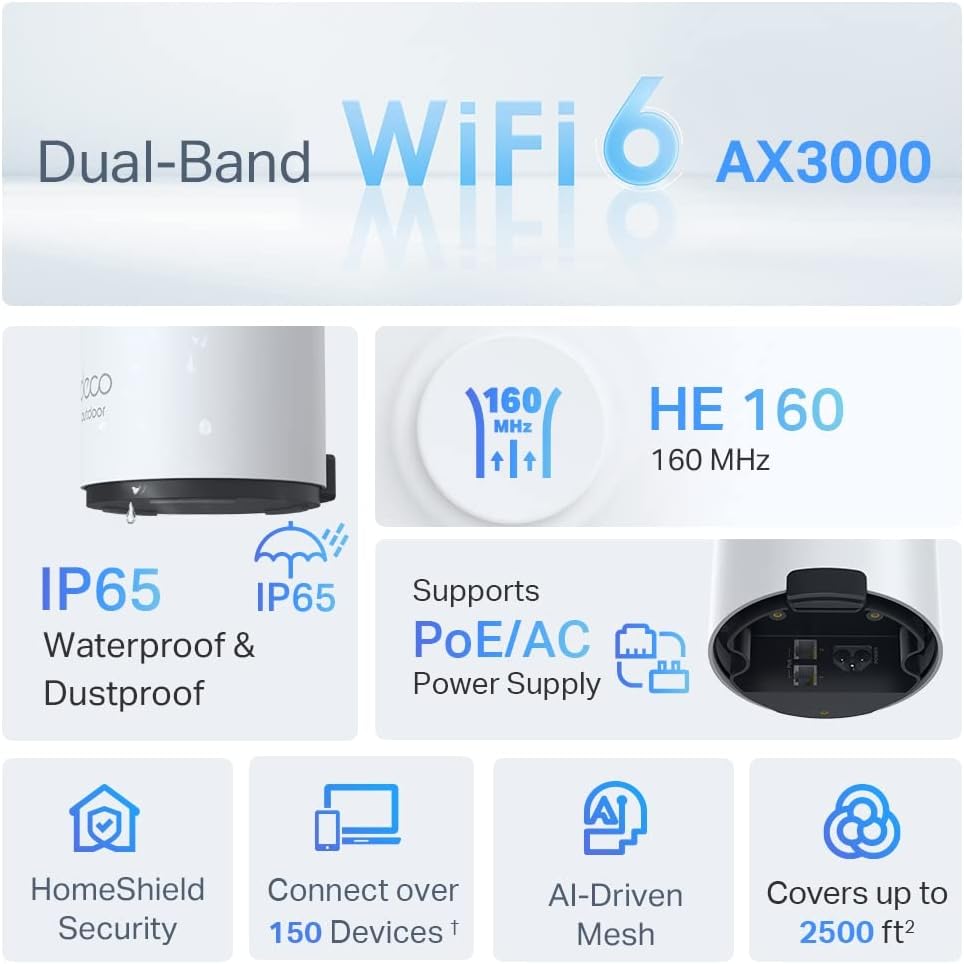
Image: An infographic highlighting key features of the Deco X50-Outdoor, including Dual-Band WiFi 6, AX3000 speeds, IP65 rating, PoE/AC power support, HomeShield Security, support for over 150 devices, AI-Driven Mesh, and up to 2500 sq ft coverage.
| שטריך | דעטאַל |
|---|---|
| מאָדעל נאָמען | AX3000 Outdoor Whole Home Mesh WiFi 6 Unit |
| ווירעלעסס סטאַנדאַרד | Wi-Fi 6 (802.11 אַקס) |
| אָפטקייַט באַנד קלאַס | צווייענדיק-באַנד |
| דאַטאַ אַריבערפירן קורס | Up to 2402 Mbps (5 GHz) + 574 Mbps (2.4 GHz) |
| קאַנעקטיוויטי קייט | Up to 2000 Square Feet (per unit) |
| פּאָרץ | 2 x Gigabit Ethernet Ports (Auto-sensing WAN/LAN) |
| מאַכט צושטעלן | PoE (802.3at) or AC Power Adapter (240V AC) |
| וועטער קעגנשטעל | IP65 (וואַסערפּרוף און שטויבפּרוף) |
| זיכערהייט פּראָטאָקאָל | WPA, WPA2, WPA3 |
| קאָנטראָל מעטאָד | TP-Link Deco App |
| פּונקט וואָג | 0.9 קילאָגראַמס |
10. וואָראַנטי און שטיצן
פֿאַר וואָראַנטי אינפֿאָרמאַציע און טעכנישע שטיצע, ביטע זען די באַאַמטער TP-Link webפּלאַץ אָדער קאָנטאַקט זייער קונה דינסט.
- טי-פי-לינק אפיציעל Webפּלאַץ: www.tp-link.com
- טעכניש שטיצן: Visit the support section on the TP-Link webפּלאַץ פֿאַר FAQ, טראָובלעשאָאָטינג פירער און קאָנטאַקט אינפֿאָרמאַציע.