
1. הקדמה
The HiBy FD1 is a portable USB Digital-to-Analog Converter (DAC) and headphone amplifier designed to enhance audio quality from various devices. It features dual ES9118 audio chips for high-resolution sound and supports both single-ended and balanced headphone outputs.
This device is compatible with a wide range of operating systems and devices, including Android, iOS, Windows, macOS, smartphones, computers, tablets, and digital audio players.

Image 1: The HiBy FD1 USB Headphone Ampלײַכטער, ווײַזןasinג זײַן קאָמפּאַקטן דיזײַן.
שליסל פֿעיִקייטן:
- Dual ES9118 Audio Chips: Provides high-resolution audio and enhanced decoding capabilities.
- Dual Crystal Oscillators: Lowers jitter and improves digital audio accuracy for 44.1x and 48x clocked audio signals.
- ווערסאַטאַל אַוטפּוץ: Includes 3.5mm single-ended (SE) and 2.5mm balanced headphone outputs.
- ברייט קאַמפּאַטאַבילאַטי: Supports multiple system platforms including Android, iOS, Windows, and macOS.
- Lossless Audio Support: Compatible with most lossless music formats, including native DSD128 decoding.
- Hardware USB Mode Switch: Allows switching between USB Audio 1.0 and 2.0 standards.
- Driverless Plug-and-Play: No charging required; automatically powers on when connected via USB and shuts down when unplugged.
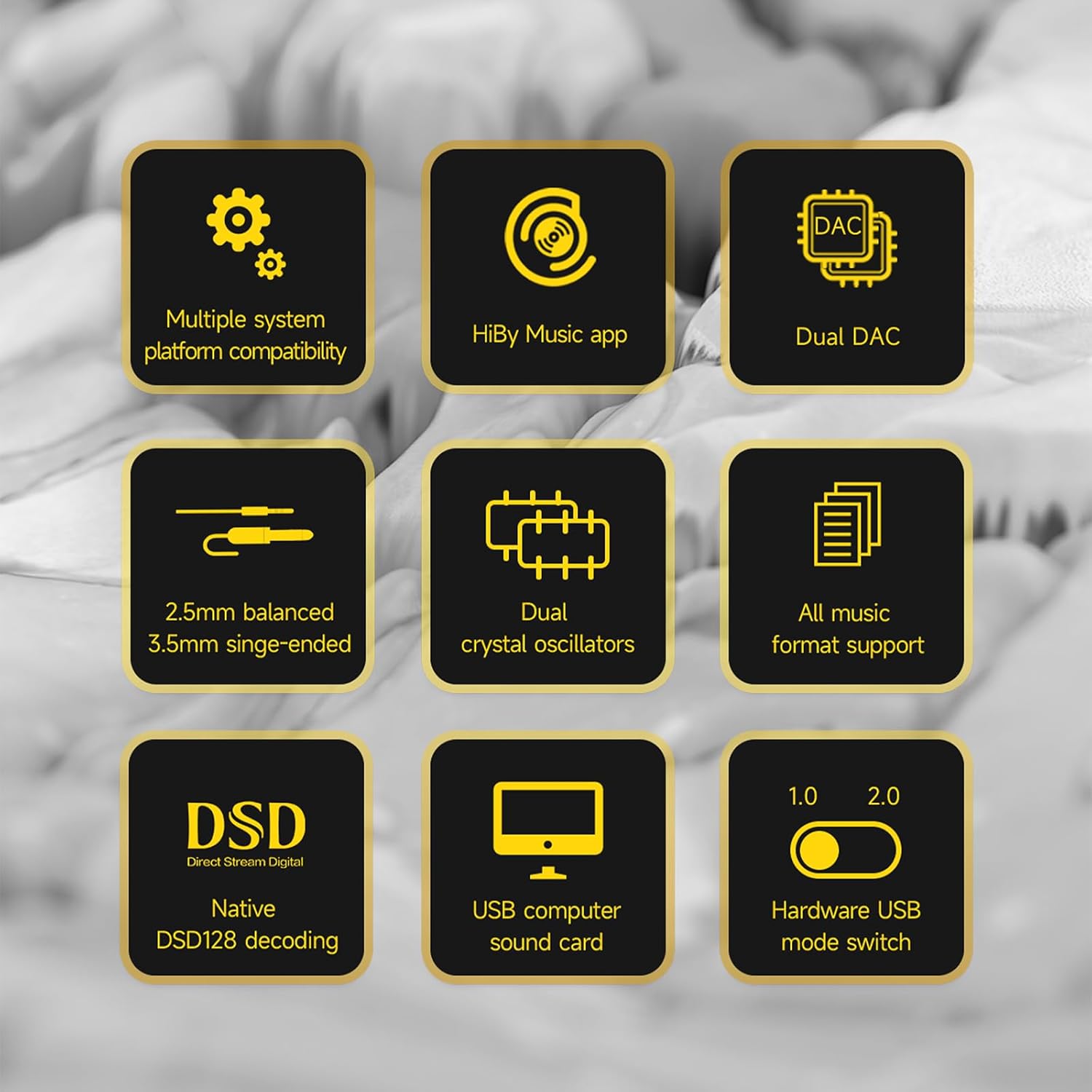
Image 2: A visual representation of the HiBy FD1's key features, including dual DAC, DSD support, and multiple system compatibility.
2. סעטאַפּ
2.1 קאַנעקטינג צו דעוויסעס
The HiBy FD1 connects to your source device (computer, smartphone, tablet) via its USB Type-C port. It is designed for driverless plug-and-play operation.
- For Android/Windows/macOS: Connect the FD1 using a compatible USB Type-C cable.
- פֿאַר iOS דעוויסעס (iPhone/iPad): A Camera Connection Kit (CCK) cable is required for proper functionality.

Image 3: The HiBy FD1 connected to various devices, illustrating its broad compatibility with smartphones, tablets, and computers.
2.2 USB Mode Switch
The FD1 features a hardware switch to select between USB Audio 1.0 and USB Audio 2.0 standards. This switch is located on the side of the device.
- USB Audio 1.0: Provides driverless plug-and-play functionality on Windows 7/8/10. DSD audio is not supported in this mode.
- USB Audio 2.0: Offers driverless plug-and-play on Windows 10 (build 1703 and later). For DSD support on Windows, an additional driver installation may be required.

Image 4: Close-up of the HiBy FD1's hardware USB mode switch, allowing selection between 1.0 and 2.0 standards.
2.3 פּאַוערינג אויף / אַוועק
The HiBy FD1 automatically powers on when connected to a USB source and automatically shuts down when disconnected. No external power button or charging is required as it draws power directly from the connected device.

Image 5: The HiBy FD1 connected to a smartphone and a laptop, demonstrating its plug-and-play functionality without external charging.
3. אַפּערייטינג ינסטרוקטיאָנס
3.1 קאַנעקטינג כעדפאָונז
The HiBy FD1 offers two headphone output options:
- 3.5mm Single-Ended (SE) Output: For standard headphones.
- 2.5 מם באַלאַנסט רעזולטאַט: For headphones with a balanced connection, offering improved audio performance.
Connect your headphones to the appropriate port on the FD1.
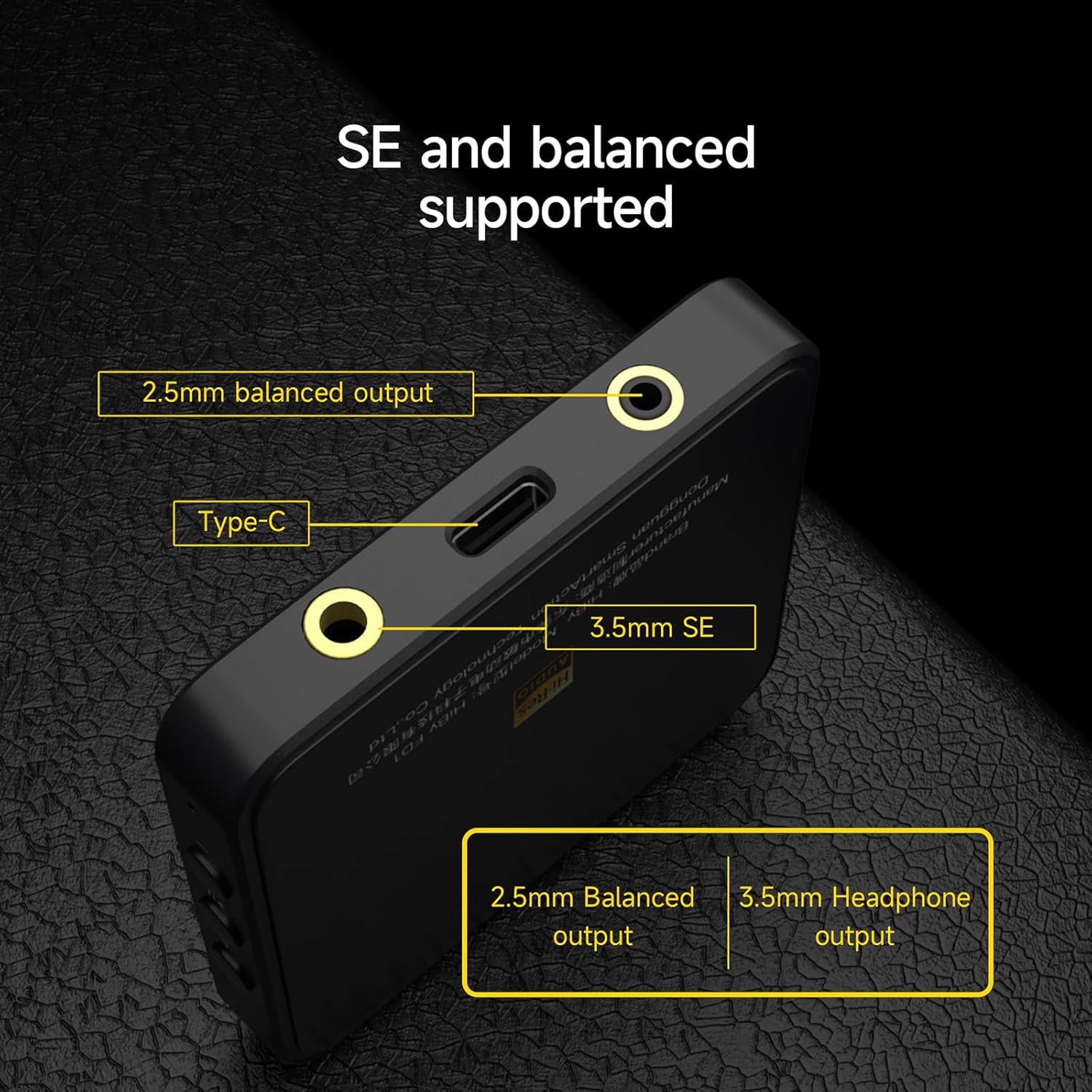
בילד 6: א דעטאלירטע view of the HiBy FD1's ports, highlighting the 2.5mm balanced output, Type-C input, and 3.5mm single-ended output.
3.2 Playback and Controls
Once connected, the FD1 acts as an external sound card for your device. Play audio through your preferred music application. The FD1 features hardware buttons for basic playback control:
- באנד +: Tap to increase volume.
- שפּיל / פּויזע: צאַפּן צו שפּילן אָדער פּויזע אַודיאָ.
- באַנד -: Tap to decrease volume.
3.3 אינדיקאַטאָר ליכט סטאַטוס
The FD1 includes an indicator light that changes color to reflect the current audio status and sampדי שיעור:

Image 7: The HiBy FD1's hardware buttons (Volume+, Play/Pause, Volume-) and a table explaining the indicator light colors for different audio statuses.
| סטאַטוס | רויט | גרין | בלוי | ווייַס |
|---|---|---|---|---|
| Connected, not playing | ||||
| Playing at PCM 32k-48kHz | יא | |||
| Playing at PCM 88.2k-192kHz | יא | |||
| Playing at DSD | יא |
Note: The table indicates which color is active for each status.
3.4 HiBy Music App
For optimal compatibility and advanced features, it is recommended to use the HiBy Music app, which offers an exclusive HQ USB Audio Access mode.
4. וישאַלט
To ensure the longevity and optimal performance of your HiBy FD1, follow these general maintenance guidelines:
- האַלט דאָס אַפּאַראַט ריין דורך עס אָפּווישן מיט אַ ווייכן, טרוקענעם שטאָף. פֿאַרמייַדט ניצן שאַרפע כעמיקאַלן אָדער אַברייסיוו מאַטעריאַלן.
- האַלט דאָס אַפּאַראַט אין אַ קיל, טרוקן אָרט אַוועק פון דירעקט זונשייַן, עקסטרעמע טעמפּעראַטורן און הויכער הומידיטי.
- ויסמיידן דראַפּינג די מיטל אָדער אונטערטעניק צו שטאַרק ימפּאַקץ.
- Do not attempt to disassemble or repair the device yourself, as this may void the warranty.
5. טראָובלעשאָאָטינג
If you encounter issues with your HiBy FD1, consider the following basic troubleshooting steps:
- קיין קול:
- Ensure the FD1 is securely connected to your source device and headphones.
- Check the volume levels on both your source device and the FD1.
- Verify that the correct audio output device (HiBy FD1) is selected in your operating system's sound settings.
- Test with different headphones or a different source device to isolate the problem.
- מיטל ניט דערקענט:
- פּרוּווט אַ אַנדערש וסב פּאָרט אָדער קאַבלע.
- Ensure the USB mode switch on the FD1 is set correctly (1.0 or 2.0) for your operating system.
- ריסטאַרט דיין מקור מיטל.
- For Windows 10 (build 1703 and later) with USB Audio 2.0 and DSD, ensure any necessary drivers are installed.
- פאַרקרימט אַודיאָ:
- Reduce the volume on your source device or the FD1.
- פאַרזיכערן די אַודיאָ file איז נישט פארדארבן.
- קוק פֿאַר ינטערפיראַנס פון אנדערע עלעקטראָניש דעוויסעס.
אויב די טריט לייזן נישט דעם פראבלעם, ביטע זעט די שטיצע סעקציע פאר ווייטערדיגע הילף.
6. ספּעסאַפאַקיישאַנז
| שטריך | באַשרייַבונג |
|---|---|
| מאָדעל נומער | HiBy FD1 |
| סאָרט | HiBy |
| ייַזנוואַרג צובינד | וסב טיפּ-C |
| קאַמפּאַטאַבאַל דעוויסעס | Desktop, Laptop, Smartphones, Tablets (Android, iOS, Windows, macOS) |
| דאַטאַ לינק פּראָטאָקאָל | וסב |
| דאַטאַ אַריבערפירן קורס | 441 Megabits Per Second (Max) |
| דאַק טשיפּס | Dual ES9118 |
| כעדפאָון אַוטפּוץ | 3.5mm Single-Ended, 2.5mm Balanced |
| DSD Support | Native DSD128 decoding |
| וסב אַודיאָ מאָדעס | USB Audio 1.0, USB Audio 2.0 (switchable) |
7. וואָראַנטי אינפֿאָרמאַציע
HiBy products come with a 1 יאָר וואָראַנטי from the date of purchase. This warranty covers manufacturing defects. If damage is not caused by human factors, parts will be replaced free of charge.
ביטע האַלטן דיין דערווייַז פון קויפן פֿאַר וואָראַנטי קליימז.
8. שטיצן
For technical support, warranty claims, or further inquiries regarding your HiBy FD1, please contact HiBy customer service through their official webוועבזייטל אדער דער הענדלער פון וועמען איר האט געקויפט דעם פּראָדוקט.
You can visit the official HiBy store on Amazon for more information: HiBy Amazon Store