
1. הקדמה
Thank you for choosing the WOOLINK N1060-2PK 4MP Solar Security Camera System. This manual provides detailed instructions for the installation, operation, and maintenance of your new security cameras. Please read this manual thoroughly before use to ensure proper setup and functionality. Keep this manual for future reference.
2. פּראָדוקט איבערview
2.1 פּעקל אינהאַלט
- 2 x WOOLINK 4MP Solar Security Cameras
- 2 x Solar Panels with Mounting Brackets
- 2 רענטגענ וסב טשאַרדזשינג קאַבלעס
- מאָנטירונג שרויפן און וואַנט אַנקערס
- באַניצער מאַנואַל
2.2 קאַמעראַ קאָמפּאָנענטן
Each WOOLINK N1060-2PK camera features a 4MP lens for 2.5K resolution video, integrated solar panel for continuous power, and a pan/tilt mechanism for wide area coverage. Key components include the camera lens, infrared lights, spotlights, PIR motion sensor, microphone, speaker, and a Micro SD card slot.

Image: Two WOOLINK N1060-2PK solar security cameras, each with an integrated solar panel, designed for outdoor installation.

Image: Visual comparison demonstrating the superior clarity of 2.5K resolution captured by the camera compared to 1080P.
3. סעטאַפּ גייד
3.1 ערשט טשאַרדזשינג
Before initial use, fully charge the camera's built-in 6000mAh battery using the provided USB cable and a 5V/2A power adapter (not included). A full charge ensures optimal performance, especially during periods of low sunlight.
3.2 אַפּ אראפקאפיע און ינסטאַלירונג
אָפּלאָדירן די 'HoMeYe Pro' app from your smartphone's app store (iOS App Store or Google Play Store). Follow the on-screen instructions to create an account and log in.
3.3 קאַמעראַ פּערינג
- Open the 'HoMeYe Pro' app and tap the '+' icon to add a new device.
- Select the appropriate camera model or scan the QR code on the camera.
- פֿאָלגט די אינסטרוקציעס אין דער אַפּ צו פֿאַרבינדן די קאַמעראַ צו אייער 2.4GHz Wi-Fi נעץ. (Note: 5GHz Wi-Fi is not supported.)
- Ensure your phone is close to the camera and Wi-Fi router during the pairing process.
3.4 מאָונטינג די אַפּאַראַט
אויסקלייבן אַ מאָנטירונג אָרט וואָס גיט אַ קלאָרע view פון דער געגנט וואָס איר ווילט מאָניטאָרירן און באַקומט ample direct sunlight for the solar panel. Ensure the camera is within range of your 2.4GHz Wi-Fi network. Use the provided screws and wall anchors to securely mount the camera and solar panel bracket.

Image: An outdoor mounted WOOLINK solar security camera with its solar panel, illustrating the pan/tilt remote control functionality via a smartphone app.
4. אַפּערייטינג ינסטרוקטיאָנס
4.1 לעבן View און פּאַן/טילט קאָנטראָל
Open the 'HoMeYe Pro' app and select your camera to access the live video feed. Use the on-screen controls to pan (355°) and tilt (90°) the camera lens to adjust the viewing angle as needed. This allows for comprehensive coverage of your property.

Image: The camera's pan and tilt capabilities allow for a sensitive remote control, achieving a 360-degree view אָן בלינד ספּאַץ.
4.2 צוויי-וועג אַודיאָ
The camera features a built-in microphone and speaker. In the live view interface, tap the microphone icon to speak through the camera and the speaker icon to listen to audio from the camera's location. This enables real-time communication with visitors or deterrence of unwanted individuals.

Image: A user communicating with a delivery driver at their doorstep using the camera's two-way audio function.
4.3 נאַכט זעאונג מאָדעס
The camera supports two night vision modes: infrared (IR) night vision for black and white images in low light, and full-color night vision using integrated spotlights. You can switch between these modes or set them to activate automatically based on ambient light conditions within the app settings.

Image: The camera's 2.5K Full HD Color Night Vision in action, showing clear, illuminated color video in dark conditions.
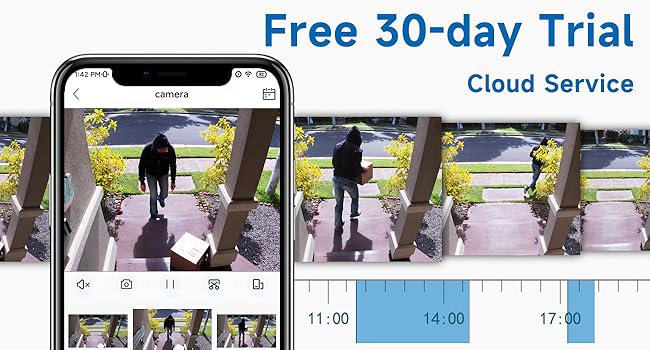
Image: A visual comparison illustrating the camera's capabilities in daytime vision, infrared night vision (black and white), and full-color night vision.
4.4 באַוועגונג דעטעקציע און וואָרענונגען
The integrated PIR motion sensor detects movement. When motion is detected, the camera can send real-time alerts to your smartphone. Enable the Human Detection feature in the app to filter out non-human movements and receive more relevant notifications. The camera can also activate its built-in spotlight and siren upon detection to deter intruders.

Image: The camera's spotlight and siren activating to deter a potential intruder, demonstrating its active security features.
4.5 רעקאָרדינג און סטאָרידזש
The camera supports two storage options for recorded video: a local Micro SD card (up to 128GB, not included) and cloud storage (subscription required). Recorded events can be accessed and reviewed through the 'HoMeYe Pro' app. The camera does not support 24/7 continuous recording to conserve battery life.
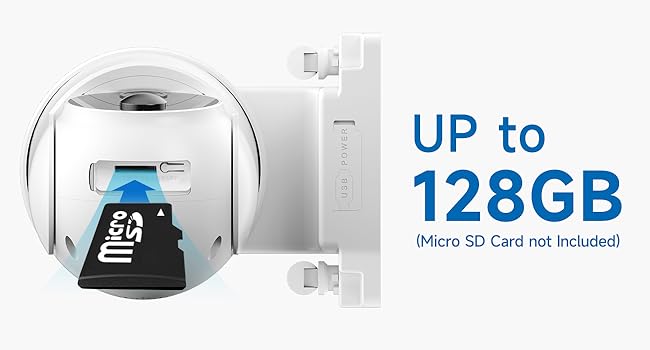
בילד: א נאָענטע בילד view of the Micro SD card slot on the camera, supporting up to 128GB for local storage.
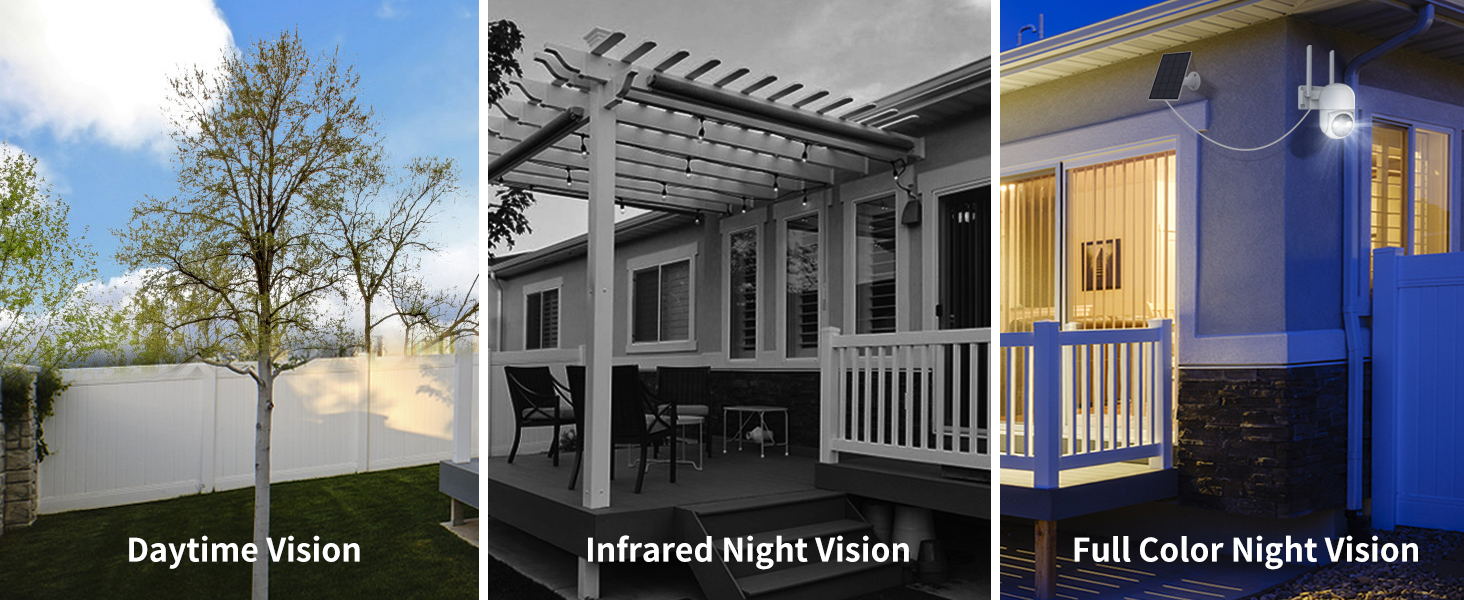
Image: The 'HoMeYe Pro' app interface displaying a timeline of recorded events stored in the cloud service.
5. וישאַלט
5.1 באַטערי מאַנאַגעמענט
The camera is primarily powered by its solar panel, which charges the internal 6000mAh battery. Ensure the solar panel is kept clean and free from obstructions to maximize charging efficiency. If the camera's battery level drops significantly due to prolonged cloudy weather or insufficient sunlight, you can recharge it using the USB cable.
5.2 רייניקונג
רייניקן פּעריִאָדיש די קאַמעראַ לינז און זונ פּאַנעל מיט אַ ווייכן, דamp cloth to remove dust, dirt, or water spots. Avoid using harsh chemicals or abrasive materials that could damage the surfaces.
5.3 וועטער קעגנשטעל
The WOOLINK N1060-2PK camera is IP65 waterproof, designed to withstand various outdoor weather conditions, including rain, snow, and temperatures ranging from -10°C to 55°C (14°F to 131°F).

Image: The WOOLINK camera shown functioning reliably during rainfall, emphasizing its IP65 waterproof design for all-weather use.
6. טראָובלעשאָאָטינג
- קאַמעראַ פֿאַרבינדט זיך נישט צו Wi-Fi: Ensure your Wi-Fi is 2.4GHz, the signal is strong at the camera's location, and you have entered the correct password. Try resetting the camera and repeating the pairing process.
- נעבעך ווידעא קוואַליטעט: Check your Wi-Fi signal strength. Ensure the camera lens is clean and free from obstructions. In the app, verify that the video resolution is set to 2.5K HD.
- באַטערי נישט טשאַרדזשינג: Ensure the solar panel is clean and positioned to receive direct sunlight for several hours daily. If the issue persists, try charging the camera directly via USB.
- קיין באַוועגונג אַלערץ: Verify that motion detection is enabled in the app settings and the sensitivity level is appropriate. Check app notification settings on your smartphone.
- צוויי-וועג אַודיאָ פּראָבלעמען: Ensure your phone's microphone and speaker permissions are granted to the 'HoMeYe Pro' app. Check the volume settings on both your phone and within the app.
7. ספּעסאַפאַקיישאַנז
| שטריך | באַשרייַבונג |
|---|---|
| מאָדעל נומער | N1060-2PK |
| ווידעא האַכלאָטע | 4MP (2.5K) |
| מאַכט מקור | Solar Powered / 6000mAh Battery |
| קאַנעקטיוויטי | 2.4GHz Wi-Fi (IEEE 802.11b/g/n) |
| פּאַן / טילט קייט | פּאַן 355°, טילט 90° |
| נאַכט זעאונג | IR נאַכט זעאונג, פול קאָליר נאַכט זעאונג |
| אַודיאָ | צוויי-וועג אַודיאָ |
| באַוועגונג דעטעקשאַן | PIR Sensor, Human Detection |
| סטאָרידזש אָפּציעס | מיקראָ SD קאַרטל (ביז 128 גיגאבייט), וואָלקן סטאָרידזש |
| וואַסער קעגנשטעל | IP65 וואָטערפּרוף |
| אַפּערייטינג טעמפּעראַטור | -10°C צו 55°C (14°F צו 131°F) |
| דימענשאַנז | 7.64 X 6.36 X 10.91 אינטשעס |
| וואָג | 3.96 פונט |
8. וואָראַנטי און שטיצן
WOOLINK products are designed for reliability and performance. For any questions, technical assistance, or warranty inquiries, please contact WOOLINK customer support through the 'HoMeYe Pro' app or visit the official WOOLINK website. Please have your model number (N1060-2PK) and purchase information ready when contacting support.


