
IK Multimedia TONEX Pedal
IK Multimedia TONEX Pedal Instruction Manual
Model: TONEX Pedal
בראַנד: IK מולטימעדיאַ
1. הקדמה
The IK Multimedia TONEX Pedal is a stereo multi-effects guitar and bass pedal designed to bring ultra-realistic amp and pedal tones to your live performance or studio setup. Utilizing breakthrough AI Machine Modeling technology, it offers a vast library of authentic tone models, along with a comprehensive suite of built-in effects. This manual provides essential information for setting up, operating, maintaining, and troubleshooting your TONEX Pedal.
2. זיכערקייַט אינפֿאָרמאַציע
- מאַכט צושטעלן: Use only the provided 9V DC power supply. Ensure the correct voltage and polarity to prevent damage.
- וואַסער און נעץ: Do not expose the unit to water, rain, or excessive moisture. Avoid operating in damp ינווייראַנמאַנץ.
- היץ קוואלן: האַלט דעם אַפּאַראַט אַוועק פון היץ קוועלער ווי ראַדיאַטאָרן, היץ רעגיסטערס, אויוון, אָדער אַנדערע אַפּאַראַטן וואָס פּראָדוצירן היץ.
- ווענטילאַטיאָן: זיכער מאַכן אַז עס איז דאָ געהעריקע ווענטילאַציע. נישט פֿאַרשטאָפּן קיין ווענטילאַציע עפענונגען.
- רייניקונג: ריין בלויז מיט אַ טרוקן שטאָף. דו זאלסט נישט נוצן פליסיק קלינערז אָדער אַעראָסאָל קלינערז.
- סערוויס: איבערגעבן אלע סערוויסינג צו קוואַליפֿיצירטע סערוויס פּערסאָנעל. פּרוּווט נישט צו סערוויסן דעם פּראָדוקט אַליין.
3. פּעקל אינהאַלט
- IK Multimedia TONEX Pedal
- 9 וו דק מאַכט צושטעלן
- וסב קאַבלע
- Registration Card/Software Download Instructions
4. פּראָדוקט איבערview
The TONEX Pedal features a robust anodized aluminum chassis designed for durability. Its intuitive layout provides quick access to essential controls and versatile connectivity options.
4.1. פראָנט פּאַנעל קאָנטראָלס
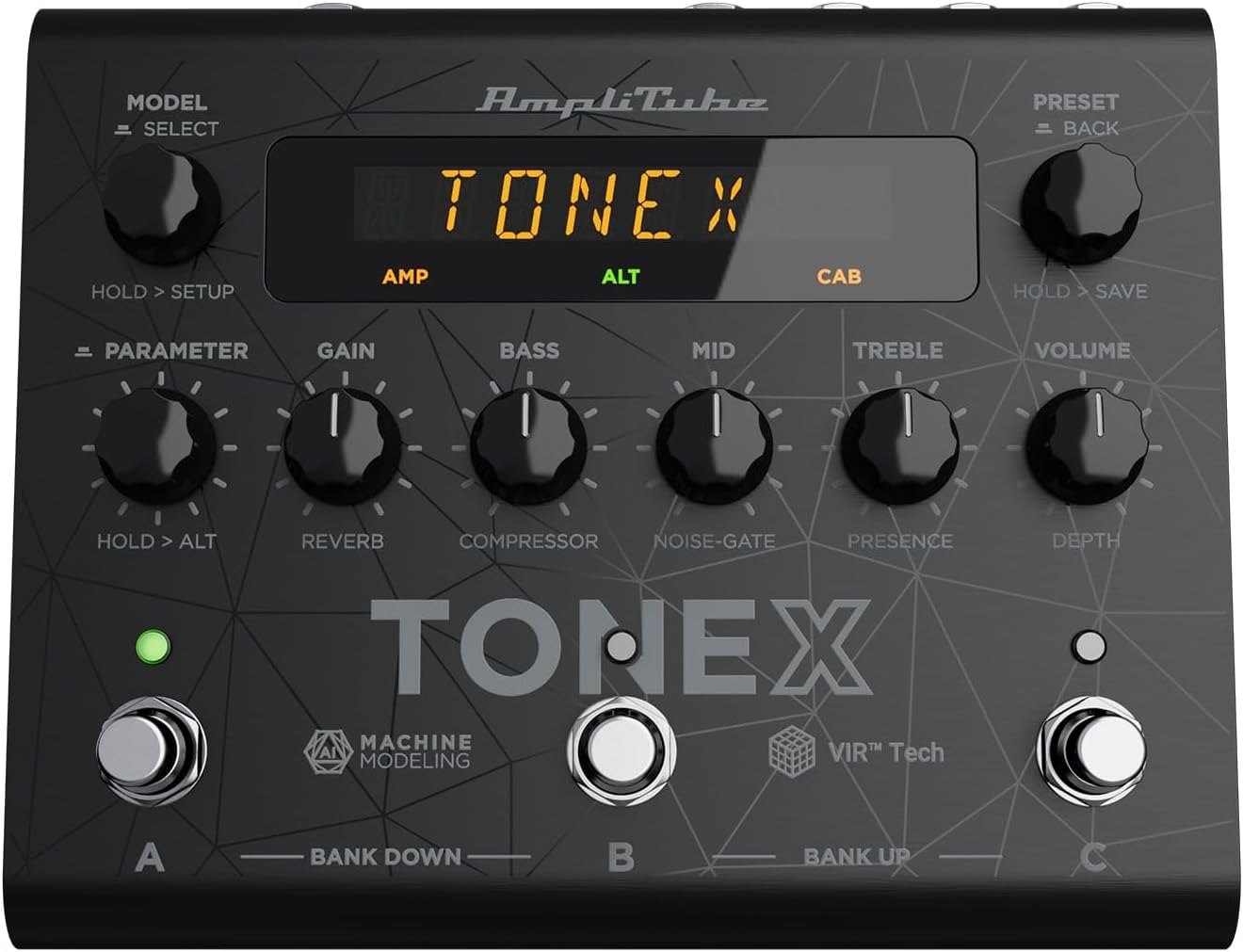
Figure 1: TONEX Pedal Front Panel
דאָס בילד ווײַזט די אויבערשטע view of the TONEX Pedal, highlighting its compact design and the arrangement of knobs, footswitches, and the digital display. Key controls such as 'Model/Select', 'Preset/Back', 'Parameter', 'Gain', 'Bass', 'Mid', 'Treble', and 'Volume' are visible, along with the three footswitches labeled A, B, and C.
- מאָדעל / סעלעקט קנעפּל: Used to select tone models and navigate menus. Press and hold for Setup menu.
- פאָרגעשטעלט / צוריק קנעפּל: Used to select presets and go back in menus. Press and hold to save presets.
- פּאַראַמעטער קנעפּל: Adjusts various parameters. Press and hold for alternative parameters.
- GAIN קנעפּל: Controls the input gain of the tone model.
- באַס קנופּ: אַדזשאַסטירט די נידעריק-פרעקווענץ רעאַקציע.
- מיטל קנעפּל: Adjusts the mid-frequency response.
- טרעבל קנופּ: אַדזשאַסטירט די הויך-פרעקווענץ רעאַקציע.
- VOLUME קנופּ: קאָנטראָלס די קוילעלדיק רעזולטאַט באַנד.
- פֿוס־שוויטשעס A, B, C: Select presets within a bank. Also used for bank up/down (A+B, B+C) and bypass.
- ווייַז: Shows current preset, parameter values, and menu options.
4.2. דערציען פּאַנעל קאַנעקשאַנז

Figure 2: TONEX Pedal Rear Panel Connections
This image shows the rear panel of the TONEX Pedal, detailing its various input and output connections. Visible ports include the instrument input, left and right outputs (mono), headphone output, MIDI In/Out, external control input, USB port, and the 9V DC power input. This panel facilitates integration into various audio setups, from live rigs to studio environments.
- איינגאבע: 1/4" mono input for your guitar or bass.
- OUTPUT L/R (MONO): 1/4" stereo outputs for connecting to a PA system, power amp, or audio interface. Use the L output for mono operation.
- העאַדפאָנעס: 1/4" stereo output for silent practice.
- MIDI אריין/אויס: 5-pin DIN connectors for MIDI control and integration with other MIDI devices.
- EXT. CONTROL: 1/4" input for an external expression pedal or footswitch.
- וסב: USB-B port for connecting to a computer (PC/Mac) for software control, preset management, and using the pedal as an audio interface.
- POWER 9V DC: Input for the included 9V DC power supply.
5. סעטאַפּ
5.1. ערשטע פֿאַרבינדונגען
- פאַרבינדן דיין קיילע צו די אַרייַנשרייַב דזשעק אויף די הינטערשטע טאַפליע.
- פאַרבינדן די OUTPUT L (און R for stereo) to your amplifier, PA system, or audio interface.
- If desired, connect headphones to the כעדפאָונז דזשאַק.
- Connect the included 9V DC power supply to the מאַכט 9 וו דק input and plug it into a power outlet. The pedal will power on automatically.
5.2. ווייכווארג ינסטאַלירונג
To unlock the full potential of your TONEX Pedal, including access to ToneNET and advanced editing features, install the TONEX Editor software on your computer.
- Visit the IK Multimedia website and register your product using the provided registration card.
- Download and install the TONEX Editor software for your operating system (Windows 10 or later, macOS 10.15 or later).
- Connect the TONEX Pedal to your computer via the וסב port. The pedal can function as a 24-bit/44.1 kHz USB audio interface for studio recording.
- Follow the on-screen instructions in the software to update firmware and manage your tone models and presets.
6. אַפּערייטינג ינסטרוקטיאָנס
6.1. Navigating Presets
The TONEX Pedal comes preloaded with 150 gig-ready presets, organized into 50 banks of three presets each.
- אויסקלייבן פאָרסעטן: דרייען די PRESET / BACK knob to quickly scroll through and audition available presets.
- Using Footswitches: Tap footswitches A, B, אָדער C to load different presets within the current bank.
- Changing Banks: Simultaneously press footswitches A און B to move down a bank, or B און C to move up a bank.
- Bypass Tone Model: Once a preset is loaded, tapping its corresponding footswitch a second time will bypass the tone model, allowing for a clean signal.
6.2. אַדזשאַסטינג פּאַראַמעטערס
The TONEX Pedal offers five main and five alternative parameters on the front panel for tone shaping.
- הויפּט פּאַראַמעטערס: Directly adjust געווינען, באַס, MID, טרעבל, און באַנד using their respective knobs.
- Alternative Parameters: האַלטן אַראָפּ די פּאַראַמעטער encoder to access alternative parameters: Reverb Level, Compressor Threshold, Noise Gate Threshold, Presence, and Depth. Rotate the corresponding knobs to adjust these.
- נאָך פּאַראַמעטערס: דרוק די פּאַראַמעטער encoder once to access further parameters for fine-tuning your sound.
6.3. שפּאָרן פּרעסעץ
- Saving with Renaming/Relocation: האַלטן די PRESET / BACK encoder. You can then rotate the PRESET knob to edit characters for renaming, and rotate the מאָדעל knob to move the cursor or change the bank location. Press the PRESET knob again to confirm and save.
- Quick Save: To quickly save a preset with the same name in the same location, press the מאָדעל און PRESET encoders simultaneously. The display will show "SAVED".
6.4. Cab Emulation
If connecting to a standard guitar or bass amp with its own speaker cabinet, you may wish to turn off the TONEX Pedal's internal cab emulation to avoid redundant processing. This can be done via the Setup menu (hold MODEL / SELECT קנופּ).
6.5. Official Product Video: TONEX Pedal Main Features
ווידעא 1: אן איבערview of the IK Multimedia TONEX Pedal's main features, including its controls, connectivity, and basic operation. This video demonstrates how to navigate presets, adjust parameters, and utilize the pedal's various functions for live and studio use.
7. וישאַלט
- רייניקונג: Regularly wipe the pedal with a soft, dry cloth to remove dust and grime. Avoid abrasive cleaners.
- סטאָרידזש: Store the pedal in a cool, dry place when not in use. Protect it from extreme temperatures and humidity.
- קאַבלע פאַרוואַלטונג: Ensure cables are not kinked or strained to prevent damage to the connectors and ports.
8. טראָובלעשאָאָטינג
- קיין מאַכט: Ensure the 9V DC power supply is correctly connected to the pedal and a working power outlet.
- קיין קול: Check all audio cable connections (instrument input, outputs to amp/PA, headphones). Verify volume levels on the pedal and connected devices. Ensure the tone model is not bypassed.
- Unexpected Behavior/Glitches: Try performing a factory reset (refer to the full online manual for specific steps). Ensure your firmware is up to date via the TONEX Editor software.
- ווייכווארג קאנעקטיוויטי פראבלעמען: Ensure the USB cable is securely connected. Try a different USB port or cable. Restart both the pedal and your computer.
9. ספּעסאַפאַקיישאַנז
| שטריך | באַשרייַבונג |
|---|---|
| מאָדעל נומער | TONEX פּעדאַל |
| דימענסיעס (L X W X H) | 6.93 x 5.59 x 2.17 אינטשעס (אומגעפער 17.6 x 14.2 x 5.5 ס״מ) |
| פּונקט וואָג | 2.86 פונט (אומגעפער 1.3 ק"ג) |
| קאָליר | שוואַרץ |
| מאַכט מקור | 9V DC (געטראָגן עלעקטריש) |
| ייַזנוואַרג צובינד | וסב |
| סיגנאַל פֿאָרמאַט | דיגיטאַל |
| אַפּערייטינג סיסטעם קאַמפּאַטאַבילאַטי | Windows® 10 or later, macOS® 10.15 or later (macOS® 11 Big Sur required for Modeler) |
| אָפטקייַט ענטפער | 5 הערץ - 24 קילאָהערץ |
| דינאַמיש קייט | 123 דב |
10. וואָראַנטי און שטיצן
IK מולטימעדיאַ פּראָדוקטן זענען באדעקט מיט אַ לימיטעד וואָראַנטי. פֿאַר דעטאַלירטע וואָראַנטי אינפֿאָרמאַציע, פּראָדוקט רעגיסטראַציע, און טעכנישע שטיצע, ביטע באַזוכט די אָפֿיציעלע IK מולטימעדיאַ וועבזייטל. webזייטל אדער קאנטאקט זייער קאסטומער סערוויס. האלט אייער באווייז פון קויפן פאר גאראנטיע טענות.
Webפּלאַץ: www.ikmultimedia.com
Ask a question about this manual
Ask about setup, troubleshooting, compatibility, parts, safety, or missing instructions. Manuals+ will review the question and use this page’s manual context to help answer it.