
הקדמה
This manual provides instructions for the Beyution RC877S replacement infrared remote control. This remote is designed to be a direct replacement for various Onkyo Audio Soundbar and Home Theater Systems, including models LS-T10, LS-B50, LSB50, LST10, 24140877, RC-877S, and RC877. It operates using infrared technology and typically requires no programming or setup for compatible devices.
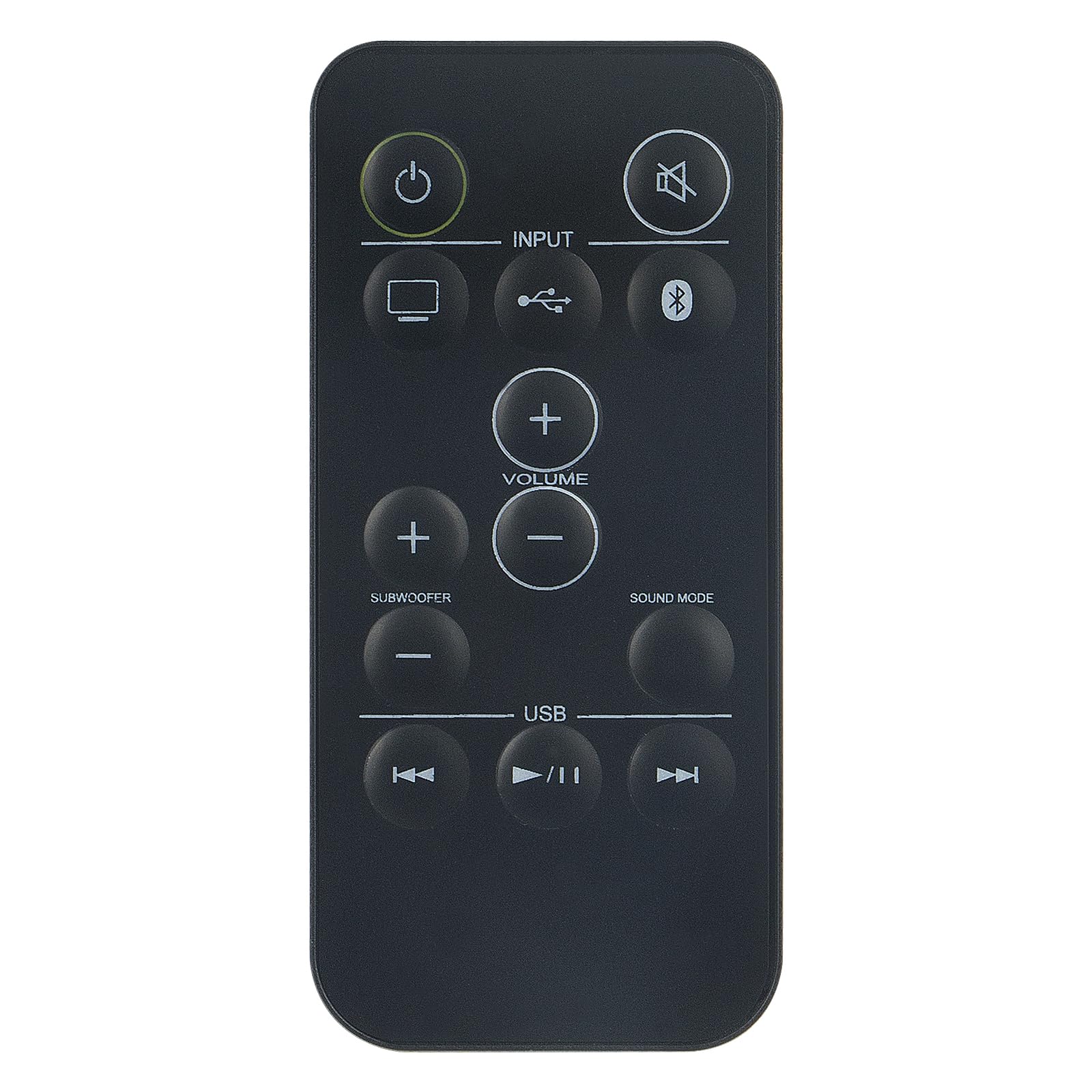
בילד: פראָנט view of the Beyution RC877S remote control, showing all buttons clearly labeled.
סעטאַפּ
ייַנמאָנטירונג פון באַטאַרייע
The RC877S remote control requires two AAA batteries for operation. Follow these steps to install the batteries:
- געפֿינען די דעקן פון די באַטאַרייע אָפּטייל אויף די צוריק פון די ווייַט קאָנטראָל.
- שלעפּט דעם דעקל אַראָפּ אָדער דריק דעם לאַטש (אויב פֿאַראַן) צו עפֿענען דעם אָפּטייל.
- אַרײַנשטעלן צוויי AAA באַטעריעס, און זיכער מאַכן אַז די פּאָזיטיוו (+) און נעגאַטיוו (-) טערמינאַלן זענען ריכטיק אויסגעשטעלט מיט די מאַרקירונגען אינעווייניק אין דעם אָפּטייל.
- לייגט צוריק דעם דעקל פונעם באַטעריע־אָפּטייל דורך עס צוריקצורוקן אין פּלאַץ ביז עס קליקט זיכער.
באַמערקונג: This remote control is designed to work immediately with compatible devices without any additional programming. If the remote does not respond, ensure batteries are installed correctly and have sufficient charge.

בילד: ווינקלדיק view of the Beyution RC877S remote control, highlighting its ergonomic design.
אַפּערייטינג ינסטראַקשאַנז
Point the remote control directly at your Onkyo audio soundbar or home theater system. The maximum effective operating distance is approximately 10 meters (33 feet).
קנעפּל פאַנגקשאַנז:
- מאַכט (⏻): טורנס די מיטל אויף אָדער אַוועק.
- שטום (🔇): מיוטעס אָדער אַנמיוט די אַודיאָ רעזולטאַט.
- אַרייַנשרייַב: Cycles through available input sources (e.g., TV, USB, Bluetooth).
- באַנד (+/-): Increases or decreases the main volume level.
- Subwoofer (+/-): אַדזשאַסטיד די סובוואָאָפער באַנד מדרגה.
- געזונט מאָדע: Changes the audio sound mode or preset.
- וסב: Selects the USB input source.
- פריערדיגע ליד (⏮): Skips to the beginning of the current track or the previous track during media playback.
- Play/Pause (⏸/⏸): שפּילט אָדער פּויזירט מעדיע ווידערשפּיל.
- נעקסטע ליד (⏭): Skips to the next track during media playback.

Image: A person comfortably using the remote control to operate a home theater system, demonstrating typical usage.
וישאַלט
כדי צו זיכער מאַכן די לאַנגלעבעניש און אָפּטימאַלע פאָרשטעלונג פון דיין ווייַט קאָנטראָל, נאָכפאָלגן די וישאַלט גיידליינז:
- רייניקונג: ווישט אָפּ די ווײַטקאָנטראָל מיט אַ ווייכן, טרוקענעם שטאָף. פֿאַר שווערן שמוץ, ווייכט עס אַ ביסל אויס.ampen the cloth with water or a mild cleaning solution, then wipe dry immediately. Avoid using abrasive cleaners or solvents.
- באַטערי פאַרבייַט: Replace batteries when the remote's response becomes sluggish or it stops functioning. Always replace both batteries at the same time with new ones of the same type (AAA).
- סטאָרידזש: Store the remote control in a cool, dry place away from direct sunlight, extreme temperatures, and high humidity. If the remote will not be used for an extended period, remove the batteries to prevent leakage.
- ויסמיידן טראפנס: באַשיצט דעם ווײַטקאָנטראָל פֿון פֿיזישן קלאַפּ, ווײַל פֿאַלן קענען שאַטן אינעווייניקסטע קאָמפּאָנענטן.
טראָובלעשאָאָטינג
If you experience issues with your RC877S remote control, refer to the following common solutions:
- ווייַט ניט ריספּאַנדינג:
- Check if the batteries are installed correctly with the correct polarity (+/-).
- פאַרבייַטן אַלטע באַטעריעס מיט נייַע AAA באַטעריעס.
- Ensure there is a clear line of sight between the remote control and the device's infrared receiver. Obstructions can block the signal.
- Make sure you are within the effective operating range (approximately 10 meters).
- ספעציפישע קנעפּלעך ארבעטן נישט:
- רייניקט די ווײַטקאָנטראָל, ספּעציעל אַרום די קנעפּלעך, צו באַזײַטיקן יעדן שמוץ אָדער דעבריס וואָס קען זיי פֿאַרשטאָפּן.
- If only certain buttons are unresponsive, the remote might be damaged.
- Device not compatible:
- Verify that your Onkyo audio system model is listed as compatible (LS-T10, LS-B50, LSB50, LST10, 24140877, RC-877S, RC877).
- This remote is an infrared replacement and does not require programming. If your original remote used a different technology (e.g., RF), this replacement may not be suitable.
אויב די טריט לייזן נישט דעם פראבלעם, ביטע זעט די וואראנטי און שטיצע סעקציע פאר ווייטערדיגע הילף.
ספּעסאַפאַקיישאַנז
| סאָרט | בייוטאָן |
| מאָדעל נאָמען | RC877S |
| מאָדעל נומער | WY-RC877S-US |
| קאַנעקטיוויטי טעכנאָלאָגיע | ינפרערעד |
| מאַקסימום קייט | 10 מעטער (33 פֿיס) |
| נומער פון באַטעריז פארלאנגט | 2 |
| באַטערי טיפּ | אַאַאַ אַלקאַלינע |
| מאַטעריאַל | אַבס פּלאַסטיק |
| קאָליר | שוואַרץ |
| נומער דימענשאַנז (L X W X H) | 5" x 1" x 0.5" |
וואָראַנטי און שטיצן
וואָראַנטי אינפֿאָרמאַציע
This Beyution RC877S remote control comes with a 1 יאָר וואָראַנטי פֿון דעם קויפֿדאַטום. די וואָראַנטי דעקט פֿאַבריקאַציע־דעפֿעקטן און גאַראַנטירט אַז דער פּראָדוקט פֿונקציאָנירט ווי באַשטימט אונטער נאָרמאַלן באַנוץ. ביטע באַהאַלטן אייער קויפֿבאַווײַז פֿאַר וואָראַנטי־קליימז.
קונה שטיצן
For any questions, concerns, or issues regarding your remote control, including damage or malfunction, please contact our customer service team. We are committed to providing a satisfactory solution within 24 hours.
קאָנטאַקט: Please refer to the seller's contact information on your purchase platform for direct assistance.