
הקדמה
Thank you for choosing the Setty 10000 mAh Solar Power Bank. This portable charger is designed to provide reliable power for your mobile devices, featuring a high-capacity battery, integrated charging cables, and a solar panel for emergency charging. Please read this manual carefully to ensure proper use and maintenance of your device.
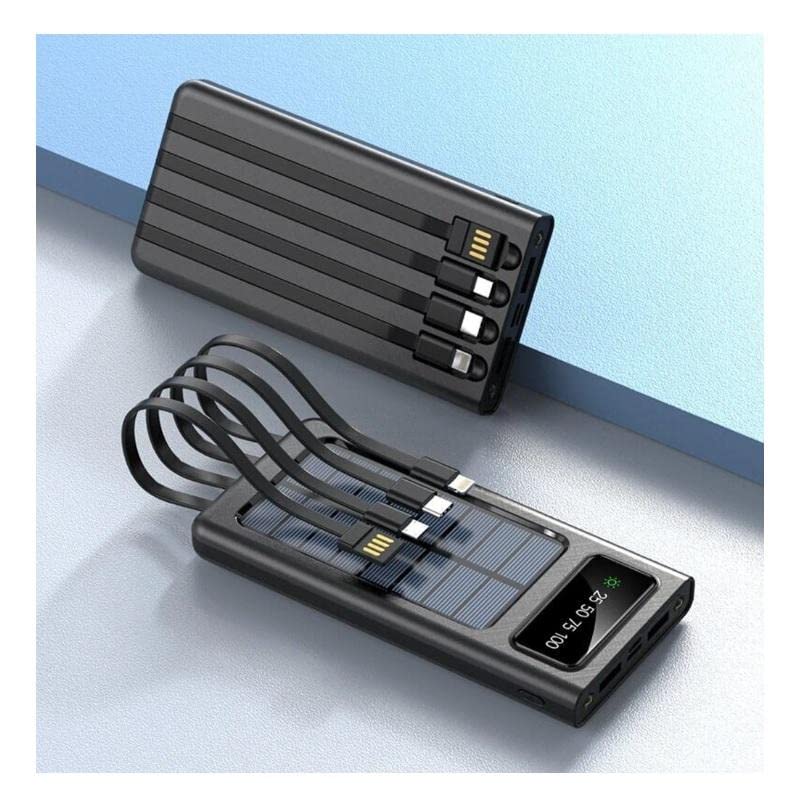
פּראָדוקט פֿעיִקייטן
- 10000 mAh הויך קאַפּאַציטעט: גיט קייפל טשאַרדזשיז פֿאַר רובֿ סמאַרטפאָונז.
- Integrated Charging Cables: Includes built-in USB, USB-C, MicroUSB, and Lightning cables for universal compatibility.
- סאָלאַר טשאַרדזשינג פיייקייט: Equipped with a solar panel for emergency power replenishment when conventional power sources are unavailable.
- קייפל רעזולטאַט פּאָרץ: Features a standard USB output port for charging various mobile devices.
- LCD ווייַז: Digital screen indicates battery charge level.
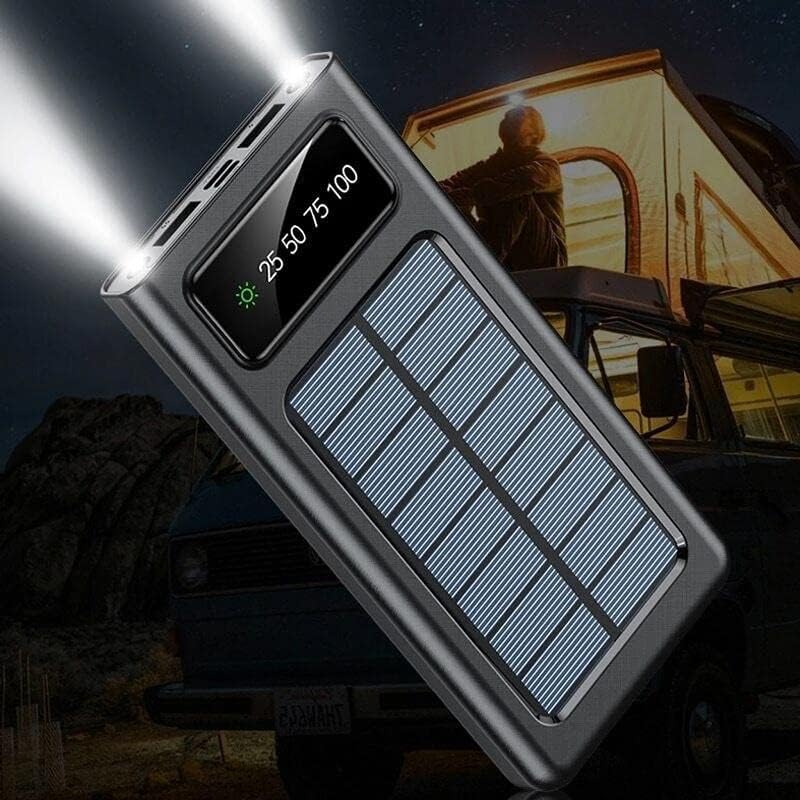
- LED פלאַשליגהט: Built-in flashlight for convenience in low-light conditions.
פּעקל אינהאַלט
- Setty 10000 mAh Solar Power Bank (Model 84730235)
- באַניצער מאַנואַל
קאָמפּאָנענט לעגיטימאַציע

- זונ פּאַנעל: For emergency solar charging.
- LCD ווייַז: שאָוז באַטאַרייע פּערסיזtagE און טשאַרדזשינג סטאַטוס.
- ינטעגראַטעד קאַבלעס: USB, USB-C, MicroUSB, Lightning output cables.
- USB-A רעזולטאַט פּאָרט: Standard USB port for connecting external cables.
- USB-C אַרייַנשרייַב פּאָרט: פֿאַר אָפּלאָדן די פּאַוער באַנק.
- MicroUSB Input Port: פֿאַר אָפּלאָדן די פּאַוער באַנק.
- מאַכט קנעפּל: To turn on/off the device and activate the flashlight.
- LED פלאַשליגהט: אינטעגרירטע ליכט מקור.
סעטאַפּ
ערשט טשאַרדזשינג
Before first use, fully charge the power bank using a wall adapter. This ensures the internal battery is properly calibrated and ready for optimal performance.
- Connect a USB-C or MicroUSB cable to the corresponding input port on the power bank.
- Connect the other end of the cable to a USB wall adapter (not included).
- צאַפּן די וואַנט אַדאַפּטער אין אַ מאַכט ווענטיל.
- דער על-סי-די דיספּלעי וועט ווײַזן דעם טשאַרדזשינג פּראָגרעס. טשאַרדזש ביז דער דיספּלעי ווײַזט 100%.
אַפּערייטינג ינסטראַקשאַנז
טשאַרדזשינג די מאַכט באַנק
The power bank can be charged via a wall adapter or its solar panel.
Via Wall Adapter (Recommended for fastest charge)
- Use the USB-C or MicroUSB input port with a compatible cable and wall adapter.
- The LCD display will show the charging percentage.
Via Solar Panel (Emergency Charging)

- Place the power bank in direct sunlight. Ensure the solar panel faces the sun.
- The solar charging indicator on the LCD display will illuminate when charging via solar energy.
- Solar charging is slower than wall charging and is intended for emergency use to extend battery life, not as a primary charging method.
טשאַרדזשינג פונדרויסנדיק דעוויסעס
The power bank can charge up to four devices simultaneously using its integrated cables and USB-A output port.
- Identify the correct integrated cable (USB, USB-C, MicroUSB, or Lightning) for your device.
- Connect the appropriate integrated cable to your device's charging port.
- Alternatively, use your device's original charging cable and connect it to the USB-A output port on the power bank.
- די פּאַוער באַנק וועט אויטאָמאַטיש אָנהייבן לאָדן דיין מיטל. אויב נישט, דריק דעם פּאַוער קנעפּל איין מאָל.
- The LCD display will show the remaining battery level of the power bank.
ניצן די געפֿירט פלאַשליגהט
- To turn on the flashlight, press and hold the power button for approximately 3 seconds.
- To turn off the flashlight, press and hold the power button again for approximately 3 seconds.
לקד ווייַז אינפֿאָרמאַציע

- דער אַרויסווייַזן ווייזט די באַטאַרייע אָפּצאָל מדרגה ווי אַ פּראָצענטtage (e.g., 25, 50, 75, 100).
- A sun icon will appear when the power bank is actively charging via its solar panel.
וישאַלט
- רייניקונג: ווישט אָפּ די פּאַוער באַנק מיט אַ ווייכן, טרוקענעם שטאָף. ניצט נישט קיין שאַרפע כעמיקאַלן אָדער אַברייסיוו מאַטעריאַלן.
- סטאָרידזש: האַלט די פּאַוער באַנק אין אַ קיל, טרוקן אָרט אַוועק פון דירעקט זונשייַן און עקסטרעמע טעמפּעראַטורן.
- באַטערי זאָרגן: כדי צו פארלענגערן די לעבן פון די באַטעריע, זאָלט איר גאָר אויפלאָדן די פּאַוער באַנק לפּחות איין מאָל יעדע דריי חדשים אויב איר ניצט עס נישט רעגולער. פֿאַרמייַדט אָפט גאָר אויסצולאָדן די באַטעריע.
- וואַסער ויסשטעלן: די דעווייס איז נישט וואַסערפּרוף. פֿאַרמייַדט אויסשטעלונג צו וואַסער אָדער איבעריקע פֿײַכטקייט.
טראָובלעשאָאָטינג
| פּראָבלעם | מעגלעך סיבה | לייזונג |
|---|---|---|
| מאַכט באַנק איז נישט טשאַרדזשינג | קאַבל נישט ריכטיק פארבונדן; דעפעקטיווער קאַבל/אַדאַפּטער; פּאַוער באַנק גאָר אויפגעלאָדן. | Ensure cables are securely connected. Try a different cable or wall adapter. Check LCD display for 100% charge. |
| די מיטל איז נישט טשאַרדזשינג פון די מאַכט באַנק | Power bank battery low; incorrect cable; device not compatible; power bank not activated. | Charge the power bank. Use the correct integrated cable or a known good external cable. Press the power button to activate output. |
| Solar charging is slow or not working | Insufficient sunlight; solar panel obstructed; solar charging is inherently slow. | Place the power bank in direct, unobstructed sunlight. Solar charging is supplementary; use wall charging for faster results. |
| געפירט פלאַשליגהט איז נישט ארבעטן | Power bank battery low; incorrect operation. | Charge the power bank. Press and hold the power button for 3 seconds to activate/deactivate. |
ספּעסאַפאַקיישאַנז
| שטריך | דעטאַל |
|---|---|
| מאָדעל נומער | 84730235 |
| סאָרט | Setty |
| פאַבריקאַנט | TelForceOne |
| באַטאַרייע קאַפּאַציטעט | 10000 מאַה |
| באַטערי טיפּ | Lithium-polymer (1 Lithium-ion battery included) |
| אַרייַנשרייַב פּאָרץ | USB Type C, MicroUSB |
| רעזולטאַט פּאָרץ | USB Type A, Integrated USB, USB-C, MicroUSB, Lightning cables |
| Voltage | 5 וואלטס |
| Ampעראַגע | 2.1 א |
| קאָליר | שוואַרץ |
| רעקאַמענדיד נוצן | מאָביל טעלעפֿאָנען |
| קאַמפּאַטאַבאַל דעוויסעס | מאָביל טעלעפֿאָנען |
זיכערקייַט אינפֿאָרמאַציע
- Do not expose the power bank to extreme temperatures, direct sunlight for prolonged periods (especially when not charging), or fire.
- Do not immerse the power bank in water or expose it to rain or excessive moisture.
- דו זאלסט נישט דיסאַסעמבאַל, מאָדיפיצירן אָדער פּרווון צו פאַרריכטן די מיטל זיך.
- האַלטן אויס פון דערגרייכן פון קינדער.
- ניצן בלויז קאַמפּאַטאַבאַל טשאַרדזשינג קייבאַלז און אַדאַפּטערז.
- ויסמיידן דראַפּינג אָדער אונטערטעניק די מאַכט באַנק צו שטאַרק ימפּאַקץ.
- If the power bank swells, overheats, or shows any other abnormal behavior, discontinue use immediately.
וואָראַנטי און שטיצן
This product is covered by a standard manufacturer's warranty. For specific warranty terms and conditions, please refer to the documentation provided at the time of purchase or contact your retailer. For technical support or inquiries, please visit the official Setty webפּלאַץ אָדער קאָנטאַקט זייער קונה סערוויס אָפּטיילונג.