
1. זיכערקייַט אינפֿאָרמאַציע
Please read this manual carefully before using the camera to ensure safe and proper operation. Keep this manual for future reference.
- צי ניט ויסשטעלן די אַפּאַראַט צו וואַסער אָדער נעץ.
- פֿאַרמײַדט צו לאָזן פֿאַלן די קאַמעראַ אָדער אויסשטעלן זי צו שטאַרקע קלאַפּן.
- Do not attempt to disassemble or modify the camera. Repairs should only be performed by qualified personnel.
- Keep the camera away from direct sunlight and high temperatures.
- Use only the specified battery type and charging cable.
- אַוועקוואַרפן באַטעריז רעכט לויט די היגע רעגיאַליישאַנז.
- Clean the camera lens and screen with a soft, dry cloth.
2. פּעקל אינהאַלט
באַשטעטיקט אַז אַלע זאכן וואָס זענען אויסגערעכנט אונטן זענען אַרייַנגערעכנט אין אייער פּעקל:
- Andoer Digital Camera Body
- Lithium Battery (3.7V 550mAh)
- וסב טשאַרדזשינג קאַבלע
- פירן באַג
- באַניצער מאַנואַל (דעם דאָקומענט)

Image: Contents of the Andoer Digital Camera package, showing the camera, wrist strap, USB charging cable, carry bag, and user manual.
3. פּראָדוקט איבערview
3.1 פראָנט View

בילד: פראָנט view of the Andoer Digital Camera, displaying the lens, built-in flash, and indicating 2.7" TFT screen and 18 Megapixels.
3.2 דערציען View (Display and Controls)
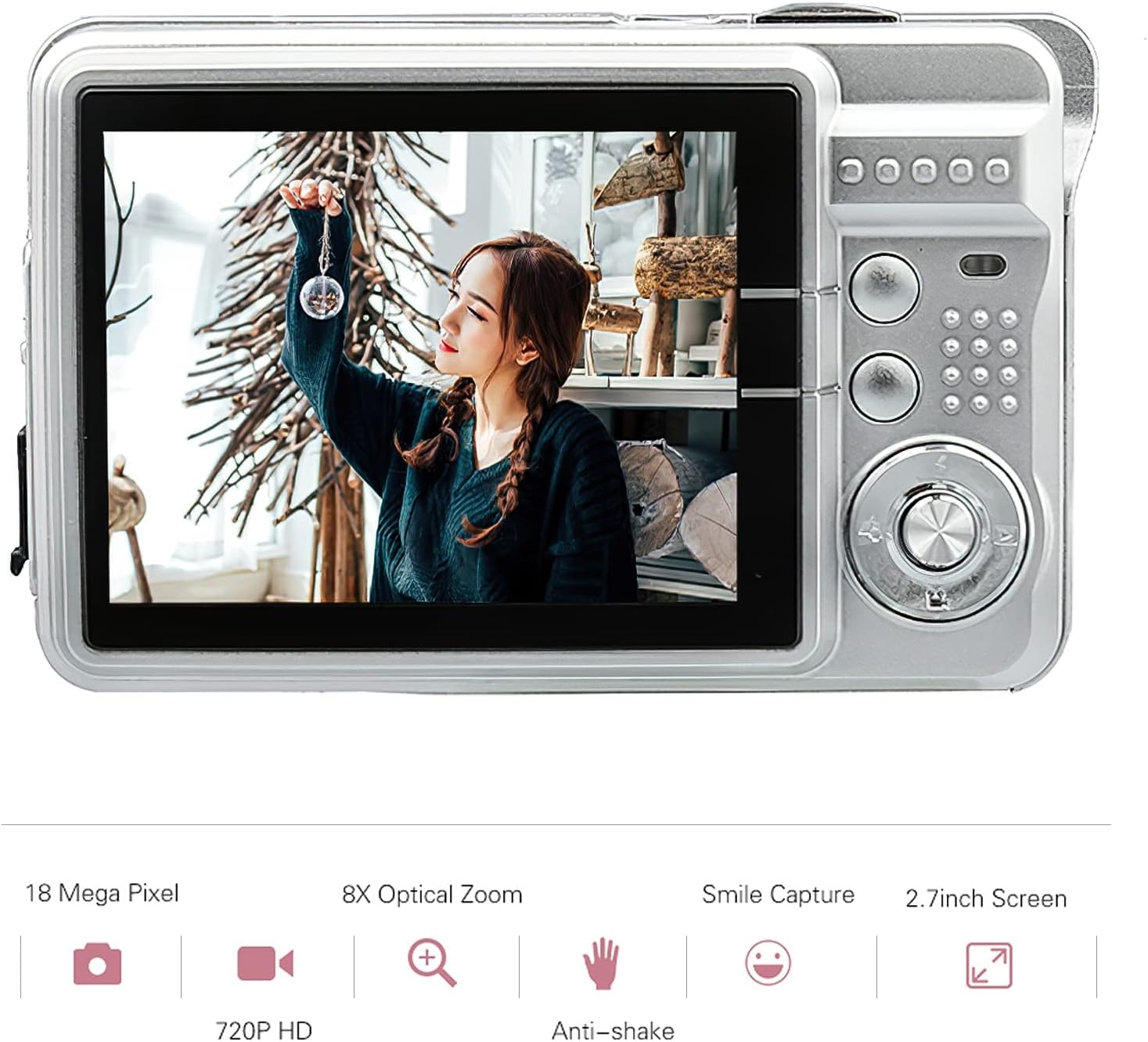
בילד: הינטערשטע view of the Andoer Digital Camera, featuring the 2.7-inch TFT display and various control buttons on the right side.
The camera features a 2.7-inch TFT display for viewing photos and videos, along with intuitive controls for navigation and settings adjustment.
4. סעטאַפּ
4.1 טשאַרדזשינג די באַטאַרייע
- Open the battery compartment cover on the side of the camera.
- Insert the provided Lithium battery (3.7V 550mAh) into the compartment, ensuring correct polarity.
- פאַרמאַכן די באַטאַרייע אָפּטייל דעקן סיקיורלי.
- Connect the camera to a USB power source (e.g., computer, USB wall adapter) using the supplied USB charging cable.
- The charging indicator light will illuminate. Charging is complete when the light turns off or changes color (refer to camera display for battery status).
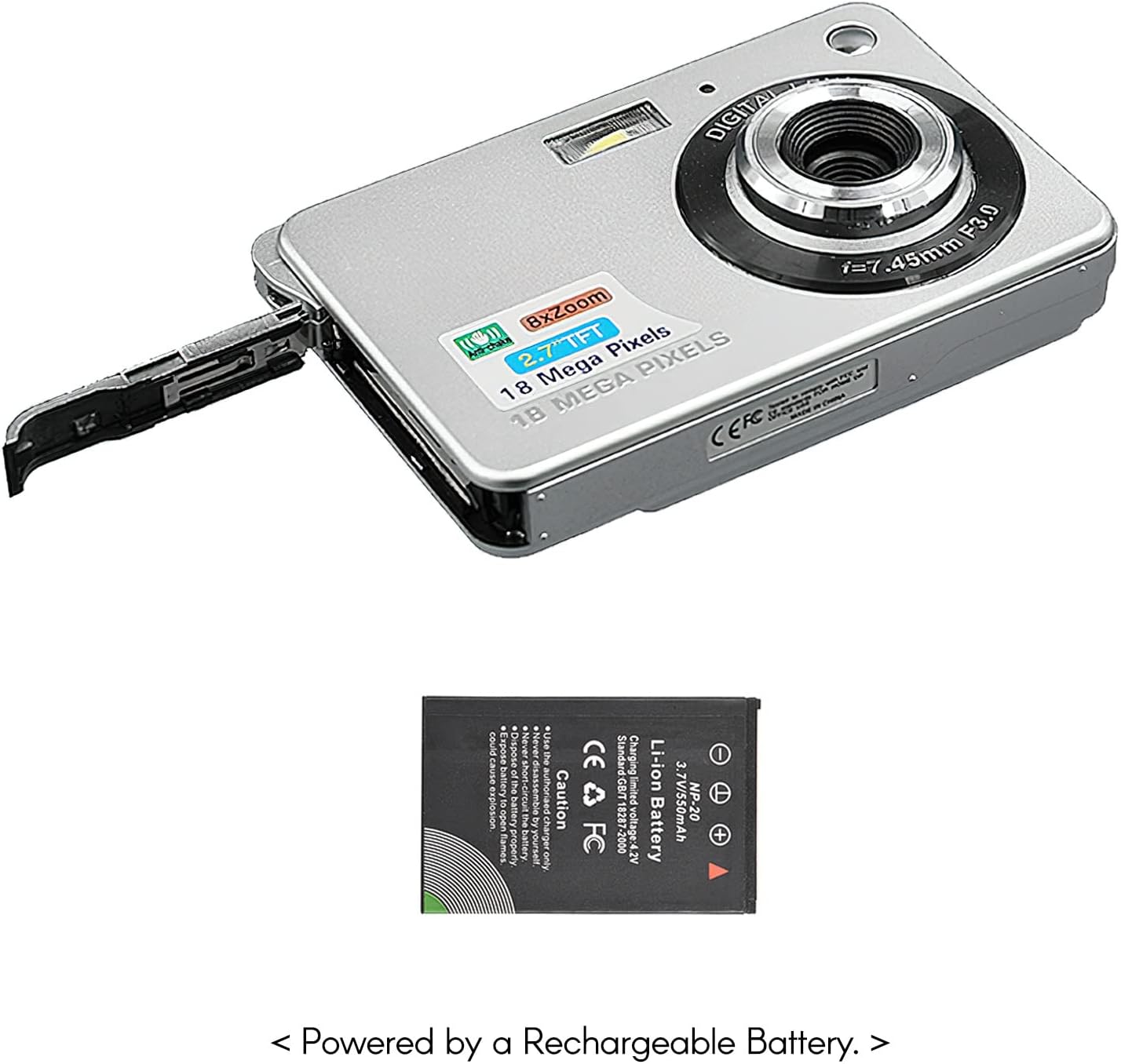
בילד: זייט view of the camera with the battery compartment open, illustrating how to insert the rechargeable lithium battery.
4.2 Inserting a Memory Card (Not Included)
This camera supports SD memory cards up to 32GB. A memory card is required to save photos and videos.
- געפינט דעם זכּרון קאַרטל שפּאַלט, געוויינטלעך לעבן דעם באַטאַרייע אָפּטייל.
- אַרײַנשטעלן די SD קאַרטל מיט די מעטאַלענע קאָנטאַקטן אַראָפּ (אָדער ווי געוויזן אויף דער דיאַגראַמע לעבן דעם שפּאַלט) ביז עס קליקט אַרײַן אין פּלאַץ.
- צו אַרויסנעמען, שטופּ די קאַרטל לײַכט אַרײַן ביז זי שפּרינגט אַרויס.
5. אַפּערייטינג ינסטרוקטיאָנס
5.1 פּאַוערינג אויף / אַוועק
דריק און האַלט דעם פּאַוער קנעפּל (געפינט זיך געוויינטלעך אויף דער שפּיץ אָדער זייט) צו דרייען די קאַמעראַ אָן אָדער אויס.
5.2 נעמען בילדער
- קער אויף די אַפּאַראַט.
- Frame your shot using the 2.7-inch TFT display.
- Press the Shutter button (typically on top) halfway down to focus, then press fully to capture the image.

Image: The camera's screen showing a captured image, demonstrating the 18 Megapixel photo capability.
5.3 רעקאָרדינג ווידיאס
- קער אויף די אַפּאַראַט.
- Switch to video recording mode (usually via a mode button or menu option).
- Press the Record button (often marked with a red dot) to start recording. Press again to stop.

Image: The camera's screen displaying a video playback, illustrating its 720P high-definition video recording function.
5.4 דיגיטאַל פארגרעסער
The camera features 8X digital zoom. Use the zoom buttons (often labeled 'W' for Wide and 'T' for Telephoto) to adjust the zoom level.

Image: A visual representation of the 8x digital zoom capability, showing a scene at 1x magnification and then zoomed in at 8x.
5.5 מעניו נאַוויגאַציע
Press the 'Menu' button to access camera settings. Use the directional buttons to navigate and the 'OK' or 'Set' button to confirm selections. Available settings include:
- Self-Timer: Off/ 2 sec/ 5 sec/ 10 sec
- אויסגעשטעלטקייט: EV-3 to EV+3
- ווייַס באַלאַנס: Auto/ Daylight/ Cloudy/ Incandescent/ Fluorescent
- סצענע מאָדעס: Auto/ Night Portrait/ Night Scenery/ Portrait/ Scenery/ Sport/ Party/ Beach/ High sensitivity
- אנדערע פֿעיִקייטן: Anti-Shake, Face Detect, Smile Capture
6. וישאַלט
6.1 רייניקן די קאַמעראַ
- ניצט אַ ווייכן, לינט-פֿרייע שטאָף צו רייניקן דעם קאַמעראַ קערפּער.
- For the lens and screen, use a specialized lens cleaning cloth and solution if necessary. Avoid abrasive materials.
- Do not use organic solvents to clean the camera.
6.2 באַטערי קער
- באַשולדיקן די באַטאַרייע גאָר איידער ערשטער נוצן.
- אויב די קאַמעראַ וועט נישט ווערן גענוצט פֿאַר אַ לענגערע צייט, נעמט אַרויס די באַטאַרייע.
- סטאָר באַטעריז אין אַ קיל, טרוקן אָרט.
7. טראָובלעשאָאָטינג
| פּראָבלעם | מעגלעך סיבה | לייזונג |
|---|---|---|
| די קאַמעראַ גייט נישט אָן. | די באַטעריע איז אויסגעשעפּט אָדער נישט ריכטיק אַרײַנגעשטעלט. | לאָדט די באַטעריע אויף. מאַכט זיכער אַז די באַטעריע איז אַרײַנגעשטעלט מיט דער ריכטיקער פּאָלאַריטעט. |
| קען נישט נעמען בילדער/רעקארדירן ווידיאס. | No memory card inserted or card is full/corrupted. | אַרײַנשטעלן אַ קאָמפּאַטיבלע SD קאַרטל. אויסמעקן נישט-נייטיקע זאכן. files or format the card (this will erase all data). |
| בילדער זענען בלערי. | די לינז איז שמוציק, נישט גענוג ליכט, אדער די קאַמעראַ האט געשאָקלט. | Clean the lens. Use the flash in low light. Hold the camera steady or use anti-shake feature. |
| די קאַמעראַ פרירט זיך אָדער ווערט נישט-רעאַגירנדיק. | צייטווייליגע ווייכווארג פראבלעם. | אַרויסנעמען און צוריקשטעלן די באַטאַרייע צו ריסעט די קאַמעראַ. |
8. ספּעסאַפאַקיישאַנז
| שטריך | דעטאַל |
|---|---|
| מאָדעל | IAT4319650447530BC |
| בילד סענסאָר | קמאָס סענסאָר |
| ווייַז | 2.7 אינטש טפט לקד |
| פאָטאָ האַכלאָטע | אַרויף צו 18 מעגאַפּיקסעלס |
| ווידעא האַכלאָטע | 1280x720 (720P), 720x480, 640x480 (VGA), 320x240 (QVGA) |
| דיגיטאַל פארגרעסער | 8X |
| בילד סטאַביליזאַטיאָן | דיגיטאַל אַנטי-שייק |
| ויסשטעלן פאַרגיטיקונג | EV-3 to EV+3 |
| ווייסע באַלאַנס | Auto/ Daylight/ Cloudy/ Incandescent/ Fluorescent |
| File פֿאָרמאַט | JPEG (Photo), AVI (Video) |
| סטאָרידזש מידיאַ | SD קאַרטל (ביז 32 גיגאבייט, נישט אַרייַנגערעכנט) |
| מאַכט צושטעלן | 1 * Lithium battery (3.7V 550mAh) |
| שטיצט סיסטעם | Windows XP, VISTA, WIN7, MAC |
| נומער גרייס | 9 * 6 * 2 סענטימעטער / 3.5 * 2.4 * 0.8 אינטש |
| פּונקט וואָג | 90 ג / 3.2 אַז |
9. וואָראַנטי און שטיצן
Andoer products are designed and manufactured to the highest quality standards. For warranty information and customer support, please refer to the documentation provided at the time of purchase or visit the official Andoer webפּלאַץ.
If you encounter any issues not covered in this manual, please contact Andoer customer service for assistance.
באַמערקונג: ספּעסאַפאַקיישאַנז זענען אונטערטעניק צו טוישן אָן פריערדיק באַמערקן.