
1. הקדמה
This manual provides essential information for the safe and efficient operation of your Strong 32HF2003 32-inch HD LED TV. Please read it thoroughly before using the product and retain it for future reference.
The Strong 32HF2003 is a 32-inch HD LED television featuring USB media playback and Electronic Program Guide (EPG) functionality. It is designed for home entertainment and offers various connectivity options.
2. זיכערקייַט אינסטרוקציעס
שטענדיק פֿאָלגן די גרונטלעכע זיכערהייט מיטלען ווען איר ניצט דעם טעלעוויזיע צו רעדוצירן דעם ריזיקאָ פֿון פֿײַער, עלעקטרישן קלאַפּ און שאָדן.
- דו זאלסט נישט ויסשטעלן די טעלעוויזיע צו רעגן אָדער נעץ.
- דו זאלסט נישט פאַרשפּאַרן ווענטאַליישאַן אָופּאַנינגז.
- זיכער מאַכן אַז די מאַכט שנור איז געהעריק גראַונדינג.
- נעמט ארויס דעם טעלעוויזאר בעת בליץ-שטורעמס אדער ווען מען ניצט עס נישט פאר לאנגע צייטן.
- אָפּשיקן אַלע סערוויסעס צו קוואַלאַפייד סערוויס פּערסאַנעל.
3. וואָס איז אין דער קעסטל
ביים אויספּאַקן, זיכער מאַכן אַז אַלע זאכן זענען פאַראַן און נישט געשעדיגט:
- Strong 32HF2003 32-inch HD LED TV
- ווײַטקאָנטראָל (דאַרפֿט 2 AAA באַטעריעס, נישט אַרייַנגערעכנט)
- Stand (for tabletop placement)
- מאַכט שנור
- באַניצער מאַנואַל (דעם דאָקומענט)

Image: The Strong 32HF2003 television displayed with its remote control, illustrating the main components included.
4. סעטאַפּ
4.1 אַטאַטשינג די שטיין
- לייגט פֿאָרזיכטיק דעם טעלעוויזיע־עקראַן אַראָפּ אויף אַ ווייכער, ריינער ייבערפֿלאַך כּדי צו פֿאַרמייַדן קראַצן.
- גלייכט אויס די שטאַנד קאָמפּאָנענטן מיט די מאַונטינג לעכער אויף דער אונטערשטער טייל פון דער טעלעוויזיע.
- באַפעסטיקט דעם שטאַנד מיט די צוגעשטעלטע שרויפן. נישט צו שטאַרק אָנציִען.
- הייב פֿאָרזיכטיק דעם טעלעוויזאָר צו זײַן אויפֿרעכטער פּאָזיציע אויף אַ סטאַבילער, גלייכער ייבערפֿלאַך.

Image: The Strong 32HF2003 television with its stand attached, ready for placement.
4.2 קאַנעקטינג פונדרויסנדיק דעוויסעס
The TV offers various connection ports for external devices:
- הדמי: For high-definition audio and video from devices like Blu-ray players, game consoles, or set-top boxes. The TV has 2 HDMI 2.0 ports.
- וסב: פֿאַר פֿאַרבינדן USB סטאָרידזש דעוויסעס צו שפּילן מעדיע files. The TV has 1 USB 2.0 port.
- AV אין: For standard definition video and stereo audio from older devices.
- אַנט אין: For connecting an antenna for terrestrial broadcast reception.
- SAT In: For connecting a satellite dish for satellite broadcast reception.
- סי שפּעלטל: פֿאַר קאָנדישאַנאַל אַקסעס מאָדולן (CAM) צו דעקריפּטירן ענקריפּטעד קאַנאַלן.
- S/PDIF: פֿאַר דיגיטאַלער אַודיאָ אַרויסגאַנג צו אַן עקסטערנער אַודיאָ סיסטעם.
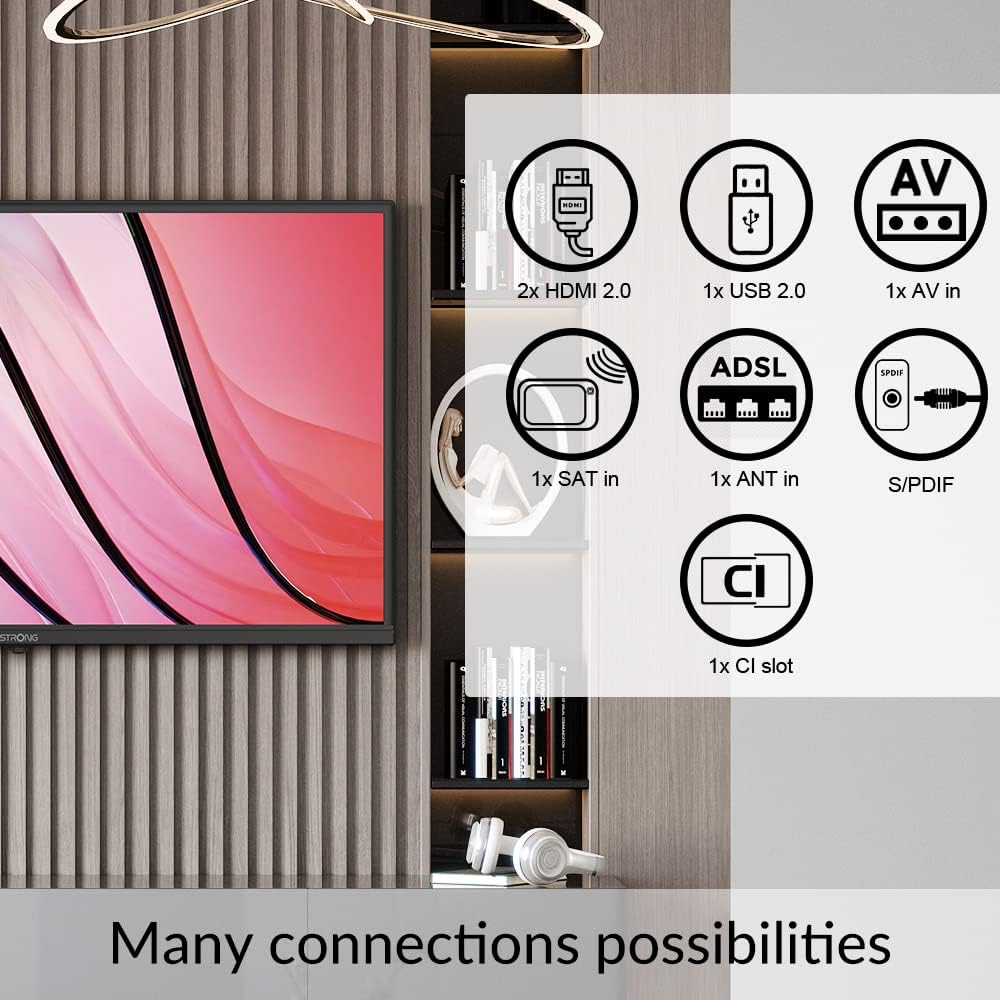
Image: A diagram illustrating the various connectivity options available on the Strong 32HF2003 television, including HDMI, USB, AV In, ANT In, SAT In, CI Slot, and S/PDIF.
צו פאַרבינדן אַ וסב מיטל:

בילד: א נאָענטע בילד view of the USB port on the television, demonstrating how to insert a USB drive for media playback.
4.3 מאַכט קאַנעקשאַן
After all external devices are connected, plug the power cord into the TV's power inlet and then into a suitable wall outlet.
5. אַפּערייטינג ינסטרוקטיאָנס
5.1 מאַכט אויף / אַוועק
- דרוק די מאַכט קנעפּל אויף דער ווײַטקאָנטראָל אָדער אויף דער טעלעוויזיע צו אַנצינדן אָדער אויסלעשן דעם טעלעוויזיע.
- The TV will enter standby mode when turned off.
5.2 ערשטע סעטאַפּ וויזאַרד
The first time you turn on the TV, an initial setup wizard will guide you through language selection, country, time zone, and channel scanning. Follow the on-screen prompts.
5.3 Channel Selection and Volume Control
- ניצן די טש +/- buttons to change channels sequentially.
- Use the number buttons to directly enter a channel number.
- ניצן די וואָל +/- קנעפּלעך צו סטרויערן די באַנד.
- דרוק די שטום קנעפּל צו צייטווייליג שטיל מאַכן דעם אַודיאָ.
5.4 אויסוואל פון איינגאבע מקור
To switch between connected devices (e.g., HDMI, AV, USB):
- דרוק די מקור or אַרייַנשרייַב קנעפּל אויף די ווייַט קאָנטראָל.
- Use the arrow buttons to navigate through the list of available input sources.
- דרוק OK or אַרייַן צו אויסקלייַבן דעם געוואלט מקור.
5.5 יו-עס-בי מעדיע פּלייבּעק
Insert a USB storage device into the USB port. The TV will typically detect the device and prompt you to open the media browser. You can then navigate and play supported video, audio, or image files.
5.6 עלעקטראָניש פּראָגראַם גייד (EPG)
The EPG provides a schedule of current and upcoming programs for digital channels. Press the EPG button on your remote control to access it. You can view program details and set reminders.
5.7 האטעל מאָדע
This TV features a Hotel Mode, which allows for customization of settings suitable for hospitality environments. This mode typically restricts certain user adjustments and can be configured by authorized personnel.

Image: The Strong 32HF2003 television displayed in a hotel room environment, highlighting its Hotel Mode feature.
6. וישאַלט
6.1 רייניקן דעם עקראַן
- אָפּשטעקן די טעלעוויזיע איידער רייניקונג.
- ניצט אַ ווייכן, לינט-פֿרייע שטאָף צו זאַכט ווישן דעם עקראַן.
- פֿאַר שווערע פֿלעקן, לײַכט דריקןampווישט דעם שטאָף מיט וואַסער אָדער אַ ספּעציאַליזירטן עקראַן רייניגער (שפּריצט נישט גלייך אויפן עקראַן).
- Avoid using abrasive cleaners, alcohol, or benzene.
6.2 רייניקונג די קאַבינעט
Wipe the TV cabinet with a soft, dry cloth. If necessary, use a slightly damp שטאָף, דעמאָלט מיד טרוקן.
6.3 Battery Replacement (Remote Control)
When the remote control's range decreases, replace the two AAA batteries with new ones, ensuring correct polarity.
7. טראָובלעשאָאָטינג
| פּראָבלעם | מעגלעך סיבה | לייזונג |
|---|---|---|
| קיין מאַכט | עלעקטרישע שנור נישט פארבונדן; קיין עלעקטריע פון דער ווענטיל. | קאָנטראָלירט די פֿאַרבינדונג פֿון דער עלעקטרישער שנור; פּרובירט די אַוטלעט מיט אַן אַנדער אַפּאַראַט. |
| קיין בילד נישט, אבער סאונד איז דא | אומרעכטע אינפוט מקור אויסגעקליבן; דעפעקטיווע קאַבל פֿאַרבינדונג. | Select correct input source; check cable connections. |
| קיין קלאַנג, אָבער בילד איז דאָ | די קול איז שטיל אדער צו נידעריג; פראבלעם מיט עקסטערנעם אודיא סיסטעם. | Unmute or increase volume; check external audio connections. |
| ווייַט קאָנטראָל נישט ארבעטן | באַטעריעס אויסגעשעפּט אָדער נישט ריכטיק אַרײַנגעשטעלט; פֿאַרשטאָפּונג. | Replace batteries; ensure clear path to TV's IR sensor. |
| "קיין סיגנאַל" מעסעדזש | Antenna/cable not connected; incorrect input source. | Check antenna/cable connection; select correct input. |
אויב די פראבלעם בלייבט נאך פרובירן די לייזונגען, ביטע קאנטאקטירט קאסטומער סופארט.
8. ספּעסאַפאַקיישאַנז
| שטריך | דעטאַל |
|---|---|
| סאָרט | שטאַרק |
| מאָדעל נומער | SRT32HF2003 |
| פאַרשטעלן גרייס | 32 אינטשעס |
| ווייַז טעכנאָלאָגיע | לקד |
| האַכלאָטע | 720p (HD) |
| דערפרישן קורס | 60 הז |
| אַספּעקט פאַרהעלטעניש | 16:9 |
| קאַנעקטיוויטי טעכנאָלאָגיע | וסב |
| ספּעציעלע שטריך | Flat, EPG, Hotel Mode |
| אַרייַנגערעכנט קאַמפּאָונאַנץ | שטיין |
| פּראָדוקט גרייס (מיט שטאַנד) | Approx. 28.84"W x 17.11"H x 3.17"D (732.5mm W x 480.2mm H x 19.69mm D - based on images and specs) |
| פּונקט וואָג | 3.7 קילאָגראַמס (8.14 פונט) |
| Voltage | 230 וואלטס (AC) |
| רעזולטאַט וואָסtage (Audio) | 5 וואטס |
| באַטעריעס פארלאנגט (ראָוט) | 2 אַאַאַ באַטעריז |

Image: A technical diagram illustrating the physical dimensions of the Strong 32HF2003 television in millimeters.

Image: The Dolby Audio logo superimposed on a television screen, indicating the audio technology supported by the device.
9. וואָראַנטי און שטיצן
Your Strong 32HF2003 television is covered by a standard manufacturer's warranty. Please refer to the warranty card included with your product or visit the official Strong webזייטל פֿאַר דעטאַלירטע וואָראַנטי טערמינען און באדינגונגען.
For technical support, troubleshooting assistance beyond this manual, or service inquiries, please contact Strong customer support through their official webזייטל אדער די קאָנטאַקט אינפֿאָרמאַציע וואָס איז צוגעשטעלט אין אייער פּראָדוקט פּאַקאַדזשינג.
באַמערקונג: האַלט אייער קויף קוויטל ווי אַ באַווייַז פון קויפן פֿאַר וואָראַנטי קליימז.