
פּראָדוקט איבערview
The Clarion JM-Carry On is a portable speaker designed for versatile audio playback. It features a wired microphone input, multi-color light effects, and an in-built battery for on-the-go use. Its compact and portable design allows for easy transport and setup in various environments.

Image: Clarion JM-Carry On Portable Bluetooth Speaker shown with its wired microphone.
ווידעא: אן איבערview of the Clarion Portable Bluetooth Speaker, highlighting its features and audio performance.
פּעקל אינהאַלט
ביטע אָפּהאַקן דאָס קעסטל פֿאַר די פֿאָלגנדיקע זאַכן:
- Clarion JM-Carry On Portable Bluetooth Speaker
- ווייערד מיקראָפאָן
- טשאַרדזשינג קאַבלע
ערשט סעטאַפּ
- טשאַרדזשינג די רעדנער: Connect the provided charging cable to the speaker's charging port and a suitable power source. The LED indicator will show charging status. Ensure the speaker is fully charged before first use for optimal battery life.
- מאַכט אויף / אַוועק: Locate the power switch on the speaker. Slide it to the 'ON' position to power on the device. Slide it to 'OFF' to power off.
- Bluetooth Pairing:
- Turn on the speaker. It will automatically enter Bluetooth pairing mode, indicated by a flashing LED.
- אויף דיין סמאַרטפאָנע אָדער טאַבלעט, געבן בלועטאָאָטה און זוכן פֿאַר בנימצא דעוויסעס.
- Select "Clarion JM-Carry On" from the list. A confirmation tone will sound upon successful pairing.
- Connecting Wired Microphone: Insert the wired microphone's plug into the designated microphone input jack on the speaker.
אָפּעראַציע גייד
- מאָדע סעלעקציע: Use the 'Mode' button to switch between Bluetooth (BT), FM Radio, USB, and AUX input modes.
- בלועטאָאָטה מאָדע: Once paired, audio from your connected device will play through the speaker. Use your device or the speaker's controls for volume and track navigation.
- עפעם ראַדיאָ מאָדע: In FM mode, press and hold the 'Play/Pause' button to auto-scan and save available radio stations. Use the 'Next/Previous' buttons to navigate through saved stations.
- USB/AUX מאָדע: Insert a USB drive into the USB port for MP3 playback or connect an external audio device via the AUX input using a 3.5mm audio cable.
- TWS (True Wireless Stereo) Functionality: To connect two JM-Carry On speakers for stereo sound, ensure both speakers are in Bluetooth mode and not connected to any device. Press and hold the TWS button on one speaker until you hear a pairing tone. The two speakers will connect, and then you can pair your device to the primary speaker.
- געזונט קאָנטראָל: Adjust the master volume using the main rotary knob. Separate controls may be available for microphone volume and echo effects.
- LED ליכט יפעקץ: The speaker features multi-color LED light effects. Use the dedicated 'Light' button to cycle through different light modes or turn them off.
זאָרגן און וישאַלט
- רייניקונג: ניצט אַ ווייכע, טרוקענע שטאָף צו רייניקן די אויסערלעכע זייט פון דעם רעדנער. ניצט נישט קיין שרײַבנדיקע רייניגערס אדער סאָלווענטן.
- סטאָרידזש: האַלט דעם רעדנער אין אַ קיל, טרוקן אָרט אַוועק פון דירעקט זונשייַן און עקסטרעמע טעמפּעראַטורן.
- באַטערי זאָרגן: כדי צו פארלענגערן די לעבן פון די באַטעריע, זאָלט איר נישט אָפט אויסלאָדן די באַטעריע. לאָדט דעם רעדנער רעגולער אויף, אפילו אויב עס ווערט נישט גענוצט פאר לענגערע צייטן.
- וואַסער קעגנשטעל: די רעדנער איז נישט וואַסערפּרוף. פֿאַרמייַדט אויסשטעלונג צו וואַסער אָדער הויך הומידיטי.
טראָובלעשאָאָטינג גייד
| פּראָבלעם | לייזונג |
|---|---|
| דער רעדנער גייט נישט אן. | Ensure the battery is charged. Connect the charging cable and try again. Check the power switch position. |
| קיין געזונט פון די רעדנער. | Check the volume level on both the speaker and the connected device. Ensure the correct input mode (BT, AUX, USB) is selected. |
| בלועטאָאָטה פּערינג פיילז. | Ensure the speaker is in pairing mode. Turn off and on Bluetooth on your device. Move the device closer to the speaker. Disconnect from other Bluetooth devices. |
| דער מיקראָפאָן אַרבעט נישט. | Ensure the microphone is securely plugged into the correct jack. Check the microphone volume control on the speaker. |
| די FM ראַדיאָ אָפּנאַם איז שוואַך. | Adjust the speaker's position. Extend any external antenna if available. |
טעכניש ספּעסאַפאַקיישאַנז
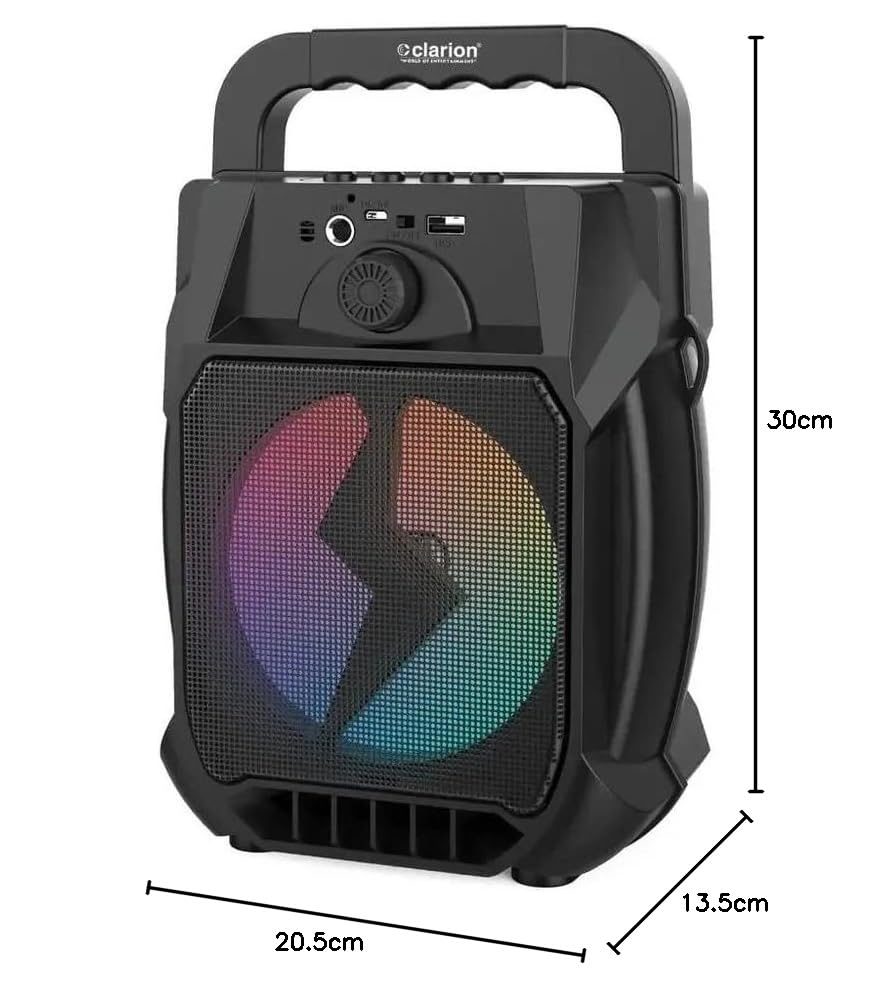
Image: Clarion JM-Carry On Portable Bluetooth Speaker with its dimensions indicated.
- סאָרט: Clarion (Generic)
- מאָדעל נאָמען: JM-Carry On
- רעדנער מאַקסימום רעזולטאַט מאַכט: 20 וואטס רמס
- קאַנעקטיוויטי טעכנאָלאָגיע: הילפס-פארבינדונג, בלועטוט, יו-עס-בי
- אַודיאָ רעזולטאַט מאָדע: סטערעאָ
- מאַונטינג טיפּ: שטאָק שטייענדיק
- רעדנער טיפּ: סאַטעליט
- פּראָדוקט פֿעיִקייטן: Built-In Microphone, Radio, Subwoofer, Multi-color Light Effect, Sound Controller
- קאָנטראָל אופֿן: ריר
- Woofer Driver Diameter: 6.5 אינטשעס
- באַטערי דורכשניטלעך לעבן: 3-4 שעה
- באַטאַרייע קאַפּאַציטעט: 1.2 Amp שעה (3.7V)
- נומער דימענשאַנז (ד x וו x ה): 13.5 X 20.5 X 30 סענטימעטער
- קאַמפּאַטאַבאַל דעוויסעס: סמאַרטפאָנע, טאַבלעט
- מאַכט מקור: באַטאַרייע פּאַוערד
וואָראַנטי און קונה שטיצן
This Clarion JM-Carry On Portable Bluetooth Speaker comes with a 1 יאָר וואָראַנטי on the speaker unit from the date of purchase. Please retain your purchase receipt as proof of warranty.
For any technical assistance, troubleshooting, or warranty claims, please contact Clarion Computers customer support. Refer to your purchase documentation for specific contact details or visit the official Clarion Computers webוועבזייטל פֿאַר שטיצע אינפֿאָרמאַציע.
Note: The warranty typically covers manufacturing defects and does not cover damage caused by misuse, accidents, unauthorized modifications, or normal wear and tear.