
הקדמה
א דאנק פארן קויפןasing the BELVA BDMRS5 Single DIN Bluetooth Car Stereo. This manual provides detailed instructions for the installation, operation, and maintenance of your new car stereo. Please read this manual thoroughly before installation and use to ensure proper function and to prevent damage.
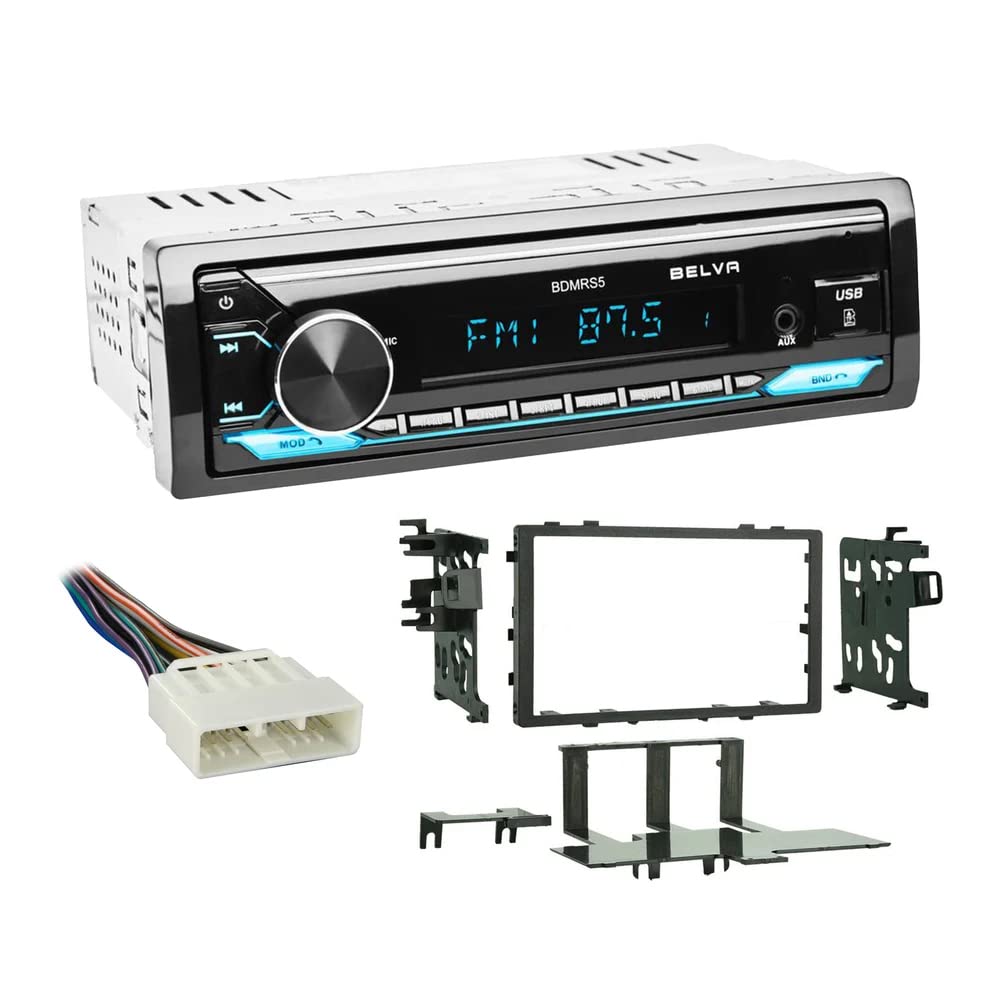
פראָנט view of the BELVA BDMRS5 Single DIN Bluetooth Car Stereo, showing the display, control knob, and various input ports.
זיכערקייַט אינפֿאָרמאַציע
- Always consult a professional for installation if you are unsure about any steps.
- זיכער מאַכן אַז די באַטאַרייע פֿון דער פֿאָרמיטל איז אָפּגעטיילט איידער איר הייבט אָן די אינסטאַלאַציע צו פֿאַרמייַדן עלעקטרישע קורצע שאָרטקעס.
- Do not operate the stereo in a manner that distracts you from driving.
- פֿאַרמײַדן אויסצושטעלן דעם אַפּאַראַט צו פֿײַכטקייט אָדער עקסטרעמע טעמפּעראַטורן.
פּעקל אינהאַלט
באַשטעטיקן אַז אַלע זאכן זענען פאַראַן אין פּעקל:
- BELVA BDMRS5 Car Stereo Unit
- Wire Harness (Vehicle Specific)
- Dash Kit (Vehicle Specific)
- ווייַט קאָנטראָל
- מאַונטינג ייַזנוואַרג
- ינסטרוקטיאָן מאַנואַל (דעם דאָקומענט)
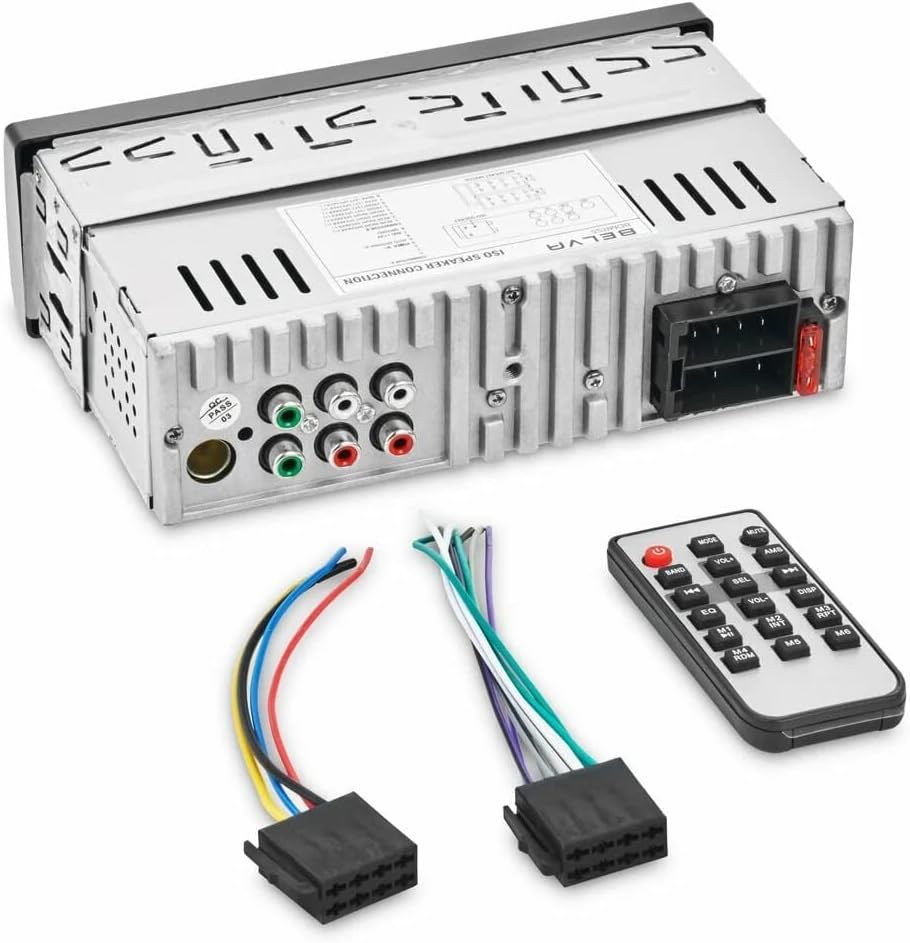
דערציען view of the BELVA BDMRS5 stereo, showing RCA outputs, power connector, and antenna input, alongside the included wire harnesses and remote control.
סעטאַפּ און ינסטאַלירונג
Proper installation is crucial for optimal performance. If you are not experienced with car audio installations, it is highly recommended to seek professional assistance.
קאָמפּאַטיביליטי באַמערקונג:
While this unit is marketed as an upgrade for specific vehicles, it is essential to verify the compatibility of the included dash kit and wire harness with your exact vehicle model and year. Some users have reported incompatibility with certain Honda CR-V models (e.g., 1997-1998) due to incorrect harness or dash adapter fitment. Always double-check before proceeding with permanent modifications.
ינסטאַלירונג סטעפּס:
- דיסקאַנעקט באַטערי: איידער איר הייבט אן, דיסקאנעקטירט דעם נעגאטיוון טערמינאל פון אייער אויטא'ס באטעריע כדי צו פארמיידן עלעקטרישע קורצע צוזאמענברוכן.
- אַראָפּנעמען אַלטע סטערעאָ: Carefully remove your existing car stereo and any associated mounting brackets.
- Install Dash Kit: Assemble the provided vehicle-specific dash kit according to its separate instructions. This kit is designed to integrate the new single DIN stereo into your vehicle's dashboard opening.

Various components of the vehicle-specific dash kit, used to securely mount the stereo in the dashboard.
- Wire Harness Connection: Connect the BELVA BDMRS5 wire harness to the vehicle-specific wire harness provided. Match the wire colors and functions carefully.

Close-up of the vehicle-specific wire harness, showing multiple colored wires and a connector for integration with the car's electrical system.
- Connect Stereo Wires:
- מאַכט (געל): Connect to constant 12V power.
- אַקסעסאָרי (רויט): Connect to switched 12V power.
- ערד (שוואַרץ): פֿאַרבינדט זיך צו אַ ריינעם שאַסי גראַונד פּונקט.
- רעדנער ווירעס: Connect to your vehicle's speaker wires (e.g., White/White-Black for front left, Gray/Gray-Black for front right, Green/Green-Black for rear left, Purple/Purple-Black for rear right). Ensure correct polarity.
- אַנטענע: Connect the vehicle's antenna cable to the stereo's antenna input.
- Preamp אויסגאבן (RCA): אויב ניצן פונדרויסנדיק amplifiers, connect RCA cables from the stereo's 5V preamp outputs to your ampליפערז.
- Mount Stereo: Slide the BELVA BDMRS5 stereo into the dash kit and secure it using the provided mounting hardware.
- רעקאָננעקט באַטערי: Once all connections are secure and verified, reconnect the negative terminal of your vehicle's battery.
- טעסט פאַנגקשאַנאַליטי: Turn on the stereo and test all functions (radio, Bluetooth, USB, AUX, sound output) before fully reassembling the dashboard.
אַפּערייטינג ינסטראַקשאַנז
פראָנט פּאַנעל קאָנטראָלס:

דעטאַילעד view of the BELVA BDMRS5 front panel, highlighting the power button, mode button, volume knob, track controls, and input ports.
- מאַכט קנעפּל (⑂): דרוק צו קער די אַפּאַראַט אויף / אַוועק.
- Mode Button (MOD): Press to cycle through available sources: Radio (FM/AM), Bluetooth, USB, SD, AUX.
- באַנד קנעפּל: Rotate to adjust volume. Press to access audio settings (Bass, Treble, Balance, Fader, EQ).
- Track/Tune Buttons (◀◀ / ▶▶): In radio mode, short press to seek stations. Long press for manual tuning. In USB/SD/Bluetooth mode, short press to skip tracks.
- Band Button (BND): אין ראַדיאָ מאָדע, דריקן צו באַשטימען צווישן FM1, FM2, FM3, AM1, AM2 באַנדס.
- וסב פּאָרט: אַרײַנשטעלן USB פלאַש דרייווס פֿאַר מעדיע ווידערשפּיל.
- SD Card Slot: אַרײַנשטעלן SD קאַרדס פֿאַר מעדיע ווידערשפּיל.
- AUX אריינגאנג (3.5 מ"מ): פֿאַרבינדט עקסטערנע אַודיאָ דעוויסעס מיט אַ 3.5 מם אַודיאָ קאַבל.
בלועטאָאָטה אָפּעראַציע:
- פּאָרינג:
- Turn on the stereo and select Bluetooth mode using the MOD button.
- אויף דיין רירעוודיק מיטל, געבן בלועטאָאָטה און זוכן פֿאַר בנימצא דעוויסעס.
- Select "BELVA BDMRS5" (or similar name) from the list. If prompted for a password, enter "0000".
- Once paired, the stereo will indicate a successful connection.
- אַודיאָ סטרימינג: After pairing, you can stream audio from your device to the stereo. Use the stereo's track controls or your device to manage playback.
- הענט-פריי רופן: When a call comes in, the stereo will display the caller ID (if supported). Press the ► button (Play/Pause) to answer, and press it again to end the call.
וסב / סד קאָרט פּלייבאַק:
- Insert a USB flash drive or SD card into the respective port/slot.
- The stereo will automatically switch to USB or SD mode and begin playback. If not, press the MOD button to select the correct source.
- Use the track buttons (◀◀ / ▶▶) to skip tracks.
- דרוק די ► button (Play/Pause) to pause or resume playback.
ראַדיאָ אָפּעראַציע:
- Press the MOD button to select Radio mode.
- Press the BND button to cycle through FM1, FM2, FM3, AM1, AM2 bands.
- אויטאָ זוכן: Short press the track buttons (◀◀ / ▶▶) to automatically seek the next strong station.
- מאַנואַל ניגון: Long press the track buttons (◀◀ / ▶▶) to manually tune the frequency.
- סטאָר פּרעסעץ: To store a station, tune to the desired frequency, then long press one of the numbered preset buttons (1-6) until you hear a beep.
- צוריקרופן פּרעסעץ: Short press a numbered preset button (1-6) to recall a stored station.
ווייַט קאָנטראָל:
The included remote control provides convenient access to most functions. Ensure the remote has a working battery and is pointed towards the stereo's front panel for optimal response.

The BELVA BDMRS5 car stereo shown with its included remote control and wiring harnesses, illustrating the full package.
וישאַלט
- רייניקונג: ניצט אַ ווייכע, טרוקענע שטאָף צו רייניקן דעם פראָנט פּאַנעל. ניצט נישט קיין שרײַבנדיקע רייניגערס אדער סאָלווענטן.
- פֿאַרבינדונגען: קאָנטראָלירט פּעריִאָדיש אַלע וויירינג פֿאַרבינדונגען צו זיכער מאַכן אַז זיי זענען זיכער און פֿרײַ פֿון קעראָוזשאַן.
- ווייכווארג דערהייַנטיקונגען: Check the BELVA website for any available firmware updates for your model.
טראָובלעשאָאָטינג
| פּראָבלעם | מעגלעך סיבה | לייזונג |
|---|---|---|
| קיין מאַכט | דורכגעבלאָזן פיוז; פאַלשע וויירינג; פרייַ מאַכט פֿאַרבינדונג. | Check the fuse in the stereo and vehicle's fuse box. Verify power and ground connections. Ensure the yellow (constant) and red (accessory) wires have power. |
| קיין געזונט | Incorrect speaker wiring; volume too low; mute function active; incorrect source selected. | Check speaker connections for correct polarity and secure fit. Increase volume. Ensure mute is off. Select the correct audio source. |
| בלועטאָאָטה ניט קאַנעקטינג | Device not in pairing mode; stereo not in Bluetooth mode; interference. | Ensure both devices are in pairing mode. Select Bluetooth source on stereo. Try restarting both devices. Clear previous pairings. |
| USB/SD Not Reading | ניט געשטיצט file פֿאָרמאַט; פֿאַרדאָרבן files; incompatible device; card/drive not inserted correctly. | ענסורע מידיאַ files are in supported formats (e.g., MP3). Reformat the USB/SD card if necessary. Try a different USB drive or SD card. Ensure it is fully inserted. |
| נעבעך ראַדיאָ אָפּטראָג | Antenna not connected; damaged antenna; weak signal area. | Check antenna connection. Inspect antenna for damage. Try auto-seeking stations. |
ספּעסאַפאַקיישאַנז
- מאָדעל: BDMRS5
- טיפּ: Single DIN In-Dash MP3/USB Car Stereo Receiver
- מאַקס מאַכט רעזולטאַט: 50 וואטס רענטגענ 4 טשאַנאַלז
- Preamp אויסגאבעס: 3 Sets of 5V Preamp אַוטפּוץ
- קאַנעקטיוויטי: Built-in Bluetooth (hands-free and audio streaming), Front AUX Input, Front USB Input, Front SD Card Input
- קאַמפּאַטאַבאַל דעוויסעס: סמאַרטפאָנע, רעדנער
- אַודיאָ רעזולטאַט מאָדע: סטערעאָ
- סאָונד סאָונד קאַנאַל קאַנפיגיעריישאַן: 4 קאַנאַל
- וואָסtage: 200 Watts (Total Output)

דערציען view of the BELVA BDMRS5 stereo, specifically showing the three sets of 5V preamp אַוטפּוץ פֿאַר קאַנעקטינג פונדרויסנדיק ampליפערז.

פראָנט view of the BELVA BDMRS5 stereo, clearly indicating the accessible USB, Micro SD, and AUX input ports.
וואָראַנטי און שטיצן
This BELVA product is covered by a manufacturer's warranty. Please refer to the warranty card included in your package or visit the official BELVA webזייטל פֿאַר ספּעציפֿישע תּנאים און באַדינגונגען וועגן וואָראַנטי קאַווערידזש און געדויער.
For technical support, troubleshooting assistance, or warranty claims, please contact BELVA customer service through their official website or the retailer from whom you purchased the product. You can find more information and contact details on the BELVA Store on Amazon.