
1. הקדמה און איבערview
The Metronic Netsocket 600 Powerline Adapter is designed to extend your home network using your existing electrical wiring. This device transforms any electrical outlet into a network connection, providing high-speed internet access throughout your home without the need for new cables. It is ideal for applications requiring high bandwidth, such as HD video streaming and online gaming.
שליסל פֿעיִקייטן אַרייַננעמען:
- פּלוג און שפּיל ינסטאַלירונג: Simple setup without requiring any drivers.
- הויך-גיכקייַט דאַטן אַריבערפירן: Up to 600 Mbps, suitable for demanding network activities.
- Integrated Pass-Through Socket: Ensures the electrical outlet remains available for other devices.
- Anti-Interference Filter: Reduces electrical noise from connected devices, maintaining optimal network performance.
- ברייט קאַמפּאַטאַבילאַטי: Works with all ADSL boxes and devices equipped with an RJ45 Ethernet port (computers, smart TVs, game consoles).
- זיכער פּאָרינג: Easy button-press pairing for adding new adapters to your network.

בילד 1.1: פראָנט view of the Metronic Netsocket 600 Powerline Adapter, showing the integrated electrical socket and indicator lights.
2. זיכערקייַט אינפֿאָרמאַציע
Please read and follow these safety instructions carefully to prevent damage to the device or injury to yourself.
- שטעלט נישט אויס דעם אפאראט צו וואסער, פייכטקייט, אדער עקסטרעמע טעמפעראטורן.
- עפֿנט נישט און פּרוּווט נישט צו פאַרריכטן דאָס אַפּאַראַט אַליין. לאָזט איבער אַלע סערוויסעס צו קוואַליפֿיצירטע פּערסאָנעל.
- Ensure the electrical outlet used is properly grounded.
- Avoid plugging the adapter into power strips or extension cords, as this may reduce performance. Plug directly into a wall outlet.
- האַלטן די מיטל אַוועק פון היץ קוואלן און דירעקט זונשייַן.
- Use only the power cord and accessories provided or recommended by the manufacturer.
3. סעטאַפּ אינסטרוקציעס
Setting up your Metronic Netsocket 600 Powerline Adapter is a simple Plug & Play process.
3.1 Initial Setup (Two Adapters)
- פֿאַרבינדט דעם ערשטן אַדאַפּטער: Plug one Metronic Netsocket 600 adapter directly into a wall electrical outlet near your internet router or modem.
- פאַרבינדן צו ראָוטער: Use an Ethernet cable to connect the adapter's RJ45 port to an available LAN port on your internet router/modem.
- פֿאַרבינדט דעם צווייטן אַדאַפּטער: Plug the second Metronic Netsocket 600 adapter directly into a wall electrical outlet in the room where you need network access.
- פאַרבינדן צו מיטל: Use another Ethernet cable to connect the second adapter's RJ45 port to your device (e.g., computer, smart TV, game console).
The adapters should automatically detect each other and establish a secure network connection. The indicator lights on the adapters will confirm the connection status.
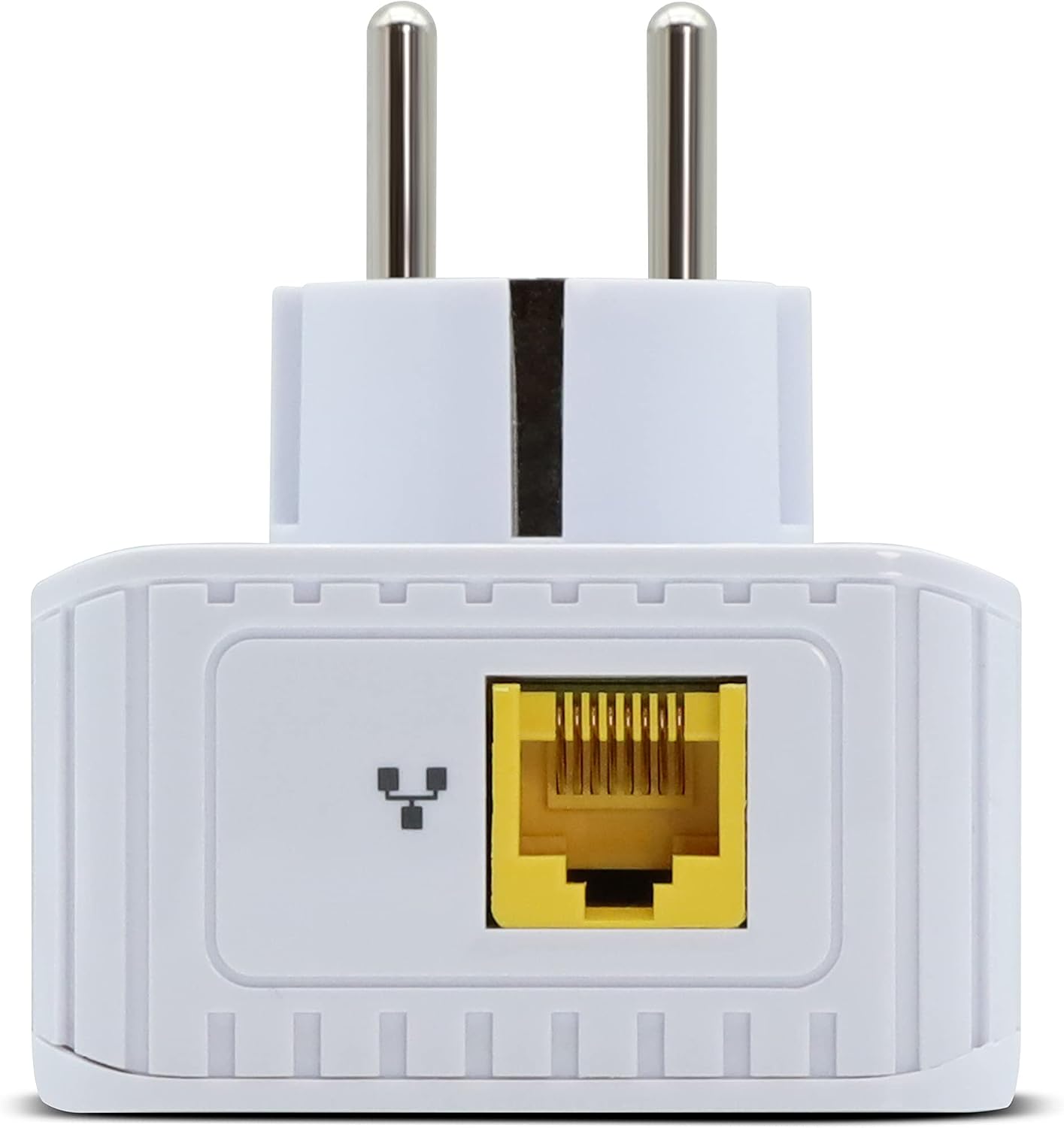
בילד 3.1: אונטן view of the adapter, showing the Fast Ethernet RJ45 port.
3.2 Adding More Adapters (Pairing)
To expand your Powerline network with additional Metronic Netsocket 600 adapters:
- Plug the new adapter into a wall outlet.
- Press the pairing button on one of the existing, already connected adapters for approximately 2 seconds.
- Within 2 minutes, press the pairing button on the new adapter for approximately 2 seconds.
The adapters will automatically pair and establish a secure connection (128-bit AES encryption). This process typically takes less than 30 seconds.

Image 3.2: Close-up of the adapter's indicator lights and the pairing button (often labeled with a lock icon).
4. אַפּערייטינג ינסטרוקטיאָנס
Once set up, the Metronic Netsocket 600 operates automatically. Here's what to expect:
4.1 ינדיקאַטאָר לייץ
The adapter features several indicator lights to show its status:
- Power LED (⏻): ווײַזט אָן אויב דער אַדאַפּטער איז אנגעצינדן.
- Powerline LED (⇆): Indicates the status of the Powerline connection. A solid light usually means a successful connection.
- Ethernet LED (↔): Indicates activity on the Ethernet port. Blinking suggests data transfer.
4.2 Integrated Socket
The integrated pass-through electrical socket allows you to plug other electrical devices into the same wall outlet without losing the outlet's functionality. The built-in anti-interference filter helps to prevent electrical noise from these devices from affecting your Powerline network performance.
5. וישאַלט
The Metronic Netsocket 600 Powerline Adapter requires minimal maintenance.
- רייניקונג: ניצט אַ ווייכע, טרוקענע שטאָף צו רייניקן די אויסערלעכע זייט פון דעם אַדאַפּטער. ניצט נישט קיין פליסיקע רייניגערס אדער אַעראָזאָלן.
- סוויווע: Ensure the adapter is used in a dry, well-ventilated area, away from direct sunlight and heat sources.
- Firmware דערהייַנטיקונגען: Periodically check the Metronic webזייטל פֿאַר אַלע בנימצא פירמווער דערהייַנטיקונגען פֿאַר דיין מאָדעל צו ענשור אָפּטימאַל פאָרשטעלונג און זיכערהייט.
6. טראָובלעשאָאָטינג
If you encounter issues with your Powerline adapter, try the following solutions:
6.1 No Network Connection / Slow Speed
- טשעק מאַכט: Ensure both adapters are plugged directly into wall outlets and powered on.
- טשעק עטערנעט קייבלס: Verify that all Ethernet cables are securely connected to both the adapters and your devices/router.
- ינדיקאַטאָר לייץ: Check the Powerline LED on both adapters. If it's off or blinking erratically, the Powerline connection may not be established.
- Try Different Outlets: Move the adapters to different wall outlets to rule out issues with a specific electrical circuit. Avoid power strips or extension cords.
- Re-Pair Adapters: If the Powerline LED is off, try re-pairing the adapters as described in Section 3.2.
- ינטערפיראַנס: Large electrical appliances (e.g., washing machines, refrigerators, microwaves) on the same electrical circuit can cause interference. Try plugging the adapters into outlets on different circuits or away from such appliances.
6.2 פּראָבלעמען מיטן צוזאַמענשטעלן
- Ensure you press the pairing button on the first adapter, then the second, within the 2-minute window.
- Make sure both adapters are powered on and plugged directly into wall outlets during the pairing process.
7. טעכניש ספּעסאַפאַקיישאַנז
| שטריך | באַשרייַבונג |
|---|---|
| מאָדעל נומער | 495466 |
| סאָרט | מעטראָניק |
| דאַטאַ אַריבערפירן קורס | אַרויף צו 600 Mbps |
| עטהערנעט פּאָרט | 1 x Fast Ethernet (100 Mbps) |
| מאַכט אַרייַנשרייַב | 110-240 וו ~ 50/60 הז |
| טשיפּסעט | MStar MSE1060 |
| ענקריפּשאַן | AES 128-ביסל |
| Powerline Standard | Homeplug AV compatible |
| דימענסיעס (L X W X H) | 8.5 X 19 X 15.5 סענטימעטער |
| קאָליר | ווייַס |
| קאַמפּאַטאַבאַל דעוויסעס | Computer, Laptop, Smart TV, Game Console |
8. וואָראַנטי אינפֿאָרמאַציע
The Metronic Netsocket 600 Powerline Adapter comes with a 2 יאָר וואָראַנטי on spare parts. Please retain your proof of purchase for warranty claims. The warranty covers defects in materials and workmanship under normal use. It does not cover damage caused by misuse, accidents, unauthorized modifications, or external causes.
9. קונה שטיצן
If you require further assistance or have questions not covered in this manual, please contact Metronic customer support.
- פאַבריקאַנט: מעטראָניק
- Webפּלאַץ: www.metronic.com (ביטע טשעק די אפיציעלע website for contact details and the latest support information.)


