
הקדמה
Thank you for choosing the DELUX GM905 Ergonomic Wireless Keyboard. This manual provides detailed instructions for setting up, operating, and maintaining your keyboard to ensure optimal performance and comfort. Please read this manual thoroughly before using the product.

פּראָדוקט פֿעיִקייטן
- Ergonomic Split and Curved Design: Engineered to promote a natural arm and wrist posture, reducing strain and discomfort during extended typing sessions.
- מולטי דיווייס קאַנעקטיוויטי: Supports 2.4G wireless (via USB receiver) and Bluetooth 5.0 (BT1 + BT2 channels), allowing connection to up to three devices simultaneously with easy switching.
- Integrated Padded Wrist Rest: Features a skin-friendly synthetic leather wrist rest to provide comfortable support for your palms and wrists.
- Full-Size Layout with Multimedia Keys: Includes a standard 112-key layout with a number pad, 12 FN function keys, and dedicated multimedia controls for enhanced productivity.
- Adjustable Front and Palm Supports: Equipped with four adjustable kickstands to customize the keyboard angle for both seated and standing postures.
- ברייט סיסטעם קאָמפּאַטאַביליטי: Compatible with Microsoft Windows (7/8/10/11), Mac OS 10.12 or higher, and Android 4.3 or higher.


פּעקל אינהאַלט
ביטע טשעק די אינהאַלט פון די פּאַקעט ווען איר עפֿנט עס אויס:
- DELUX GM905 Ergonomic Wireless Keyboard
- 2.4G וסב ופנעמער
- וסב קאַבלע
- באַניצער מאַנואַל (דעם דאָקומענט)
סעטאַפּ
1. ינסטאַלירן באַטעריז
The keyboard requires two AAA batteries (not included). Locate the battery compartment on the underside of the keyboard. Open the cover, insert two AAA batteries according to the polarity indicators, and close the cover.
2. פֿאַרבינד זיך צו דיין מיטל
The DELUX GM905 keyboard offers three connection modes: 2.4G Wireless and two Bluetooth 5.0 channels (BT1, BT2).
2.1. 2.4ג ווירעלעסס קאַנעקשאַן
- Locate the 2.4G USB receiver, usually stored in a compartment on the keyboard or included in the package.
- צאַפּן די וסב ופנעמער אין אַ בנימצא וסב פּאָרט אויף דיין קאָמפּיוטער.
- אויף די קלאַוויאַטור, דריקן די 2.4G key to switch to 2.4G wireless mode. The indicator light will illuminate.
- Your computer should automatically detect and install the keyboard.
2.2. בלועטוט פֿאַרבינדונג (BT1 / BT2)
- אויף דער קלאַוויאַטור, דריק און האַלט אָדער די קנעפּל BT1 or BT2 key for 3-5 seconds until the corresponding indicator light flashes rapidly. This indicates pairing mode.
- אויף אייער דעווייס (קאמפיוטער, טאַבלעט, סמאַרטפאָון), גייט צו בלועטוט סעטטינגס און אַקטיווירט בלועטוט.
- זוכן פֿאַר new devices. You should see "DELUX GM905" or a similar name appear in the list.
- Select the keyboard to pair. The indicator light on the keyboard will stop flashing and remain solid once connected.
- Repeat these steps for the other Bluetooth channel (BT2 or BT1) to connect a second device.


3. Adjust Keyboard Angle
The keyboard features adjustable kickstands at the front and palm rest area. You can adjust these to find the most comfortable typing angle for your seated or standing posture. Experiment with different angles to reduce wrist and arm strain.

אַפּערייטינג ינסטראַקשאַנז
באַשטימען צווישן דיווייסאַז
Once multiple devices are paired, you can switch between them by simply pressing the corresponding connection key: 2.4G, BT1, אָדער BT2. The keyboard will connect to the selected device almost instantly.
Using Function (FN) Keys
The keyboard features 12 FN function keys (F1-F12) with secondary multimedia functions. To activate the secondary function, hold down the Fn key (located near the left Ctrl key) and then press the desired F-key.
Common FN key combinations include:
- Fn+F1: שנייַדן
- Fn+F2: קאָפּי
- Fn+F3: פּאַפּ
- Fn+F4: זוכן
- Fn+F5: פֿריִערדיקע שפּירט
- Fn+F6: שפּיל / פּויזע
- Fn+F7: ווייַטער שפּור
- Fn+F8: שטום
- Fn+F9: באַנד אַראָפּ
- Fn+F10: באַנד אַרויף
- Fn+F11: לאַק סקרין
- Fn+F12: קאַלקולאַטאָר

Dedicated Multimedia Controls
The central circular dial provides quick access to multimedia functions:
- צענטער קנעפּל: שפּיל / פּויזע
- לינקס / רעכט קנעפּלעך: פֿריִערדיקע/ווייַטער טראַק
- אַרויף/אַראָפּ קנעפּלעך: באַנד אַרויף / אַראָפּ
- Top/Bottom Buttons (Sun icons): Brightness Up/Down (System dependent)

וישאַלט
רייניקונג די קלאַוויאַטור
- אָפּשטעקן די קלאַוויאַטור פֿון אייער דעווייס איידער איר רייניגט עס.
- ניצן אַ ווייך, לינט-פֿרייַ שטאָף אַ ביסל דampened with water or a mild cleaning solution to wipe the surface of the keyboard.
- For stubborn dirt between keys, use compressed air or a soft brush.
- פֿאַרמײַדט די נוצן פֿון שאַרפֿע כעמיקאַלן, אַברייזיווע רייניגער, צי איבעריקע פֿײַכטקייט, ווײַל די קענען שאַטן די קלאַוויאַטור.
- Clean the wrist rest with a damp cloth and mild soap if necessary, then wipe dry.
באַטערי פאַרבייַט
When the keyboard's performance degrades or the connection becomes unstable, it may be time to replace the batteries. Follow the "Install Batteries" steps in the Setup section to replace the two AAA batteries.
טראָובלעשאָאָטינג
| פּראָבלעם | מעגלעך סיבה | לייזונג |
|---|---|---|
| קלאַוויאַטור ניט ריספּאַנדינג | Low batteries; Incorrect connection mode; USB receiver not plugged in (2.4G); Bluetooth not paired. | Replace batteries. Ensure the correct connection mode (2.4G, BT1, BT2) is selected. For 2.4G, ensure the USB receiver is securely plugged in. For Bluetooth, re-pair the keyboard. |
| פאַרהאַלטונג אָדער ינטערמיטאַנט פֿאַרבינדונג | Interference; Distance from device; Low batteries. | Move closer to your device. Remove potential sources of interference (other wireless devices). Replace batteries. |
| Keys not typing correctly or double typing | Software issue; Keyboard defect; Low batteries. | Restart your computer. Ensure keyboard drivers are up to date. Replace batteries. If the issue persists, contact customer support. |
| מולטימעדיאַ שליסלען נישט ארבעטן | System compatibility; Software conflict. | Ensure your operating system supports multimedia key functions. Check for any conflicting software or drivers. |
ספּעסאַפאַקיישאַנז
- סאָרט: דעלוקסע
- מאָדעל: GM905
- קאַנעקטיוויטי: 2.4G Wireless, Bluetooth 5.0 (BT1, BT2)
- קאַמפּאַטאַבאַל דעוויסעס: PC, Laptop, Smart TV, Smartphone, Tablet
- קלאַוויאַטור טיפּ: Ergonomic, Split, Wireless, Full-Size
- נומער פון שליסלען: 112
- שליסל אויסלייג: QWERTY
- באַשטימען טיפּ: דריקט
- האַנטגעלענק רו: Integrated, Padded (Synthetic Leather)
- אַדזשאַסטאַבאַל ווינקל: Yes (Front and Palm Kickstands)
- מאַכט מקור: 2 X AAA באַטעריז
- מאַטעריאַל: פּלאַסטיק
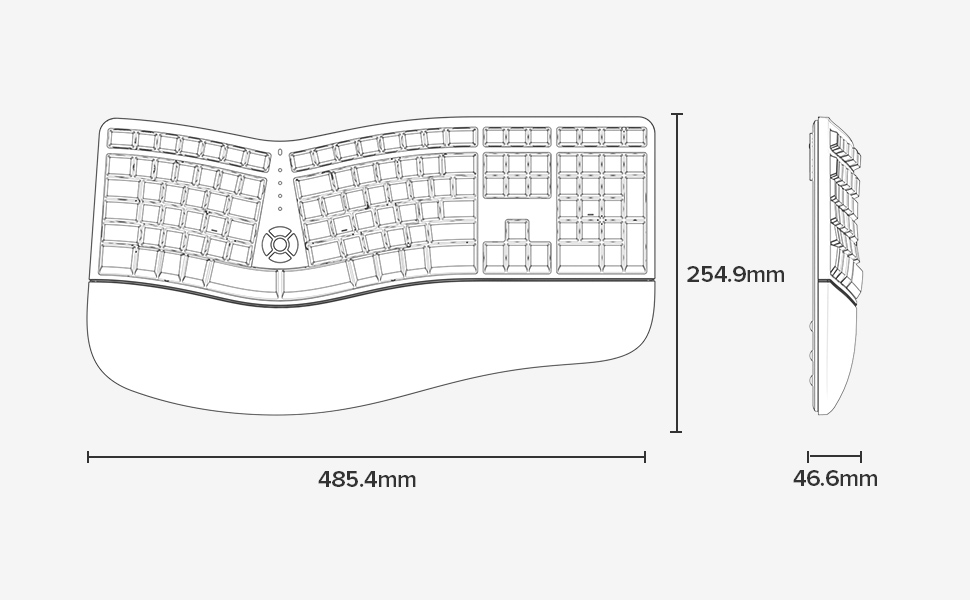
- דימענשאַנז (L x W x H): 48.5 סענטימעטער X 25.5 סענטימעטער X 4.7 סענטימעטער (19.1 X 10.0 X 1.85 אינטשעס)
- וואַסער קעגנשטעל: ניט וואַסער קעגנשטעליק
- קעסטל אינהאַלט: Keyboard, 2.4G USB Receiver, USB Cable


וואָראַנטי אינפֿאָרמאַציע
Specific warranty details for the DELUX GM905 Ergonomic Wireless Keyboard are not provided in the available product data. Please refer to the product packaging or the manufacturer's official webוועבזייטל פֿאַר וואָראַנטי טערמינען און באדינגונגען.
שטיצן
For further assistance, technical support, or inquiries regarding your DELUX GM905 keyboard, please visit the official DELUX website or contact their customer service department. Contact information is typically found on the product packaging or the manufacturer's webפּלאַץ.
You can also visit the DELUX store on Amazon for more information: DELUX Amazon Store