
1. פּראָדוקט איבערview
The Apple Watch Series 8 is an advanced smartwatch designed to enhance daily life through health monitoring, fitness tracking, and seamless connectivity. It features a durable design, a bright Always-On Retina display, and a suite of sensors for comprehensive health insights.

Image: Apple Watch Series 8 in Midnight Aluminum with Midnight Sport Band.
2. וואָס איז אין דער קעסטל
- Apple Watch Series 8 (Midnight Aluminum Case with Midnight Sport Band, M/L)
- Magnetic Fast Charger to USB-C Cable (1m)
3. סעטאַפּ גייד
3.1 אויספּאַקן און ערשטע אָפּצאָל
- Carefully remove the Apple Watch and charging cable from the packaging.
- Connect the Magnetic Fast Charger to USB-C Cable to a compatible USB-C power adapter (sold separately) and plug it into a power outlet.
- Place the back of your Apple Watch on the magnetic charger. The watch will begin charging and display a charging indicator.
3.2 פּאָרן מיט אייפאָון
The Apple Watch Series 8 requires an iPhone 8 or later with the latest iOS version for setup and full functionality.
- קער אויף דיין עפּל וואַך דורך דרינגלעך און האַלטן די זייַט קנעפּל ביז די עפּל לאָגאָ איז ארויס.
- ברענגט אייער אייפאָון נענטער צו אייער עפּל וואַטש. א פּערינג סקרין וועט דערשייַנען אויף אייער אייפאָון. דריקט 'פאָרזעצן'.
- שטעלט אייער אייפאָון אַזוי אַז אייער עפּל וואַטש זאָל דערשייַנען אין דער viewfinder of the Camera app. This will pair the devices.
- Follow the on-screen instructions on both your iPhone and Apple Watch to complete the setup, including setting up a passcode, Apple ID, and preferred settings.
ווידעא: אן איבערview of the Apple Watch Series 8, including unboxing and initial setup steps.
4. אפערירן אייער עפל וואטש סעריע 8
4.1 יקערדיק נאַוויגאַציע
- דיגיטאַל קרוין: Rotate to scroll, zoom, or adjust values. Press once to go to the watch face or app launcher. Double-press to switch between recently used apps. Press and hold for Siri.
- זייַט קנעפּל: Press once to open the Dock (recently used apps). Press and hold to access Emergency SOS, Medical ID, or power options. Double-press for Apple Pay.
- ריר ווייַז: Tap to select, swipe to navigate, force touch for additional options (depending on the app).
4.2 Key Features and Applications
- Always-On Retina Display: The display remains visible even when your wrist is down, showing time and complications.
- געזונט מאָניטאָרינג: Advanced sensors provide insights into heart rate, blood oxygen levels, and temperature changes.
- פיטנעסס טראַקינג: Enhanced Workout app with advanced metrics and activity rings to track daily movement.
- קאַנעקטיוויטי: Make calls, send texts, listen to music, and receive notifications directly from your wrist.
- זיכערקייַט פֿעיִקייטן: Includes Fall Detection, Emergency SOS, and Crash Detection for urgent assistance.
Video: A user demonstrating various features of the Apple Watch Series 8, including Siri activation and fitness tracking rings.
5. געזונטהייט פֿעיִקייטן
The Apple Watch Series 8 is equipped with advanced health sensors to help you better understand your body.
- טעמפּעראַטור סענסינג: Provides retrospective ovulation estimates and advanced cycle tracking features. This sensor works primarily during sleep to track baseline temperature changes.
- בלוט זויערשטאָף אַפּ: מעסט אייער בלוט זויערשטאָף לעוועלס אויף פארלאנג.
- עקג אַפּ: Take an electrocardiogram anytime, anywhere, to check for signs of atrial fibrillation.
- האַרץ קורס מאָניטאָרינג: Receive high and low heart rate notifications and irregular rhythm notifications.
- שלאָף טראַקינג: מאָניטאָר דיין שלאָףtages (REM, Core, Deep) to gain insights into your sleep patterns.

בילד: איבערview of Apple Watch Series 8 health and safety features.

Image: Close-up of the Apple Watch Series 8 display showing a temperature reading.
6. פיטנעס טראַקינג
The enhanced Workout app and Activity rings help you stay active and motivated.
- טעטיקייט רינגען: Track your daily Move, Exercise, and Stand goals. Close your rings to achieve daily activity targets.
- טרענירונג אַפּ: Choose from a variety of workout types, including running, cycling, swimming, yoga, and more. Get advanced metrics for your performance.
- גפּס: Built-in GPS accurately tracks your outdoor workouts without needing your iPhone.

Image: Apple Watch Series 8 showing the Workout app interface.
7. קאָנעקטיוויטי און קאָמוניקאַציע
Stay connected with your Apple Watch Series 8.
- Calls and Messages: Make and receive calls, and send and reply to text messages directly from your wrist when connected to your iPhone or Wi-Fi.
- סירי: אַקטיוויזיר סירי דורך הייבן דיין האַנטגעלענק און רעדן, אָדער דורך דריקן און האַלטן די דידזשאַטאַל קרוין.
- Apple Pay: Make secure payments instantly by double-pressing the side button.
- נאָטיפיקאַטיאָנס: Receive alerts from your favorite apps, calendar events, and more.
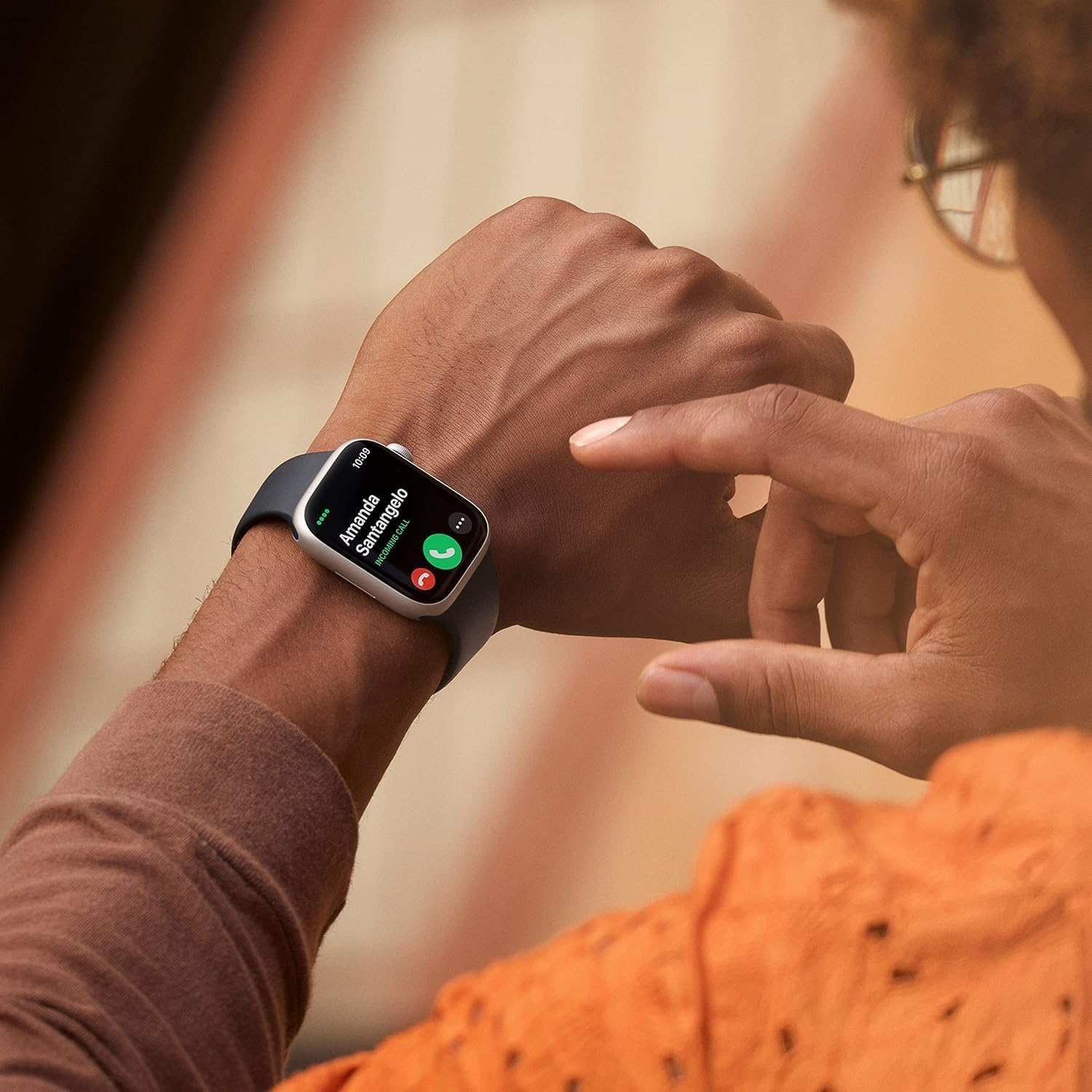
Image: A user answering a call on their Apple Watch Series 8.
8. האַרטקייט און וואַסער קעגנשטעל
The Apple Watch Series 8 is built for everyday use and various activities.
- קראַק קעגנשטעליק: Features a highly crack-resistant front crystal.
- שטויב קעגנשטעל: IP6X-certified for dust resistance.
- וואַסער קעגנשטעל: Swimproof with WR50 water resistance, suitable for shallow-water activities like swimming in a pool or ocean. Not recommended for scuba diving, waterskiing, or other high-velocity water activities.
9. באַטאַרייע און טשאַרדזשינג
The Apple Watch Series 8 offers all-day battery life and fast charging capabilities.
- באַטאַרייע לעבן: Up to 18 hours of typical use.
- שנעל טשאַרדזשינג: Charges from 0% to 80% in approximately 45 minutes with the Magnetic Fast Charger to USB-C Cable and a compatible 20W USB-C Power Adapter (sold separately).
10. קוסטאָמיזאַטיאָן
Personalize your Apple Watch Series 8 to match your style and needs.
- באַנדס: Easily interchangeable bands allow you to switch styles. The Midnight Sport Band (M/L) is included, fitting 150–200mm wrists.
- וואַך פנימער: Choose from a wide variety of watch faces and customize complications to display information important to you.
Image: Apple Watch Series 8 with its default Midnight Sport Band.
11. ספּעסאַפאַקיישאַנז
| שטריך | דעטאַל |
|---|---|
| מאָדעל נאָמען | וואַך סעריע 8 |
| מאָדעל נומער | A2770 |
| קאַסע גרייס | 41 מם |
| קאַסע מאַטעריאַל | אַלומינום |
| באַנד קאָליר | האַלבנאַכט |
| אָפּערייטינג סיסטעם | וואַטש אָ. עס. |
| זכּרון סטאָרידזש קאַפּאַסיטי | 32 גיגאבייט |
| פאַרשטעלן גרייס | 1.8 אינטשעס |
| ווייַז טיפּ | AMOLED |
| קאַנעקטיוויטי טעכנאָלאָגיע | בלועטאָאָטה |
| גפּס | געבויט-אין גפּס |
| וואַסער קעגנשטעל טיפקייט | 50 מעטער |
| באַטערי דורכשניטלעך לעבן | 18 שעה |
| נומער דימענשאַנז | 1.61 X 1.37 X 0.42 אינטשעס |
12. וישאַלט
- רייניקונג: ווישט אָפּ אייער עפּל וואַטש און באַנד מיט אַ ווייכן, לינט-פֿרייע שטאָף. אויב נייטיק, לייכט ווישטampשווענקט דעם שטאָף מיט פריש וואַסער. ניצט נישט קיין זייף אָדער אַנדערע רייניקונג פּראָדוקטן.
- דרייינג: Ensure your Apple Watch is completely dry after exposure to water or cleaning.
- ווייכווארג דערהייַנטיקונגען: האַלט אייער עפּל וואַטש ווייכווארג אַפּדייטעד צו דער לעצטער ווערסיע פֿאַר אָפּטימאַלער פאָרשטעלונג און זיכערהייט. אַפּדייץ קענען זיין געראטן דורך די וואַטש אַפּ אויף אייער אייפאָון.
13. טראָובלעשאָאָטינג
- זייגער טוט זיך נישט אן: Ensure the watch is charged. Place it on the magnetic charger for at least 30 minutes.
- פּאָרינג ישוז: Make sure your iPhone's Bluetooth is on and both devices are close to each other. Restart both devices if necessary.
- נישט פּינקטלעכע לייענונגען: Ensure the watch is worn snugly on your wrist. Clean the back of the watch regularly.
- די באַטאַרייע פליסן געשווינד: Check for background app refresh settings. Enable Low Power Mode if needed.
14. וואָראַנטי און שטיצן
This renewed Apple Watch Series 8 comes with a 90-טאָג לימיטעד וואָראַנטי. For detailed warranty information and support, please refer to the documentation provided with your purchase or visit the official Apple support webפּלאַץ.
For additional assistance, you can contact Apple Support or visit an authorized Apple service provider.