
1. פּראָדוקט איבערview
The GIGABYTE G24F 2 is a 23.8-inch gaming monitor designed for an immersive visual experience. It features a Super Speed IPS panel, Full HD (1920 x 1080) resolution, and a high refresh rate for smooth gameplay.

פיגורע 1.1: פראָנט view of the GIGABYTE G24F 2 gaming monitor.
שליסל פֿעיִקייטן:
- פּאַנעל גרייס: 23.8-inch SS IPS display
- רעזאלוציע: 1920 X 1080 (FHD)
- ענטפער צייט: 1ms MPRT
- דערפרישן קורס: 165 הערץ (איבערקלאָקבאר ביז 180 הערץ)
- קאָליר סאַטוראַטיאָן: 95% DCI-P3, 125% sRGB
- ברייטקייט: 300 סי / מ 2 (טיפּ)
- קאַנטראַסט פאַרהעלטעניש: 1100:1
- קאַנעקטיוויטי: 2 x HDMI 2.0, 1 x DisplayPort 1.2 (HDR capable), 2 x USB 3.2 Gen 1 Downstream, 1 x USB 3.2 Gen 1 Upstream, 1 x Earphone Jack
- ספּעציעלע פֿעיִקייטן: OSD Sidekick, Aim Stabilizer, Black Equalizer, Dashboard, Crosshair, Timer, Counter, Auto-Update, Smart OD, HDR Ready, Flicker-free, Kensington lock
2. זיכערקייַט אינפֿאָרמאַציע
ביטע ליינט אלע אינסטרוקציעס קערפול איידער איר ניצט דעם מאָניטאָר. האַלט דעם מאַנואַל פֿאַר צוקונפֿטיקע רעפֿערענץ.
- שטעלט נישט אויס דעם מאָניטאָר צו רעגן אָדער פייכטקייט כּדי צו פֿאַרמייַדן פֿײַער אָדער שאָק געפֿאַרן.
- עפֿנט נישט דעם מאָניטאָר casinז. עס זענען נישטאָ קיין טיילן וואָס דער באַניצער קען סערוויסן אינעווייניק. לאָזט איבער אַלע סערוויסינג צו קוואַליפֿיצירטע פּערסאָנעל.
- שטעלט דעם מאָניטאָר אויף אַ סטאַבילער, גלאַטער ייבערפלאַך כּדי צו פאַרהיטן אַז ער זאָל נישט פאַלן.
- זיכער מאַכן אַז די ווענטילאַציע אַרום דעם מאָניטאָר איז ריכטיק. בלאָקירט נישט די ווענטילאַציע עפענונגען.
- ניצט נאָר די מאַכט אַדאַפּטער און קייבלס וואָס ווערן צוגעשטעלט דורך דעם פאַבריקאַנט.
- נעמט ארויס דעם מאָניטאָר פֿון דער עלעקטרישער אַוטלעט בעת בליץ-שטורעמס אָדער ווען ער ווערט נישט גענוצט פֿאַר לאַנגע פּעריאָדן.
- Clean the screen with a soft, lint-free cloth. Avoid using liquid cleaners directly on the screen.
3. פּעקל אינהאַלט
באַשטעטיקן אַז אַלע זאכן זענען פאַראַן אין דיין פּעקל:
- GIGABYTE G24F 2 Monitor
- מאָניטאָר שטאַנד (באַזע און האַלדז)
- מאַכט קאַבלע
- HDMI קאַבלע
- USB Cable (Upstream)
- שנעל אָנהייב גייד (QSG)
- וואָראַנטי קאַרד

פיגורע 3.1: דערציען view of the monitor, illustrating the stand attachment area.
4. סעטאַפּ
4.1 צוזאַמענשטעלן דעם שטאַנד
- נעמט פֿאָרזיכטיק אַרויס דעם מאָניטאָר און שטאַנד קאָמפּאָנענטן פֿון דער פּאַקאַדזשינג.
- באַפעסטיקט דעם שטאַנד האַלדז צום מאָניטאָר פּאַנעל. מאַכט זיכער אַז עס קליקט זיכער אין פּלאַץ אָדער איז באַפעסטיקט מיט שרויפן אויב עס איז צוגעשטעלט.
- באַפעסטיקט דעם שטאַנד באַזע צום שטאַנד האַלדז. פֿעסט צו דעם גראָבן שרויף אָדער די שרויפן ביים דנאָ פֿון דער באַזע.
- שטעלט דעם צוזאַמענגעשטעלטן מאָניטאָר אויף אַ סטאַבילער, גלאַטער ייבערפלאַך.
4.2 קאַנעקטינג די מאָניטאָר
Connect the monitor to your computer and other devices using the appropriate cables.

פיגור 4.1: מאָניטאָר קאַנעקטיוויטי פּאָרץ.
- מאַכט קשר: פֿאַרבינדט דעם מאַכט קאַבל צום מאָניטאָר'ס מאַכט אַרייַנגאַנג און דערנאָך צו אַ מאַכט ווענטיל.
- ווידעא קשר:
- For optimal performance, use the DisplayPort 1.2 cable to connect to your computer's graphics card.
- Alternatively, use one of the two HDMI 2.0 ports.
- יו-עס-בי אַפּסטרים קאַנעקשאַן: Connect the provided USB 3.2 Gen 1 Upstream cable from your computer to the monitor's upstream USB port to enable the monitor's downstream USB ports.
- USB Downstream Connections: Connect USB devices (e.g., keyboard, mouse) to the monitor's two USB 3.2 Gen 1 Downstream ports.
- אַודיאָ רעזולטאַט: פֿאַרבינדט כעדפאָונז אָדער עקסטערנע רעדנערס צו די אויערפֿאָן דזשעק.
5. אַפּערייטינג די מאָניטאָר
5.1 מאַכט אויף / אַוועק
Press the power button, usually located on the bottom or rear of the monitor, to turn the monitor on or off. The power indicator light will show the monitor's status.
5.2 אויף-סקרין ווייַז (אָסד) מעניו
The OSD menu allows you to adjust various monitor settings. Navigate the OSD using the joystick or buttons typically found on the rear of the monitor.

Figure 5.1: OSD Sidekick software for convenient monitor control.
For advanced control, install the OSD Sidekick software on your PC. This utility allows you to adjust monitor settings directly from your desktop.
5.3 גיימינג פֿעיִטשערס
The GIGABYTE G24F 2 includes several features to enhance your gaming experience:
- ציל סטאַביליזאַטאָר: Reduces motion blur and improves visual clarity in fast-paced games.
- שוואַרץ עקוואַליזער: Enhances visibility in dark areas of the game without overexposing bright areas.

Figure 5.2: Black Equalizer in action.
- דאַשבאָרד: Displays real-time hardware information (e.g., CPU/GPU temperature, usage) directly on the screen.

Figure 5.3: Dashboard displaying system metrics.
- קראָסשאַיר: Provides a customizable on-screen crosshair to assist with aiming.

Figure 5.4: On-screen Crosshair.
- טייַמער/ציילער: On-screen timers and counters for in-game tracking.
- Smart OD: Optimizes overdrive settings for the best response time.
- אַוטאָ-דערהייַנטיקונג: Ensures the monitor's firmware and OSD Sidekick software are up-to-date.
5.4 ווייַז סעטטינגס
- דערפרישן קורס: The monitor supports up to 165Hz, with an overclock option to 180Hz, for fluid motion.
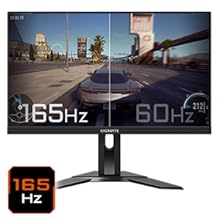
Figure 5.5: Visual comparison of 165Hz vs. 60Hz refresh rate.
- ענטפער צייט: Enjoy a 1ms MPRT (Moving Picture Response Time) for minimal ghosting.
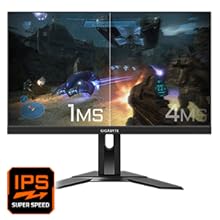
Figure 5.6: Visual comparison of 1ms vs. 4ms response time.
- קאָליר גאַמע: The monitor covers 95% DCI-P3 and 125% sRGB for vibrant and accurate colors.
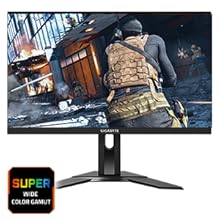
Figure 5.7: Wide color gamut for rich visuals.
- נידעריק בלוי ליכט: Reduces blue light emissions to protect your eyes during extended use.
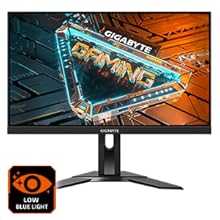
Figure 5.8: Low Blue Light feature for reduced eye strain.
- פליקער-פריי: עלימינירט דעם פליקער פון דעם עקראַן פֿאַר אַ מער באַקוועמען viewינג דערפאַרונג.

Figure 5.9: Flicker-Free technology for comfortable viewing.
5.5 Product Feature Video
ווידעא 5.1: אן איבערview of the GIGABYTE G24F 2 monitor's features and specifications.
6. וישאַלט
געהעריגע אויפהאלטונג גאראנטירט די לאנגעוויטי פון אייער מאָניטאָר.
- רייניקונג די פאַרשטעלן: ווישט אָפּ דעם עקראַן מיט אַ ווייכן, טרוקענעם, לינט-פֿרײַעם שטאָף. פֿאַר שווערע פֿלעקן, ווישט לײַכטampווישט דעם שטאָף מיט וואַסער אָדער אַ ספּעציעלן עקראַן רייניגער (אויפֿטראָגן אויפן שטאָף, נישט גלייך אויפן עקראַן).
- רייניקונג פון די Casing: ניצט אַ ווייכע, טרוקענע שטאָף צו ווישן דעם מאָניטאָרasinז. פֿאַרמײַדן אַברייסיוו רייניגער.
- ווענטילאַטיאָן: Ensure the ventilation openings on the monitor are clear of dust and obstructions.
- מאַכט אַוועק: Turn off and unplug the monitor when not in use for extended periods.
7. טראָובלעשאָאָטינג
If you encounter issues with your monitor, refer to the following table for common problems and solutions.
| פּראָבלעם | מעגלעך סיבה | לייזונג |
|---|---|---|
| קיין בילד אויף פאַרשטעלן | Power cable not connected; Video cable not connected; Incorrect input source selected | קאָנטראָלירט די מאַכט און ווידעא קאַבל קאַנעקשאַנז; סעלעקטירט די ריכטיקע אַרייַנגאַנג מקור דורך די OSD. |
| בילד איז פארשוואומען אדער פארדרייט | פאַלשע רעזאָלוציע; פרייַ ווידעא קאַבל | שטעלט דעם דיספּלעי רעזאָלוציע צו 1920x1080; מאַכט זיכער אַז די ווידעאָ קאַבל איז זיכער פארבונדן. |
| קיין קלאַנג פֿון כעדפאָונז/רעדנערס | Audio cable not connected; Volume too low; Incorrect audio output selected on PC | Check audio cable connection; Adjust volume; Select monitor as audio output on PC. |
| וסב פּאָרץ נישט ארבעטן | יו-עס-בי אַפּסטרים קאַבל נישט פארבונדן | Connect the USB 3.2 Gen 1 Upstream cable from the monitor to your PC. |
| פליקערנדיקער עקראַן | Refresh rate issue; Faulty cable | Ensure refresh rate is set correctly; Try a different video cable. |
8. ספּעסאַפאַקיישאַנז
Detailed technical specifications for the GIGABYTE G24F 2 monitor.

פיגור 8.1: מאָניטאָר דימענסיעס.
| שטריך | דעטאַל |
|---|---|
| סאָרט | GIGABYTE |
| מאָדעל נאָמען | G24F 2 |
| מאָדעל נומער | 9DG24F2-00-1ABIN |
| פאַרשטעלן גרייס | 23.8 אינטשעס |
| האַכלאָטע | 1920 x 1080 פּיקסעלס (FHD 1080p) |
| אַספּעקט פאַרהעלטעניש | 16:9 |
| ווייַז טיפּ | LCD (SS IPS Panel) |
| דערפרישן קורס | 165 Hz (180Hz OC) |
| ענטפער צייט | 1 Milliseconds (MPRT) |
| ברייטנאַס | 300 candela_per_square_meter (TYP) |
| קאַנטראַסט פאַרהעלטעניש | 1100:1 |
| קאָליר סאַטוראַטיאָן | 95% DCI-P3, 125% sRGB |
| Viewינג אַנגלע | 178 דיגריז |
| קאַנעקטיוויטי | 2 x HDMI 2.0, 1 x DisplayPort 1.2, 2 x USB 3.2 Gen 1 Downstream, 1 x USB 3.2 Gen 1 Upstream, 1 x Earphone Jack |
| אַדאַפּטיוו סינק | פרעעסינק פּרעמיום |
| מאַכט קאַנסאַמשאַן | 17.5 וואטס |
| פּונקט וואָג | 3.2 קילאָגראַמס |
| נומער דימענשאַנז (ד רענטגענ וו רענטגענ ה) | 5.3D x 54.1W x 32.6H סענטימעטער |
| מאַונטינג טיפּ | וואנט בארג |
| פּראָדוקט פֿעיִקייטן | Flicker-Free, Height Adjustment, High Dynamic Range, Tilt Adjustment |
9. וואָראַנטי און שטיצן
The GIGABYTE G24F 2 monitor comes with a 3 יאָר וואָראַנטי פון דער פאַבריקאַנט.
For technical support, warranty claims, or further inquiries, please contact GIGABYTE customer service:
- פאַבריקאַנט: GIGABYTE Technology (India) Pvt Ltd
- אַדרעס: B-808, Naman Midtown, Elphinstone Road, Mumbai – 400013 – INDIA
- טעלעפֿאָן: +91-22-40633222
ביטע באַהאַלטן אייער קויפן-באַווייַז פֿאַר וואָראַנטי סערוויס.