1. הקדמה
Thank you for choosing the Generic M29 Pro Wireless Earbuds. This manual provides detailed instructions on how to set up, operate, maintain, and troubleshoot your new earbuds. Please read this manual carefully before use to ensure optimal performance and longevity of your device.
2. פּעקל אינהאַלט
זיכער מאַכן אַז אַלע די זאכן וואָס זענען אויסגערעכנט אונטן זענען פאַראַן אין דיין פּעקל:
- M29 Pro Wireless Earbuds (Left and Right)
- טשאַרדזשינג קאַסע
- וסב טיפּע- C טשאַרדזשינג קאַבלע
- באַניצער מאַנואַל

Image: Contents of the M29 Pro Wireless Earbuds package, showing the earbuds, charging case, USB-C data cable, and instruction manual.
3. פּראָדוקט איבערview
The M29 Pro Wireless Earbuds feature an ergonomic in-ear design, touch controls, and an LED display on the charging case for battery status. The earbuds are designed for comfortable, all-day wear.
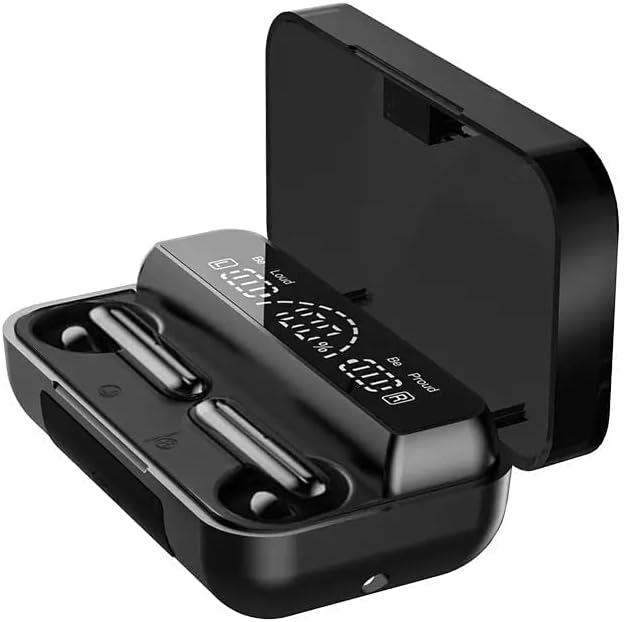
Image: The M29 Pro Wireless Earbuds resting in their open charging case, highlighting their compact design.
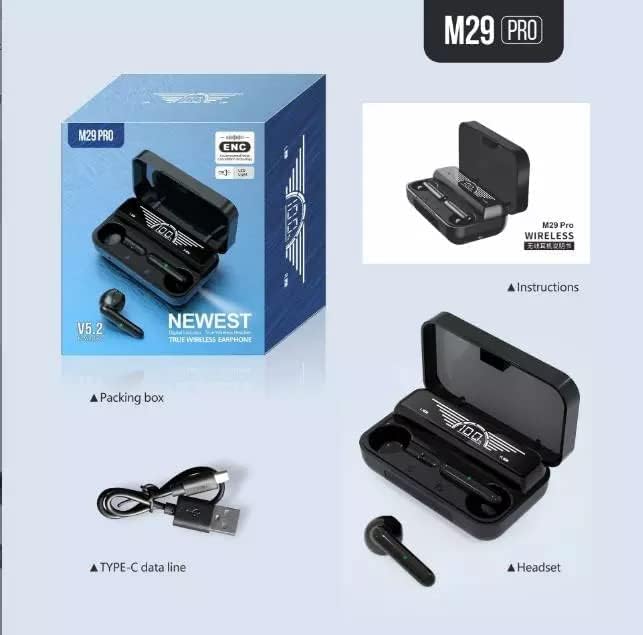
Image: The M29 Pro Wireless Earbuds inside the charging case, with the LED display clearly showing the battery percentage פֿאַר ביידע די קעסטל און יחיד אויערן-קנעפּלעך.
4. טשאַרדזשינג
4.1 ערשט אָפּצאָל
Before first use, fully charge the earbuds and the charging case. Place the earbuds into the charging case and connect the USB Type-C cable to the charging port on the case and a power source. The LED display on the case will indicate the charging status.
4.2 טשאַרדזשינג די עאַרבודז
Place the earbuds into the charging case. They will automatically begin charging. The LED display on the case will show the individual earbud battery levels.
4.3 אויפלאָדן דעם קעסטל
Connect the charging case to a power source using the provided USB Type-C cable. The LED display will show the case's battery percentage. A full charge for both the case and earbuds takes approximately 2 hours.
4.4 פּאַוער באַנק פונקציע
The charging case can also function as a power bank to charge other devices. Connect your device to the USB output port on the charging case using an appropriate cable (not included).
5. מאַכט אויף / אויסגעלאשן
5.1 מאַכט אויף
- אָטאַמאַטיק: עפֿענען די טשאַרדזשינג פאַל, און די עאַרבודז וועט קער אויף אויטאָמאַטיש.
- מאַנואַל: Press and hold the touch control area on both earbuds for approximately 3 seconds until you hear a power-on prompt.
5.2 מאַכט אויסגעלאשן
- אָטאַמאַטיק: Place the earbuds back into the charging case and close the lid. They will power off automatically and begin charging.
- מאַנואַל: Press and hold the touch control area on both earbuds for approximately 5 seconds until you hear a power-off prompt.
6. בלועטאָאָטה פּערינג
6.1 ערשטער מאָל פּערינג
- פאַרזיכערן אַז די עאַרבודז זענען גאָר באפוילן.
- עפֿנט דעם טשאַרדזשינג קעסטל. די אויערקנעפּלעך וועלן אויטאָמאַטיש אַרײַן אין פּערינג מאָדע, וואָס ווערט אָנגעוויזן דורך אַ בלינקנדיק LED ליכט אויף די אויערקנעפּלעך.
- געבן בלועטאָאָטה אויף דיין סמאַרטפאָנע אָדער אנדערע מיטל.
- זוכן פֿאַר "M29 Pro" in the list of available Bluetooth devices.
- Select "M29 Pro" to connect. Once connected, you will hear a confirmation sound, and the earbud LED lights will turn off.
The M29 Pro uses Bluetooth V5.1 technology for a stable connection up to 10 meters.
6.2 Re-connection
After initial pairing, the earbuds will automatically connect to the last paired device when taken out of the charging case, provided Bluetooth is enabled on the device and it is within range.
7. ריר קאָנטראָלס
The M29 Pro earbuds feature intuitive touch controls for various functions:
| קאַמף | פֿונקציע |
|---|---|
| Single tap (Left/Right) | שפּיל / פּויזע מוזיק, ענטפֿערן / סוף רופן |
| Double tap (Left earbud) | פֿריִערדיקע שפּור |
| Double tap (Right earbud) | ווייַטער שפּור |
| Triple tap (Left/Right) | אַקטאַווייט די קול אַססיסטאַנט |
| Press and hold (Left/Right) | אָפּוואַרפן ינקאַמינג רופן |
| Long press (Left/Right) | Toggle Active Noise Cancellation (ANC) |
8. אַודיאָ פֿעיִטשערז
The M29 Pro earbuds are engineered to deliver a high-fidelity audio experience with deep bass and clear sound, enhanced by CVC 8.0 noise cancellation technology to minimize external distractions.

Image: An internal diagram of an earbud, highlighting the moving coil unit design for surging bass and HiFi sound effects, ensuring good audio resolution and minimal distortion for an immersive listening experience.
9. וישאַלט
- רייניקונג: Regularly clean the earbuds and charging case with a soft, dry cloth. Avoid using liquids or abrasive cleaners.
- סטאָרידזש: סטאָר די עאַרבודז אין זייער טשאַרדזשינג פאַל ווען ניט אין נוצן צו באַשיצן זיי און האַלטן זיי טשאַרדזשינג.
- ויסמיידן עקסטרעמע טנאָים: שטעלט נישט אויס די אויערן-קנעפּלעך צו עקסטרעמע טעמפּעראַטורן, הומידיטי, אדער דירעקטע זונשייַן.
- וואַסער קעגנשטעל: The earbuds are sweat-resistant, making them suitable for sports. However, they are not waterproof; avoid submerging them in water.
10. טראָובלעשאָאָטינג
| פּראָבלעם | לייזונג |
|---|---|
| עאַרבודס נישט פּערינג | Ensure earbuds are charged. Turn off and on Bluetooth on your device. Forget "M29 Pro" from your device's Bluetooth list and try pairing again. |
| בלויז איין עאַרבוד אַרבעט | Place both earbuds back into the charging case, close the lid, then open it again. Ensure both earbuds are charged. |
| קיין געזונט | Check device volume. Ensure earbuds are connected. Try re-pairing. |
| טשאַרדזשינג פאַל ניט טשאַרדזשינג | זיכער מאַכן אַז דער USB-C קאַבל איז ריכטיק פֿאַרבונדן צו ביידע דעם קעסטל און דער מאַכט מקור. פּרוּווט אַן אַנדער קאַבל אָדער מאַכט אַדאַפּטער. |
11. ספּעסאַפאַקיישאַנז
| שטריך | דעטאַל |
|---|---|
| מאָדעל נאָמען | M29 Pro |
| סאָרט | גענעריק |
| קאַנעקטיוויטי טעכנאָלאָגיע | דראָטלאָז (בלוטוט V5.1) |
| כעדפאָונז פאָרעם פאַקטאָר | אין אויער |
| ראַש קאָנטראָל | אַקטיווע ראַש קאַנסאַליישאַן (CVC 8.0) |
| קאָנטראָל מעטאָד | ריר קאָנטראָל |
| טשאַרדזשינג קאַסע באַטערי | 2000mAh (פּאָלימער ליטיום) |
| עאַרבוד פּלייַטיים | Approximately 6 hours (per charge) |
| גאַנץ שפּילצייט (מיט קעסטל) | אַרויף צו 48 שעה |
| סטאַנדביי צייט | 280 שעה |
| גאַנץ אָפּצאָל צייט | Approximately 2 hours (case and earbuds) |
| מאַטעריאַל | אַבס פּלאַסטיק |
| קאָליר | שוואַרץ |
| פּעקל דימענשאַנז | 13.8 X 11.8 X 7.1 סענטימעטער |
| וואָג | 140 גראַמז |
12. זיכערקייַט אינפֿאָרמאַציע
- דו זאלסט נישט דיסאַסעמבאַל אָדער מאָדיפיצירן די פּראָדוקט.
- האַלטן אַוועק פון קינדער און פּעץ.
- פֿאַרמײַדט פֿאַרלענגערט הערן בײַ הויכע וואָלומען כּדי צו פֿאַרמײַדן שאָדן צו דער הערן.
- אָפּזאָגן דעם פּראָדוקט ריספּאַנסאַבלי לויט די היגע רעגיאַליישאַנז.
13. וואָראַנטי און שטיצן
For warranty information or technical support, please refer to the retailer or contact the manufacturer directly. Keep your purchase receipt as proof of purchase.