
הקדמה
The Solid State Logic SSL 12 is a high-performance 12-in/8-out USB audio interface designed for professional recording and mixing environments. It features studio-quality audio conversion, robust preamps, and flexible monitoring options to enhance your audio production workflow. This manual provides essential information for setting up, operating, maintaining, and troubleshooting your SSL 12 interface.

פיגורע 1: פראָנט view of the Solid State Logic SSL 12 USB Audio Interface.
סעטאַפּ
Follow these steps to set up your SSL 12 audio interface:
- ווייכווארג ינסטאַלירונג: Before connecting the hardware, download and install the latest drivers and SSL 360° software from the official Solid State Logic website. This software is essential for full control and functionality of your interface.
- פאַרבינדן צו קאָמפּיוטער: Connect the SSL 12 to your computer using the provided USB cable. The interface is bus-powered via USB.
- מאַכט אויף: Press the power button located on the rear panel of the unit. The power indicator LED on the front panel will illuminate.
- Connect Microphones/Instruments: Use XLR or 1/4-inch TRS cables to connect your microphones or instruments to the combo inputs (1-4) on the rear panel. For instruments, use the dedicated 1/4-inch instrument inputs (INST 1, INST 2) on the front panel for optimal impedance matching.
- Connect Monitors/Headphones: Connect your studio monitors to the 1/4-inch TRS outputs (1-4) on the rear panel. Plug your headphones into the dedicated 1/4-inch headphone outputs (A, B) on the front panel.
- ADAT and MIDI Connections (Optional): If expanding your setup, connect ADAT compatible devices to the ADAT IN port and MIDI devices to the MIDI IN/OUT ports on the rear panel.

Figure 2: SSL 12 with various cables connected for a typical studio setup.
אַפּערייטינג ינסטראַקשאַנז
Understanding the controls and connections of your SSL 12 is crucial for effective operation.
פראָנט פּאַנעל קאָנטראָלס

פיגורע 3: שפּיץ view of the SSL 12, highlighting front panel controls.
- טשאַננעלס קסנומקס-קסנומקס: Each channel features a GAIN knob to adjust input level, a +48V button for phantom power (for condenser microphones), and a LINE button to switch between microphone/instrument and line-level inputs. The LED meters provide visual feedback on input levels.
- Legacy 4K Buttons: These buttons activate the '4K' mode, which emulates the sound characteristics of the classic SSL 4000 series console, adding harmonic enhancement and a high-frequency boost.
- מאָניטאָר לעוועל: The large blue knob controls the overall output level to your main studio monitors.
- כעדפאָון אַוטפּוץ (A & B): Two independent headphone outputs with individual level controls allow for separate monitoring mixes.
- רעדן: The built-in talkback microphone allows communication with artists in a separate recording space. Use the TALK button to activate, CUT to mute, and ALT to switch between alternative monitor outputs.
דערציען פּאַנעל קאַנעקשאַנז
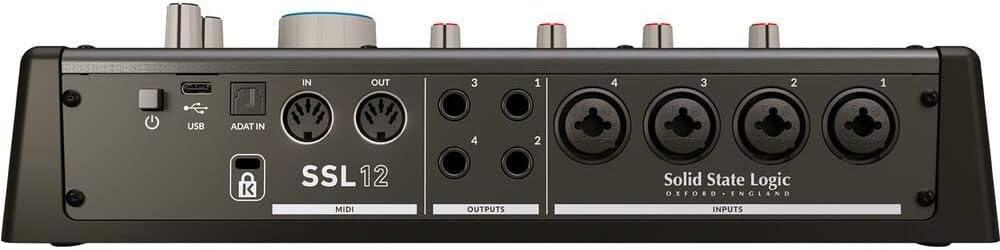
פיגורע 4: דערציען view of the SSL 12, showing input and output connections.
- אַרייַנשרייַבן 1-4: Combo XLR/TRS jacks for connecting microphones and line-level sources.
- אַוטפּוץ 1-4: 1/4-inch TRS balanced outputs for connecting studio monitors or other outboard gear.
- MIDI אין / אָוט: Standard 5-pin DIN connectors for connecting MIDI controllers or other MIDI-enabled devices.
- ADAT In: Optical input for expanding your input count with an ADAT-compatible device, providing up to 8 additional channels.
- וסב: USB-C port for connection to your computer.
- מאַכט: On/Off switch for the unit.
וישאַלט
To ensure the longevity and optimal performance of your SSL 12, follow these maintenance guidelines:
- רייניקונג: ניצט אַ ווייכן, טרוקענעם שטאָף צו רייניקן די אויסערלעכע זייט פון דעם אַפּאַראַט. פֿאַרמייַדט אַברייסיוו רייניקונגס־מיטלען אָדער סאָלווענטן. פֿאַר שווערן שמוץ, ניצט אַ ביסל טרוקן שטאָף.amp cloth can be used, ensuring no moisture enters the unit.
- שטויב שוץ: Keep the unit covered when not in use to prevent dust accumulation, which can affect internal components and ventilation.
- ווענטילאַטיאָן: זיכער מאַכן אַז עס איז גענוג לופט שטראָם אַרום דעם אַפּאַראַט. נישט פאַרשפּאַרן די ווענטילאַציע עפענונגען.
- קאַבלע פאַרוואַלטונג: אָרגאַניזירט די קאַבלען אָרדנטלעך צו פאַרמייַדן שפּאַנונג אויף די קאַנעקטאָרס און אַקסאַדענטאַלע דיסקאַנעקשאַנז.
- ווייכווארג דערהייַנטיקונגען: Regularly check the Solid State Logic website for firmware and software updates to ensure compatibility and access to the latest features and bug fixes.
טראָובלעשאָאָטינג
If you encounter issues with your SSL 12, refer to the following common problems and solutions:
- קיין מאַכט: Ensure the USB cable is securely connected to both the interface and your computer. Verify the power button on the rear panel is in the 'On' position. Try a different USB port or cable.
- קיין סאָונד רעזולטאַט: Check that your monitors and headphones are correctly connected and powered on. Verify the Monitor Level and Headphone Level knobs are turned up. Ensure the correct output device is selected in your computer's sound settings and your Digital Audio Workstation (DAW).
- קיין אינפוט סיגנאַל: Confirm that microphones/instruments are properly connected to the correct inputs. Check the GAIN knob for the respective channel is turned up. Ensure +48V phantom power is enabled for condenser microphones. Verify the correct input is selected in your DAW.
- Audio Clipping/Distortion: Reduce the GAIN on the input channel. Ensure your input source is not sending an excessively hot signal. Check your DAW's input levels. The 32-bit float converters offer high dynamic range, but extreme input levels can still cause clipping.
- לייטאַנסי ישוז: Adjust the buffer size in your DAW's audio settings. Lower buffer sizes reduce latency but require more processing power. Ensure your computer meets the minimum system requirements.
- ווייכווארג דערקענט נישט דעם אינטערפייס: Reinstall the SSL 360° software and drivers. Try connecting the interface to a different USB port. Restart your computer.
ספּעסאַפאַקיישאַנז
| שטריך | באַשרייַבונג |
|---|---|
| סאָרט | סאָליד שטאַט לאָגיק |
| מאָדעל נומער | 726705X1 |
| קאַנעקטיוויטי טעכנאָלאָגיע | וסב |
| נומער פון טשאַנאַלז | 14 (12-in, 8-out) |
| מאַקסימום זample קורס | 192 KHz |
| ביסל דעפּט | 32-ביסל |
| מיק געווינען | 62dB |
| קאַמפּאַטאַבאַל דעוויסעס | Headphone, Personal Computer |
| שטיצט ווייכווארג | SSL 360 degrees (DAW) |
| אָפּערייטינג סיסטעם | Windows (and macOS, though not explicitly listed in provided data, it's standard for audio interfaces) |
| פּונקט וואָג | 1.43 קילאָגראַמס |
| UPC | 878076001678 |
וואָראַנטי און שטיצן
The Solid State Logic SSL 12 USB Audio Interface comes with a 1 יאָר וואָראַנטי פֿון דעם קויפֿדאַטום. די וואָראַנטי דעקט פֿאַבריקאַציע־דעפֿעקטן און גאַראַנטירט אַז אייער פּראָדוקט פֿונקציאָנירט ווי באַשטימט אונטער נאָרמאַלן באַנוץ.
For technical support, warranty claims, or additional product information, please visit the official Solid State Logic webזייטל אדער קאנטאקט זייער קאסטומער סערוויס דעפארטמענט. האלט אייער באווייז פון קויפן פאר יעדע גאראנטיע-פארבינדענע אנפראגן.