
הקדמה
This manual provides comprehensive instructions for the setup, operation, maintenance, and troubleshooting of your BrightSign XD1035 4K Expanded I/O Player. Please read this manual thoroughly before using the device to ensure proper functionality and to maximize its performance and longevity.
פּראָדוקט איבערview
The BrightSign XD1035 is a professional 4K digital signage media player designed for enterprise-level applications. It features dynamic memory allocation, optimized motion graphics capabilities, and support for 4K content playback. The player also includes Power over Ethernet Plus (PoE+) for simplified installation, Live TV input, full OpenGL ES support, and a dynamic mosaic mode. Its expanded I/O options provide versatile connectivity for various digital signage setups.
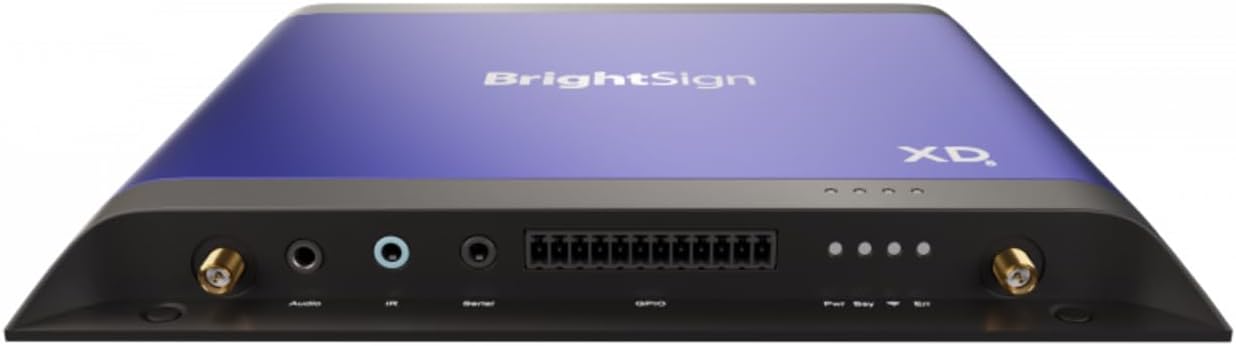
Figure 1: BrightSign XD1035 4K Expanded I/O Player. This image displays the top of the player, which is a vibrant blue with the "BrightSign" logo and "XD" series designation. The rear panel is visible, showcasing various input/output ports including audio, IR, serial, GPIO, and antenna connectors on both sides, along with status indicator lights.
סעטאַפּ
Follow these steps for the initial setup of your BrightSign XD1035 player:
- אויספּאַקן: Carefully remove the player and all accessories from the packaging. Verify that all components are present.
- מאַכט קשר:
- If using Power over Ethernet (PoE+), connect a compatible PoE+ enabled Ethernet cable to the player's Ethernet port.
- Alternatively, connect the provided power adapter to the player's power input and then to a suitable power outlet.
- ווייַז קשר: Connect an HDMI cable from the player's HDMI output port to your 4K display or television.
- נעץ קאַנעקשאַן:
- For wired connection, connect an Ethernet cable from your network router/switch to the player's Ethernet port.
- For Wi-Fi connection, ensure the Wi-Fi antennas are securely attached (if external) and configure Wi-Fi settings through the BrightSign software. The player features simplified Wi-Fi installation.
- סטאָרידזש ינסטאַלירונג: If using an SSD for content storage, follow the instructions for simplified SSD installation. Ensure the SSD is properly seated.
- פּעריפעראַל קאַנעקשאַנז: Connect any necessary peripherals such as audio devices, IR receivers, serial devices, or GPIO inputs/outputs to the corresponding ports on the player.
- ערשטע בוט: Power on the player. The device will boot up, and you can proceed with content loading and configuration using BrightSign's software tools.
אַפּערייטינג ינסטראַקשאַנז
The BrightSign XD1035 is designed for continuous operation in digital signage environments. Content management and playback are primarily handled through BrightSign's proprietary software, BrightAuthor or BrightSign BSN.cloud.
Content Management and Publishing:
- ווייכווארג: Utilize BrightAuthor (desktop application) or BSN.cloud (cloud-based platform) to create, schedule, and publish your digital signage presentations.
- אינהאַלט שאַפונג: Design presentations incorporating 4K video, images, HTML5 content, and interactive elements. The player supports optimized motion graphics and full OpenGL ES for rich visual experiences.
- ארויסגעבן: Publish content to the player via network (LAN/Wi-Fi), USB, or SD card. For network publishing, ensure the player is connected to the internet or local network.
פּלייבאַק פֿעיִקייטן:
- 4K Playback: The player is capable of seamless 4K video playback, ensuring high-resolution content delivery.
- לעבן טעלעוויזיע: Connect a compatible Live TV source to the player to integrate live broadcast content into your digital signage.
- Dynamic Mosaic Mode: Utilize this feature to display multiple content zones or videos simultaneously on a single screen, creating dynamic layouts.
- ינטעראַקטיווע קאָנטראָל: The player supports various interactive inputs via its expanded I/O, including touchscreens, buttons, and motion sensors. Control can also be managed via remote control (if applicable and configured).
For detailed instructions on creating and managing content, refer to the BrightAuthor software documentation or the BSN.cloud online help resources.
וישאַלט
Regular maintenance ensures the longevity and optimal performance of your BrightSign XD1035 player.
- רייניקונג:
- Gently wipe the exterior of the player with a soft, dry, lint-free cloth.
- Do not use liquid cleaners, aerosols, or solvents, as these can damage the finish or internal components.
- זיכער מאַכן אַז ווענטילאַציע עפענונגען זענען ריין פון שטויב און שמוץ צו פאַרמייַדן איבערהיצונג.
- Firmware דערהייַנטיקונגען:
- Periodically check for firmware updates from the BrightSign website or through BrightAuthor/BSN.cloud.
- Firmware updates often include performance improvements, bug fixes, and new features.
- Follow the provided instructions carefully when performing firmware updates to avoid interruption.
- ינווייראַנמענאַל טנאָים:
- Operate the player within its specified temperature and humidity ranges.
- Avoid exposing the player to direct sunlight, excessive heat, moisture, or extreme cold.
- זיכער מאַכן אַז עס איז גענוג לופט־פלוס אַרום דעם אַפּאַראַט.
- אינהאַלט פאַרוואַלטונג: קעסיידער שייַעךview and optimize your digital signage content. Remove outdated files and ensure content is properly formatted to prevent playback issues.
טראָובלעשאָאָטינג
This section addresses common issues you might encounter with your BrightSign XD1035 player. For more complex problems, refer to the BrightSign support webוועבזייטל אדער קאָנטאַקט טעכנישע שטיצע.
| פּראָבלעם | מעגלעך סיבה | לייזונג |
|---|---|---|
| דער שפּילער גייט נישט אָן. | No power supply; faulty power adapter/PoE connection. | Verify power cable is securely connected. Ensure PoE+ switch/injector is active. Test with a different power outlet or adapter if available. |
| ניט קיין אַרויסווייַזן רעזולטאַט. | HDMI cable loose/faulty; incorrect display input selected; display off/faulty. | Check HDMI cable connection at both ends. Ensure display is on and set to the correct HDMI input. Test with a different HDMI cable or display. |
| Content not playing or updating. | Network connectivity issue; incorrect content publishing; corrupted content. | Verify network connection (wired/Wi-Fi). Re-publish content from BrightAuthor/BSN.cloud. Check content for errors. Reboot the player. |
| Player is unresponsive. | Software crash; overheating. | Perform a hard reboot by disconnecting and reconnecting power. Ensure player is in a well-ventilated area. Check for firmware updates. |
| Audio issues. | Incorrect audio settings; faulty audio cable/device. | Check audio cable connections. Verify audio settings in BrightAuthor/BSN.cloud. Ensure external audio devices are powered on and functioning. |
ספּעסאַפאַקיישאַנז
Key technical specifications for the BrightSign XD1035 4K Expanded I/O Player:
- מאָדעל נאָמען: XD1035
- סאָרט: Brightsign
- רעזאלוציע: 4K
- קאַנעקטיוויטי טעכנאָלאָגיע: Wi-Fi, Ethernet (PoE+)
- ספּעציעלע פֿעיִקייטן: PoE+, Thinner Design, Simplified Wi-Fi & SSD Install, Dynamic Memory Allocation, Optimized Motion Graphics, Live TV, Full OpenGL ES, Dynamic Mosaic Mode
- נומער וואָג: בעערעך 2.57 פונט (1.16 קג)
- קאָליר: שוואַרץ
- פאָרם פאַקטאָר: טעלעוויזיע באָקס
- קאָנטראָללער טיפּ: Remote Control (configurable)
- קאַמפּאַטאַבאַל דעוויסעס: Television, various digital signage displays
- Supported Internet Services (for content): נעטפליקס, הולו, עמעזאן פריים ווידעא (Note: These refer to content types that can be displayed if integrated into a digital signage presentation, not built-in streaming apps on the player itself.)
וואָראַנטי און שטיצן
For information regarding the product warranty, please refer to the documentation included with your purchase or visit the official BrightSign webזייטל. גאַראַנטיע טערמינען און באדינגונגען קענען זיין אַנדערש לויט געגנט און ריסעלער.
For technical support, product inquiries, or service requests, please contact BrightSign customer support directly through their official website or the contact information provided by your authorized reseller. Ensure you have your product model number (XD1035) and serial number ready when contacting support.
While protection plans may be offered by third-party retailers, these are separate from the manufacturer's warranty. Please review the terms of any such plans carefully.