
1. וויכטיק סאַפעטי אינפֿאָרמאַציע
ביטע ליינט אלע זיכערהייט אינסטרוקציעס קערפול איידער איר ניצט דעם פראדוקט. נישט נאכפאלגן די אינסטרוקציעס קען רעזולטירן אין שאָדן אדער שאדן.
- אָרט: Avoid placing the camera in unstable locations or within reach of children or pets.
- מאַכט: Use only the provided AC adapter and power cable. Disconnect power before moving the device.
- סוויווע: Keep the camera away from high humidity, dust, and extreme temperatures. This product is not waterproof.
- וישאַלט: Do not attempt to disassemble or repair the camera yourself. Contact customer support for any issues.

Image: General safety guidelines for camera usage.
2. פּעקל אינהאַלט
באַשטעטיקן אַז אַלע זאכן זענען אַרייַנגערעכנט אין דיין פּעקל:
- Galayou G2 Camera Unit
- אַק אַדאַפּטער
- מאַכט קאַבלע
- מאָנטירונג קיט (שרויף, אַנקערס)
- Japanese Instruction Manual

Image: The Galayou G2 camera and a smartphone displaying its live feed.
3. סעטאַפּ גייד
3.1 ערשט סעטאַפּ
- מאַכט אויף: Connect the camera to power using the provided AC adapter and cable. The indicator light will turn red.
- אַפּ אראפקאפיע Download the dedicated 'blurams' app from the App Store (iOS) or Google Play Store (Android).
- אַפּ פּערמישאַנז: Ensure Bluetooth and Location permissions are enabled for the 'blurams' app in your smartphone settings.
- צוריקשטעלן קאַמעראַ: Press and hold the reset button on the camera until you hear a beep sound. The indicator light will flash red and blue alternately, indicating it's ready for network connection.
- לייג צו אפאראט אין אפליקאציע: Open the 'blurams' app, tap 'Add Device' or the '+' icon. Select your camera model (G2 or similar D1 model) and choose 'Wi-Fi connection via Bluetooth'.
- Wi-Fi קאַנעקשאַן: Enter your 2.4GHz Wi-Fi network name and password. The camera only supports 2.4GHz Wi-Fi.
- QR קאָד סקאַן: The app will display a QR code. Hold your smartphone in front of the camera lens to scan the QR code. You will hear a beep sound from the camera upon successful scan.
- פֿאַרבינדונג באַשטעטיקונג: The camera will announce 'Connection successful' and then 'Connecting to network'. Once connected, the indicator light will turn solid blue.
3.2 Video Guide: Bluetooth Wi-Fi Connection
Video: This video demonstrates the Bluetooth-assisted Wi-Fi connection method for the D1 camera, which is similar to the G2 model. It shows the steps from app permissions to successful network connection.
3.3 Video Guide: Camera Setup Method
Video: This video provides a general guide on how to set up a Skyworth pet camera, which can be used as a reference for the Galayou G2's setup process.
4. אַפּערייטינג ינסטרוקטיאָנס
4.1 לעבן View און פּאַן/טילט קאָנטראָל
Once connected, you can access the live feed through the 'blurams' app. The camera offers a 355° horizontal rotation and 52° vertical rotation for comprehensive coverage.
- פּאַן / טילט: Use the directional controls in the app to remotely adjust the camera's viewינג ווינקל.
- דיגיטאַל פארגרעסער: The camera supports 4x digital zoom to view פּרטים.

Image: The camera's pan and tilt capabilities, offering a wide field of view.
4.2 ווידעא קוואַליטעט און נאַכט זעאונג
The G2 camera features 2K high-resolution video (1440p) and a 3-megapixel CMOS sensor for clear images. It also provides advanced night vision capabilities.
- 2K רעזאָלוציע: Enjoy clear and detailed video footage.
- נאַכט זעאונג מאָדעס: The camera supports three night vision modes: Smart Night Vision (auto-switches between color and black & white based on motion), Color Night Vision (always color), and Infrared Night Vision (always black & white).
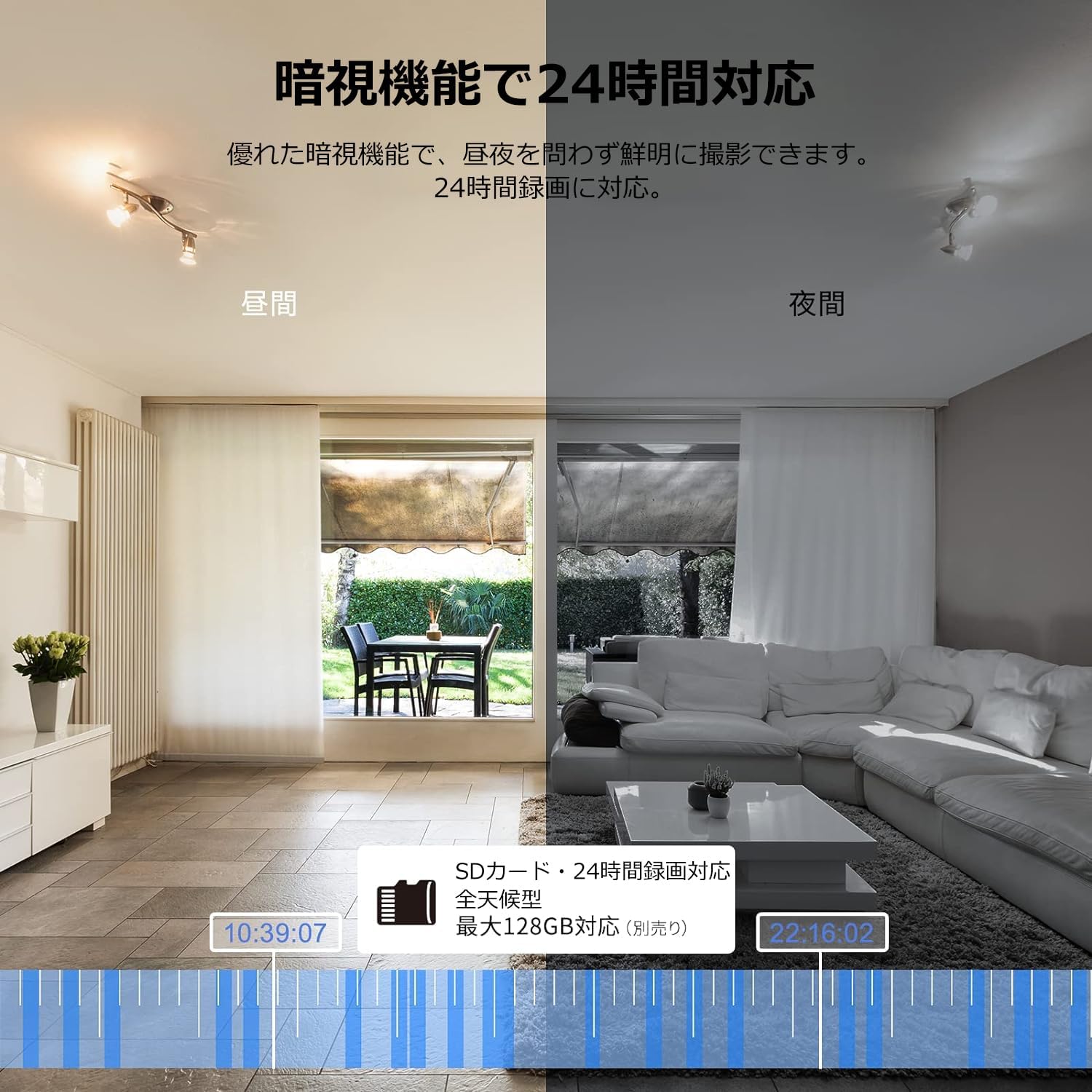
Image: Comparison of day and night vision, demonstrating the camera's ability to record clearly in low light.
4.3 צוויי-וועג אַודיאָ
Equipped with a microphone and speaker, the camera allows for real-time two-way communication.
- Speak and Listen: Talk to family members or pets through the app, and hear their responses.
- ראַש רעדוקציע: The two-way audio features noise reduction for clearer sound.

Image: The camera's two-way audio feature, allowing interaction with pets.
4.4 Motion Detection & Automatic Tracking
The camera can detect motion and automatically track subjects within its field of view.
- באַוועגונג אַלערץ: באַקומען רעגע נאָוטאַפאַקיישאַנז אויף דיין סמאַרטפאָון ווען באַוועגונג איז דעטעקטעד.
- אויטאָמאַטישע טראַקינג: The camera will follow detected movement, keeping the subject in frame.
- מענטשנרעכט דעטעקטיאָן: Advanced AI can differentiate between humans and other moving objects, reducing false alarms.
- שרעק פֿונקציע: Trigger an alarm sound from the camera via the app to deter intruders.

Image: Motion detection and alarm features, showing alerts on a smartphone.
4.5 רעקאָרדינג און סטאָרידזש
The camera supports both local and cloud storage options for continuous recording.
- מיקראָסד קאָרט: Supports up to 128GB microSD cards (sold separately) for 24-hour continuous recording with automatic overwriting.
- וואָלקן סטאָרידזש: Optional paid cloud storage service is available for extended recording and backup.
- ווידעא קאַמפּרעשאַן: Utilizes H.264 and H.265 compression formats for efficient storage.


Images: MicroSD card recording and cloud storage options.
4.6 פּריוואַטקייט מאָדע
Activate privacy mode to physically cover the camera lens, ensuring your privacy when needed.
- One-Tap Activation: Easily turn off the lens via the app.
- Physical Cover: The camera physically rotates its lens downwards, blocking the view.

Image: Privacy mode icon.
4.7 אַלעקסאַ אינטעגראַציע
The Galayou G2 is Alexa-certified, allowing for voice control and viewing the camera feed on compatible Alexa devices.
- קול קאַמאַנדז: ניצן קול קאַמאַנדז צו view the camera feed on an Echo Show or other Alexa-enabled screen.

Image: Alexa integration with the Galayou G2 camera.
4.8 Multi-Camera Support & Sharing
The app supports adding multiple cameras and sharing access with family members.
- עטלעכע קאַמעראַס: Monitor different areas of your home by adding several cameras to the app.
- משפּחה ייַנטיילונג: Share camera access with up to 4 family members simultaneously.

Image: Family sharing and multi-camera viewing.
4.9 Video Guide: Product Features
Video: This video showcases various features of a Skyworth pet camera, including its monitoring capabilities, which are comparable to the Galayou G2.
4.10 Video Guide: Blurams 300万画素 見守りカメラ
Video: This video highlights the features of a Blurams 3-megapixel monitoring camera, demonstrating functionalities similar to the Galayou G2.
4.11 Video Guide: JUFLSKY 300万画素 360°PTZ機 (Preview)
ווידעא: א קורצע הקדמהview ווידעא שאָוasing a 300-megapixel 360° PTZ camera, similar in functionality to the G2.
5. טראָובלעשאָאָטינג
- קענען ניט פאַרבינדן צו Wi-Fi:
- זיכער מאַכן אַז אייער Wi-Fi נעץ איז 2.4GHz. די קאַמעראַ שטיצט נישט 5GHz נעטוואָרקס.
- קאָנטראָלירט אייער Wi-Fi פּאַראָל פֿאַר אַקיעראַסי.
- ריקט די קאַמעראַ נענטער צו אייער Wi-Fi ראַוטער.
- Perform a factory reset on the camera and try the setup process again.
- No Live Feed:
- קוק דיין אינטערנעט פֿאַרבינדונג.
- Ensure the camera is powered on and the indicator light is solid blue.
- Restart the app and/or your smartphone.
- באַוועגונג דעטעקשאַן ניט ארבעטן:
- Verify that motion detection is enabled in the app settings.
- אַדזשאַסטירן די באַוועגונג דעטעקשאַן סענסיטיוויטי.
- זיכער מאַכן אַז עס זענען נישטאָ קיין שטערונגען וואָס בלאָקירן די קאַמעראַ'ס view.
- נעבעך ווידעא קוואַליטעט:
- Check your internet speed. A stable connection is required for optimal streaming.
- מאַכן זיכער אַז די אַפּאַראַט אָביעקטיוו איז ריין.
- Adjust the video quality settings in the app (e.g., from SD to 2K).
6. ספּעסאַפאַקיישאַנז
| שטריך | באַשרייַבונג |
|---|---|
| מאָדעל נאָמען | G2 |
| מאַונטינג טיפּ | Tabletop and Ceiling Mount |
| ווידעא קאַפּטורע רעסאָלוטיאָן | 1440 פּ (2 ק) |
| קאָליר | Automatic Tracking Camera |
| אַרייַנגערעכנט קאַמפּאָונאַנץ | Camera body, AC adapter, Japanese instruction manual, mounting set, power cable |
| ווירעלעסס קאָמוניקאַציע טעכנאָלאָגיע | Wi-Fi (נאָר 2.4GHz) |
| עפעקטיוו ווידעא האַכלאָטע | 2 Megapixels (300万画素) |
| פעלד פון View | 95 דיגריז |
| נאַכט וויזשאַן ראַנגע | 7 מעטער |
| ראַם קורס | 15 fps |
| מאַטעריאַל | פּלאַסטיק |
| פּראָדוקט דימענשאַנז (LxWxH) | 7.2 X 7.2 X 10.9 סענטימעטער |
| וואַסער קעגנשטעל מדרגה | ניט וואָטערפּרוף |
| ליכט מקור | ינפרערעד |
| רעקאַמענדיד נוצן | דרינענדיק זיכערהייַט |
| דרינענדיק / דרויסנדיק נוצן | דרינענדיק |
| קאַמפּאַטאַבאַל דעוויסעס | סמאַרטפאָון, טאַבלעט, דעסקטאָפּ, לאַפּטאָפּ |
| מאַכט מקור | קאָרדעד עלעקטריק |
| קאָנטראָללער טיפּ | אַפּ |
7. וואָראַנטי און שטיצן
The Galayou G2 camera comes with a manufacturer's warranty and customer support.
- וואָראַנטי: 1-year manufacturer's warranty.
- טעכניש שטיצן: For any issues or questions, please contact GALAYOU customer support through the app or visit the official GALAYOU store on Amazon.