
הקדמה
Thank you for choosing the Ledwood Apollo S TWS Earphones. This manual provides detailed instructions on how to set up, operate, maintain, and troubleshoot your new wireless earbuds. Please read this manual carefully before use to ensure optimal performance and longevity of your device.
פּעקל אינהאַלט
- Ledwood Apollo S TWS Earphones (Left and Right)
- ווירעלעסס טשאַרדזשינג קאַסע
- וסב טשאַרדזשינג קאַבלע
- באַניצער מאַנואַל
פּראָדוקט איבערview
The Ledwood Apollo S TWS Earphones feature a sleek design and provide a seamless wireless audio experience. The compact charging case not only protects your earbuds but also provides additional battery life on the go. The case includes a digital screen to display the current battery level.
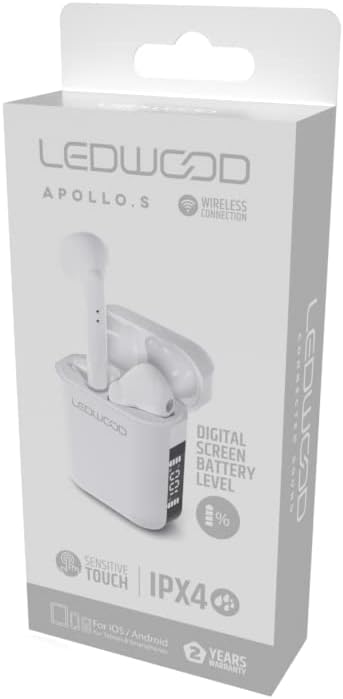
Image showing the Ledwood Apollo S TWS Earphones inside their charging case, highlighting the compact design and in-ear style.
סעטאַפּ
1. אויפלאָדן די אויערפאָונז און קעסטל
- Place both earphones into the charging case. Ensure they are properly seated.
- פֿאַרבינדט דעם USB טשאַרדזשינג קאַבל צום טשאַרדזשינג פּאָרט אויף דער קעסטל און שטעקט דעם אַנדערן עק אין אַ USB מאַכט אַדאַפּטער (נישט אַרייַנגערעכנט) אָדער אַ קאָמפּיוטער'ס USB פּאָרט.
- The digital screen on the charging case will display the current battery level during charging.
- Allow the earphones and case to fully charge before first use. The earphones will indicate full charge (e.g., LED indicator changes color or turns off).
2. פּערינג מיט דיין מיטל
- זיכער מאַכן אַז די אויערפאָונז זענען אויפגעלאָדן און געשטעלט אין די טשאַרדזשינג קעסטל.
- Open the charging case. The earphones will automatically enter pairing mode (indicated by flashing LED lights on the earbuds).
- אויף אייער סמאַרטפאָון אָדער בלועטוט-ענייבאַלד מיטל, גייט צו די בלועטוט סעטטינגס.
- זוכן פֿאַר available devices and select "Ledwood Apollo S" from the list.
- Once connected, the earphones will provide an audio confirmation, and the LED indicators will stop flashing.
- If pairing fails, turn off Bluetooth on your device, place the earphones back in the case, close the case, then repeat the steps.
אַפּערייטינג ינסטראַקשאַנז
The Ledwood Apollo S earphones feature sensitive touch controls for easy management of calls and music playback.
ריר קאָנטראָלס
- שפּיל / פּויזע: איין צאַפּן אויף יעדער עאַרבוד.
- ווייַטער שפּור: צאַפּ צוויי מאָל אויף די רעכטע אויערקנעפּל.
- פֿריִערדיקע שפּור: צאַפּ צוויי מאָל אויף די לינקע אויערקנעפּל.
- ענטפֿערן / סוף רופן: איין צאַפּ אויף יעדן אויערקנעפּל בעת אַן אינקאַמינג רוף אָדער אַקטיוון רוף.
- אָפּוואַרפן רופן: דריק און האלט איינע פון די אויערקנעפל פאר 2 סעקונדעס בעת אן אנקומענדיקן רוף.
- אַקטאַווייט קול אַססיסטאַנט: טרייפאַך צאַפּן אויף יעדן אויערקנעפּעל.
- באַנד אַרויף: דריק און האַלט די רעכטע אויערקנעפּל.
- באַנד אַראָפּ: דריק און האַלט די לינקע אויערקנעפל.
וישאַלט
רייניקונג
- רייניקט רעגולער די אויערפאָונז און די טשאַרדזשינג קעסטל מיט אַ ווייכן, טרוקענעם, לינט-פֿרייע שטאָף.
- ניצט נישט קיין שרײַבנדיקע רייניגער, אַלקאָהאָל, אדער כעמישע סאָלווענטן.
- Ensure charging contacts on both the earphones and the case are clean and free of debris to maintain proper charging.
סטאָרידזש
- ווען נישט אין באַנוץ, לייגט די אויערפאָונז אין זייער טשאַרדזשינג קעסטל צו באַשיצן זיי און האַלטן זיי טשאַרדזשד.
- האַלט דעם אַפּאַראַט אין אַ קיל, טרוקן אָרט, אַוועק פון עקסטרעמע טעמפּעראַטורן און דירעקט זונשייַן.
טראָובלעשאָאָטינג
- אויערפאָונז נישט פּערינג: Ensure both earphones are charged. Place them back in the case, close it, then reopen to re-enter pairing mode. Check your device's Bluetooth settings.
- קיין קלאַנג פֿון איין אויערקנעפּל: Try resetting the earphones by placing them in the case, closing it, and then taking them out again. Re-pair with your device.
- טשאַרדזשינג ישוז: Clean the charging contacts on both the earphones and the case. Ensure the charging cable is securely connected and the power source is functional.
- נידעריק באַנד: אַדזשאַסטירן דעם באַנד אויף ביידע אייער פֿאַרבונדענע מיטל און ניצן די אויערקנעפּל ריר קאָנטראָלס.
ספּעסאַפאַקיישאַנז
| מאָדעל נאָמען | אַפּאָללאָ ס |
| מאָדעל נומער | LD-APOLLO-S-BLK |
| קאַנעקטיוויטי טעכנאָלאָגיע | ווירעלעסס (בלועטאָאָטה) |
| קאָנטראָל מעטאָד | ריר, באַנד קאָנטראָל |
| סטייל | אין אויער |
| וואַסער קעגנשטעל מדרגה | IPX4 (שפריץ קעגנשטעליק) |
| ספּעציעלע פֿעיִקייטן | Fast Charging, Digital Screen Battery Level |
| מאַטעריאַל | האלץ |
| פאַבריקאַנט | Ledwood |
וואָראַנטי און שטיצן
The Ledwood Apollo S TWS Earphones come with a 2 יאָר וואָראַנטי פֿון דעם קויפֿדאַטום, וואָס באַדעקט פֿאַבריקאַציע־דעפֿעקטן. ביטע באַהאַלטן אייער קויפֿבאַווײַז פֿאַר וואָראַנטי־קליימז.
For technical support, troubleshooting assistance, or warranty inquiries, please contact Ledwood customer service through their official webפּלאַץ אָדער די זיצער ווו די פּראָדוקט איז פּערטשאַסט.
For more information, visit the official Ledwood webפּלאַץ: www.ledwood.com (נאטיץ: דאס איז א פלאצהאלטער URL as no specific support link was provided).