
הקדמה
Thank you for choosing the Ledwood Apollo S True Wireless Stereo (TWS) Earphones. This manual provides essential instructions for setting up, operating, and maintaining your earphones to ensure optimal performance and longevity. The Apollo S earphones feature a sleek design, sensitive touch controls, and a wireless charging case with a digital battery level display.
פּעקל אינהאַלט
- Ledwood Apollo S TWS Earphones (Left and Right)
- ווירעלעסס טשאַרדזשינג קאַסע
- וסב טשאַרדזשינג קאַבלע
- באַניצער מאַנואַל
Note: Please check all items are present upon unboxing.
סעטאַפּ
1. אויפלאָדן די אויערפאָונז און קעסטל
Before first use, fully charge the earphones and the charging case. The charging case features a digital screen that displays the battery level percentage.
- טשאַרדזשינג די קאַסטן: Connect the provided USB charging cable to the charging port on the case and to a USB power adapter (not included). The digital display will show the charging progress.
- טשאַרדזשינג די ירפאָונז: Place the earphones into their respective slots in the charging case. Ensure they are correctly seated. The earphones will automatically begin charging. The case's digital display may indicate the charging status of the earphones.
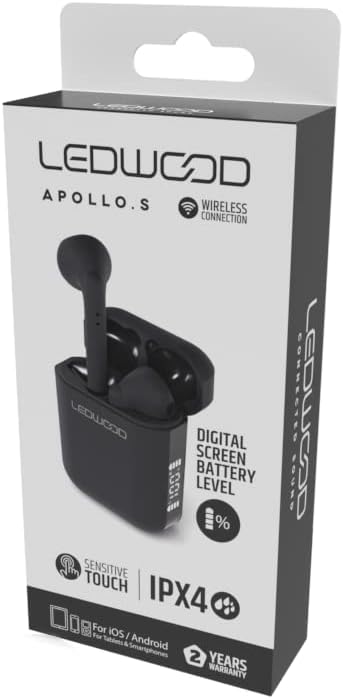
Image: Ledwood Apollo S TWS Earphones shown inside their open charging case. The earphones are black, and the case is also black with a sleek design. This image illustrates the product components.
2. פּערינג מיט אַ בלועטאָאָטה דיווייס
- שריט 1: Ensure the earphones are charged. Open the charging case. The earphones will automatically enter pairing mode, indicated by a flashing LED light on one or both earphones.
- שריט 2: אויף אייער מאָביל מיטל (סמאַרטפאָן, טאַבלעט, אאז"וו), גייט צו די בלועטוט סעטטינגס.
- שריט 3: קער אויף בלועטאָאָטה. זוכן פֿאַר בנימצא דעוויסעס.
- שריט 4: Select "Ledwood Apollo S" from the list of available devices.
- שריט 5: Once connected, the LED indicator on the earphones will stop flashing, and you will hear a confirmation tone.
- Note: The earphones will automatically reconnect to the last paired device when taken out of the case, if Bluetooth is enabled on the device.
אַפּערייטינג ינסטראַקשאַנז
ווערינג די ירפאָונז
Gently insert the earphones into your ears, ensuring a comfortable and secure fit. Adjust them slightly to achieve optimal sound quality and passive noise isolation.
ריר קאָנטראָלס
The Ledwood Apollo S earphones feature sensitive touch controls on each earbud. The functions may vary slightly depending on your device and operating system.
- שפּיל / פּויזע: איין צאַפּן אויף יעדער עאַרבוד.
- ווייַטער שפּור: צאַפּ צוויי מאָל אויף די רעכטע אויערקנעפּל.
- פֿריִערדיקע שפּור: צאַפּ צוויי מאָל אויף די לינקע אויערקנעפּל.
- ענטפֿערן / סוף רופן: איין צאַפּ אויף יעדן אויערקנעפּל בעת אַן אינקאַמינג רוף אָדער אַקטיוון רוף.
- אָפּוואַרפן רופן: דריק און האלט איינע פון די אויערקנעפל פאר 2 סעקונדעס בעת אן אנקומענדיקן רוף.
- אַקטאַווייט קול אַססיסטאַנט: דריק דריי מאָל אויף יעדן אויערקנעפּעל (למשל, סירי, גוגל אַסיסטאַנט).
- מאַכט אויף / אַוועק: Earphones power on automatically when removed from the case and power off when placed back into the case. Manual power on/off may be available by pressing and holding the touch area for an extended period (refer to specific device behavior).
וישאַלט
- רייניקונג: ניצט אַ ווייכע, טרוקענע, לינט-פֿרייע שטאָף צו רייניקן די אויערפֿאָנען און די טשאַרדזשינג קעסטל. ניצט נישט קיין שרײַבנדיקע רייניגער אָדער סאָלווענטן.
- סטאָרידזש: ווען נישט אין באַנוץ, לייגט די אויערפאָונז אין זייער טשאַרדזשינג קעסטל צו באַשיצן זיי און האַלטן זיי טשאַרדזשד.
- וואַסער קעגנשטעל: The earphones are rated IPX4, meaning they are resistant to splashing water from any direction. They are not waterproof and should not be submerged in water. Avoid exposure to heavy rain or sweat for extended periods.
- טעמפּעראַטור: פֿאַרמײַדט אויסשטעלן די אויערפֿאָנען צו עקסטרעמע טעמפּעראַטורן (הייס אָדער קאַלט) אָדער הויכער פֿײַכטקייט.
טראָובלעשאָאָטינג
- אויערפאָונז נישט פּערינג:
- זיכער מאַכן אַז ביידע אויערפאָונז זענען אויפגעלאָדן.
- אויסלעשן בלועטוט אויף אייער דעווייס און עס ווידער אנצינדן.
- Forget "Ledwood Apollo S" from your device's Bluetooth list and try pairing again.
- לייגט צוריק די אויערפאָונז אין דעם קעסטל, מאַכט צו דעם דעקל, וואַרט אַ פּאָר סעקונדעס, און עפֿנט ווידער צו ריסעט.
- קיין קלאַנג פֿון איין אויערקנעפּל:
- מאַכן זיכער אַז ביידע עאַרבודז זענען באפוילן.
- פרובירט צוריקצולייגן ביידע אויערקנעפּלעך אין דעם קעסטל און זיי ווידער ארויסנעמען.
- קאָנטראָלירט די אַודיאָ באַלאַנס סעטטינגס פון אייער דעווייס.
- טשאַרדזשינג פאַל ניט טשאַרדזשינג:
- זיכער מאַכן אַז דער טשאַרדזשינג קאַבל איז זיכער פארבונדן צו ביידע דעם קעסטל און די מאַכט מקור.
- פּרוּווט אַ אַנדערש וסב קאַבלע אָדער מאַכט אַדאַפּטער.
- ריר קאָנטראָלס רעאַגירן נישט:
- זיכער מאַכן אַז אייערע פינגער זענען ריין און טרוקן.
- ריסטאַרט דיין מיטל און פּרובירן ווידער.
ספּעסאַפאַקיישאַנז
| סאָרט | Ledwood |
| מאָדעל נאָמען | APOLLO S (LD-APOLLO-S-BLK) |
| פאָרם פאַקטאָר | אין אויער |
| קאַנעקטיוויטי טעכנאָלאָגיע | ווירעלעסס (בלועטאָאָטה) |
| קאָנטראָל מעטאָד | ריר |
| וואַסער קעגנשטעל שאַץ | IPX4 |
| געבויט-אין מידיאַ | ווירעלעסס טשאַרדזשינג קאַסע |
| נאָך פֿעיִקייטן | שנעל טשאַרדזשינג |
| מאַטעריאַל | פּלאַסטיק |
| קאָליר | שוואַרץ |
| קאַמפּאַטאַבילאַטי | For iOS / Android (Tablets & Smartphones) |
וואָראַנטי און שטיצן
The Ledwood Apollo S TWS Earphones come with a 2 יאָר וואָראַנטי פֿון דעם קויפֿדאַטום. די וואָראַנטי דעקט פֿאַבריקאַציע־דעפֿעקטן. ביטע באַהאַלטן אייער קויפֿבאַווײַז פֿאַר וואָראַנטי־קליימז.
For technical support or warranty inquiries, please contact your retailer or visit the official Ledwood website for customer service information. Ensure you have your model number (LD-APOLLO-S-BLK) and purchase details ready.