
MEGA MOTION HY-A03
MEGA MOTION Hoverboard Go Kart User Manual
מאָדעל: HY-A03
הקדמה
Welcome to the MEGA MOTION Hoverboard Go Kart user manual. This guide provides essential information for the safe operation, setup, maintenance, and troubleshooting of your new self-balancing scooter and kart attachment. Please read this manual thoroughly before first use to ensure optimal performance and safety.

Image: The MEGA MOTION Hoverboard in blue, featuring LED lights on the wheels, paired with its adjustable blue Go Kart attachment. This image showcases the complete product package.
זיכערקייַט אינפֿאָרמאַציע
WARNING: Always wear appropriate safety gear, including a helmet, knee pads, and elbow pads, when operating the hoverboard or kart. Adult supervision is recommended for children.
- וואָג לימיט: The hoverboard supports a load-bearing capacity of 20-100kg. Do not exceed the maximum weight limit.
- ספּיד לימיט: The speed limit is 15 km/hr (9 mph). Avoid excessive speed, especially in crowded areas.
- באַטערי זיכערקייַט: The product features a built-in battery overload protection system. Charge the device once a month to maintain battery life, even during periods of non-use.
- ינווייראַנמענאַל טנאָים: Use the hoverboard on flat, dry surfaces. Avoid wet conditions, uneven terrain, or steep inclines.
- פאַר-נוץ טשעק: Always check the status of the hoverboard before each use to ensure all components are secure and functioning correctly.
- ינטעליגענט שוץ: The device includes intelligent fault detection, low battery reminder, intelligent weight sensing, balance assist, explosion-proof tires, and overspeed warning functions.

Image: Two children, fully equipped with helmets and protective pads, are seen enjoying their hoverboards. One child is on a pink hoverboard, and the other is on a green one, demonstrating safe and fun usage.
פּראָדוקט איבערview און קאַמפּאָונאַנץ
The MEGA MOTION Hoverboard Go Kart system consists of two primary components: the self-balancing hoverboard and the adjustable hoverkart attachment.
Hoverboard Features:
- מאַטעריאַל: High-quality ABS+PC material for durability.
- ווהעעלס: 6.5-inch aluminum alloy wheels with unique non-slip pedals.
- מאָטאָר: Dual 250W motors for full power and stable performance.
- לייטינג: Bright LED headlights for enhanced visibility and safety during night riding.
- אַודיאָ: Integrated Bluetooth speaker for music playback.

Image: A blue MEGA MOTION Hoverboard with vibrant LED lights on its wheels and front. A smartphone icon indicates Bluetooth connectivity, highlighting its integrated speaker feature.
Hoverkart Features:
- אַדזשאַסטאַבאַל לענג: The frame length can be adjusted from 31-44.5 inches (78.7-113 cm) using a telescopic button, accommodating various user heights.
- קאָנטראָל: Allows control of the hoverboard from a seated position.
- צוטשעפּען: Easily attaches to the hoverboard with included straps.

Image: A blue Hoverkart attachment, demonstrating its adjustable length feature with arrows indicating extension and retraction. The image highlights the telescopic mechanism for user comfort.
סעטאַפּ
Hoverboard Initial Setup:
- אויספּאַקן: קערפאַלי באַזייַטיקן אַלע קאַמפּאָונאַנץ פון די פּאַקקאַגינג.
- ערשט אָפּצאָל: Before first use, fully charge the hoverboard battery. Connect the charger to the charging port and plug it into a power outlet. The indicator light on the charger will change when fully charged.
- מאַכט אויף: דריקן די מאַכט קנעפּל צו אַקטאַווייט די האָווערבאָאַרד.
Attaching the Hoverkart:
- Assemble Kart Frame: If not pre-assembled, connect the kart frame components according to the included assembly instructions.
- סטרויערן לענג: Adjust the length of the hoverkart frame to suit the rider's height by rotating the telescopic button and securing it.
- Attach to Hoverboard: Position the hoverkart over the hoverboard. Use the provided straps to securely fasten the hoverkart's attachment points to the hoverboard's footpads. Ensure the straps are tight and the kart is stable.

בילד: א נאָענטע בילד view of a hand adjusting the length of the Hoverkart's frame using a knob, illustrating the ease of customization for different users.
אַפּערייטינג ינסטראַקשאַנז
Operating the Hoverboard (Standing):
- מאָונטינג: Place one foot on a footpad, then quickly place the other foot on the second footpad. Maintain balance by keeping your body upright.
- באַוועגונג: Lean slightly forward to move forward, and lean backward to slow down or move in reverse. To turn, apply more pressure to the footpad on the side opposite the desired turning direction.
- דיסמאָונטינג: טרעט אַראָפּ פֿון האָווערבאָרד איין פֿוס אין אַ מאָל, בעסער צוריק.

Image: A child confidently riding a pink hoverboard, showcasing the self-balancing technology and ease of use for young riders.
Operating with the Hoverkart (Seated):
- זיצן: Sit comfortably in the kart seat with your feet on the footrests.
- קאָנטראָל לעווערס: Use the two control levers to steer and accelerate. Push both levers forward to move forward, pull both back to brake or reverse. Push one lever forward and pull the other back to turn.
- לערנען קורווע: Users can master the hoverboard and kart controls within minutes due to intuitive design.
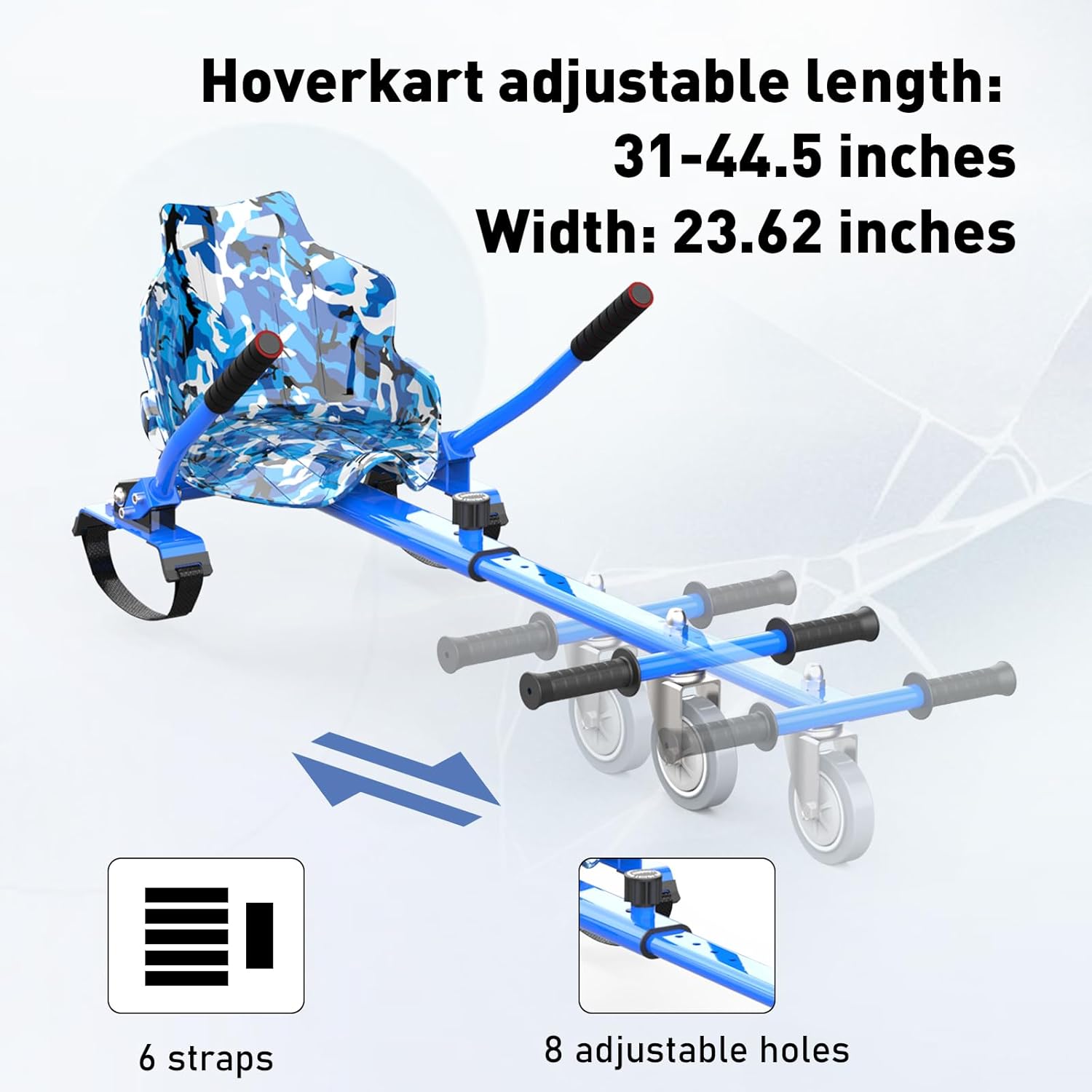
Image: A child happily riding the hoverboard with the kart attachment, demonstrating the seated operation and the fun experience it provides.
Bluetooth Speaker Functionality:
- פּאָרינג: Turn on the hoverboard. Enable Bluetooth on your mobile device and search for "MEGA MOTION" or a similar device name. Select to pair.
- מוזיק פּלייבאַק: Once paired, you can play music through the hoverboard's built-in speaker.
וישאַלט
- רייניקונג: Wipe the hoverboard and kart with a damp cloth. Do not use harsh chemicals or abrasive cleaners. Ensure the device is dry before charging or storing.
- באַטערי זאָרגן: Charge the battery regularly, even if not in use, to prevent deep discharge and prolong battery life. Store in a cool, dry place.
- טייער דורכקוק: Periodically check the tires for wear and tear. Ensure they are free from punctures or damage.
- סטאָרידזש: Store the hoverboard and kart in a dry, temperature-controlled environment away from direct sunlight and moisture.
טראָובלעשאָאָטינג
| פּראָבלעם | מעגלעך סיבה | לייזונג |
|---|---|---|
| האָווערבאָרד טוט זיך נישט אָן. | נידעריגע באַטעריע אָדער פּראָבלעם מיט דער מאַכט קנעפּל. | לאָדט אויף דעם האָווערבאָרד גאָר. מאַכט זיכער אַז דער מאַכט קנעפּל איז פעסט געדריקט. |
| Hoverboard not balancing correctly. | Calibration needed or sensor issue. | Refer to the full product manual for calibration steps. Ensure you are on a flat surface. |
| בלועטוט קאנעקט נישט. | Hoverboard not in pairing mode or device too far. | Ensure hoverboard is on. Move your device closer. Restart both devices and try pairing again. |
| רידוסט באַטאַרייע לעבן. | באַטעריע דעגראַדאַציע אָדער נישט ריכטיק טשאַרדזשינג. | Ensure regular charging as per maintenance guidelines. Avoid over-discharging. |
| Kart attachment feels loose. | Straps not tightened sufficiently. | Re-tighten all straps connecting the kart to the hoverboard. Check for wear on straps. |
פֿאַר מער קאָמפּליצירטע פּראָבלעמען, ביטע קאָנטאַקטירט קונה שטיצע.
ספּעסאַפאַקיישאַנז
| שטריך | דעטאַל |
|---|---|
| מאָדעל נאָמען | HY-A03 |
| סאָרט | MEGA MOTION |
| קאָליר | Blue - Blue |
| עלטער ראַנגע | קינד |
| מאַקסימום וואָג קאַפּאַציטעט | 100 קילאָגראַמס |
| מאָטאָר מאַכט | 250W (Dual Motors) |
| ספּיד לימיט | 15 קילאמעטער / ה (9 מ.פ.ש) |
| ראָד גרייס | 6.5 אינטשעס |
| באַטערי טיפּ | Lithium Polymer (4AH) |
| טשאַרדזשינג צייט | בעערעך 2-3 שעה |
| ראַם מאַטעריאַל | אַלומינום |
| אַרייַנגערעכנט קאַמפּאָונאַנץ | Hoverboard, Hoverkart |
| פּעקל דימענשאַנז | 61 X 56 X 22 סענטימעטער |
| פּונקט וואָג | 13.4 קג |
וואָראַנטי און שטיצן
MEGA MOTION products are manufactured with quality and performance in mind. For any questions or support, please refer to the following contact information:
- פאַבריקאַנט: YONGKANG CHIC
- EU פארשטייער: Lead Speed B.V. (support@megamotion.eu)
- וק פארשטייער: BOOSTERE COMMERCE SOLUTION LIMITED (boosteremm@outlook.com)
- ביטע האַלטן דיין דערווייַז פון קויפן פֿאַר וואָראַנטי קליימז.