
הקדמה
The Orange Box is a portable Bluetooth speaker designed to deliver high-quality audio. This manual provides essential information for setting up, operating, maintaining, and troubleshooting your device. Please read these instructions carefully before use to ensure optimal performance and longevity of your speaker.
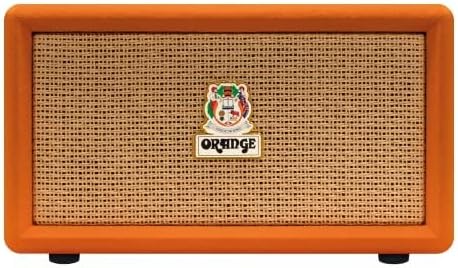
בילד: פראָנט view of the Orange Box Portable Bluetooth Speaker.
וויכטיק סאַפעטי אינפֿאָרמאַציע
כדי צו רעדוצירן דעם ריזיקע פון עלעקטרישן שאק, פייער און שאדן, ביטע באמערקן די פאלגנדע זיכערהייט מיטלען:
- שטעלט נישט אויס דעם רעדנער צו רעגן אדער פייכטקייט.
- צענעמט נישט דעם אַפּאַראַט. לאָזט איבער אַלע סערוויסעס צו קוואַליפֿיצירטע פּערסאָנאַל.
- Avoid extreme temperatures. Do not place near heat sources or in direct sunlight.
- Use only the power cable supplied with the device.
- האַלטן אויס פון דערגרייכן פון קינדער.
- זאָרגט פֿאַר געהעריקע ווענטילאַציע; פֿאַרשטאָפּט נישט קיין ווענטילאַציע עפענונגען.
פּעקל אינהאַלט
באַשטעטיקן אַז אַלע זאכן זענען פאַראַן אין דער קעסטל:
- Orange Box Portable Bluetooth Speaker
- מאַכט קאַבלע
- דעטאַטשאַבלע שעפּן

Image: The Orange Box speaker shown with its retail packaging, indicating included accessories.
פּראָדוקט איבערview
פראָנט פּאַנעל קאָנטראָלס
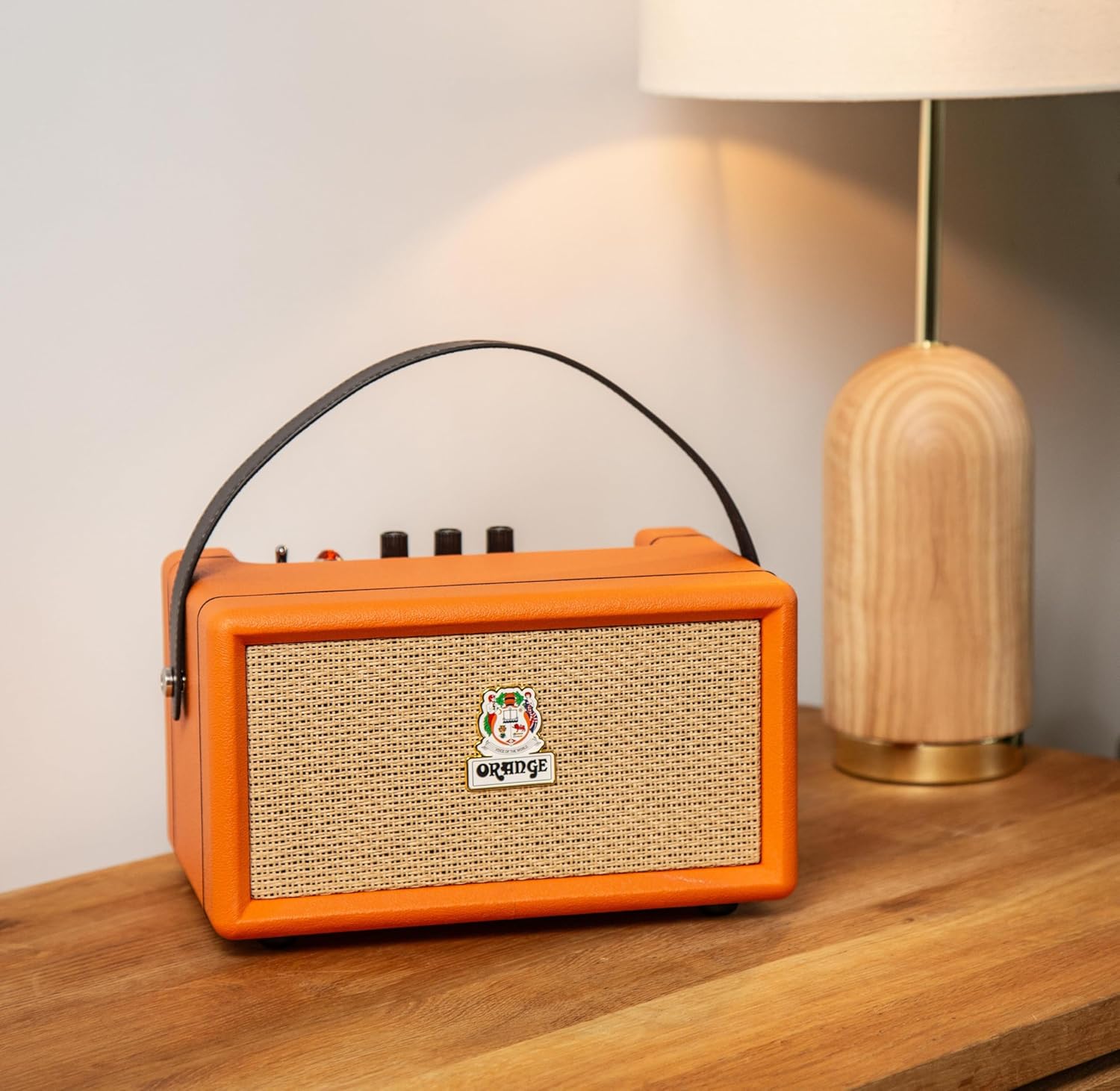
בילד: דעטאַלירט view of the Orange Box control panel.
- אָנ / אַוועק באַשטימען: טוישט די רעדנער מאַכט.
- באַטערי ינדיקאַטאָר: ווײַזט דעם איצטיקן באַטעריע טשאַרדזש לעוועל.
- טרעבל קאָנטראָל: Adjusts the high-frequency audio output.
- באַס קאָנטראָל: Adjusts the low-frequency audio output.
- באַנד קאָנטראָל: אַדזשאַסטירט דעם אַלגעמיינעם געזונט־אויסגאַנג־לעוועל.
- AUX אין: 3.5 מ״מ אַרײַנגאַנג פֿאַר פֿאַרבינדן עקסטערנע אַודיאָ דעוויסעס.
- בלועטאָאָטה קנעפּל: הייבט אן בלועטוט פארינג מאָדע.
- אָווערלאָאַד ליכט: Illuminates when the audio signal is too high, indicating potential distortion.
דערציען פּאַנעל קאַנעקשאַנז

בילד: הינטערשטע view of the Orange Box speaker, highlighting the power input.
- דק אין: Power input port for connecting the supplied power cable to charge the battery or operate the speaker.
סעטאַפּ
1. טשאַרדזשינג די ספּיקער
- Connect the supplied power cable to the DC IN port on the rear of the speaker.
- צאַפּן די אנדערע סוף פון די מאַכט קאַבלע אין אַ פּאַסיק מאַכט ווענטיל.
- The battery indicator light will show charging status. A full charge provides up to 15 hours of playback.

Image: Visual representation of the speaker's long battery life.
2. פּאָווערינג אויף / אויסגעלאשן
- To power on, flip the On/Off switch to the 'On' position.
- To power off, flip the On/Off switch to the 'Off' position.
אַפּערייטינג ינסטראַקשאַנז
1. בלועטאָאָטה פּערינג
- פאַרזיכערן אַז די רעדנער איז פּאַוערד אויף.
- Press the Bluetooth button on the control panel. The Bluetooth indicator light will flash, indicating pairing mode.
- אויף אייער אַודיאָ מיטל (סמאַרטפאָן, טאַבלעט, אאז"וו), אַקטיווירט בלועטוט און זוכט פֿאַר פֿאַראַן דעוויסעס.
- Select "Orange Box" from the list of devices.
- Once connected, the Bluetooth indicator light will become solid. The speaker has a Bluetooth range of up to 15 meters.

Image: Bluetooth 5.0 connectivity icon.
2. Using the AUX Input
- Connect a 3.5mm audio cable (not supplied) from your audio device's headphone jack to the AUX In port on the speaker's control panel.
- The speaker will automatically switch to AUX input mode.
3. Adjusting Audio
- באַנד: דריי דעם וואָלומען קנעפּל צו פאַרגרעסערן אָדער פאַרמינערן דעם געזונט לעוועל.
- באַס / טרעבל: Use the Bass and Treble knobs to fine-tune the audio equalization to your preference.
4. Overload Indicator
The Overload light illuminates when the input signal is too strong, which can cause audio distortion. If this light frequently comes on, reduce the volume from your audio source or the speaker's volume knob to prevent clipping and ensure clear sound.

Image: Overload light indicator on the control panel.
וישאַלט
- רייניקונג: Use a soft, dry cloth to clean the speaker''s exterior. Do not use liquid cleaners or aerosols.
- סטאָרידזש: ווען נישט אין באַנוץ פֿאַר לענגערע פּעריאָדן, האַלט דעם רעדנער אין אַ קיל, טרוקן אָרט.
- באַטערי זאָרגן: כדי צו פארלענגערן די לעבן פון די באַטעריע, זאָלט איר נישט אָפט אויסלאָדן די באַטעריע. לאָדט דעם רעדנער רעגולער אויף, אפילו אויב ער איז נישט אין באַנוץ.
טראָובלעשאָאָטינג
| פּראָבלעם | מעגלעך סיבה | לייזונג |
|---|---|---|
| קיין מאַכט | די באַטעריע איז אויסגעשעפּט אָדער די מאַכט קאַבל איז נישט פארבונדן. | Charge the speaker using the supplied power cable. Ensure the power switch is in the 'On' position. |
| קיין געזונט | Volume is too low, incorrect input selected, or device not paired. | Increase speaker volume and source device volume. Ensure Bluetooth is paired or AUX cable is properly connected. |
| בלועטאָאָטה איז נישט קאַנעקטינג | דער רעדנער איז נישט אין פּערינג מאָדע אדער דער דעווייס איז אַרויס פון דערגרייכונג. | Press the Bluetooth button to enter pairing mode. Move your device closer to the speaker (within 15 meters). Forget the device on your phone and re-pair. |
| פאַרקרימט געזונט | Volume too high (overload) or poor audio source quality. | Reduce the volume on the speaker or your audio source. Check the audio source for quality issues. |
| קורץ באַטאַרייע לעבן | Battery not fully charged or aged battery. | Ensure the speaker is fully charged before use. Battery performance may decrease over time. |
ספּעסאַפאַקיישאַנז
| שטריך | דעטאַל |
|---|---|
| סאָרט | מאַראַנץ |
| מאָדעל נומער | Orange Box |
| מאָדעל נאָמען | ORA ORANGEBOX |
| רעדנער מאַקסימום רעזולטאַט מאַכט | 50 וואטס רמס |
| קאַנעקטיוויטי טעכנאָלאָגיע | Bluetooth, Aux |
| בלועטאָאָטה קייט | 15 מעטער |
| אַודיאָ רעזולטאַט מאָדע | סטערעאָ |
| רעדנער טיפּ | פּאָרטאַטיוו ספּיקער |
| קאָליר | מאַראַנץ |
| אָפּצוימונג מאַטעריאַל | פּלאַסטיק |
| נומער דימענשאַנז (ד רענטגענ וו רענטגענ ה) | 13"ד רענטגענ 11"וו רענטגענ 10"ה |
| פּונקט וואָג | 2.97 קילאָגראַמס |
| מאַכט מקור | באַטאַרייע פּאַוערד |
| באַטערי לעבן | אַרויף צו 15 שעה |
| קאָנטראָל מעטאָד | Touch (for Bluetooth button), Rotary Knobs |

Image: Dimensions of the Orange Box speaker.
וואָראַנטי און שטיצן
The Orange Box Portable Bluetooth Speaker comes with a איין יאָר לימיטעד וואָראַנטי from the manufacturer, Orange. This warranty covers defects in materials and workmanship under normal use.
For warranty claims, technical support, or service inquiries, please contact Orange customer support through their official website or the retailer where the product was purchased. Please have your proof of purchase and the product's model number (Orange Box) available when contacting support.