
1. הקדמה
This manual provides essential information for the proper use and care of your ZdalaMit AH81-11699A Replacement Remote Control. This remote is designed as a direct replacement for specific Samsung Soundbar models, requiring no programming for immediate use.
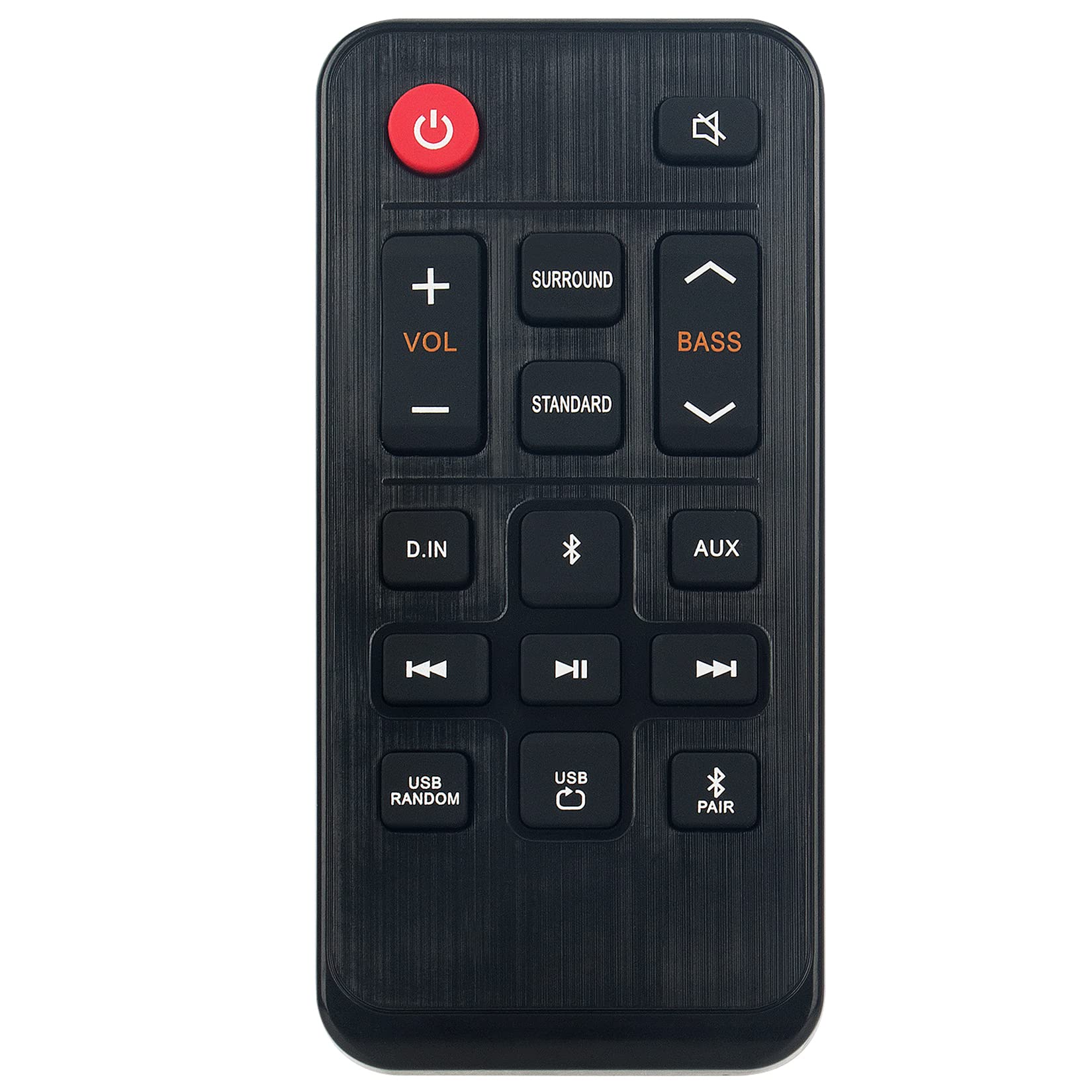
בילד 1.1: The ZdalaMit AH81-11699A Replacement Remote Control. This image displays the front view of the black remote control, featuring various buttons for power, volume, mute, and other soundbar functions.
2. קאַמפּאַטאַבילאַטי
The AH81-11699A Replacement Remote Control is compatible with the following Samsung Soundbar models:
- HW-T400
- HW-T400/ZA
- HW-T400/XU
- HWT400
- HWT400/ZA
No programming is required for these models. Simply insert the battery, and the remote is ready for use.
3. סעטאַפּ
To begin using your replacement remote control, follow these simple steps for battery installation:
- געפֿינען די באַטערי אָפּטייל: On the back of the remote control, identify the battery compartment cover.
- עפענען די אָפּטייל: Gently slide or press the latch to open the battery compartment cover.
- אַרייַנלייגן באַטערי: Insert one CR2032 coin cell battery into the compartment. Ensure the positive (+) side of the battery is facing upwards, as indicated by the diagram inside the compartment.
- פאַרמאַכן די אָפּטייל: לייג צוריק דעם דעקל פונעם באַטעריע־אָפּטייל, און זאָרג אַז עס קליקט זיכער אַרײַן.
The remote control is now ready for operation. No additional pairing or programming is necessary for compatible Samsung Soundbar models.
4. אַפּערייטינג ינסטרוקטיאָנס
The AH81-11699A remote control features 18 buttons designed for intuitive control of your Samsung Soundbar. Point the remote directly at your soundbar for optimal performance.
- מאַכט קנעפּל: דריק צו דרייען די סאַונדבאַר אָן אָדער אויס.
- באַנד אַרויף / אַראָפּ: Use the '+' and '-' buttons to adjust the soundbar's volume level.
- שטיל קנעפּל: Press to temporarily silence the soundbar's audio. Press again to restore sound.
- מקור קנעפּל: Cycle through available input sources (e.g., Bluetooth, Optical, HDMI).
- סאַונד מאָדע קנעפּל: Change the sound effect mode (e.g., Standard, Surround, Game).
- באַס / טרעבל קאָנטראָל: Adjust bass and treble levels (if supported by your soundbar model).
- אַנדערע פֿונקציע קנעפּלעך: Additional buttons may control specific soundbar features. Refer to your soundbar's original manual for detailed functionality.
Ensure there are no obstructions between the remote control and the soundbar's infrared receiver for proper signal transmission. The maximum effective range is approximately 33 feet (10 meters).
5. וישאַלט
געהעריגע אויפהאלטונג גאראנטירט די לאנגעוויטי און אפטימאלע פאָרשטעלונג פון אייער ווײַטקאָנטראָל.
- רייניקונג: ווישט אָפּ די ווײַטקאָנטראָל מיט אַ ווייכן, טרוקענעם שטאָף. ניצט נישט קיין פֿליסיקע רייניגער, סאָלווענטן, אָדער אַברייסיוו מאַטעריאַלן, ווײַל די קענען שאַטן די ייבערפֿלאַך אָדער אינעווייניקסטע קאָמפּאָנענטן.
- באַטערי פאַרבייַט: Replace the CR2032 battery when the remote's responsiveness decreases or it stops functioning. Always use a fresh, high-quality CR2032 alkaline battery.
- סטאָרידזש: האַלט די ווײַטקאָנטראָל אין אַ קיל, טרוקן אָרט ווײַט פֿון דירעקטער זון, עקסטרעמע טעמפּעראַטורן און הויכער פֿײַכטקייט.
- ויסמיידן טראפנס: באַשיצט די ווייַטקאָנטראָל פון פיזישע קלאַפּן, ווײַל פאַלן קענען שעדיקן די אינערלעכע קרייזן.
6. טראָובלעשאָאָטינג
If you experience issues with your remote control, refer to the following common solutions:
| פּראָבלעם | מעגלעך סיבה | לייזונג |
|---|---|---|
| ווײַטקאָנטראָל רעאַגירט נישט. | טויטע אדער נישט ריכטיק אינסטאלירטע באַטעריע. | טוישט אויס די CR2032 באַטעריע, און זאָרגט אַז די פּאָלאַריטעט זאָל זיין ריכטיק (+ זייט אַרויף). |
| Remote has short range or intermittent response. | Weak battery; Obstruction between remote and soundbar; Remote not pointed correctly. | Replace battery. Remove any objects blocking the signal path. Ensure the remote is pointed directly at the soundbar's IR receiver. |
| ספעציפישע קנעפלעך ארבעטן נישט. | Button malfunction; Soundbar does not support the function. | Test other buttons. If only specific buttons fail, the remote may be faulty. Verify if your soundbar model supports the intended function. |
| Remote works but soundbar functions incorrectly. | Issue with the soundbar itself. | Refer to your Samsung Soundbar's original user manual for troubleshooting soundbar-specific issues. |
אויב די טריט לייזן נישט דעם פראבלעם, ביטע קאנטאקטירט קאסטומער סופארט.
7. ספּעסאַפאַקיישאַנז
- מאָדעל נאָמען: AH81-11699A
- סאָרט: ZdalaMit
- קאַנעקטיוויטי טעכנאָלאָגיע: ינפרערעד
- קאַמפּאַטאַבאַל דעוויסעס: Samsung Soundbar (HW-T400 series)
- באַטערי טיפּ: 1 x CR2032 Coin Cell (Alkaline recommended)
- מאַקסימום קייט: Approximately 33 Feet (10 meters)
- Button Quantity: 18
- קאָנטראָללער טיפּ: קנעפּל קאָנטראָל
- דימענשאַנז (L x W x H): 4.76" x 2.18" x 0.55" (12.09 ס״מ x 5.54 ס״מ x 1.40 ס״מ)
- קאָליר: שוואַרץ
- ספּעציעלע שטריך: ערגאַנאַמיק פּלאַן
8. וואָראַנטי און שטיצן
This ZdalaMit AH81-11699A Replacement Remote Control comes with a 1 יאָר וואָראַנטי פֿון דעם קויפֿדאַטום, וואָס באַדעקט פֿאַבריקאַציע־דעפֿעקטן.
For warranty claims, technical assistance, or any other inquiries, please contact our customer support. We are available to assist you with any questions or concerns you may have regarding your product.
Contact information for support is typically provided at the point of purchase or on the product packaging.