
הקדמה
א דאנק פארן קויפןasing the Proscan PSP333 Portable Bluetooth Speaker. This manual provides important safety instructions, operational guidelines, and maintenance tips to ensure optimal performance and longevity of your device. Please read this manual thoroughly before using the product and retain it for future reference.
זיכערקייַט אינפֿאָרמאַציע
- שטעלט נישט אויס דעם אַפּאַראַט צו עקסטרעמע טעמפּעראַטורן, דירעקטע זונשייַן, אדער הויכע הומידיטי.
- ויסמיידן דראַפּינג אָדער ונטערטעניק די רעדנער צו שטאַרק ימפּאַקץ.
- נעמט נישט אויס דעם אַפּאַראַט און פּרוּווט נישט צו פאַרריכטן עס אַליין. לאָזט איבער אַלע סערוויסעס צו קוואַליפֿיצירטע פּערסאָנאַל.
- האַלטן די רעדנער אַוועק פון וואַסער און אנדערע ליקווידס.
- ניצט נאָר דעם ספּעציפֿישן טשאַרדזשינג קאַבל.
- זאָרגט פֿאַר געהעריקע ווענטילאַציע ווען איר אַפּערירט דעם רעדנער.
פּעקל אינהאַלט
ביטע קאָנטראָלירט אַז די פאלגענדע זאכן זענען אַרייַנגערעכנט אין דיין פּעקל:
- Proscan PSP333 Portable Bluetooth Speaker
- וסב טשאַרדזשינג קאַבלע
- באַניצער מאַנואַל (דעם דאָקומענט)
פּראָדוקט פֿעיִקייטן
The Proscan PSP333 speaker offers a range of features for an enhanced audio experience:
- Wireless Bluetooth connectivity for streaming audio from compatible devices.
- Integrated LED lights for visual ambiance.
- Built-in FM radio for listening to local stations.
- Auxiliary (AUX) input for wired connection to non-Bluetooth devices.
- Adjustable Bass, Treble, and Volume controls.
- Rechargeable battery for portable use.
- Convenient carrying handles that also function as a built-in stand.
- Output Power: 2 x 3W (6-Watt-RMS total).
קאָנטראָלס און קאַנעקשאַנז
מאַכט זיך באַקאַנט מיטן קאָנטראָל פּאַנעל און פֿאַרבינדונג פּאָרץ פֿון אייער רעדנער.

פיגורע 1: פראָנט view of the Proscan PSP333 speaker, highlighting the speaker grilles and the central control interface.
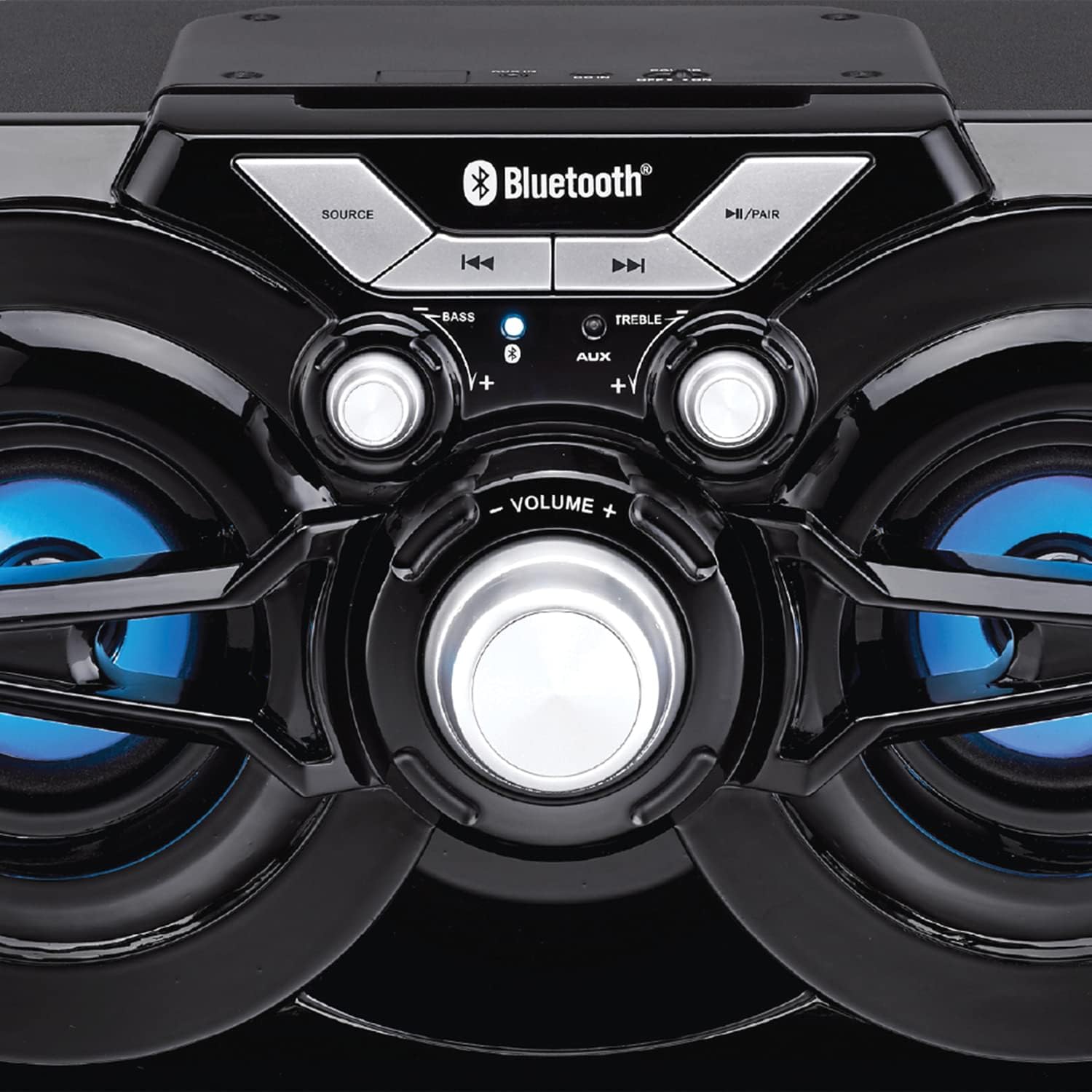
פיגורע 2: דעטאַילעד view of the speaker's control panel, illustrating the various buttons and adjustment knobs.
קאָנטראָל פּאַנעל פאַנגקשאַנז:
- SOURCE קנעפּל: דריקן צו באַשטימען צווישן בלועטוט, FM ראַדיאָ, און AUX אַרייַנגאַנג מאָדעס.
- ◀◀ (Previous Track/Tune Down) Button: In Bluetooth mode, press to go to the previous track. In FM mode, press to tune down the frequency.
- ▶▶ (Next Track/Tune Up) Button: In Bluetooth mode, press to go to the next track. In FM mode, press to tune up the frequency.
- ►/PAIR Button: Press to Play/Pause audio. Press and hold to initiate Bluetooth pairing mode. In FM mode, press and hold to auto-scan for stations.
- באַס קנופּ: דרייען צו סטרויערן די באַס מדרגה.
- טרעבל קנופּ: דרייען צו סטרויערן די טרעבאַל מדרגה.
- VOLUME קנופּ: Rotate to adjust the overall volume output.
- AUX אַרייַנשרייַב: 3.5mm jack for connecting external audio devices via an auxiliary cable (not included).
- טשאַרדזשינג פּאָרט: פֿאַר פֿאַרבינדן דעם USB טשאַרדזשינג קאַבל.
סעטאַפּ
ערשט טשאַרדזשינג:
- Before first use, fully charge the speaker. Connect the small end of the included USB charging cable to the charging port on the speaker.
- פֿאַרבינדט דעם גרעסערן עק פֿונעם USB קאַבל צו אַ USB מאַכט אַדאַפּטער (נישט אַרייַנגערעכנט) אָדער אַ קאָמפּיוטער'ס USB פּאָרט.
- The charging indicator light will illuminate. Once fully charged, the light may change color or turn off (refer to specific indicator behavior if detailed in product).
- א פולע טשאַרדזש נעמט טיפּיש עטלעכע שעה.
מאַכט אויף / אַוועק:
- To power on the speaker, locate the power switch (usually on the back or side) and slide it to the 'ON' position.
- To power off, slide the switch to the 'OFF' position.
אַפּערייטינג ינסטראַקשאַנז
בלועטאָאָטה מאָדע:
- Power on the speaker. It will automatically enter Bluetooth pairing mode, indicated by a flashing LED light (e.g., blue LED).
- If the speaker is not in Bluetooth mode, press the מקור קנעפּל ביז די בלועטוט אינדיקאַטאָר ליכט בלינקט.
- אויף אייער מאָבילער מיטל (סמאַרטפאָן, טאַבלעט, אאז"וו), אַקטיווירט בלועטוט און זוכט פֿאַר פֿאַראַן דעוויסעס.
- Select "PSP333" or "Proscan Speaker" from the list of devices.
- Once paired, the Bluetooth indicator light will stop flashing and remain solid. You can now play audio from your device through the speaker.
- Use the ◀◀, ▶▶, and ►/PAIR buttons on the speaker or your device to control playback.
AUX אַרייַנשרייַב מאָדע:
- מאַכט די רעדנער.
- פֿאַרבינדט איין עק פֿון אַ 3.5 מ״מ אַודיאָ קאַבל (נישט אַרייַנגערעכנט) צום AUX אַרייַנגאַנג פּאָרט אויף דעם רעדנער.
- פֿאַרבינדט דעם אַנדערן עק פֿון דעם 3.5 מ״מ אַודיאָ קאַבל צום כעדפֿאָן דזשעק אָדער אַודיאָ אַרויסגאַנג פֿון אייער עקסטערנעם מיטל (למשל, MP3 שפּילער, קאָמפּיוטער).
- דרוק די מקור button until the speaker is in AUX mode.
- Play audio from your external device. Volume can be controlled via the speaker's VOLUME knob and your external device.
עפעם ראַדיאָ מאָדע:
- מאַכט די רעדנער.
- דרוק די מקור button until the speaker is in FM Radio mode.
- To auto-scan and save available stations, press and hold the ►/PAIR button. The speaker will scan and store stations automatically.
- Once scanning is complete, use the ◀◀ and ▶▶ buttons to navigate between the saved stations.
- For manual tuning, short press the ◀◀ or ▶▶ buttons to adjust the frequency incrementally.
LED לייץ:
The speaker features integrated LED lights that illuminate the speaker cones. These lights typically activate automatically when the speaker is powered on. There may be a dedicated button or a combination of button presses to cycle through light modes or turn them off/on. (Note: Specific control for LED lights is not detailed in product description, assume automatic or simple toggle if present.)
טשאַרדזשינג די רעדנער
The Proscan PSP333 speaker is equipped with a built-in rechargeable Lithium Ion battery.
- When the battery is low, the speaker may emit an audible alert or an indicator light may flash.
- Connect the included USB charging cable to the speaker's charging port and to a suitable USB power source (e.g., 5V USB adapter, computer USB port).
- די טשאַרדזשינג ינדיקאַטאָר וועט ווייַזן די טשאַרדזשינג סטאַטוס.
- Disconnect the charging cable once the battery is fully charged to preserve battery life.
וישאַלט
- רייניקונג: ניצט אַ ווייכע, טרוקענע שטאָף צו רייניקן די אויסערלעכע זייט פון דעם רעדנער. ניצט נישט קיין פליסיקע רייניגער אדער שברייענדע מאַטעריאַלן.
- סטאָרידזש: ווען נישט אין באַנוץ פֿאַר לענגערע פּעריאָדן, זאָל מען דעם רעדנער אַוועקלייגן אין אַ קיל, טרוקן אָרט, אַוועק פֿון דירעקטער זון און עקסטרעמע טעמפּעראַטורן.
- באַטערי זאָרגן: To maintain battery health, avoid fully discharging the battery frequently. Charge the speaker regularly, even if not in use, to prevent deep discharge.
טראָובלעשאָאָטינג
| פּראָבלעם | מעגלעך לייזונג |
|---|---|
| דער רעדנער גייט נישט אן. | Ensure the battery is charged. Connect the speaker to a power source using the USB cable. Check the power switch is in the 'ON' position. |
| קיין געזונט פון די רעדנער. | Increase the volume on both the speaker and the connected device. Ensure the correct source mode (Bluetooth, AUX, FM) is selected. Check audio cable connection for AUX mode. |
| קען נישט פארבינדן דורך בלוטוט. | Ensure the speaker is in Bluetooth pairing mode (flashing LED). Make sure the speaker is within 30 ft (9 meters) of your device. Turn off and on Bluetooth on your device. Forget "PSP333" from your device's Bluetooth list and try pairing again. |
| די FM ראַדיאָ אָפּנאַם איז שוואַך. | Relocate the speaker to an area with better signal. Ensure no large metallic objects are blocking the signal. |
| פאַרקרימט געזונט. | Reduce the volume on both the speaker and the connected device. Check Bass and Treble settings. Ensure the audio source is not distorted. |
ספּעסאַפאַקיישאַנז

פיגורע 3: Dimensions of the Proscan PSP333 speaker, showing its length, height, and depth.
| שטריך | דעטאַל |
|---|---|
| מאָדעל נומער | PSP333 |
| רעזולטאַט מאַכט | 2 x 3W (6-Watt-RMS) |
| קאַנעקטיוויטי | Bluetooth, Auxiliary (3.5mm Jack) |
| דרייווער גרייס | 3 אינטשעס |
| ווירעלעסס ראַנגע | אַרויף צו 30 פט (9 מעטער) |
| מאַכט מקור | קריקאָנלאָדלעך ליטהיום יאָן באַטערי |
| פּראָדוקט דימענשאַנז (L x W x H) | 24.31 x 42.09 x 24.1 ס״מ (אומגעפער 9.57 x 16.57 x 9.49 אינטשעס) |
| פּונקט וואָג | 2.61 ק"ג (אומגעפער 5.75 פונט) |
| קאָליר | שוואַרץ |
וואָראַנטי און שטיצן
This product is covered by a limited manufacturer's warranty. For specific warranty terms and conditions, please refer to the documentation provided at the time of purchase or contact the retailer. For technical support or service inquiries, please contact the customer service department of PROSCAN or your authorized dealer.
Manufacturer: Curtis International
Place of Business: Mississauga, ON L5S 2A4