
1. הקדמה
This manual provides detailed instructions for the safe and effective use of your KINSEI Thermal Imaging Monocular TPC-K40-G13. Please read this manual thoroughly before operating the device and retain it for future reference.
זיכערקייַט אינפֿאָרמאַציע
- Do not look directly at strong light sources (e.g., the sun) through the device, as this may cause permanent eye damage.
- האַלטן די מיטל אַוועק פון עקסטרעם טעמפּעראַטורעס, הומידיטי און דירעקט זונשייַן.
- פרובירט נישט צו צענעמען אדער מאדיפיצירן דעם אפאראט. רעפארן זאלן נאר דורכגעפירט ווערן דורך בארעכטיגטע פערסאנעל.
- Ensure the device is fully charged before extended use.
- The L-pointer automatically deactivates after 10 seconds to protect eyes from potential injury.

א דיטיילד view of the KINSEI Thermal Imaging Monocular, showcasing its design and lens.
2. פּעקל אינהאַלט
באַשטעטיקט אַז אַלע זאכן וואָס זענען אויסגערעכנט אונטן זענען אַרייַנגערעכנט אין אייער פּעקל:
- KINSEI Thermal Monocular (x1)
- Plug Converter (x1)
- Micro Charge/Data Cable (x1)
- טראָג־זאַק (x1)
- באַניצער מאַנואַל (x1)
- Various Connectors (x4)

The KINSEI Thermal Monocular shown with water droplets, emphasizing its IP67 waterproof rating, alongside an illustration of the included accessories: thermal monocular, plug converter, micro charge/data cable, carrying bag, user manual, and various connectors.
3. פּראָדוקט איבערview
The KINSEI Thermal Imaging Monocular is designed for enhanced observation in various conditions, including low light and complete darkness. It features a 13mm focal lens, 400x300 effective pixels, and 4x digital zoom.
מיטל קאָנטראָלס

A clear diagram labeling the controls of the KINSEI Thermal Monocular, including the Power On/Off button, Photo Capture button, Mode Switch, Digital Zoom buttons, and Diopter Adjustment knob.
- מאַכט אויף / אַוועק קנעפּל: דריק און האלט אן צו אנצינדן אדער אויסלעשן דעם אפאראט.
- Photo Capture Button: דריקן צו כאַפּן נאָך בילדער.
- מאָדע באַשטימען קנעפּל: Cycles through display modes (Warm White, Warm Black, Warm Red, Heat Oxide).
- Digital Zoom Buttons: Adjusts digital magnification (1x, 2x, 3x, 4x).
- דיאָפּטער אַדזשאַסטמאַנט קנופּ: Rotates to adjust the eyepiece focus for individual vision.
4. סעטאַפּ
4.1 טשאַרדזשינג די באַטאַרייע
The device includes a built-in rechargeable Lithium-ion battery. To charge:
- Connect the micro charge/data cable to the device's charging port.
- Connect the other end of the cable to the provided plug converter and then to a power outlet.
- The charging indicator will show the charging status. A full charge provides approximately 5 hours of operation (with WiFi hotspot off at 25°C).
4.2 פּאַוערינג אויף / אַוועק
- צו מאַכט אויף: Press and hold the Power On/Off button until the display illuminates.
- צו מאַכט אַוועק: Press and hold the Power On/Off button until the display shuts down.
4.3 דיאָפּטער אַדזשאַסטמאַנט
Adjust the diopter to ensure a clear image for your individual eyesight:
- קוק דורך די אויגפּיעסע.
- Rotate the Diopter Adjustment Knob until the image appears sharp and in focus.
5. אַפּערייטינג ינסטרוקטיאָנס
5.1 אַרויסווייַזן מאָדעס
The monocular offers four distinct display modes to optimize thermal imaging for different environments and preferences. Press the Mode Switch Button to cycle through them:
- וואַרעם ווייַס: Hot objects appear white, colder objects appear black.
- Warm Black: Hot objects appear black, colder objects appear white.
- Warm Red: Highlights hotter areas in red, with varying shades for temperature differences.
- Heat Oxide: Provides a distinct color palette for thermal differentiation.

Illustration of the four thermal display modes: Warm White, Warm Black, Warm Red, and Heat Oxide, demonstrating how they help identify objects.
5.2 דיגיטאַל פארגרעסער
The device features a 4x digital zoom to magnify your view. Use the Digital Zoom buttons to adjust the magnification level:
- Press the '+' button to increase zoom (1x, 2x, 3x, 4x).
- Press the '-' button to decrease zoom.
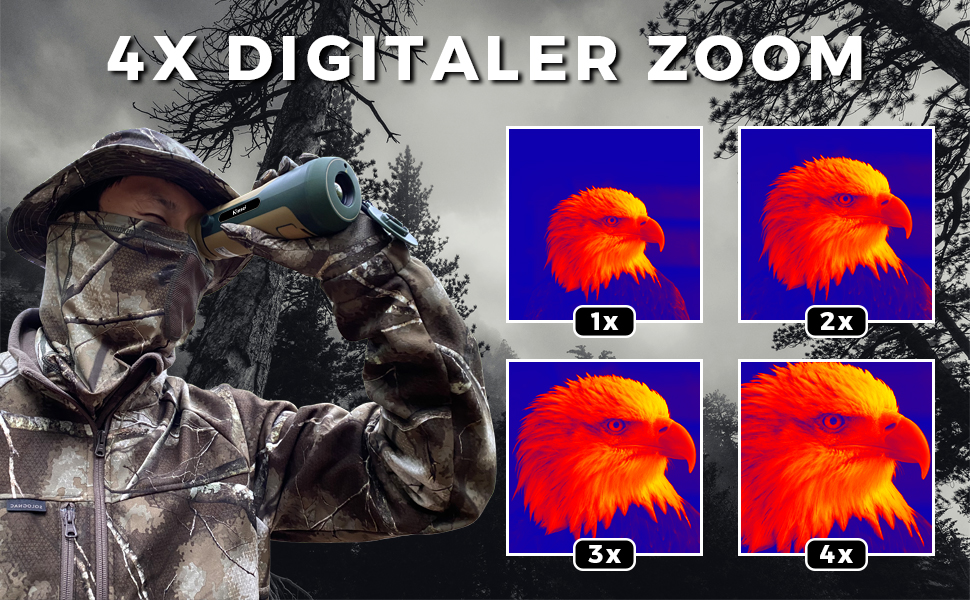
A visual representation of the 4x digital zoom feature, showing how the image can be magnified from 1x to 4x.
5.3 Automatic Distance Measurement
The monocular includes a distance measurement function:
- Highlight the top and bottom of a target on the screen.
- The user interface will automatically display the estimated distance to the target.
5.4 פאָטאָ כאַפּן
To capture a still image of your view, press the Photo Capture button. Images are saved to the internal memory or an inserted Micro-SD card (not included).
5.5 L-Pointer Function
The L-pointer is used to indicate a position. For eye safety, the pointer automatically deactivates after 10 seconds of use.
6. וישאַלט
6.1 רייניקונג די מיטל
- לענס: Use a soft, lint-free cloth specifically designed for optical lenses. Gently wipe the lens surface. Avoid using abrasive materials or excessive force.
- גוף: ווישט דעם אַפּאַראַט־קערפּער מיט אַ ווייכן, דamp שטאָף. דו זאלסט נישט נוצן האַרב קעמיקאַלז אָדער סאָלוואַנץ.
6.2 באַטערי קער
- לאָדט די באַטאַרייע רעגולער, אפילו אויב די דעוויס ווערט נישט אָפט גענוצט, כּדי צו האַלטן די באַטאַרייע געזונט.
- פֿאַרמײַדט אָפֿט פֿולשטענדיק אויסצולאָדן די באַטעריע.
- סטאָר די מיטל אין אַ קיל, טרוקן אָרט ווען ניט אין נוצן.
6.3 סטאָרידזש
When storing the monocular for extended periods, ensure it is clean, dry, and stored in its protective carrying bag. Avoid storing it in areas with extreme temperatures or high humidity.
7. טראָובלעשאָאָטינג
If you encounter issues with your KINSEI Thermal Imaging Monocular, refer to the following common problems and solutions:
| פּראָבלעם | מעגלעך סיבה | לייזונג |
|---|---|---|
| די מיטל טוט נישט מאַכט אויף. | נידעריגע אדער אויסגעשעפטע באַטעריע. | Charge the device fully using the provided cable and adapter. |
| דאָס בילד איז פֿאַרשוואָמען אָדער נישט אין פֿאָקוס. | דיאָפּטער נישט ריכטיק אַדזשאַסטיד. | Adjust the Diopter Adjustment Knob until the image is clear. |
| No image or distorted image. | Lens is dirty or obstructed. | Clean the objective lens with a soft, optical-grade cloth. |
| די קנעפּלעך זענען נישט ריספּאַנדינג. | צייטווייליגע ווייכווארג פראבלעם. | Power off the device and restart it. If the issue persists, contact customer support. |
8. ספּעסאַפאַקיישאַנז
The following table outlines the technical specifications of the KINSEI Thermal Imaging Monocular TPC-K40-G13:
| שטריך | באַשרייַבונג |
|---|---|
| מאָדעל נומער | TPC-K40-G13 |
| Objective Focal Length | 13 מם |
| עפעקטיוו פּיקסעלס | 400x300 (50 Hz) |
| אָביעקטיוו קאָוטינג | גאָר מולטי-קאָוטאַד |
| פּיקסעל פּיטש | 17 μם |
| פאַרגרעסערונג | 4x דיגיטאַל פארגרעסער |
| ווייַז מאָדעס | 4 (Warm White, Warm Black, Warm Red, Heat Oxide) |
| אַפּערייטינג טעמפּעראַטור | -20 °C צו +55 °C |
| וואָטערפּרוף רייטינג | IP67 |
| Detection Distance (Vehicles) | Up to 279 yards (255m) |
| Detection Distance (Animals) | Up to 107 yards (98m) |
| פאַרשטעלן האַכלאָטע | 1280 x 960 (0.4 inch LCD) |
| ווידעא קאַמפּרעשאַן | ה.265 |
| באַטערי טיפּ | 1 ליטיום-יאָן (אַרייַנגערעכנט) |
| באַטערי לעבן | Approx. 5 hours (WiFi off, @25°C) |
| וואָג | 449.06 גראַמז |
| דימענסיעס (L X W X H) | 18.75 X 6.65 X 6.85 סענטימעטער |

A table comparing the KINSEI Thermal Monocular's specifications with other brands.

13mm Objective Focal Length and Multi-Coated Lens.

400x300 Effective Pixels and 0.4-inch Screen.

H.265 Video Compression and 1280x960 Display.

IP67 Waterproof and Wide Operating Temperature.
9. וואָראַנטי און שטיצן
9.1 וואָראַנטי אינפֿאָרמאַציע
The KINSEI Thermal Imaging Monocular TPC-K40-G13 comes with a 2 יאָר וואָראַנטי פֿון דעם קויפֿדאַטום. די וואָראַנטי דעקט פֿאַבריקאַציע־דעפֿעקטן און גאַראַנטירט אַז דער פּראָדוקט פֿונקציאָנירט ווי באַשטימט אונטער נאָרמאַלן באַנוץ. ביטע באַהאַלטן אייער קויפֿבאַווײַז פֿאַר וואָראַנטי־קליימז.
9.2 קונה שטיצן
For technical assistance, troubleshooting, or warranty inquiries, please contact KINSEI customer support. Refer to the contact information provided on the product packaging or the official KINSEI webפּלאַץ.