
1. הקדמה
Welcome to the user manual for your new TAOPON Smartwatch IP67 Round. This guide provides essential information on setting up, operating, maintaining, and troubleshooting your device. Please read this manual thoroughly to ensure proper use and to maximize your smartwatch's features.
2. פּראָדוקט איבערview
The TAOPON Smartwatch is a versatile wearable device designed for both men and women, offering a range of features to support your health and daily activities. It features a round, high-definition display and is built with IP67 water resistance.

פיגור 2.1: א נאנטע בילד view of the TAOPON Smartwatch, showcasinזײַן קײַלעכדיקן אַרויסווײַז און גלאַטן דיזײַן.
שליסל פֿעיִקייטן:
- Physical Health Monitoring: Equipped with a heart rate sensor, the smartwatch helps monitor your heart rate and blood pressure. Sleep data analysis assists in improving sleep quality.
- High-Definition Round Screen: Features a 1.28-inch IPS 240x240 color touchscreen for easy operation. Offers 5 main interfaces and a soft, humanized silicone strap for comfort.
- אַקטיוויטעט טראַקינג: Tracks steps, calories burned, distance, and other important fitness information. Includes functions like 'find phone', stopwatch, alarm, music control, and sedentary reminders.
- נאָטיפיקאַטיאָנס: Connects via Bluetooth to your smartphone using the 'Da Fit' app to display caller ID/number, SMS, and SNS notifications (Facebook, WhatsApp, Twitter, Instagram, Messenger, email, Skype). Vibrates to alert you to important calls and messages.
- Compatibility & Battery: Compatible with iOS 9.0+ and Android 5.0+ smartphones. Features a 200mA battery providing 7-10 days of normal use and charges fully in 2 hours.
פּעקל אינהאַלט:
זיכער מאַכן אַז אַלע זאכן זענען פאַראַן אין פּעקל:
- TAOPON Smartwatch
- טשאַרדזשינג קאַבלע
- באַניצער מאַנואַל
- סיליקאָנע רימען

Figure 2.2: The smartwatch package contents, including the watch, charging cable, and user manual.
3. סעטאַפּ
3.1 אויפלאָדן די סמאַרטוואַטש
Before first use, fully charge your smartwatch. Connect the magnetic charging cable to the charging contacts on the back of the watch and plug the USB end into a power adapter (not included) or a computer's USB port. A full charge typically takes about 2 hours.

Figure 3.1: The smartwatch charging, highlighting its ultra-thin dial and battery life.
3.2 אַפּ ינסטאַלירונג
צו עפענען אלע פֿונקציעס און סינקראניזירן דאטן, דאונלאוד די 'Da Fit' app on your smartphone. You can find it on the App Store (for iOS devices) or Google Play Store (for Android devices).
- Scan the QR code in the manual or on the watch packaging, or search for 'Da Fit' in your phone's app store.
- אראפקאפיע און ינסטאַלירן די אַפּ.
- געבט די נויטיגע דערלויבענישן ווען די אַפּ בעט עס.
3.3 מיטל פּערינג
נאכדעם וואס איר אינסטאלירט די אפליקאציע, פארבינדט אייער סמאַרטוואַטש מיט אייער סמאַרטפאָון:
- מאַכן זיכער אַז בלועטאָאָטה איז ענייבאַלד אויף דיין סמאַרטפאָנע.
- עפֿנט די 'Da Fit' אַפּ.
- גיי צו דער "דעווייס" אדער "צולייגן דעווייס" סעקציע אין דער אפליקאציע.
- The app will search for available devices. Select your TAOPON Smartwatch from the list (it may appear as 'Smartwatch' or a similar identifier).
- Confirm the pairing request on both your phone and the smartwatch if prompted.
4. אַפּערייטינג ינסטרוקטיאָנס
4.1 יקערדיק נאַוויגאַציע
The smartwatch features a full touchscreen for intuitive control:
- שלעפּן אַרויף / אַראָפּ: סקראל דורך מעניוז און נאָוטאַפאַקיישאַנז.
- שלעפּן לינקס / רעכט: צוטריט צו שנעלע פונקציעס אדער פארשידענע זייגער פנימער.
- צאַפּן: אויסקלייבן אַן אייטעם אָדער באַשטעטיקן אַן אַקציע.
- דריקן די זייט קנעפל: Return to the home screen or power on/off (long press).
4.2 געזונט מאָניטאָרינג
Your smartwatch continuously monitors various health metrics:
- הארץ ראטע: Access the heart rate interface to view your current heart rate. The watch can track your heart rate throughout the day.
- בלוט דרוק: Measure your blood pressure directly from the watch. For accurate readings, remain still during measurement.
- שלאָף מאָניטאָרינג: Wear the watch to bed to track your sleep patterns, including total sleep, light sleep, and deep sleep. View detailed analysis in the 'Da Fit' app.

Figure 4.1: Health monitoring features including heart rate, calories, blood oxygen, and detailed sleep tracking.
4.3 טעטיקייט טראַקינג
The smartwatch is equipped with multiple sports modes to track your workouts:
- שריט טאָמבאַנק: Automatically records your daily steps.
- Distance & Calories: Calculates distance traveled and calories burned based on your activity.
- ספּאָרט מאָדעס: Select from various sports modes (e.g., walking, running, cycling) to get specific data for your activity.

Figure 4.2: The smartwatch tracking steps, distance, and calories during a run.
4.4 נאָוטאַפאַקיישאַנז
Receive real-time alerts directly on your wrist:
- רוף וואָרענונגען: The watch will vibrate and display the caller's name or number. You can accept or reject calls from the watch.
- מעסעדזש וואָרענונגען: View incoming SMS and social media notifications (e.g., Facebook, WhatsApp, Twitter) directly on the watch screen.

Figure 4.3: The smartwatch displaying an incoming call and icons for various messaging apps.
4.5 נאָך פאַנגקשאַנז
The smartwatch offers several convenient features:
- מוזיק קאָנטראָל: קאָנטראָלירט מוזיק ווידערשפּיל אויף אייער סמאַרטפאָון (שפּילן, פּויזירן, איבערשפּרינגען טראַקס) גלייך פֿון אייער זייגער.
- ווייַט אַפּאַראַט: Use your watch as a remote shutter button for your smartphone camera.
- געפֿינען טעלעפֿאָן: If your phone is misplaced, use this feature to make it ring.
- סטאָפּוואַטש און אַלאַרם: Utilize the built-in stopwatch and set alarms.
- זיציק דערמאָנונג: באַקומען וואָרענונגען צו זיך אריבערציען אויב איר זענט געווען צו לאַנג נישט אַקטיוו.
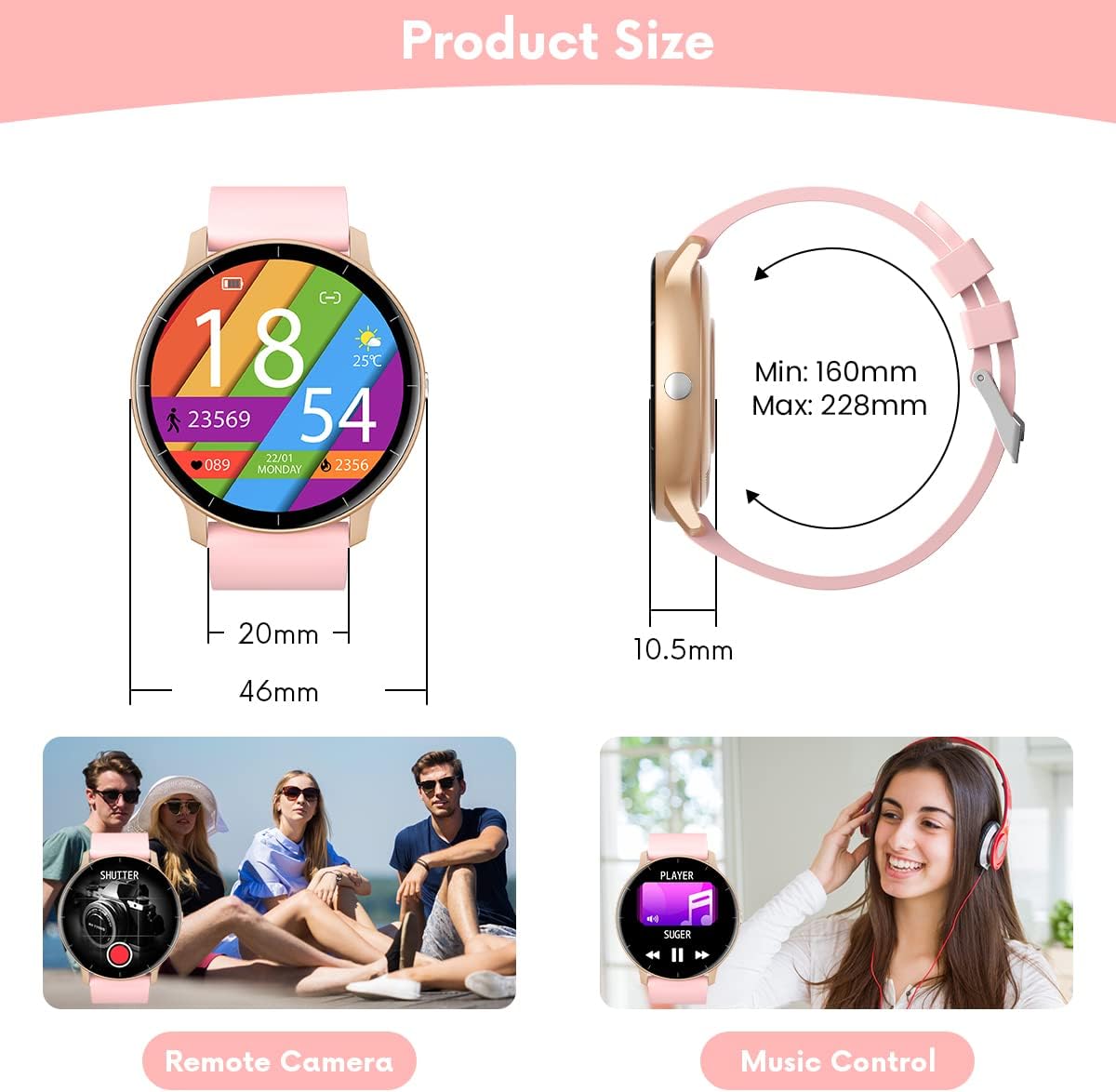
Figure 4.4: Illustrations of remote camera control and music playback features.
4.6 קאַסטאַמייזן זייגער פנימער
Personalize your smartwatch with various watch faces:
- The watch comes with several pre-installed main interfaces.
- Through the 'Da Fit' app, you can access a wider selection of watch faces or even upload your own photos to create custom designs.
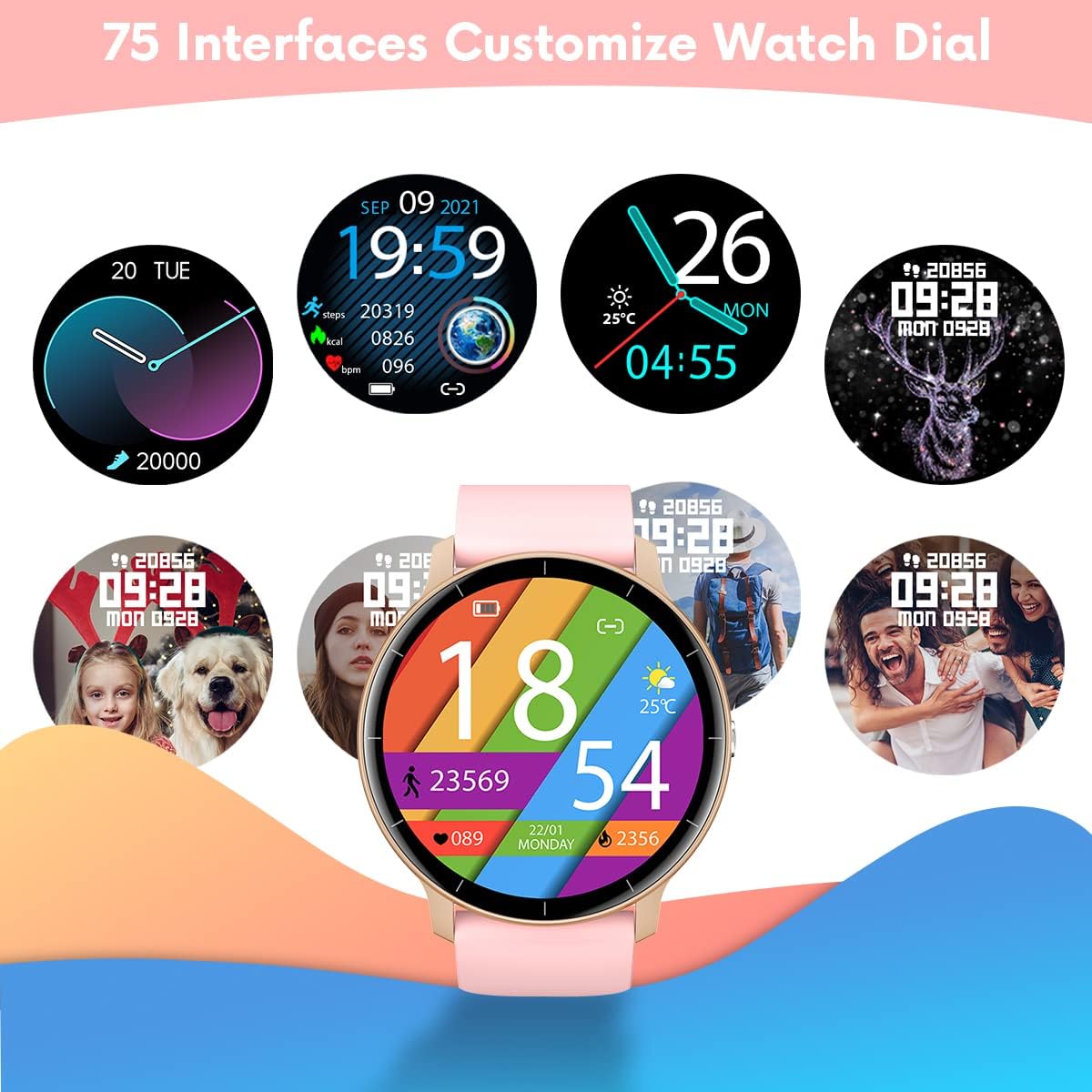
Figure 4.5: A variety of customizable watch face designs available for the smartwatch.
5. וישאַלט
5.1 רייניקן אייער סמאַרטוואַטש
To maintain the appearance and functionality of your smartwatch:
- ווישט דעם עקראַן און רימען רעגולער מיט אַ ווייכן, דamp שטאָף.
- פֿאַרמײַדט די נוצן פֿון שאַרפֿע כעמיקאַלן אָדער אַברייזיוו מאַטעריאַלן, ווײַל די קענען שאַטן דעם אַפּאַראַט.
- זיכער מאַכן אַז די טשאַרדזשינג קאָנטאַקטן זענען ריין און טרוקן איידער טשאַרדזשינג.
5.2 וואַסער קעגנשטעל (IP67)
Your TAOPON Smartwatch is rated IP67, meaning it is resistant to dust and can withstand immersion in water up to 1 meter for up to 30 minutes. This makes it suitable for daily use, such as washing hands or light rain exposure.
- דו זאלסט נישט use the watch for swimming, diving, or showering with hot water.
- Avoid exposing the watch to high-pressure water or steam.
- If the watch gets wet, dry it thoroughly before charging or using the touchscreen.

Figure 5.1: A person washing hands with the smartwatch on, illustrating its water-resistant design.
6. טראָובלעשאָאָטינג
If you encounter issues with your smartwatch, refer to the following common solutions:
| פּראָבלעם | לייזונג |
|---|---|
| וואַך טוט נישט קער אויף | זיכער מאַכן אַז די זייגער איז גאָר אויפגעלאָדן. פֿאַרבינדט עס צום טשאַרדזשער פֿאַר לפּחות 30 מינוט. |
| קען נישט צוזאמענשטעלן זיך מיטן סמאַרטפאָן | 1. זיכער מאַכן אַז בלועטוט איז אַקטיווירט אויף דיין טעלעפאָן. 2. Make sure the watch is within 10 meters of your phone. 3. Restart both the watch and your phone. 4. Check if the 'Da Fit' app has necessary permissions. |
| נאָוטאַפאַקיישאַנז ניט באקומען | 1. Check Bluetooth connection. 2. Ensure notification permissions are granted in the 'Da Fit' app and your phone's settings. 3. Verify that the app is running in the background. |
| אומגענויע געזונטהייט דאַטן | 1. Ensure the watch is worn snugly on your wrist, not too loose or too tight. 2. Keep your arm still during measurements. 3. Environmental factors and individual physiology can affect readings. |
| קורץ באַטאַרייע לעבן | 1. Reduce screen brightness. 2. Turn off continuous heart rate monitoring if not needed. 3. Limit frequent notifications. 4. Ensure the watch is fully charged (2 hours). |
If the problem persists, please refer to the 'Da Fit' app's help section or contact customer support.
7. ספּעסאַפאַקיישאַנז
| שטריך | דעטאַל |
|---|---|
| סאָרט | TAOPON |
| מאָדעל | Smartwatch IP67 Round (B0BKSFDWWL) |
| פאַרשטעלן גרייס | 1.28 אינטשעס |
| ווייַז טיפּ | IPS Color Touchscreen (LED) |
| האַכלאָטע | 240 X 240 בילדצעלן |
| קאַנעקטיוויטי | בלועטאָאָטה |
| קאַמפּאַטאַבילאַטי | אַנדרויד 5.0+ / יאָס 9.0+ |
| באַטאַרייע קאַפּאַציטעט | 200mA Lithium-polymer |
| באַטערי לעבן | 7-10 טעג (טיפּיש נוצן) |
| טשאַרדזשינג צייט | בעערעך. 2 שעה |
| וואַסער קעגנשטעל | IP67 (Dust and water resistant up to 1 meter for 30 minutes) |
| שטיצט אַפּ | דאַ פיט |
| געזונט פֿעיִקייטן | Heart Rate Monitor, Blood Pressure Monitor, Sleep Tracker |
| Activity Features | Pedometer, Calorie Counter, Distance Tracker, Multiple Sports Modes |
| אנדערע פֿעיִקייטן | Notifications (Calls, SMS, SNS), Music Control, Remote Camera, Alarm, Stopwatch, Sedentary Reminder, Find Phone |
8. וואָראַנטי און שטיצן
8.1 וואָראַנטי אינפֿאָרמאַציע
Your TAOPON Smartwatch is covered by a standard manufacturer's warranty. Please refer to the warranty card included in your product packaging for specific terms and conditions, including the warranty period and coverage details. Keep your proof of purchase for warranty claims.
8.2 קונה שטיצן
For any questions, technical assistance, or issues not covered in this manual, please contact TAOPON customer support. Contact details can typically be found on the product packaging, the official TAOPON webוועבזייטל, אדער דורך אייער הענדלער.
When contacting support, please have your product model (B0BKSFDWWL) and purchase information ready.