
הקדמה
This manual provides detailed instructions for the setup, operation, and maintenance of your LFF Atomic Clock Model LWC204. This digital clock features a large, easy-to-read display, atomic time synchronization, and a wireless sensor for indoor and outdoor temperature readings. Please read this manual thoroughly before use to ensure proper functionality and longevity of your device.
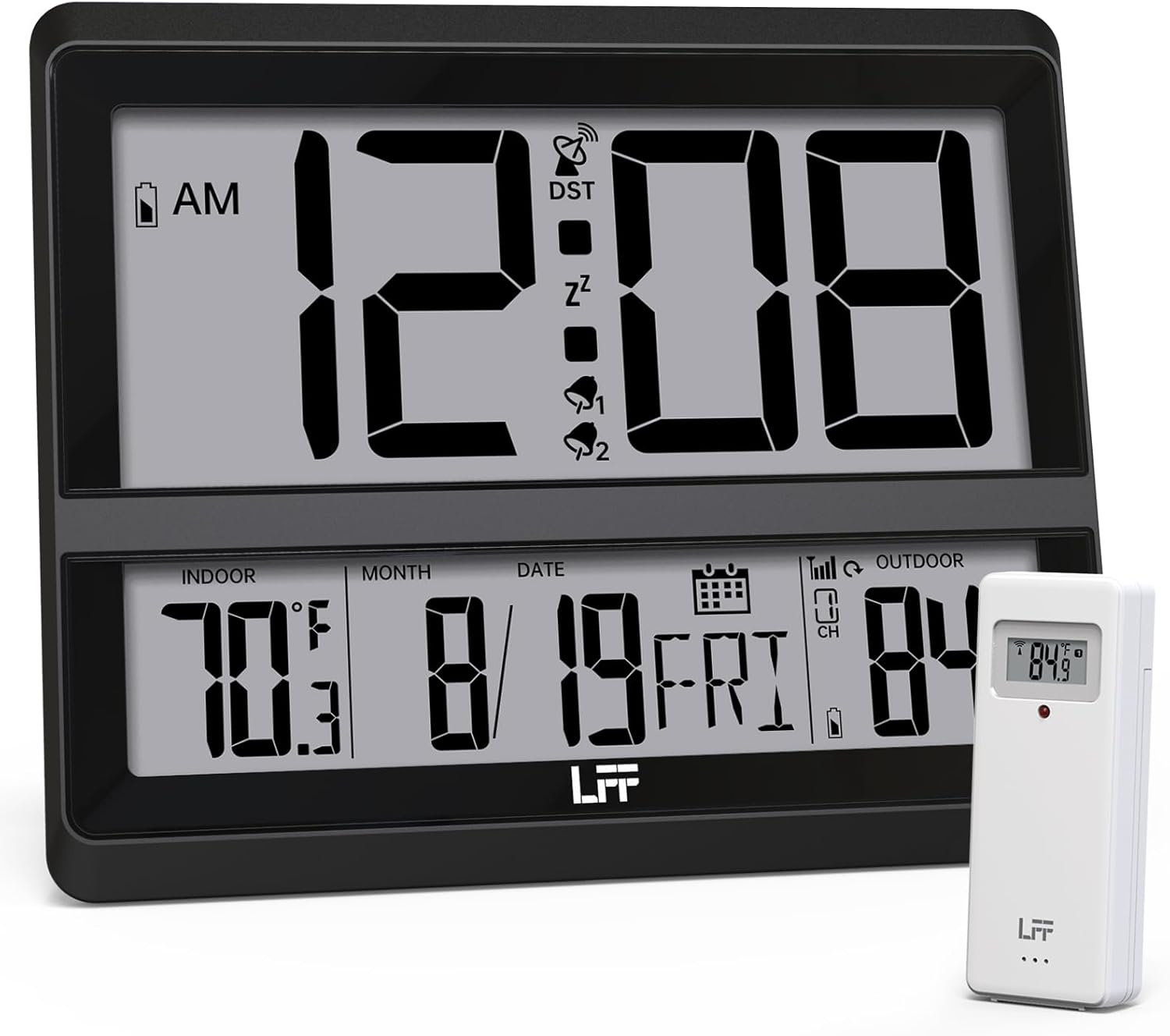
Image: The LFF Atomic Clock main unit with its wireless outdoor temperature sensor.
פּעקל אינהאַלט
- LFF Atomic Clock Main Unit
- ווירעלעסס דרויסנדיק טעמפּעראַטור סענסאָר
- ינסטרוקטיאָן מאַנואַל (דעם דאָקומענט)
- Bracket for table standing
Note: Batteries are not included. The main clock unit requires 3x AA batteries, and the outdoor sensor requires 2x AAA batteries.
פּראָדוקט איבערview
Familiarize yourself with the main components and controls of your LFF Atomic Clock.

Image: Front display and rear button layout of the LFF Atomic Clock.
ווייַז פֿעיִקייטן:
- צייט ווייַז: Large digits for current time (12/24 Hour format).
- AM/PM אינדיקאַטאָר: פֿאַר 12-שעה פֿאָרמאַט.
- DST Symbol: Indicates Daylight Saving Time is active.
- RCC Reception Icon: Shows status of atomic time signal reception.
- Alarm Icons (Zz, 1, 2): Indicate active alarms and snooze function.
- דרינענדיק טעמפּעראַטור: Current temperature inside (°C/°F).
- דרויסנדיק טעמפּעראַטור: Current temperature from wireless sensor (°C/°F).
- Date & Weekday: Month, Day, and Day of the Week.
- נידעריק באַטערי ינדיקאַטאָר: For both main unit and outdoor sensor.
צוריק קנעפּלעך:
- SET קנעפּל: גייט אריין אין סעטטינג מאָדע.
- ALARM קנעפּל: צוטריט אַלאַרם סעטטינגס.
- קאַנאַל קנעפּל: Cycles through outdoor sensor channels (if multiple sensors are used).
- DOWN/WAVE/°C/°F Button: Decreases values in setting mode, manually initiates atomic signal search (WAVE), or switches temperature units.
- UP/ALARM Button: Increases values in setting mode, or activates/deactivates alarm.
סעטאַפּ
1. באַטאַרייע ייַנמאָנטירונג
- דרויסנדיק סענסאָר:
- עפֿנט דעם באַטעריע אָפּטייל אויף דער הינטערשטער זײַט פֿון דעם וויירלעסן דרויסנדיקן סענסאָר.
- אַרײַנשטעלן 2x AAA באַטעריעס, אָבסערווירנדיק די ריכטיקע פּאָלאַריטעט (+/-).
- פאַרמאַכן די באַטאַרייע אָפּטייל סיקיורלי.
- Note: For temperatures below -4°F (-20°C), Lithium batteries are recommended for the outdoor sensor.
- הויפּט זייגער אַפּאַראַט:
- עפֿנט דעם באַטעריע־אָפּטייל אויף דער הינטערשטער זײַט פֿון דער הויפּט זייגער־איינהייט.
- Insert 3x AA batteries, observing the correct polarity (+/-).
- פאַרמאַכן די באַטאַרייע אָפּטייל סיקיורלי.

Image: Battery compartments for the main clock and outdoor sensor.
2. Initial Synchronization and Settings
Upon battery installation, the clock will automatically begin searching for the WWVB atomic time signal and attempt to connect with the outdoor sensor.
- The RCC Reception Icon will flash during the atomic signal search. This process may take several minutes or up to 24 hours depending on signal strength.
- The outdoor temperature should appear on the display within a few minutes after the sensor batteries are installed. If not, press the CHANNEL button on the main unit to cycle through channels or press the reset button on the outdoor sensor.
3. Manual Settings (if needed)
If the atomic signal is not received or you wish to adjust settings manually:
- צייט זאָנע באַשטעטיקן:
- דריקן און האַלטן די שטעלן button for 3 seconds to enter time zone setting.
- ניצן די UP/ALARM or DOWN/WAVE/°C/°F buttons to select your time zone (e.g., PST, MST, CST, EST).
- דרוק שטעלן צו באַשטעטיקן און מאַך צו די ווייַטער באַשטעטיקן.
- 12/24 שעה פֿאָרמאַט:
- After time zone, the hour format will flash. Use UP/ALARM or DOWN/WAVE/°C/°F to select 12-hour or 24-hour format.
- דרוק שטעלן צו באַשטעטיקן.
- Manual Time and Date Setting:
- פאָרזעצן דרינגלעך שטעלן to cycle through Year, Month, Day, Hour, Minute settings.
- ניצן UP/ALARM or DOWN/WAVE/°C/°F צו סטרויערן יעדן ווערט.
- דרוק שטעלן צו באַשטעטיקן יעדער באַשטעטיקן.
- טאָגליכט שפּאָרן צייט (דסט):
- After setting the time, the DST setting will flash. Use UP/ALARM or DOWN/WAVE/°C/°F to enable or disable DST.
- דרוק שטעלן צו פֿאַרלאָזן דעם סעטטינג מאָדע.

Image: The clock automatically corrects time daily via WWVB signal.
4. דרויסנדיקע סענסאָר פּלאַצירונג
- Place the wireless outdoor sensor within 330 feet (100 meters) of the main unit.
- Choose a shaded location to avoid direct sunlight, which can affect temperature accuracy.
- זיכער מאַכן אַז דער סענסאָר איז באַשיצט פון דירעקטן רעגן און שניי.
- Avoid placing the sensor near large metal objects or electrical appliances that may interfere with the wireless signal.

Image: Wireless range of 330 feet for the outdoor sensor.
אַפּערייטינג ינסטראַקשאַנז
1. ווייַז מאָדעס
- The clock continuously displays time, indoor temperature, outdoor temperature, date, and day of the week.
- דרוק די DOWN/WAVE/°C/°F button to switch between Celsius (°C) and Fahrenheit (°F) for temperature display.
2. שרעק פֿונקציע
- באַשטעטיקן די שרעק:
- דרוק די שרעק button once to display Alarm 1 time. Press again for Alarm 2.
- While an alarm time is displayed, press and hold the שרעק button for 3 seconds to enter alarm setting mode. The hour will flash.
- ניצן UP/ALARM or DOWN/WAVE/°C/°F צו סטרויערן די שעה. דרוק שרעק צו באַשטעטיקן.
- The minute will flash. Use UP/ALARM or DOWN/WAVE/°C/°F צו סטרויערן די מינוט. דרוק שרעק צו באַשטעטיקן און אַרויסגאַנג שרעק באַשטעטיקן.
- אַקטיווירן/דעאַקטיווירן אַלאַרם:
- דרוק די שרעק button to display Alarm 1 or Alarm 2.
- דרוק די UP/ALARM button to toggle the alarm ON or OFF. The corresponding alarm icon (1 or 2) will appear/disappear on the display.
- סנוז פונקציע:
- ווען דער שרעק סאָונדס, דריקן די SNOOZE button (usually located on top or a dedicated button) to activate snooze. The alarm will sound again after approximately 5-10 minutes.
- To stop the alarm completely, press any other button (e.g., שרעק, שטעלן).
3. Manual Atomic Signal Search
If you wish to manually initiate a search for the WWVB atomic time signal, press and hold the DOWN/WAVE/°C/°F button for 3 seconds. The RCC Reception Icon will flash, indicating the search is in progress.
וישאַלט
- רייניקונג: Wipe the clock and sensor with a soft, dry cloth. Do not use abrasive cleaners or solvents.
- באַטערי פאַרבייַט: When the low battery indicator appears on the display for either the main unit or the outdoor sensor, replace the batteries promptly to ensure continuous operation and accurate readings. Refer to the "Battery Installation" section for details.
- סטאָרידזש: אויב איר לייגט אַוועק דאָס אַפּאַראַט פֿאַר אַ לענגערע צײַט, נעמט אַרויס אַלע באַטעריעס כּדי צו פֿאַרמײַדן ליקאַדזש.
טראָובלעשאָאָטינג
| פּראָבלעם | מעגלעך סיבה | לייזונג |
|---|---|---|
| קיין דיספּלעי אויף הויפּט אַפּאַראַט. | באַטעריז זענען טויט אָדער ינקערעקטלי אינסטאַלירן. | קאָנטראָלירט די פּאָלאַריטעט פון די באַטעריע און פאַרבייטן מיט פרישע AA באַטעריעס. |
| Outdoor temperature not displayed or incorrect. |
|
|
| Atomic time signal not received (RCC icon flashing or not displayed). |
|
|
| Time is incorrect after atomic synchronization. | אומרעכטע צייט זאָנע איינשטעלונג. | Adjust the time zone setting as described in the "Manual Settings" section. |
ספּעסאַפאַקיישאַנז
| שטריך | דעטאַל |
|---|---|
| מאָדעל נומער | LWC204 |
| ווייַז טיפּ | דיגיטאַל לקד |
| מאַכט מקור (הויפּט אַפּאַראַט) | 3x AA באַטעריז (ניט אַרייַנגערעכנט) |
| מאַכט מקור (דרויסנדיק סענסאָר) | 2x AAA באַטעריז (ניט אַרייַנגערעכנט) |
| דרינענדיק טעמפּעראַטורע ראַנגע | 32°F צו 122°F (0°C צו 50°C) |
| דרויסנדיק טעמפּעראַטורע ראַנגע | -58°F צו 158°F (-50°C צו 70°C) |
| ווירעלעסס ראַנגע | ביז 330 פֿוס (100 מעטער) אין אָפֿענער לופֿט |
| צייט פֿאָרמאַט | 12/24 Hour selectable |
| דימענשאַנז (הויפּט אַפּאַראַט) | 7.48" W x 8.66" H (approx.) |
| מאַונטינג אָפּציעס | Wall Mount or Tabletop (bracket included) |
וואָראַנטי און שטיצן
LFF products are designed for reliability and performance. For specific warranty information, please refer to the warranty card included with your purchase or contact LFF customer support.
For technical assistance or further inquiries, please visit the official LFF website or contact their customer service department. Contact details are typically available on the product packaging or the brand's official online presence.