
הקדמה
This manual provides comprehensive instructions for the installation, operation, and maintenance of your STRONG SRT 3030 Digital HD Cable Receiver. The SRT 3030 is designed to deliver high-quality digital cable television directly to your home, offering superior image and sound. It features a convenient front USB port for file playback and software updates, an electronic program guide, 32 favorite lists for personalized channel sorting, multilingual audio tracks, and subtitle support. Please read this manual carefully before using the device to ensure optimal performance and safety.
פּעקל אינהאַלט
ביטע קאָנטראָלירט דעם אינהאַלט פֿון דער פּאַקעט קערפֿול. אויב עס פֿעלן אָדער זענען געשעדיגט, קאָנטאַקטירט גלייך אייער הענדלער.
- 1x STRONG SRT 3030 HD Cable Receiver
- 1x רימאָוט קאָנטראָל
- 2x AAA באַטעריז
- 1x Power Adapter (PSU 12V/1A/12W)
פּראָדוקט פֿעיִקייטן
- Receives free digital SD and HD channels on all cable networks.
- Exceptional image and sound quality.
- Front USB port for media playback, channel list backup, and software updates.
- Electronic Program Guide (EPG) for program information.
- 32 customizable favorite lists for TV and radio stations.
- Supports Dolby Digital Plus audio.
- Parental control features.
- Multilingual menu support.
- 8 event timers with 3 modes.
- 800 program memory capacity.
פּראָדוקט איבערview
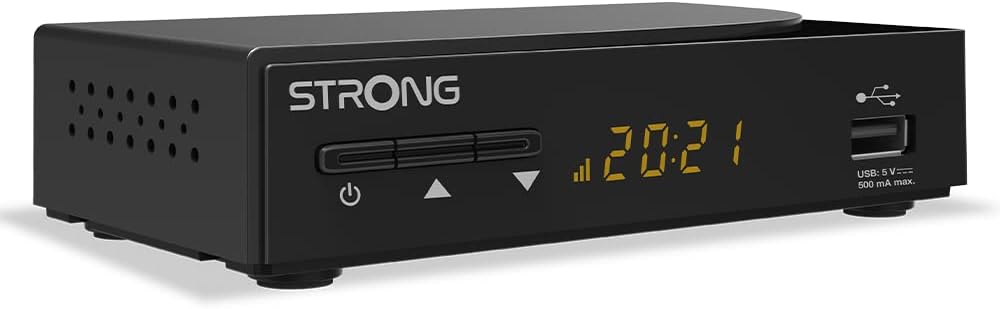
פיגורע 1: קוילעלדיק view of the STRONG SRT 3030 Digital HD Cable Receiver. This image shows the compact black unit with its front panel display and USB port.

פיגורע 2: פראָנט view of the receiver, highlighting the power button, channel navigation buttons, digital display, and the accessible USB port.

פיגורע 3: דערציען view of the receiver, showing the "CABLE IN" port, HDMI output, TV SCART connector, and the power input.

פיגורע 4: זייַט view of the receiver, illustrating the ventilation holes designed for heat dissipation.
סעטאַפּ
- פאַרבינדן צו טעלעוויזיע: Use an HDMI cable to connect the HDMI OUT port on the receiver to an HDMI IN port on your television. Alternatively, use a SCART cable if your TV does not have an HDMI port.
- Connect to Cable Network: Connect your cable network's coaxial cable to the "CABLE IN" port on the back of the receiver.
- פאַרבינדן מאַכט: Plug the provided power adapter into the DC IN port on the receiver and then into a wall outlet.
- מאַכט אויף: Press the power button on the front panel of the receiver or on the remote control.
- ערשט סעטאַפּ וויזערד: Follow the on-screen instructions for the initial setup, which typically includes language selection, country, and automatic channel scanning. Allow the receiver to complete the channel scan to find all available digital channels.
אַפּערייטינג ינסטראַקשאַנז
יקערדיק פאַנגקשאַנז
- מאַכט אויף / אַוועק: דרוק די מאַכט קנעפּל אויף די ווייַט קאָנטראָל אָדער פראָנט טאַפליע.
- קאַנאַל סעלעקציע: ניצן די טש +/- buttons to change channels sequentially, or enter the channel number directly using the numeric keypad.
- באַנד קאָנטראָל: ניצן די וואָל +/- קנעפּלעך צו סטרויערן די באַנד.
- שטום: דרוק די שטום קנעפּל צו צייטווייליג אויסלעשן דעם קלאַנג.
- עלעקטראָניש פּראָגראַם גייד (EPG): דרוק די EPG קנעפּל צו view program information and schedule recordings.
מעניו נאַוויגאַציע
דרוק די MENU button on the remote control to access the main menu. Use the arrow keys (UP / DOWN / LEFT / RIGHT) to navigate through options and OK to confirm selections. Press אַרויסגאַנג צו צוריקקומען צו לעבן טעלעוויזיע.
קאַנאַל מאַנאַגעמענט
- Channel Sorting: In the menu, navigate to "Channel Management" to sort channels by name, LCN, or other criteria.
- Favorite Lists: Create and manage up to 32 favorite lists to quickly access your preferred TV and radio stations.
וסב פונקטיאָנס
Insert a USB storage device into the front USB port. You can use it for:
- מעדיע פּלייבאַק: Play back various media files (e.g., photos, music, videos) stored on the USB device.
- ווייכווארג דערהייַנטיקן: Update the receiver's firmware by placing the update file on a USB drive and following the instructions in the system settings menu.
- Channel List Backup: Save your customized channel list to the USB device.
וישאַלט
To ensure the longevity and optimal performance of your STRONG SRT 3030 receiver, follow these maintenance guidelines:
- רייניקונג: Disconnect the power before cleaning. Use a soft, dry cloth to wipe the exterior of the receiver. Do not use liquid cleaners, aerosols, or abrasive materials.
- ווענטילאַטיאָן: Ensure that the ventilation openings on the receiver are not blocked. Do not place the receiver on soft surfaces like carpets or blankets that may obstruct airflow.
- אָרט: Place the receiver in a well-ventilated area, away from direct sunlight, heat sources, and excessive moisture.
טראָובלעשאָאָטינג
If you encounter issues with your receiver, refer to the table below for common problems and their solutions.
| פּראָבלעם | מעגלעך סיבה | לייזונג |
|---|---|---|
| קיין בילד אָדער געזונט |
|
|
| "קיין סיגנאַל" מעסעדזש |
|
|
| ווייַט קאָנטראָל נישט ארבעטן |
|
|
| Cannot play USB media |
|
|
טעכניש ספּעסאַפאַקיישאַנז
| שטריך | באַשרייַבונג |
|---|---|
| סאָרט | שטאַרק |
| מאָדעל נומער | SRT3030 |
| קאָליר | שוואַרץ |
| קאַנעקטיוויטי טעכנאָלאָגיע | HDMI |
| צובינד | HDMI, וסב 2.0 |
| גאַנץ הדמי פּאָרץ | 1 |
| אַודיאָ רעזולטאַט מאָדע | סטערעאָ |
| אַרומרינגלען סאָונד קאַנאַל קאַנפיגיעריישאַן | 2.0 |
| ווידעא קאָדירונג | H.264, H.265/HEVC, VP9, AV1, MPEG-4 |
| קאַמפּאַטאַבאַל דעוויסעס | TV, personal computer, tablet, smartphone, game console, amplifier, speaker |
| באַטעריע צוזאַמענשטעל (ווייטקאָנטראָל) | אַלקאַליין |
| פאַבריקאַנט | שטאַרק |
| לאַנד פון אָריגין | כינע |
וואָראַנטי און שטיצן
For warranty information and technical support, please refer to the documentation included with your product or visit the official Strong webזייטל. האַלט אייער קויף קוויטל ווי אַ באַווייַז פון קויפן פֿאַר וואָראַנטי קליימז.
אָנליין שטיצן: For further assistance, FAQs, and software updates, please visit the official Strong support page.