
1. הקדמה
Thank you for choosing the Voktta Battery Capacity Voltage Meter. This device is designed to accurately monitor your battery's capacity, voltage, and temperature, providing essential data for various applications. It features a clear display, alarm functions, and broad compatibility with different battery types. Please read this manual thoroughly before installation and operation to ensure correct usage and optimal performance.
2. פּראָדוקט פֿעיִקייטן
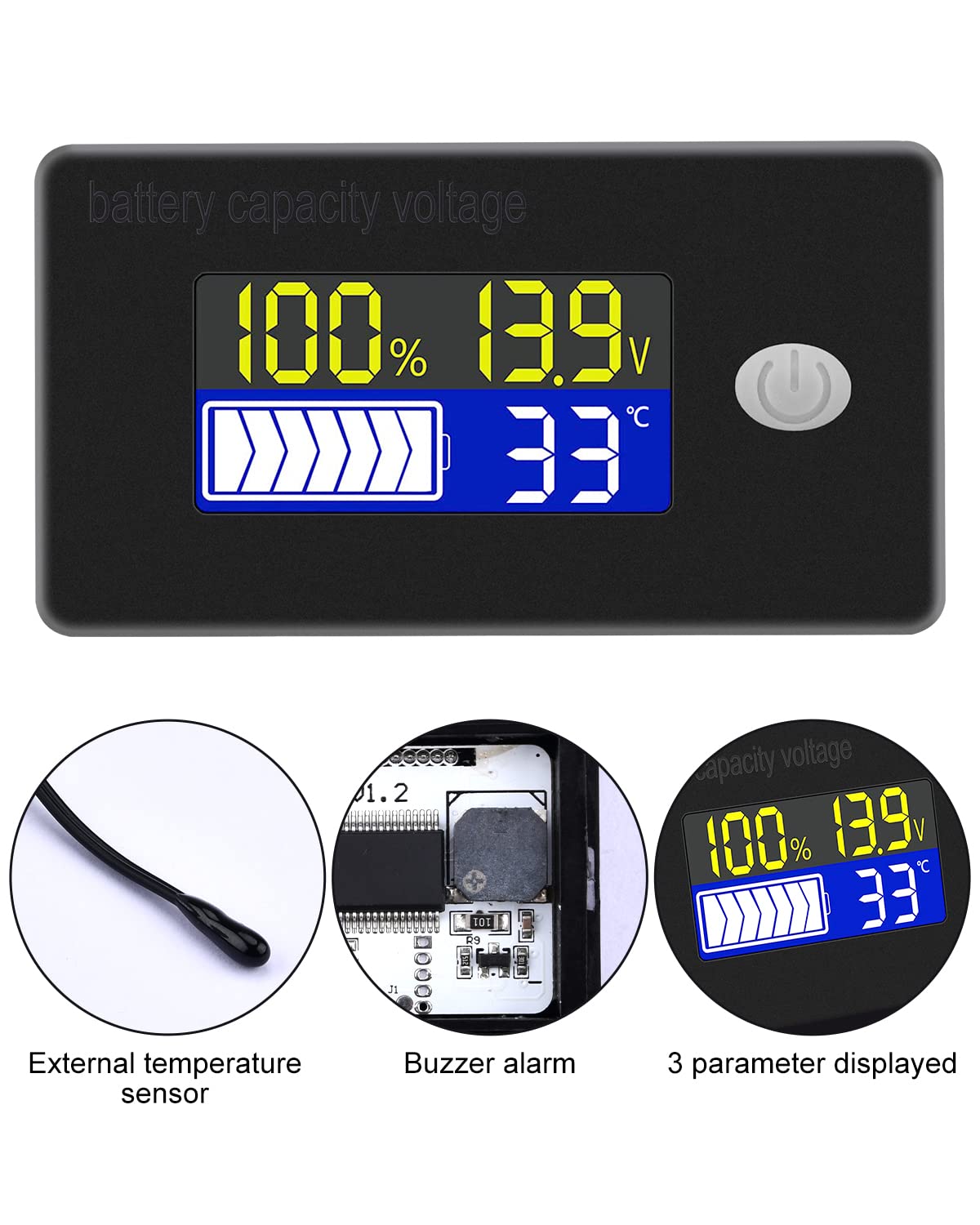
- מולטיפונקטיאָנאַל ווייַז: Simultaneously shows battery capacity percentage, voltage, and temperature (Celsius or Fahrenheit).
- אינטעגרירטע שוץ: Equipped with a protective cover, dustproof and waterproof surface, and reverse input connection protection.
- External Temperature Sensor & Buzzer: Includes an external temperature sensor for accurate readings and an internal buzzer for high/low voltage and over-temperature alarms.
- Six Programmable Modes: Allows setting battery type, delay for ultra-low power mode, adjusting battery percentage limits, activating undervoltage alarm and threshold, activating temperature alarm, and voltagE קאַלאַבריישאַן.
- ברייט באַטעריע קאָמפּאַטאַבילאַטי: Compatible with 12V, 24V, 36V, 48V, 60V, 72V, 84V lead-acid batteries, lithium-ion batteries, polymer lithium-ion batteries, 3-15 series lithium-ion batteries, water batteries, and lithium iron phosphate batteries.
- ברייט אַפּלאַקיישאַן: Suitable for use in jet skis, golf carts, RVs, lawnmowers, aquariums, DIY solar generators, and other systems requiring battery monitoring.
3. פּעקל אינהאַלט
ביטע טשעק די פּאַקעט פֿאַר די פאלגענדע זאכן:
- Voktta Battery Capacity VoltagE מעטער
- Connection Wires (Red for positive, Black for negative)
- פונדרויסנדיק טעמפּעראַטור סענסאָר
- באַניצער מאַנואַל (דעם דאָקומענט)

4. זיכערקייַט אינפֿאָרמאַציע
- שטענדיק אָפּשטעקן די מאַכט איידער איר אינסטאַלירן אָדער סערוויסן דעם מיטל.
- Ensure correct polarity when connecting the wires (Red to positive, Black to negative) to prevent damage to the meter and battery.
- נישט איבערשטייגן די ספעציפיצירטע אפעראציעס-וואליוםtagE קייט (10-100וו).
- Keep the device away from extreme temperatures, moisture, and corrosive environments.
- פרובירט נישט צו צענעמען אדער מאדיפיצירן דעם אפאראט. לאָזט איבער אלע סערוויסעס צו קוואַליפֿיצירטע פּערסאָנעל.
5. פּראָדוקט איבערview
The Voktta Battery Capacity Voltage Meter features a compact design with a clear LCD display and a single control button. The external temperature sensor provides accurate ambient or battery temperature readings.

6. ינסטאַלירונג און וויירינג
גיי די סטעפּס פֿאַר געהעריק ינסטאַלירונג:
- מאָונטינג: Choose a suitable location for the meter, ensuring it is protected from direct impact and excessive vibration. The meter is designed for panel mounting.
- מאַכט קשר: Connect the red wire to the positive (+) terminal of your battery system and the black wire to the negative (-) terminal. Ensure a secure connection. The meter supports a wide voltagE אַרייַנשרייַב קייט פון 10-100 וו.
- טעמפּעראַטור סענסאָר קאַנעקשאַן: Plug the external temperature sensor into its designated port on the back of the meter. Position the sensor to measure the desired temperature (e.g., near the battery for battery temperature, or in the environment for ambient temperature).

7. ערשט סעטאַפּ
After connecting the meter, you may need to configure it for your specific battery type and preferences.
7.1 מאַכט אויף / אַוועק
Press the power button (usually located on the front panel) to turn the device on or off.

7.2 באַשטעטיקן באַטערי טיפּ
The meter supports various battery types. Refer to the detailed programming instructions (often accessed by holding the power button or a dedicated 'SET' button) to select the correct battery chemistry and voltage configuration (e.g., 3S Lithium, 12V Lead-Acid).

8. אַפּערייטינג ינסטרוקטיאָנס
Once powered on and configured, the meter will display real-time battery information.
8.1 אַרויסווייַזן מאָדעס
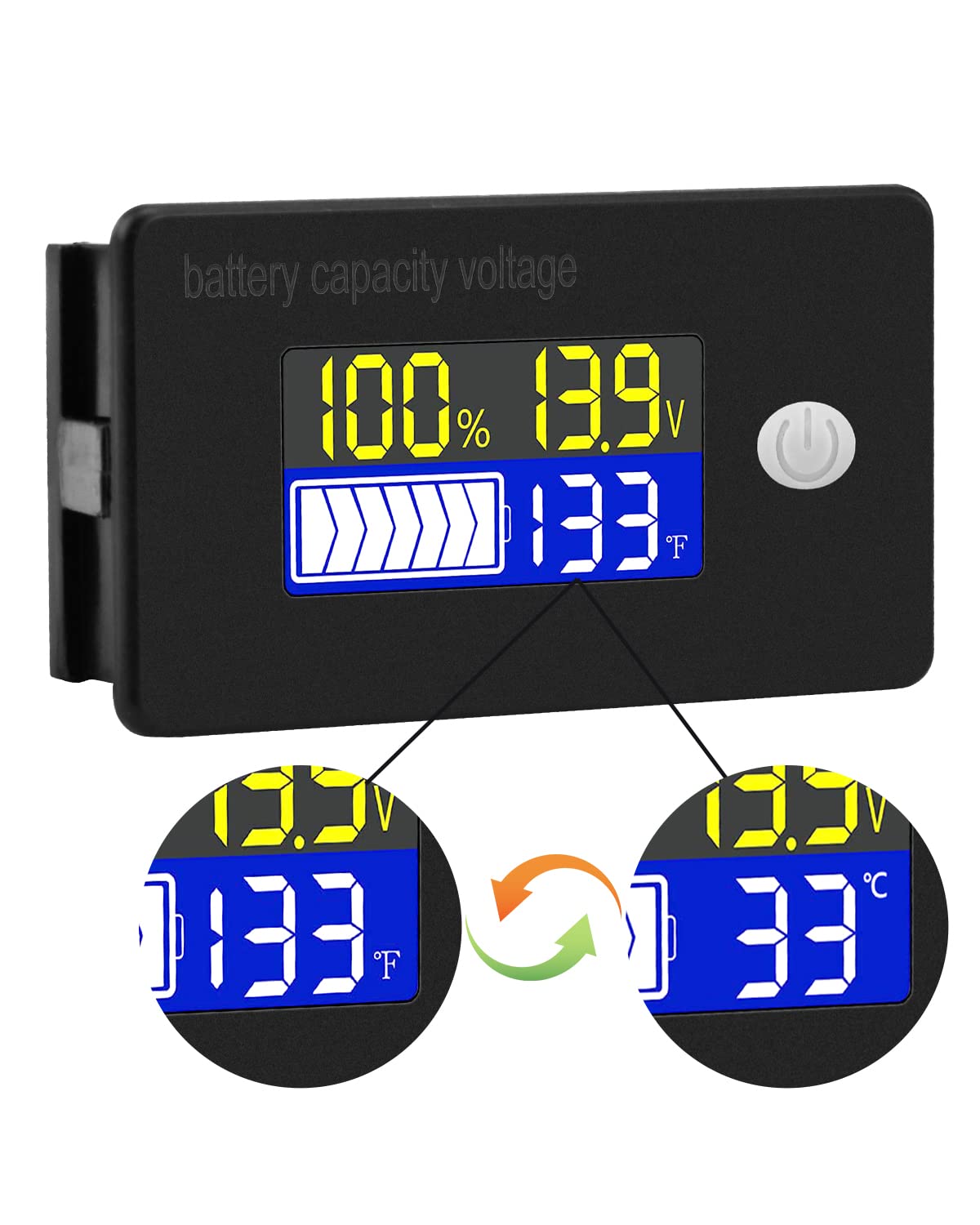
The display typically shows battery capacity percentagE, קראַנט וואָלtage, and temperature. Some models allow switching between Celsius and Fahrenheit for temperature display.
8.2 שרעק פאַנגקשאַנז
The internal buzzer will activate if the battery voltage falls below the set low voltage threshold, exceeds the high voltage threshold, or if the temperature goes beyond the set limits. This provides an audible warning for critical conditions.
9. אַוואַנסירטע קאָנפיגוראַטיאָן
The meter offers several programmable modes for fine-tuning its operation. Access these modes by following the specific button press sequences outlined in the full product documentation (if provided separately) or by holding the main button for an extended period.
- באַטעריע טיפּ סעטטינג: Configure the meter for your specific battery chemistry and cell count (e.g., LiFePO4, Li-ion, Lead-Acid, 3S, 4S, etc.).
- Ultra-Low Power Mode Delay: Set a delay (10s, 20s, 30s, 60s, 120s adjustable) before the meter enters a low power consumption state to conserve energy.
- באַטערי פּערסיזtagE לימיטעס: Adjust the upper and lower voltage thresholds that correspond to 100% and 0% battery capacity for accurate percentage אַרויסווייַזן.
- אונטערוואָלtagE שרעק: Activate and set the specific voltage threshold (e.g., 10.5V to 60.0V) at which the low voltage alarm will trigger.
- איבער-טעמפּעראַטור שרעק: Activate and set the temperature threshold (e.g., 0°C to 79°C or 0°F to 179°F) at which the over-temperature alarm will trigger.
- VoltagE קאַלאַבריישאַן: דורכפירן וואָלtage calibration to ensure the most accurate readings.
10. ספּעסאַפאַקיישאַנז
| פּאַראַמעטער | ווערט |
|---|---|
| סאָרט | וואָקטאַ |
| מאָדעל נומער | B0BHSSKRVP |
| אַפּערייטינג וואָלtage | 10-100וו |
| אַפּערייטינג קראַנט | 8-10מאַ |
| מאַכט קאַנסאַמשאַן (שלאָף מאָדע) | 15-20uA |
| Voltage אַקיעראַסי | ±0.1% ~ ±0.5% |
| טעמפּעראַטור אַקקוראַסי | ±0.5℃ ~ ±1℃ (built-in standard, external 30cm probe) |
| טעמפּעראַטור ראַנגע | -19 ~ 80 ℃ / 0 ~ 179 ℉ |
| Over-temperature Alarm Setting | 0~79℃ / 0~179℉ |
| נידעריק וואָלtage שרעק באַשטעטיקן | 10.5 ~ 60.0 וו |
| בוזזער באַנד | 60 ~ 80 דב |
| אַפּערייטינג טעמפּעראַטור | -10~65℃ |
| קאָליר | שוואַרץ |
| העסקעם | סע, IP67, RoHS |
| מעזשערמאַנט טיפּ | וואלטמעטער |
11. טראָובלעשאָאָטינג
If you encounter issues with your Voktta Battery Capacity Voltage Meter, refer to the following common problems and solutions:
- קיין ווייַז:
- Check power connections: Ensure red wire is connected to positive and black to negative, and connections are secure.
- באַשטעטיקן באַטאַרייע וואָלtage: באַשטעטיקן די באַטאַרייע וואָלומעןtage איז אינעם 10-100V אפערירנדיקן ראיאן.
- ומפּינקטלעך רידינגז:
- Voltage / קאַפּאַציטעט: Ensure the correct battery type and voltage configuration are set in the meter's settings. Perform voltage calibration if available.
- טעמפּעראַטור: Check if the external temperature sensor is properly connected and positioned.
- Alarm Constantly Triggering:
- Review alarm thresholds: Adjust the low voltagE, הויך באַנדtage, or over-temperature alarm settings to appropriate levels for your battery and application.
- Check battery health: A constantly triggering low voltage alarm might indicate a failing battery.
- קנעפּלעך ניט ריספּאַנדאַבאַל:
- Power cycle the device: Turn the meter off and then on again.
- זייט זיכער אז קיין שמוץ זאל נישט שטערן די קנעפלעך.
12. וישאַלט
To ensure the longevity and accurate operation of your Voktta Battery Capacity Voltage Meter, follow these maintenance guidelines:
- רייניקונג: Use a soft, dry cloth to clean the display and housing. Do not use abrasive cleaners or solvents.
- פֿאַרבינדונגען: קאָנטראָלירט פּעריִאָדיש אַלע וויירינג פֿאַרבינדונגען צו זיכער מאַכן אַז זיי זענען זיכער און פֿרײַ פֿון קעראָוזשאַן.
- ענוויראָנמענטאַל שוץ: While the device has some dust and water resistance (IP67), avoid prolonged exposure to harsh weather conditions or direct water immersion.
- סטאָרידזש: אויב איר לייגט דאָס אַפּאַראַט אַוועק פֿאַר אַ לענגערע צײַט, זאָלט איר עס אָפּשטעקן פֿון דער מאַכט-מקור און עס אַוועקלייגן אין אַ קילן, טרוקענעם אָרט.
13. שטיצן
For any questions, technical assistance, or if you encounter issues not covered in this manual, please contact Voktta customer support. We are committed to providing assistance to resolve any problems you may experience.
קאָנטאַקט אינפֿאָרמאַציע קען טיפּיש געפֿונען ווערן אויף דער פּראָדוקט פּאַקאַדזשינג אָדער דעם פֿאַרקויפֿערס webדעם פּלאַץ וואו דער פּראָדוקט איז געקויפט געוואָרן.