
Bmax B1 Plus
Bmax B1 Plus Mini PC User Manual
Model: B1 Plus
1. הקדמה
This user manual provides detailed instructions for setting up, operating, maintaining, and troubleshooting your Bmax B1 Plus Mini PC. Please read this manual thoroughly before using the device to ensure proper functionality and longevity.
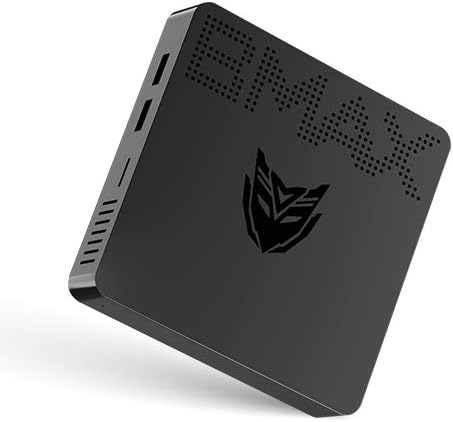
Image: Bmax B1 Plus Mini PC, showcasinג זײַן קאָמפּאַקטן דיזײַן.
2. פּראָדוקט איבערview
The Bmax B1 Plus is a compact and versatile mini PC designed for various computing needs, from daily tasks to 4K media playback. It features an Intel Celeron N3350 processor, 6GB DDR3 RAM, and 64GB eMMC storage.
2.1. פּעקל אינהאַלט

Image: Contents of the Bmax B1 Plus Mini PC retail box, including the mini PC, user guide, power adapter, HDMI cable, metal bracket, and screws.
- Bmax B1 Plus Mini PC
- מאַכט אַדאַפּטער
- HDMI קאַבלע
- מעטאַל קאַנטיקער
- סקרוז
- באַניצער גייד (דיזער מאַנואַל)
2.2. דעווייס אויסלייג און פּאָרטן
Familiarize yourself with the various ports and buttons on your Bmax B1 Plus Mini PC:

Image: Detailed diagram of the Bmax B1 Plus Mini PC's ports, including VGA, HDMI, USB 3.0, USB 2.0, RJ45 Gigabit Ethernet, 3.5mm Audio/Mic, Power In, Power Button, and Reset Button.
- VGA פּאָרט: For connecting to displays with VGA input (up to 1920x1080P@60Hz).
- הדמי פּאָרט: For connecting to displays with HDMI input (up to 4K Resolution & 2560*1600P@60Hz).
- USB 3.0 Data Ports (x2): For high-speed data transfer (Super Speed | 5Gbps).
- USB 2.0 Data Ports (x2): For standard data transfer (480Mbps).
- RJ45 גיגאַביט עטהערנעט פּאָרט: For wired network connection (10/100/1000 Mbps).
- 3.5mm Audio/Mic (2-in-1): For connecting headphones or external speakers with microphone functionality.
- Power In (12V): פֿאַרבינדט דאָ דעם צוגעשטעלטן מאַכט אַדאַפּטער.
- מאַכט קנעפּל: צו קער די מיטל אויף אָדער אַוועק.
- באַשטעטיק קנעפּל: To reset the device (often requires a pin).
3. סעטאַפּ
3.1. ערשטע פֿאַרבינדונג
- Connect your monitor(s) to the HDMI and/or VGA ports on the Bmax B1 Plus.
- פֿאַרבינדט אייער קלאַוויאַטור און מויז צו די פֿאַראַן USB פּאָרץ.
- For wired internet, connect an Ethernet cable to the RJ45 port. For wireless, ensure your Wi-Fi network is available.
- Connect the power adapter to the 'Power In' port and then plug it into a power outlet.
- Press the Power Button to turn on the Mini PC.
3.2. Dual Screen Display Setup
The Bmax B1 Plus supports dual-screen display, allowing you to extend your desktop across two monitors for increased productivity or enhanced media viewing.

Image: Illustration of the Bmax B1 Plus Mini PC connected to two monitors for a dual-screen display setup.
For a visual guide on setting up dual screens, please refer to the official video below:
Video: Official guide demonstrating the dual-screen display operation of the Bmax B1 Plus Mini PC.
3.3. VESA Mount Installation
The Bmax B1 Plus can be mounted on the back of a VESA-compatible monitor or TV, transforming it into an all-in-one PC solution and saving desk space.

Image: Step-by-step illustration of installing the Bmax B1 Plus Mini PC using the included VESA mount bracket on the back of a monitor.
3.4. סטאָרידזש יקספּאַנשאַן
You can expand the storage of your Bmax B1 Plus Mini PC by adding an M.2-2280 SATA SSD (up to 1TB) or connecting an external hard drive via USB 3.0.

Image: Diagram showing how to install an M.2-2280 SATA SSD into the Bmax B1 Plus Mini PC for storage expansion.
To install an M.2-2280 SATA SSD:
- Ensure the Mini PC is powered off and unplugged.
- Locate the M.2 SSD slot cover on the bottom of the device.
- Remove the screw securing the cover and gently open it.
- Insert the M.2 SSD into the slot at an angle and press down to secure it.
- Replace the screw to hold the SSD in place and close the cover.
4. אַפּערייטינג ינסטרוקטיאָנס
4.1. מאַכט אויף / אויסגעלאשן
- מאַכט אויף: Press the Power Button once. The power indicator light will illuminate.
- מאַכט אַוועק: From the operating system, select 'Shut down'. Alternatively, press and hold the Power Button for a few seconds to force a shutdown (not recommended for regular use).
4.2. קאַנעקטיוויטי
The Bmax B1 Plus offers robust connectivity options:
- ווי-פי: Supports 2.4GHz/5GHz Dual Band Wi-Fi (802.11ac) for fast wireless internet access.
- בלועטאָאָטה: Integrated Bluetooth 4.2 for connecting wireless peripherals like keyboards, mice, and headphones.
- עטהערנעט: Gigabit Ethernet port for stable and high-speed wired network connections.

Image: Visual representation of the Bmax B1 Plus Mini PC's dual-band Wi-Fi capabilities and integrated Intel HD Graphics 500 supporting 4K UHD output.
4.3. Portability and Use Cases
The compact size and lightweight design of the Bmax B1 Plus make it highly portable and suitable for various environments:

Image: Collage demonstrating the portability of the Bmax B1 Plus Mini PC, showing it being carried in a pocket and used in various settings such as an office, home theater, and conference room.
- Personal Office: Ideal for daily productivity tasks.
- בילדונג: Suitable for learning environments.
- היים טעאַטער: Supports 4K video playback for entertainment.
- Conference Projection: Easily connect to projectors for presentations.
5. וישאַלט
To ensure optimal performance and extend the lifespan of your Bmax B1 Plus Mini PC, follow these maintenance guidelines:
- האַלטן עס ריין: Regularly wipe the exterior with a soft, dry cloth. Avoid using liquid cleaners directly on the device.
- פאַרזיכערן ווענטאַליישאַן: Do not block the ventilation holes. Ensure adequate airflow around the device to prevent overheating.
- ווייכווארג דערהייַנטיקונגען: האַלט אייער אָפּערייטינג סיסטעם און דרייווערס אַפּדייטיד צו די לעצטע ווערסיעס פֿאַר פֿאַרבעסערונגען אין זיכערהייט און פאָרשטעלונג.
- שטיל אָפּעראַציע: The Bmax B1 Plus is designed for quiet operation. If you notice unusual fan noise (though it's fanless, some internal components might generate minimal sound or external fans might be used), ensure it's not obstructed.
- זיכער שאַטדאַון: שטענדיק אויסשליסן דעם מיני פּיסי ריכטיק דורך די אָפּערייטינג סיסטעם צו פאַרמייַדן דאַטן קאָרופּציע.
6. טראָובלעשאָאָטינג
If you encounter issues with your Bmax B1 Plus Mini PC, refer to the following common troubleshooting steps:
| פּראָבלעם | מעגלעך לייזונג |
|---|---|
| קיין אַרויסווייַזונג אויף מאָניטאָר |
|
| קיין אינטערנעט פֿאַרבינדונג |
|
| דיווייס איז שטייט אדער נישט רעאגירנדיק |
|
| USB דעוויסעס נישט דערקענט |
|
If the problem persists after trying these steps, please contact Bmax customer support for further assistance.
7. ספּעסאַפאַקיישאַנז
| שטריך | דעטאַל |
|---|---|
| סאָרט | Bmax |
| מאָדעל נומער | B1 פּלוס |
| פּראַסעסער | אינטעל סעלעראן N3350 (1.1 גיגאהערץ, ביז 2.4 גיגאהערץ) |
| באַראַן | 6 גיגאבייט DDR3 SDRAM |
| סטאָרידזש | 64 GB eMMC (expandable with M.2-2280 SATA SSD up to 1TB) |
| גראַפיקס קאָופּראַסעסער | Intel HD Graphics 500 |
| מאַקסימום סקרין האַכלאָטע | 3840 X 2160 בילדצעלן (4K) |
| ווירעלעסס טיפּ | 802.11ac (2.4GHz/5GHz Dual WiFi), Bluetooth 4.2 |
| עטהערנעט | גיגאַביט עטהערנעט (10/100/1000 מבפּס) |
| פּאָרץ | HDMI, VGA, 2x USB 3.0, 2x USB 2.0, RJ45, 3.5mm Audio/Mic, Power In |
| אָפּערייטינג סיסטעם | OS (Typically Windows 10 Pro) |
| פּונקט וואָג | 1.37 פונט |
| קאָליר | שוואַרץ |
8. וואָראַנטי און שטיצן
For warranty information and technical support, please refer to the documentation included with your product or visit the official Bmax webזייטל. האַלט אייער קויף קוויטל ווי אַ באַווייַז פון קויפן פֿאַר וואָראַנטי קליימז.
איר קענט אויך באַזוכן די יו Bmax Store on Amazon פֿאַר נאָך פּראָדוקט אינפֿאָרמאַציע און שטיצע רעסורסן.
Ask a question about this manual
Ask about setup, troubleshooting, compatibility, parts, safety, or missing instructions. Manuals+ will review the question and use this page’s manual context to help answer it.