
1. הקדמה
This manual provides essential information for the safe and efficient operation of your Cuifati 30A MPPT Solar Controller. Please read these instructions carefully before installation and use to ensure optimal performance and longevity of the product.
The Cuifati 30A MPPT Solar Controller is designed to manage the power flow from your solar panels to your battery bank, ensuring efficient charging and protecting your batteries from overcharge and over-discharge. It features an intelligent regulator compatible with 12V, 24V, 36V, and 48V systems, a built-in USB port for device charging, and an LCD digital panel for easy monitoring and parameter configuration.
2. פּראָדוקט איבערview
2.1 שליסל פֿעיִקייטן
- ברייט קאַמפּאַטאַבילאַטי: Supports 12V, 24V, 36V, and 48V battery systems.
- אינטעגרירטע USB אויסגאַנג: Two 5V/2A USB ports for charging mobile devices.
- ינטעליגענט שוץ: Features protection against overcurrent, short-circuit, inverse polarity, low voltagE, און אָוווערטשאַרדזש.
- LCD ווייַז: Provides real-time status and data, allowing for convenient mode switching and parameter configuration.
- Automatic System Management: Manages solar panel and battery operations automatically with a built-in industrial microcontroller.
2.2 קאַמפּאָונאַנץ
The solar controller unit includes the main control module with an LCD screen, USB ports, and terminal connections for solar panels, battery, and load. The device is housed in an engineering plastic casing designed for durability.

פיגורע 1: פראָנט view of the Cuifati 30A MPPT Solar Controller, showing the LCD display, USB ports, and connection terminals.
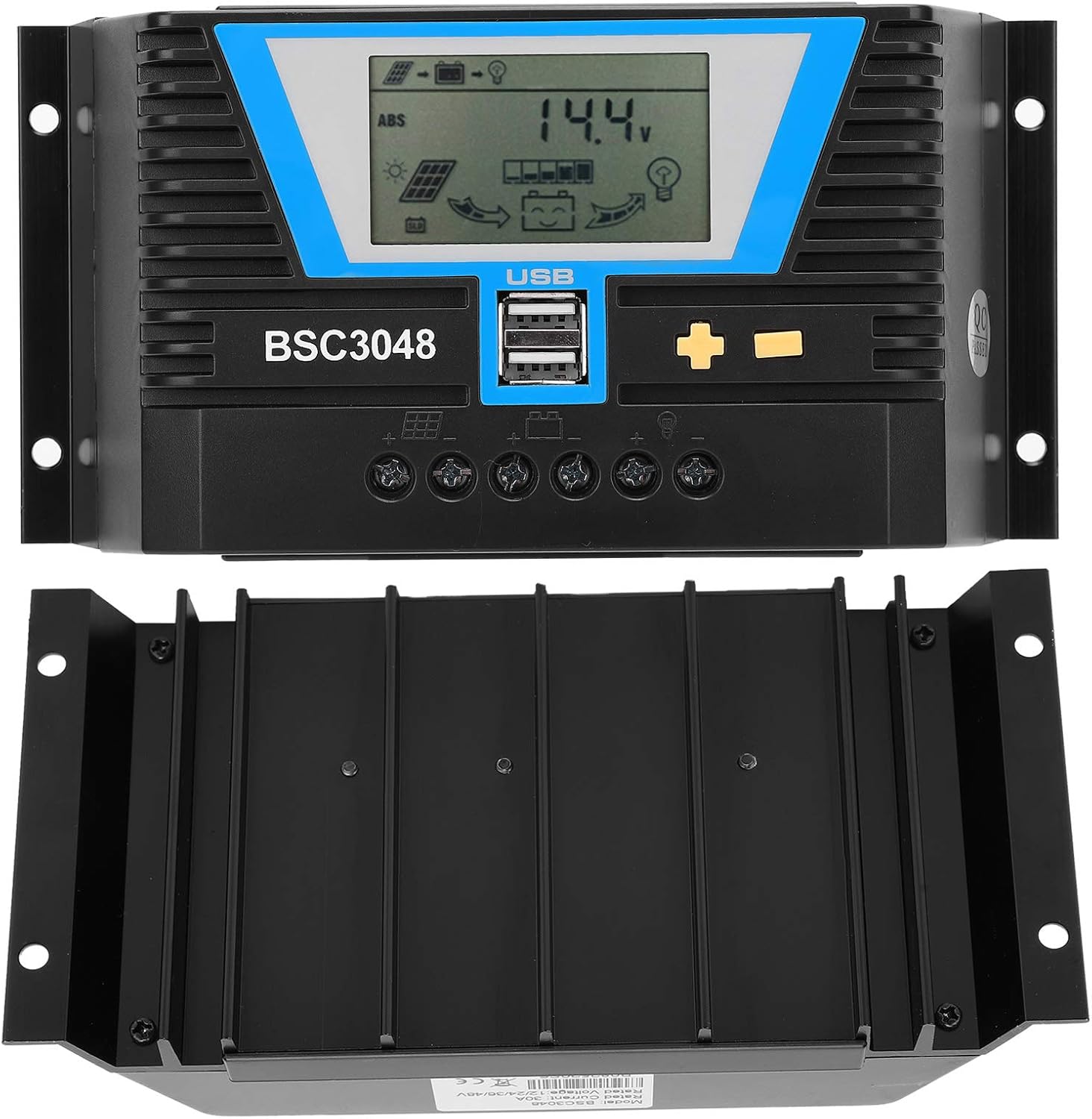
Figure 2: Front and bottom view of the solar controller, highlighting the heat sink fins for efficient cooling.
3. ספּעסאַפאַקיישאַנז
| פּאַראַמעטער | ווערט |
|---|---|
| נומער טיפּ | זונ קאָנטראָללער |
| מאַטעריאַל | אינזשעניריע פּלאַסטיק |
| רייטאַד קראַנט | 30 א |
| רייטאַד וואָרקינג וואָלtage | 12V/24V/36V/48V (Auto-sensing) |
| זונ פּאַנעל אַרייַנשרייַב וואָלtage | ≤100וו |
| סטאַטישע פארלוסט | ≤30מאַ |
| Loop Pressure Drop | ≤0.3וו |
| וסב רעזולטאַט | 5V/2A רענטגענ 2 |
| ארבעטן טעמפּעראַטור | -20~ +55℃ |
| שוץ לעוועל | IP32 |
| קאָרעוו הומידיטי | ≤95%, קיין קאַנדאַנסיישאַן |
| וואָקזאַל גרייס | 6AWG/16mm² |
| פּעקל דימענשאַנז | 8.66 X 4.57 X 2.24 אינטשעס |
| פּונקט וואָג | 1.1 פונט (0.5 קילאָגראַמס) |
4. סעטאַפּ און ייַנמאָנטירונג
Proper installation is crucial for the safe and efficient operation of your solar charging system. Please follow these steps carefully:
4.1 זיכערקייַט פּריקאָשאַנז
- Ensure all connections are secure and correct to prevent damage to the controller or other components.
- שטענדיק פארבינדן די באַטעריע ערשט, דערנאָך די זונ פּאַנעל, און צום סוף די לאַסט. אָפּשטעקן אין פאַרקערט סדר.
- Install the controller in a well-ventilated area, away from direct sunlight, high temperatures, and moisture.
- Use appropriate wire gauges for all connections to minimize power loss and prevent overheating.
4.2 קאַנעקשאַן סטעפּס
- פאַרבינדן די באַטאַרייע: Connect the positive and negative terminals of your battery to the corresponding battery terminals on the solar controller. Ensure correct polarity. The LCD display should light up.
- פאַרבינדן די זונ פּאַנעל: Connect the positive and negative terminals of your solar panel(s) to the corresponding solar panel terminals on the controller. Ensure correct polarity.
- פֿאַרבינדן די לאַסט (אָפּציאָנעל): If you are connecting a DC load directly to the controller, connect its positive and negative terminals to the load terminals on the controller.

פיגורע 3: נאָענט-אַרויף view of the controller's connection terminals for solar panels, battery, and load.
5. אַפּערייטינג ינסטרוקטיאָנס
The Cuifati solar controller features an intuitive LCD display and control buttons for easy operation and monitoring.
5.1 LCD דיספּלעי און קנעפּלעך
The LCD screen displays various system parameters such as battery voltage, charging current, discharge current, and operating modes. The controller typically has three buttons: a 'Mode' button, a '+' button, and a '-' button.

Figure 4: The controller's LCD display and control buttons, along with a guide to basic operations.
5.2 יקערדיק אָפּעראַטיאָנס
| מאָדע | אַפּערייטינג ינסטראַקשאַנז |
|---|---|
| בלעטער מאָדע | Short press the "+" or "-" button to cycle through display parameters. |
| לאָדן סוויטש | When the load is set to 24-hour mode, short press "+" on the main interface to toggle the load. Do not manually switch the load in other working modes. |
| שטעלן מאָדע | In the settable interface, long press "+" to enter parameter setting. Short press "+" or "-" to adjust the parameter. Long press "+" again to confirm and save the parameter setting. (Long pressing "-" will not save parameters and restore to the last setting). |
| באַשטעטיק | Long press "+" in the ambient temperature interface to reset the controller. |
5.3 וסב טשאַרדזשינג
The two 5V/2A USB ports can be used to charge compatible electronic devices such as mobile phones, tablets, and PCs. Simply connect your device using a standard USB cable.
6. וישאַלט
Regular maintenance ensures the longevity and optimal performance of your solar controller.
- ריינקייַט: Keep the controller clean and free from dust and debris. Use a dry cloth to wipe the surface.
- פֿאַרבינדונגען: Periodically check all wire connections to ensure they are tight and free from corrosion. Loose connections can lead to power loss or overheating.
- ווענטילאַטיאָן: Ensure the installation area remains well-ventilated to prevent overheating of the controller.
- ענוויראָנמענטאַל קאָנטראָל: Verify that the controller is not exposed to excessive moisture, extreme temperatures, or direct sunlight, which can degrade its performance and lifespan.
7. טראָובלעשאָאָטינג
If you encounter issues with your Cuifati solar controller, refer to the following common problems and solutions:
7.1 No Display on LCD Screen
- קוק די באַטאַרייע קשר: Ensure the battery is correctly connected to the controller with the correct polarity. The controller draws power from the battery to operate its display.
- באַטערי וואָלtage: באַשטעטיקן אַז די באַטאַרייע וואָלtage is within the operating range (12V-48V). If the battery is completely discharged, the controller may not power on.
7.2 באַטעריע לאָדט זיך נישט אויף
- סאָלאַר פּאַנעל קאַנעקשאַן: Check if the solar panels are correctly connected to the controller with the correct polarity.
- סאָלאַר פּאַנעל רעזולטאַט: Ensure the solar panels are receiving sufficient sunlight and are producing voltage. Use a multimeter to check the open-circuit voltagE פון די זונ - פּאַנאַלז.
- קאָנטראָללער סעטטינגס: Verify that the battery type and charging parameters are correctly set in the controller's settings.
7.3 Load Not Working
- לאָדן קשר: Ensure the load is correctly connected to the controller's load terminals.
- Load Switch Setting: Check the load switch setting on the controller. If it's in a timed mode, ensure the current time is within the active period.
- באַטערי וואָלtage: אויב די באַטאַרייע וואָלtage is too low, the controller may cut off the load to protect the battery.
- אָווערלאָאַד שוץ: The controller has overload protection. Ensure the load current does not exceed the controller's rated load current.
8. וואָראַנטי און שטיצן
The Cuifati 30A MPPT Solar Controller comes with a 12-month warranty. For any issues or support inquiries, please contact Cuifati customer service via email. Please have your product model number (CUIFATImipqrgdwyu) and purchase details ready when contacting support.
אָפּציאָנעלע שוץ פּלענער זענען בנימצא פֿאַר עקסטענדעד קאַווערידזש:
- 3-יאָר שוץ פּלאַן
- 4-יאָר שוץ פּלאַן
For details on these plans, please refer to your purchase documentation or contact your retailer.