
הקדמה
Thank you for choosing the Andoer 18.5-inch Wi-Fi Digital Photo Frame. This manual provides detailed instructions to help you set up, operate, and maintain your new digital photo frame. Please read this manual thoroughly before use and keep it for future reference.
וואָס איז אין די קעסטל
- 1 x Andoer 18.5-inch Wi-Fi Digital Photo Frame
- 1 x Back Stand
- 1 x Power Adapter (Input: 100-240V, 50/60Hz; Output: DC 12V, 2A)
- 1 x באַניצער מאַנואַל

Image: Package contents showing the digital photo frame, power adapter, back stand, and user manual.
זיכערקייַט אינפֿאָרמאַציע
כדי צו זיכער מאַכן זיכערע אָפּעראַציע און פאַרמייַדן שאָדן, ביטע אָבסערווירן די פאלגענדע זיכערהייט מיטלען:
- שטעלט נישט אויס דעם אפאראט צו רעגן, פייכטקייט, אדער עקסטרעמע טעמפעראטורן.
- Use only the provided power adapter. Using an unauthorized adapter may damage the device and void the warranty.
- Avoid placing the frame in direct sunlight or near heat sources.
- פרובירט נישט צו צענעמען אדער פאררעכטן דעם אפאראט אליין. לאָזט איבער אלע סערוויסעס צו קוואַליפֿיצירטע פּערסאָנעל.
- האַלטן די מיטל אַוועק פון שטאַרק מאַגנעטיק פעלדער.
- Clean the screen with a soft, dry cloth. Do not use liquid cleaners or sprays directly on the screen.
פּראָדוקט איבערview
The Andoer 18.5-inch Wi-Fi Digital Photo Frame is designed to display your cherished memories with ease and clarity. It features a high-resolution IPS touchscreen and Wi-Fi connectivity for instant sharing.
שליסל פֿעיִקייטן
- גרינג ייַנטיילונג: Integrated Wi-Fi supports instant and wireless sharing of photos and videos with friends and family from anywhere via the Frameo application.
- IPS Touch Screen: Features a 17.3-inch IPS screen with a 1920 x 1080 resolution, allowing for intuitive touch control to manage photos and settings.
- גרויס סטאָרידזש קאַפּאַציטעט: Equipped with 16GB of built-in memory (approximately 8GB usable for user content) and supports external TF cards up to 32GB.
- אָטאַמאַטיק ראָוטיישאַן: Automatically rotates photos to adjust direction. Includes a removable back stand for both portrait and landscape viewing, and can also be wall-mounted.

בילד: פראָנט view of the digital photo frame highlighting its main features.
סעטאַפּ
1. אַנפּאַקינג און פּלייסמאַנט
- קערפאַלי באַזייַטיקן אַלע קאַמפּאָונאַנץ פון די פּאַקקאַגינג.
- Attach the back stand to the frame for desktop placement, or prepare for wall mounting if desired.
- Place the frame on a stable, flat surface or mount it securely on a wall. Ensure adequate ventilation around the device.

בילד: עקסamples of placing the digital photo frame on a desktop or mounting it on a wall.
2. פּאַוערינג אויף
- Connect the power adapter to the DC input port on the back of the frame.
- צאַפּן די מאַכט אַדאַפּטער אין אַ נאָרמאַל עלעקטריקאַל ווענטיל.
- דער ראַם וועט זיך אויטאָמאַטיש אנצינדן און ווייַזן דעם ערשטן סעטאַפּ פאַרשטעלן.
3. ערשטע סעטאַפּ און Wi-Fi פֿאַרבינדונג
- Follow the on-screen prompts to select your preferred language, time zone, and other basic settings.
- When prompted, select your Wi-Fi network from the list and enter the password. Ensure a stable internet connection for optimal performance.
4. Frameo App Installation and Pairing
- Download the "Frameo" application from your smartphone's app store (available for iOS and Android).
- עפֿנט די Frameo אַפּ און שאַפֿט אַן אַקאַונט אָדער לאָגט זיך איין.
- On your digital photo frame, navigate to the "Add Friend" section to get a unique frame code.
- In the Frameo app on your smartphone, enter the frame code to pair your device with the photo frame.
אַפּערייטינג ינסטראַקשאַנז
1. Navigating the Touch Screen
The frame features an intuitive IPS touchscreen. Swipe left/right to browse photos, tap to access menus, and pinch to zoom (if supported by the software version).

Image: Illustrating the touch control functionality of the 18.5-inch IPS screen.
2. Uploading Photos and Videos
You can upload media to your frame using the Frameo app or via email.
- Via Frameo App: Open the Frameo app on your smartphone, select the photos/videos you wish to share, choose your connected frame, and send.
- דורך בליצפּאָסט: The frame may have a unique email address. Send photos/videos to this address, and they will appear on your frame after processing.

Image: Demonstrating how to upload photos to the frame using a mobile phone app or email.

Image: Highlighting the instant wireless sharing capability of the photo frame.
3. Managing Photos and Settings
From the frame's touchscreen interface, you can:
- Move/Hide/Delete Photos: Tap on a photo to reveal options for managing it.
- Import Photos: If using an external TF card, you can import photos from it.
- סטרויערן סעטטינגס: Access the settings menu to change brightness, language, time zone, and the frame's name.
4. Automatic Rotation
The frame automatically detects its orientation (portrait or landscape) and adjusts the displayed photos accordingly. This feature ensures your photos are always displayed correctly, regardless of how the frame is positioned.
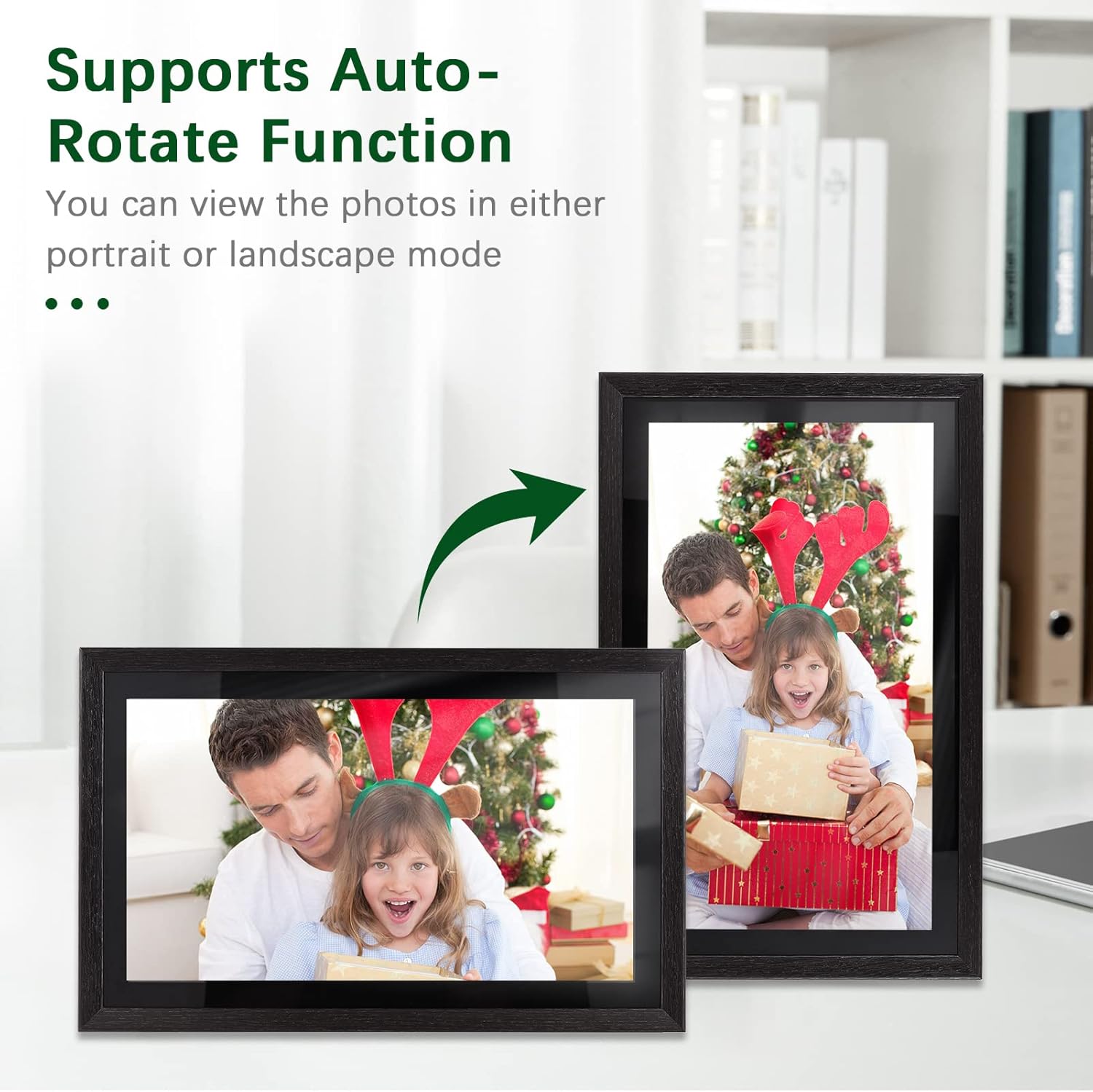
Image: Demonstration of the automatic rotation feature, showing the frame adapting to portrait and landscape orientations.
וישאַלט
רייניקונג די ראַם
- פאַרשטעלן: ווישט אָפּ דעם עקראַן מיט אַ ווייכן, לינט-פֿרײַעם שטאָף. פֿאַר שווערע פֿלעקן, ווישט אַ ביסלampווישט דעם שטאָף מיט וואַסער (שפּריצט נישט גלייך אויפן עקראַן).
- ראַם גוף: Use a soft, dry cloth to wipe the frame's body.
- Do not use abrasive cleaners, solvents, or chemical sprays, as these can damage the finish and screen.
ווייכווארג דערהייַנטיקונגען
Periodically check for software updates in the frame's settings menu. Keeping your frame's software up-to-date ensures optimal performance and access to new features.
סטאָרידזש מאַנאַגעמענט
The frame has 16GB of internal storage. If you find yourself running low on space, consider deleting old photos/videos or utilizing an external TF card (up to 32GB) for additional storage.
טראָובלעשאָאָטינג
| פּראָבלעם | מעגלעך סיבה | לייזונג |
|---|---|---|
| דער ראַם גייט נישט אָן. | מאַכט אַדאַפּטער נישט פארבונדן אָדער דעפעקט; פּראָבלעם מיט מאַכט אַוטלעט. | Ensure the power adapter is securely connected to the frame and a working electrical outlet. Try a different outlet. |
| קענען ניט פאַרבינדן צו ווי-פי. | אומרעכט פּאַראָל; שוואַך סיגנאַל; ראַוטער פּראָבלעם. | טשעק נאכאמאל דאס וויי-פיי פאסווארט. ריקט דעם ראם נענטער צום ראוטער. ריסטארט אייער ראוטער. |
| Photos/videos not uploading. | No internet connection; incorrect frame code; app issues. | Verify Wi-Fi connection. Ensure the correct frame code is entered in the Frameo app. Restart the app and try again. Check available storage on the frame. |
| טאָוטש סקרין רעאַגירט נישט. | צייטווייליגע ווייכווארג פראבלעם; עקראן שמוציג. | Restart the frame by unplugging and replugging the power adapter. Clean the screen with a soft, dry cloth. |
ספּעסאַפאַקיישאַנז
| שטריך | דעטאַל |
|---|---|
| מאָדעל נומער | DRR9822880669739GJ |
| פאַרשטעלן גרייס | 18.5 אינטשעס |
| ווייַז טיפּ | IPS פאַרבינדן פאַרשטעלן |
| האַכלאָטע | 1920 X 1080 |
| אַספּעקט פאַרהעלטעניש | 16:9 |
| אינערלעכער זכּרון | 16GB (approx. 8GB usable) |
| פונדרויסנדיק סטאָרידזש | Supports TF Card (max. 32GB) |
| קאַנעקטיוויטי | ווי-פי |
| מאַכט אַרייַנשרייַב | 12V/2A |
| מאַכט אַדאַפּטער | Input: 100-240V, 50/60Hz; Output: DC 12V, 2A |
| קאָנטראָל מעטאָד | ריר סקרין |
| קאַמפּאַטאַבאַל דעוויסעס | לאַפּטאָפּ, סמאַרטפאָון, טאַבלעט |
| קאָליר | שוואַרץ |
| פּעקל דימענשאַנז | 52.6 X 44.29 X 8.9 סענטימעטער |
| פּעקל וואָג | 2.81 קג |
וואָראַנטי און שטיצן
וואָראַנטי אינפֿאָרמאַציע
Andoer products are manufactured to the highest quality standards. This product is covered by a standard manufacturer's warranty against defects in materials and workmanship. Please refer to your purchase documentation for specific warranty terms and duration.
קונה שטיצן
If you encounter any issues or have questions regarding your Andoer 18.5-inch Wi-Fi Digital Photo Frame, please contact our customer support team. For the most up-to-date support information, including contact details and FAQs, please visit the official Andoer website or refer to your purchase platform's support section.