
SM-LED22M05, SM-LED28M04
ינסטראַקשאַנז מאַנואַל
Replacement Remote Control for Soundmax SM-LED22M05 SM-LED28M04
Model: SM-LED22M05, SM-LED28M04
1. פּראָדוקט איבערview
This instruction manual provides essential information for the use and maintenance of your Hotsmtbang Replacement Remote Control, designed for Soundmax SM-LED22M05 and SM-LED28M04 Smart LCD LED HDTVs.
The remote control is pre-programmed and requires no additional setup. It is ready for use immediately upon battery insertion.
פּעקל אינהאַלט:
- 1 x פאַרבייַט ווייַט קאָנטראָל
באַמערקונג: Batteries and additional instructions are not included in the package.

פיגורע 1: פראָנט view of the Hotsmtbang Replacement Remote Control, showing various buttons including number keys, volume, channel, and navigation controls.
2. סעטאַפּ גייד
2.1 באַטאַרייע ייַנמאָנטירונג
To begin using your remote control, you must install two AAA batteries (not included).
- געפֿינען די באַטאַרייע אָפּטייל אויף די צוריק פון די ווייַט קאָנטראָל.
- Press down on the latch and slide the battery cover downwards to open it.
- אַרײַנשטעלן צוויי AAA באַטעריעס, און זיכער מאַכן אַז די פּאָזיטיוו (+) און נעגאַטיוו (-) טערמינאַלן זענען ריכטיק אויסגעשטעלט מיט די אינדיקאַטאָרן אינעווייניק.
- רוק די באַטאַרייע דעקן צוריק אין פּלאַץ ביז עס קליקס סיקיורלי.
The remote control is now ready for immediate use with your compatible Soundmax TV.
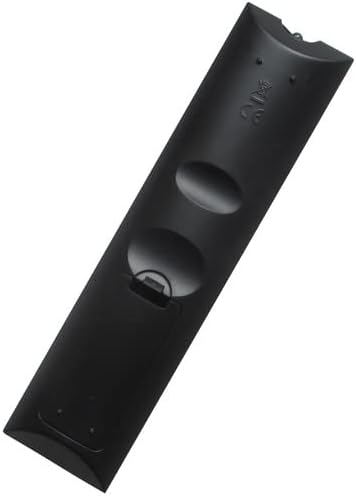
פיגורע 2: צוריק view פון דער ווײַטקאָנטראָל, ווײַזנדיק דעם דעקל פֿון דער באַטעריע־אָפּטיילונג.

פיגורע 3: צוריק view of the remote control with the battery compartment open, showing the slots for two AAA batteries.
3. אַפּערייטינג ינסטרוקטיאָנס
This replacement remote control is designed to function identically to your original Soundmax TV remote. No programming or pairing is required.
3.1 יקערדיק פאַנגקשאַנז
- מאַכט קנעפּל (●): טורנס די טעלעוויזיע אויף אָדער אַוועק.
- נומער קנעפּלעך (0-9): גלייך אויסקלייבן קאַנאַלן.
- באַנד אַרויף / אַראָפּ (VOL +/-): אַדזשאַסץ די אַודיאָ באַנד.
- קאַנאַל אַרויף/אַראָפּ (CH +/-): Changes the TV channel sequentially.
- שטום קנעפּל (שטום): Silences or restores the TV audio.
- Input/Source Button (אַרייַנשרייַב): גייט דורך די פארהאן אינפוט קוועלער (HDMI, AV, אא"וו).
- נאַוויגאַציע קנעפּלעך (אַרויף, אַראָפּ, לינקס, רעכטס, גוט): געניצט צו נאַוויגירן מעניוז און באַשטעטיקן אויסוואלן.
- מעניו קנעפּל (MENU): גייט אריין אין דעם הויפּט מעניו פון דער טעלעוויזיע.
- ארויסגאַנג קנעפּל (אַרויסגאַנג): אַרויסגאַנג דעם קראַנט מעניו אָדער פֿונקציע.
3.2 אַוואַנסירטע פאַנגקשאַנז
This remote includes standard buttons for smart TV functions, such as those for accessing smart features or specific apps, depending on your TV model's capabilities. Refer to your Soundmax TV's original manual for specific functions of less common buttons.
4. וישאַלט
4.1 רייניקונג
כדי צו אויפהאלטן די אויסזען און פונקציאנאליטעט פון דער ווײַטקאָנטראָל:
- ווישן די ייבערפלאַך מיט אַ ווייך, טרוקן שטאָף.
- פֿאַר שווערן שמוץ, אַ ביסל דampyi די שטאָף מיט וואַסער אָדער אַ מילד, ניט-אַברייסיוו רייניקונג.
- Do not use harsh chemicals, solvents, or abrasive cleaning pads.
4.2 סטאָרידזש
When not in use for extended periods, it is recommended to:
- Remove the batteries to prevent leakage and potential damage to the remote.
- האַלט די ווײַטקאָנטראָלירטע אַפּאַראַטור אין אַ קיל, טרוקן אָרט, ווײַט פֿון דירעקטער זון און עקסטרעמע טעמפּעראַטורן.
5. טראָובלעשאָאָטינג
If you experience issues with your remote control, please refer to the following common solutions:
| פּראָבלעם | לייזונג |
|---|---|
| ווײַטקאָנטראָל רעאַגירט נישט. |
|
| קנעפּלעך אַרבעטן נישט. |
|
| קורצע אפערירן ראנגע. |
|
| די ווײַט קאָנטראָלירט נישט דעם טעלעוויזאָר. |
|
6. פּראָדוקט ספּעסאַפאַקיישאַנז
| שטריך | דעטאַל |
|---|---|
| סאָרט | Generic (Hotsmtbang) |
| קאַמפּאַטאַבילאַטי | Soundmax SM-LED22M05, SM-LED28M04 Smart LCD LED HDTV TV |
| מאַכט מקור | 2 X AAA באַטעריז (ניט אַרייַנגערעכנט) |
| ספּעציעלע שטריך | קיין נאָך פּראָגראַממינג איז נישט נויטיק |
| פאַבריקאַנט | האָצמטבאַנג |
| לאַנד פון אָריגין | כינע |
| ערשטער בנימצא טאָג | 13 סעפטעמבער 2022 |
7. וואָראַנטי און שטיצן
דער פּראָדוקט קומט מיט אַ 90-day quality warranty from the date of purchase. This warranty covers manufacturing defects and ensures hassle-free returns or replacements.
For any questions, troubleshooting assistance beyond this manual, or warranty claims, please contact the seller directly through the platform where the purchase was made. Provide your order details for prompt support.
פארקויפער : האָצמטבאַנג
Ask a question about this manual
Ask about setup, troubleshooting, compatibility, parts, safety, or missing instructions. Manuals+ will review the question and use this page’s manual context to help answer it.